
1. Įvadas
This manual provides essential information for the setup, operation, maintenance, and troubleshooting of the EC Buying STM32H743XIH6 STM32 Development Board. Please read these instructions carefully before using the product to ensure proper functionality and to maximize its potential.
2. Produktas baigtasview
The STM32H743XIH6 Development Board is a high-performance core board designed for various embedded applications. It features a powerful STM32H743XIH6 microcontroller with a 480MHz main frequency, 2MB Flash memory, and 1M SRAM, complemented by 32MB SDRAM for enhanced data handling. The board offers extensive connectivity and expansion options, making it suitable for complex projects.
Pagrindinės funkcijos:
- Mikrovaldiklis: STM32H743XIH6 (480MHz, 2MB Flash, 1M SRAM)
- Išorinė atmintis: 32MB SDRAM (16-bit wide), W25Q64 Flash
- Maitinimas: 5V via USB Type-C interface
- I/O prievadai: 83 general-purpose input/output (GPIO) ports
- Onboard Components: 3.3V ttage regulator, Reset button, BOOT button, User LED
- Ekrano sąsajos: SPI LCD (0.96 to 2.0 inches), RGB LCD (larger than 4.3 inches)
- Kameros sąsaja: 8-bit DCMI driver compatible
- Darbinė temperatūra: -40°C iki 85°C
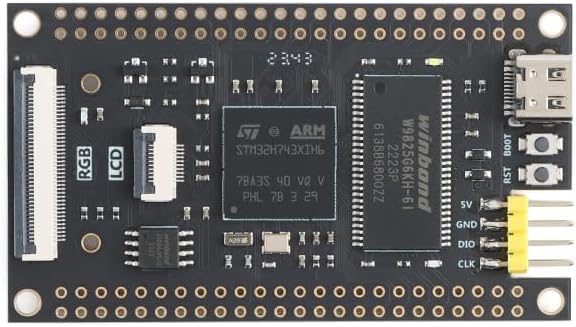
2.1 paveikslas: viršuje view of the STM32H743XIH6 Development Board, highlighting key components.

2.2 pav. Apačia view of the STM32H743XIH6 Development Board, featuring expansion interfaces.
3. Sąrankos instrukcijos
Follow these steps to set up your STM32H743XIH6 Development Board:
- Maitinimo jungtis: Connect the board to a 5V power source using a USB Type-C cable. The Type-C port is located on the board's edge. Ensure the power supply is stable.
- Tvarkyklės diegimas: Depending on your operating system and development environment, you may need to install specific USB drivers for the STM32 microcontroller. Refer to the STMicroelectronics official website or your chosen Integrated Development Environment (IDE) documentation for driver details.
- Kūrimo aplinkos sąranka: Install a suitable IDE such as STM32CubeIDE, Keil MDK, or IAR Embedded Workbench. These environments provide tools for compiling code, flashing firmware, and debugging.
- Periferinės jungtys: For connecting external components like SPI LCDs, RGB LCDs, or cameras, refer to the board's pinout diagram (if available from the seller) to identify the correct GPIO pins and interfaces. Ensure all connections are secure before powering on.
- Pradinis programavimas: Use the BOOT button and Reset button in conjunction with your IDE to enter programming mode and upload your first firmware. Typically, holding BOOT while pressing and releasing Reset, then releasing BOOT, will put the board into DFU (Device Firmware Upgrade) mode.

Figure 3.1: STM32H743XIH6 Development Board with pin headers for expansion.
4. Naudojimo instrukcijos
Once the board is set up and programmed, its operation will depend on the specific application firmware loaded onto the microcontroller. General operational guidelines include:
- Maitinimas: Connect the USB Type-C cable to a 5V power source. The onboard user LED may illuminate, indicating power.
- Atkūrimo funkcija: Press the Reset button to restart the microcontroller and execute the loaded program from the beginning.
- Derinimas: Utilize the debugging features of your IDE, typically via a SWD (Serial Wire Debug) interface, to monitor program execution, set breakpoints, and inspect variables.
- Peripheral Interaction: Interact with connected peripherals (LCDs, sensors, etc.) as defined by your firmware.
5. Priežiūra
To ensure the longevity and reliable operation of your development board, observe the following maintenance practices:
- Tvarkymas: Handle the board by its edges to avoid touching sensitive components, which can be damaged by static electricity or contaminants.
- Saugykla: Nenaudojamą plokštę laikykite sausoje, antistatinėje aplinkoje.
- Valymas: Jei reikia, švelniai nuvalykite lentą minkštu, sausu šepečiu arba suslėgtu oru, kad pašalintumėte dulkes. Venkite naudoti skysčius ar abrazyvines medžiagas.
- Aplinkos sąlygos: Operate the board within its specified temperature range of -40°C to 85°C. Avoid extreme humidity or direct exposure to moisture.
6. Problemų sprendimas
If you encounter issues with your STM32H743XIH6 Development Board, consider the following troubleshooting steps:
- Nėra maitinimo / šviesos diodas išjungtas:
- Verify the USB Type-C cable is securely connected to both the board and a functional 5V power source.
- Test the power source with another device to confirm it is supplying power.
- Kompiuteris neatpažįsta plokštės:
- Ensure all necessary USB drivers are installed correctly on your computer.
- Išbandykite kitą USB prievadą arba kabelį.
- Confirm the board is in the correct mode (e.g., DFU mode for programming) if applicable.
- Programa neveikia:
- Check your code for errors and ensure it has been successfully compiled and flashed to the board.
- Press the Reset button to restart the program.
- Use debugging tools to step through your code and identify execution issues.
- Peripheral Not Functioning:
- Double-check all wiring connections to the peripheral.
- Verify that the peripheral is correctly initialized and configured in your firmware.
- Consult the peripheral's datasheet and any available pinout diagrams for the STM32H743XIH6 board.
For more detailed technical support or specific documentation, it is recommended to contact the seller or manufacturer directly.
7. Specifikacijos
| Funkcija | Detalė |
|---|---|
| Prekės ženklas | EC Buying |
| Modelio pavadinimas | STM32H743XIH6 |
| Procesorius | STMicroelectronics ARMv7 (STM32H743XIH6) |
| Procesoriaus greitis | 480 MHz |
| Flash atmintis | 2 MB |
| SRAM | 1 MB |
| SDRAM | 32 MB (16-bit wide) |
| Išorinė blykstė | W25Q64 |
| I/O prievadai | 83 |
| Maitinimo šaltinis | 5V (via USB Type-C) |
| Ryšys | USB Type-C, SPI |
| Suderinami įrenginiai | SPI LCDs, Camera, RGB LCDs |
| Darbinė temperatūra | -40°C iki 85°C |
| Matmenys | Žr. 7.1 pav |

Figure 7.1: STM32H743XIH6 Development Board dimensions.
8. Garantija ir palaikymas
For warranty information, technical support, or to obtain additional documentation such as detailed pinout diagrams or example code, please contact EC Buying directly through their official channels or the platform where the product was purchased. Providing your product model number (STM32H743XIH6) and purchase details will assist in a quicker resolution.
