
1. Įvadas
Thank you for choosing the UNITOPSCI 7086W Double Din Car Stereo. This advanced multimedia system is designed to enhance your driving experience with its 6.9-inch IPS touchscreen, wireless Apple CarPlay, Android Auto, Bluetooth 5.2, and a range of connectivity options. This manual provides essential information for installation, operation, and maintenance to ensure optimal performance and safety.

Image 1.1: UNITOPSCI 7086W Double Din Car Stereo and accessories.
2. Saugos informacija
- Always consult a professional for installation to prevent damage to the unit or your vehicle.
- Nenaudokite įrenginio taip, kad tai atitrauktų jūsų dėmesį nuo vairavimo. Visada teikite pirmenybę eismo saugumui.
- Ensure all wiring is correctly connected to avoid short circuits or electrical hazards.
- Laikykite įrenginį atokiau nuo vandens ir per didelės drėgmės.
- Nebandykite patys taisyti įrenginio. Kreipkitės į kvalifikuotus techninės priežiūros darbuotojus.
- Naudokite tik nurodytą maitinimo šaltinį (12 V nuolatinė srovė).
3. Pakuotės turinys
Patikrinkite, ar pakuotėje yra visi reikalingi daiktai:
- 1 x Car MP5 Player (UNITOPSCI 7086W)
- 1x maitinimo laidas
- 1 x garsiakalbio laidas
- 1 x mikrofonas (MIC)
- 1 x Steering Wheel Control (Battery Not Included)
- 1 x Vartotojo vadovas
- 1 x D-BUS kabelis
- 1 x atsarginė kamera
- 1 x nuotolinio valdymo pultas (baterijos nepridedamos)
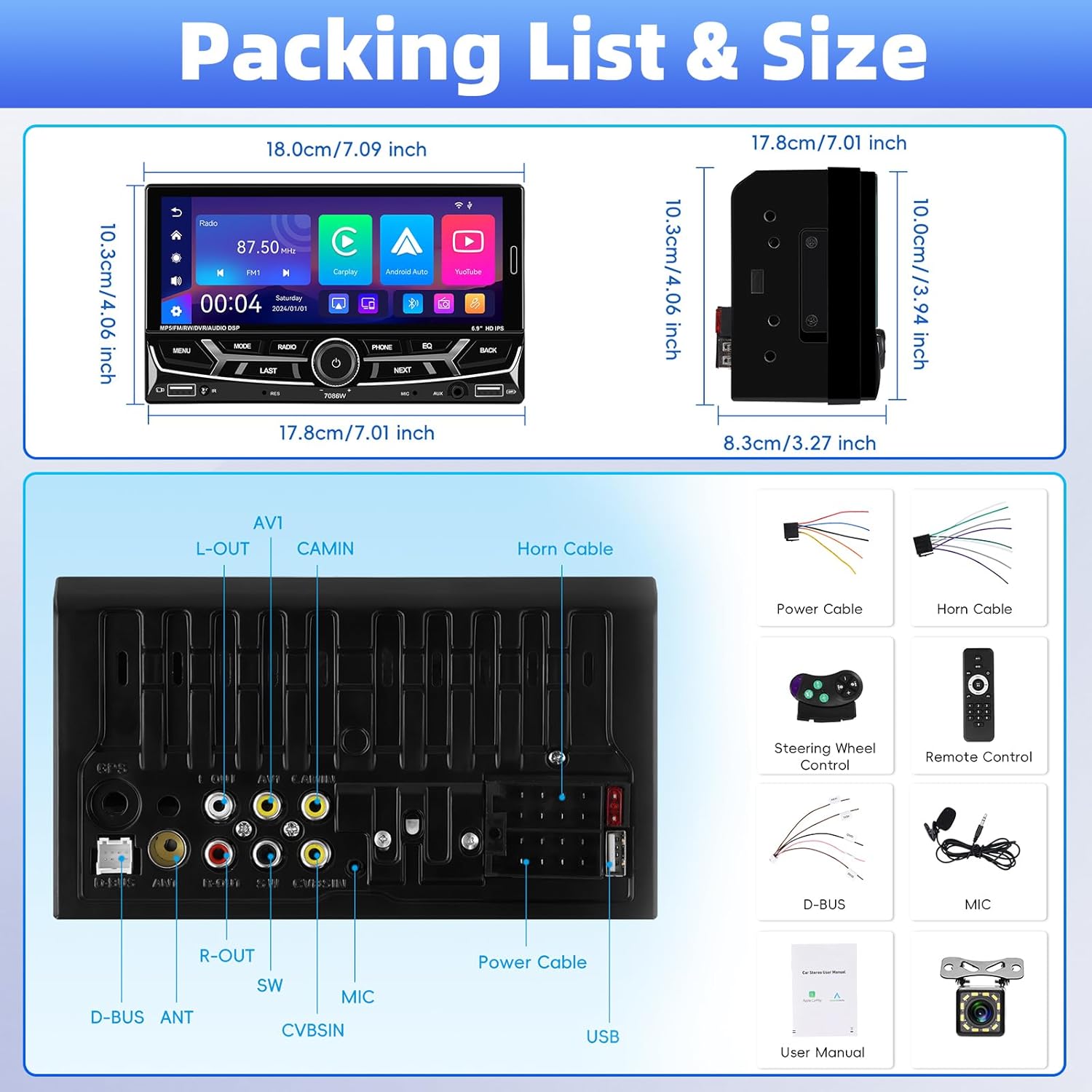
3.1 pav.: Išsamus view of package contents and wiring diagram.
4. Specifikacijos
| Funkcija | Specifikacija |
|---|---|
| Modelis | 7086W |
| Ekrano medžiaga | IPS |
| ttage | DC 12V |
| CPU lustas | 2900 |
| Ekrano dydis | 6.9 colių |
| Ekrano raiška | 1280*480 |
| Veidrodinė nuoroda | Support (iOS up to 13.4, Android up to 10.1) |
| Radijo grupė | FM / AM / RDS |
| Radijo lustas | QN8035 |
| Maitinimo išvestis | 45W*4 (Max 180 Watts) |
| Darbo temperatūra | -10-60 ℃ |
| Bluetooth versija | 5.2 |
| Spalvingas foninis apšvietimas | Support (7 colors) |
| Atbulinės eigos įvestis | AHD720/CVBS |
| Galia Ampkeltuvas Chip | TDA7388 |
| Radijo dažnis | FM: 87.5-108MHz, AM: 530-1710KHz |
| Garso formatas | MP3 / WMA / WAV / APE / FLAC |
| Vaizdo įrašo formatas | RM/RMVB/AVI/MP4/MKV/3GP |
| Paveikslėlio formatas | JPG BMP PNG |
| Gaminio matmenys | 4.37 x 7 x 4.01 colio |
| Prekės svoris | 2.64 svaro |
5. Sąranka ir diegimas
Proper installation is crucial for the performance and safety of your car stereo. It is highly recommended to have the unit installed by a qualified professional.
5.1 Laidų jungtys
Refer to the detailed wiring diagram provided in Image 3.1 (Packing List & Size) and the included user manual for specific connection points. Key connections include:
- Maitinimo kabelis: Connect to vehicle's power supply (constant 12V, accessory 12V, and ground).
- Garsiakalbio kabelis: Connect to your vehicle's speakers. Ensure correct polarity.
- Backup Camera Input (CVBSIN): Connect the included backup camera for automatic rear view ekranas.
- Mikrofonas (MIC): Connect the external microphone for improved hands-free calling.
- Vairo valdymas (SWC): Prijunkite prie savo transporto priemonės vairo valdymo laidų, kad būtų integruotas valdymas.
- USB prievadai: Two USB ports are available for media playback, charging, and DVR input.
- AUX įvestis: Skirtas prijungti išorinius garso įrenginius.
Įsitikinkite, kad visos jungtys yra saugios ir izoliuotos, kad išvengtumėte trumpojo jungimo.
6. Naudojimo instrukcijos
6.1 Įjungimas / išjungimas ir pagrindiniai valdikliai
The unit powers on automatically with the vehicle's ignition. Use the physical knob and buttons on the front panel for basic operations like volume control, mode selection, and track skipping.
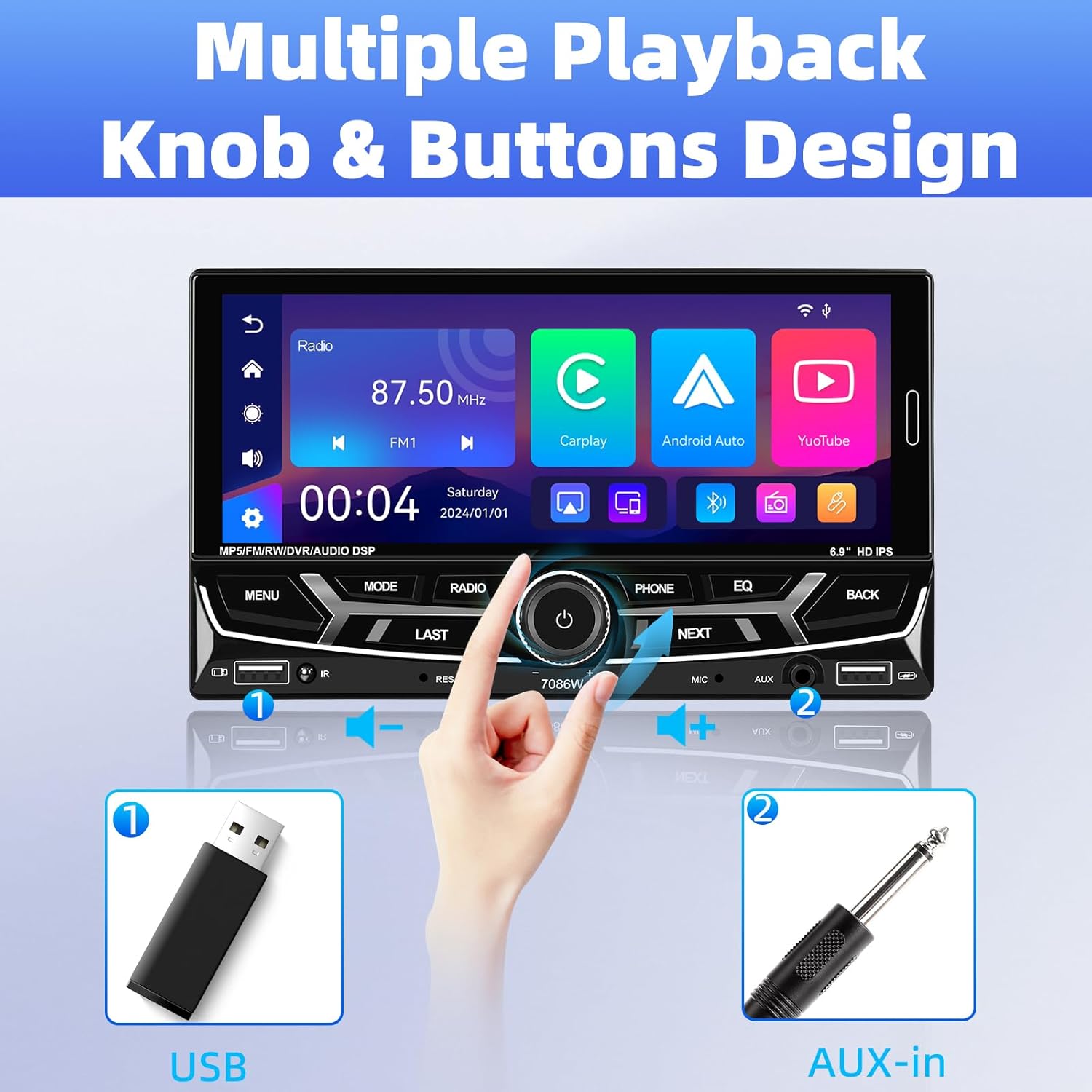
Image 6.1: Front panel controls and connectivity options.
6.2 Belaidis „Apple CarPlay“ ir „Android Auto“
Connect your smartphone wirelessly via Bluetooth to access Apple CarPlay or Android Auto. This allows you to use navigation, make calls, send messages, and listen to music directly from your phone's interface displayed on the stereo screen.
- Įsitikinkite, kad jūsų išmaniajame telefone įjungtas „Bluetooth“.
- On the car stereo, navigate to the Bluetooth settings and pair with your phone.
- Susieję, stereo pagrindiniame meniu pasirinkite „CarPlay“ arba „Android Auto“ piktogramą.
- Follow any on-screen prompts on your phone to grant necessary permissions.

6.2 pav.: Belaidės „Apple CarPlay“ ir „Android Auto“ sąsajos.
6.3 Bluetooth 5.2 Hands-free Calling and Audio Streaming
Integruotas „Bluetooth 5.2“ modulis leidžia stabiliai skambinti laisvų rankų įranga ir transliuoti aukštos kokybės garsą.
- Poravimas: Go to the Bluetooth menu on the stereo, search for your phone, and pair.
- Skambučiai be rankų: Once paired, you can dial numbers, answer, or end calls directly from the stereo's touchscreen or via voice commands (e.g., Siri). The external microphone ensures clear communication.
- Garso transliacija: Play music from your phone through the car's speakers via Bluetooth.

Image 6.3: Bluetooth 5.2 hands-free and audio features.
6.4 Veidrodinio susiejimo funkcija
The Mirror Link function allows you to display your smartphone's screen directly onto the car stereo. This is compatible with iOS devices up to version 13.4 and Android devices up to version 10.1.
- Prijunkite išmanųjį telefoną prie stereo sistemos USB laidu.
- Select the 'Mirror Link' option on the stereo.
- Vykdykite ekrane pateikiamus nurodymus, kad užmegztumėte ryšį.
6.5 FM/AM/RDS radijas
Access local radio stations with the built-in FM/AM/RDS tuner.
- Tiuningas: Use the touchscreen to scan for stations or manually tune to a specific frequency.
- Iš anksto nustatytos stotys: Išsaugokite iki 30 mėgstamiausių stočių, kad galėtumėte jas greitai pasiekti.
- RDS (radijo duomenų sistema): Displays station information such as song title or program type where available.
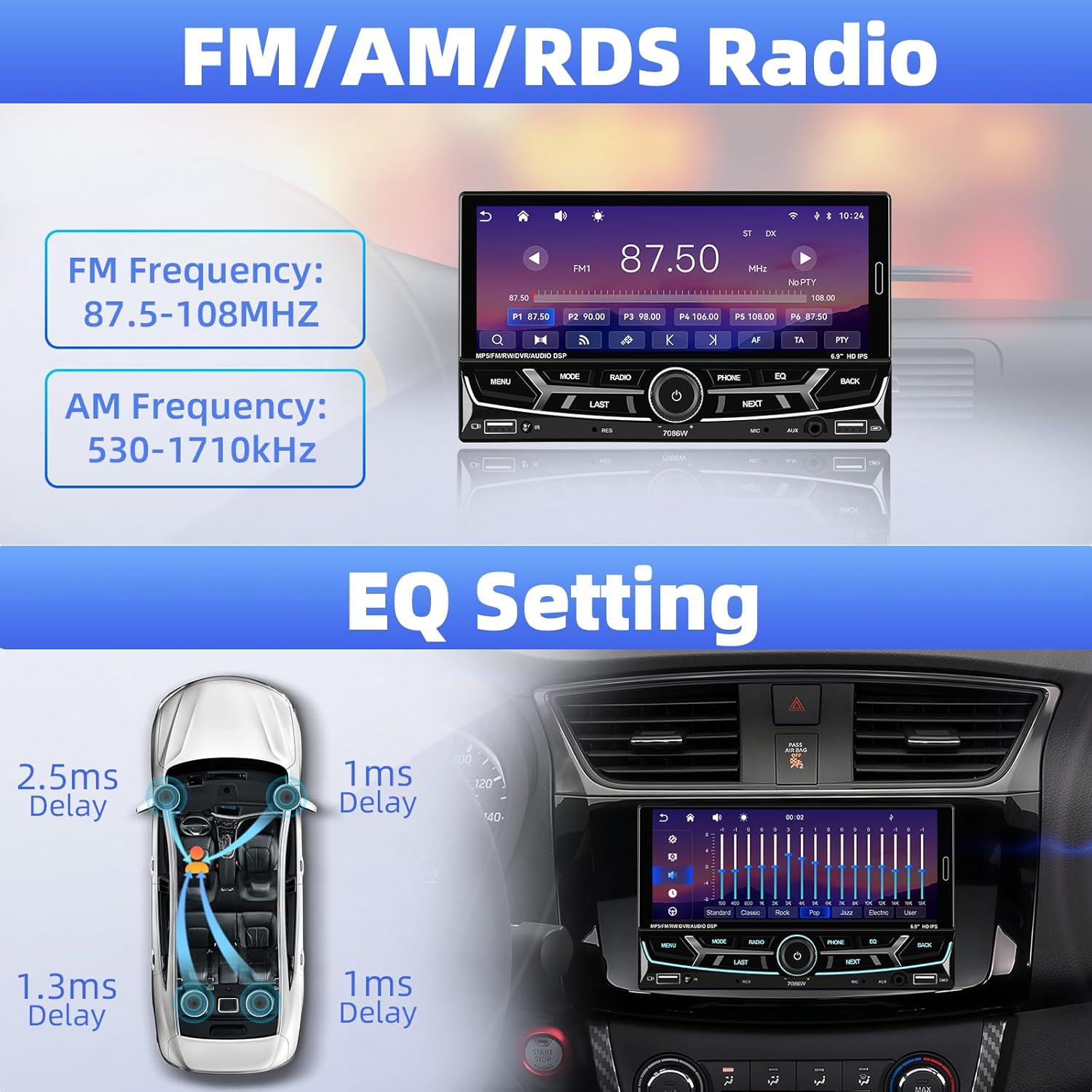
Image 6.4: FM/AM/RDS Radio interface and EQ settings.
6.6 DSP/EQ Audio Setting
Customize your audio experience with the Digital Sound Processor (DSP) and Equalizer (EQ) settings. Choose from preset sound styles like Pop, Rock, Classic, Jazz, or create your own custom profile.
6.7 USB Playback and Charging / Auxiliary Audio Input
- USB: Insert a USB drive into one of the USB ports for media playback (audio/video/pictures) or to charge your devices.
- AUX: Connect external audio devices (e.g., MP3 players) to the 3.5mm AUX input on the front panel.
6.8 Galinis View Fotoaparatas
When the vehicle is shifted into reverse gear, the stereo automatically displays the feed from the connected backup camera. The included camera features 12 LEDs, a 170° wide angle, and night vision for clear visibility, along with parking guidelines.

6.5 vaizdas: galinis view camera display and features.
6.9 Vairo valdymas (SWC)
If your vehicle supports steering wheel controls, connect the SWC wires to the stereo. This allows you to control functions like volume, track skipping, and mode switching directly from your steering wheel for convenience and safety.
6.6 pav.: Vairo valdymo funkcionalumas.
6.10 6.9-Inch IPS Touchscreen and 7-Color Backlight Display
The high-definition IPS touchscreen offers clear visuals and responsive touch control. You can customize the backlight color of the physical buttons to match your vehicle's interior or personal preference, choosing from 7 available colors.

Image 6.7: IPS Touchscreen and 7-color backlight display.
7. Priežiūra
- Ekrano valymas: Jutiklinį ekraną švelniai nuvalykite minkšta, nepūkuota šluoste. Nenaudokite abrazyvinių valiklių ar tirpiklių.
- Bendras valymas: Laikykite įrenginį švarų nuo dulkių ir šiukšlių. Išorę valykite minkšta, sausa šluoste.
- Venkite ekstremalių temperatūrų: Nelaikykite įrenginio ilgalaikėje tiesioginių saulės spindulių ar itin šalto oro veikiamo, nes tai gali paveikti jo veikimą ir tarnavimo laiką.
8. Problemų sprendimas
| Problema | Galima priežastis | Sprendimas |
|---|---|---|
| Nėra galios | Neteisingas laidų sujungimas; perdegęs saugiklis | Check power cable connections; Inspect and replace fuse if necessary. |
| Nėra garso | Speaker wires disconnected; Volume too low; Incorrect audio source | Verify speaker connections; Increase volume; Select correct audio input. |
| Bluetooth neprisijungia | „Bluetooth“ išjungtas telefone / stereo sistemoje; neteisingas susiejimo procesas | Ensure Bluetooth is active on both devices; Re-attempt pairing process. |
| „CarPlay“ / „Android Auto“ neįsijungia | Phone not compatible; Incorrect connection; App issues | Check phone compatibility; Ensure proper Bluetooth connection; Restart phone and stereo. |
| Galinio vaizdo kamera nerodoma | Camera wiring incorrect; Reverse trigger wire not connected | Check camera power and video signal cables; Ensure reverse trigger wire is connected to vehicle's reverse light. |
| Steering Wheel Control not working | SWC wires not connected; Incorrect configuration | Verify SWC wiring; Refer to vehicle-specific instructions for SWC setup. |
Jei problemos išlieka, susisiekite su klientų aptarnavimo tarnyba.
9. Garantija ir palaikymas
UNITOPSCI is committed to providing high-quality products and customer satisfaction.
- Pakeitimas: Replacement available within 24 months of purchase.
- Grąžinimai: 60-day no-worry return policy.
- Techninė pagalba: Lifetime after-sales consultation and technical support.
- Atsakymo laikas: Quick response to inquiries within 16 hours.
Jei reikia pagalbos, susisiekite su mumis adresu: UNITOPSCI@126.com