
Įvadas
This manual provides essential information for the safe and effective operation, maintenance, and troubleshooting of your vannect X390AS Walking Pad. Please read it thoroughly before initial use and retain it for future reference.
Saugos informacija
Norėdami užtikrinti saugų darbą, laikykitės šių atsargumo priemonių:
- Read all instructions in this manual before using the walking pad.
- Prieš pradėdami bet kokią naują mankštos programą, pasitarkite su gydytoju.
- Eksploatacijos metu laikykite vaikus ir naminius gyvūnus atokiau nuo vaikščiojimo kilimėlio.
- Place the walking pad on a firm, level surface with adequate clear space around it.
- The maximum user weight capacity is 150 kg (330 lbs). Do not exceed this limit.
- Atjunkite vaikščiojimo kilimėlį nuo elektros lizdo, kai jo nenaudojate arba prieš valydami / atlikdami techninę priežiūrą.
- Nenaudokite vaikščiojimo kilimėlio, jei jo laidas ar kištukas yra pažeistas arba jei jis neveikia tinkamai.
Svarbi pastaba: Recommended for use on hard floors to effectively prevent the risk of injury during exercise and to better dissipate heat to the motor, increasing the life of the motor. Avoid using on carpets or soft floors.
Pakuotės turinys
Prašome patikrinti, ar pakuotėje yra visi reikalingi daiktai:
- vannect X390AS Walking Pad
- Magnetic Remote Control
- Maitinimo laidas
- Vartotojo vadovas (šis dokumentas)
- Lubricant (may be included for belt maintenance)
Sąranka
The vannect X390AS Walking Pad comes fully assembled. Follow these steps to prepare it for use:
- Išpakavimas: Atsargiai išimkite vaikščiojimo kilimėlį iš pakuotės.
- Vieta: Place the walking pad on a firm, level surface. Ensure there is adequate clear space around the unit for safe operation. As noted in the safety section, avoid carpets or soft floors for optimal performance and motor longevity.
- Maitinimo jungtis: Connect the power cord to the walking pad's power input, then plug the other end into a grounded electrical outlet.
- Incline Adjustment (Optional): The walking pad features a 9% manual incline. To activate, locate the adjustable feet at the rear of the unit and position them to raise the walking surface. Ensure both sides are evenly adjusted for stability.

The main image of the vannect X390AS Walking Pad, illustrating its compact design, remote control, and the 9% incline capability. A user is shown walking on the pad, and another is using it with a standing desk.

This image shows a user exercising on the walking pad while working at a standing desk, highlighting its suitability for office or home office environments.
Naudojimo instrukcijos
Nuotolinio valdymo pulto funkcijos
The walking pad is primarily operated using the magnetic remote control. Ensure the remote has working batteries.

An image detailing the remote control for the walking pad, showing buttons for Mode, Speed+, Program, Speed-, Start/Pause, and Stop. It also illustrates the display tracking Speed, Time, Distance, and Calories.
- Maitinimo įjungimas/išjungimas: Press the main power switch on the walking pad itself to turn it on. The remote control manages exercise functions once the unit is powered.
- Paleisti / pristabdyti: Press the 'Start/Pause' button to begin or temporarily stop your workout. Your workout data will be retained during a pause.
- Greičio reguliavimas: Use the 'Speed +' and 'Speed -' buttons to increase or decrease the walking belt speed. The speed range is 1-10 km/h.
- Sustabdyti: Press the 'Stop' button to end your workout completely.
- Režimas / programa: Use the 'Mode' or 'P' button to cycle through different display modes or pre-set programs (if available).
- Magnetinė savybė: The remote control has magnets on the back for convenient storage on the walking pad when not in use, preventing loss.
LED ekranas
The integrated LED display provides real-time feedback on your workout progress:

Išsamią view of the walking pad's LED display, which tracks essential workout metrics such as time, speed, distance, and calories burned.
- Laikas: Displays the duration of your current workout session.
- Greitis: Shows the current speed of the walking belt in kilometers per hour (km/h).
- Atstumas: Indicates the total distance covered during your workout.
- Kalorijos: Provides an estimated number of calories burned.
Treniruočių režimai
The walking pad supports various exercise intensities to suit your fitness needs:
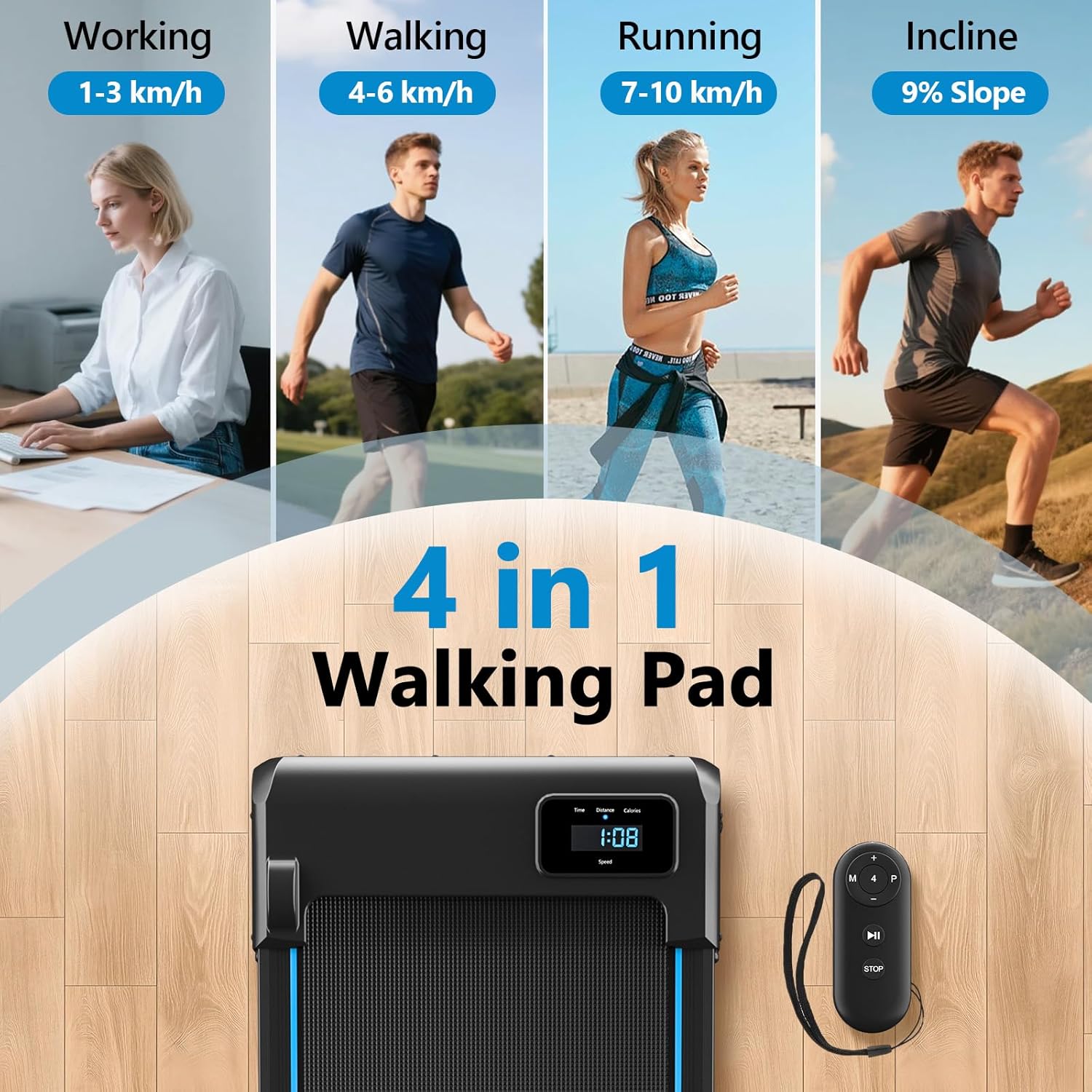
This image visually explains the four primary modes of the walking pad: working (1-3 km/h), walking (4-6 km/h), running (7-10 km/h), and the 9% incline mode, demonstrating its versatility.
- Darbo režimas: Speed range of 1-3 km/h, ideal for light activity while working or performing other tasks.
- Ėjimo režimas: Speed range of 4-6 km/h, suitable for a brisk walk.
- Važiavimo režimas: Speed range of 7-10 km/h, for jogging or light running.
- Incline Mode: Utilize the 9% manual incline feature to increase calorie burning and engage leg muscles more effectively.
Priežiūra
Regular maintenance is crucial for ensuring the longevity and optimal performance of your walking pad.
Valymas
- Nuvalykite vaikščiojimo kilimėlį reklamaamp skudurėliu po kiekvieno naudojimo, kad pašalintumėte prakaitą ir dulkes.
- Venkite naudoti abrazyvinius valiklius ar tirpiklius, nes jie gali pažeisti paviršių.
- Keep the area around the walking pad clean and free of dust, pet hair, and debris to prevent interference with moving parts.
Tepimas
The running belt requires periodic lubrication to reduce friction between the belt and the deck, which extends the lifespan of both the belt and the motor. Refer to the included lubricant instructions or contact customer support for guidance on proper application frequency and method.
Diržo reguliavimas
If the running belt becomes misaligned (drifts to one side) or feels loose (slips during use), it may need adjustment. Consult the detailed instructions in the full user manual or contact customer support for assistance with belt centering and tensioning.
Trikčių šalinimas
If you encounter any issues with your walking pad, refer to the following common problems and their potential solutions:
| Problema | Galima priežastis | Sprendimas |
|---|---|---|
| Ėjimo kilimėlis neįsijungia. | Power cord not securely connected; Electrical outlet not working; Main power switch is off. | Ensure the power cord is securely plugged into both the walking pad and a grounded electrical outlet; Test the outlet with another device; Turn on the main power switch on the walking pad. |
| Running belt stops or slips during use. | Running belt is too loose; Motor overload due to excessive weight or speed; Lack of lubrication. | Adjust the running belt tension (refer to full manual); Ensure user weight is within the specified limit (150 kg / 330 lbs); Lubricate the running belt as per maintenance instructions. |
| Nuotolinio valdymo pultas nereaguoja. | Remote control battery is low or dead; Obstruction between the remote and the walking pad's sensor. | Replace the remote control battery; Ensure there is a clear line of sight between the remote and the walking pad's display/sensor. |
| Neįprastas triukšmas veikimo metu. | Loose parts; Lack of running belt lubrication; Running belt misalignment. | Check for any loose screws or components and tighten them; Lubricate the running belt; Adjust the running belt alignment (refer to full manual). |
Specifikacijos
Key technical specifications for the vannect X390AS Walking Pad:
| Funkcija | Detalė |
|---|---|
| Modelio numeris | X390AS |
| Prekės ženklas | vannect |
| Variklio galia | 2.75 AG (didžiausia) |
| Greičio diapazonas | 1-10 km/val |
| Nuolydis | 9% (Manual Adjustment) |
| Maksimali svorio talpa | 150 kg (330 svaro) |
| Bėgimo juostos matmenys | 100 cm x 40 cm (apytiksliai) |
| Gaminio matmenys (I x P x A) | 116 x 50.5 x 12.5 cm |
| Medžiaga | Anglies plienas |
| Triukšmo lygis | <30 dB |
| Ypatingos savybės | LED Display, Remote Control, Anti-slip Running Belt, Shock Absorption System |
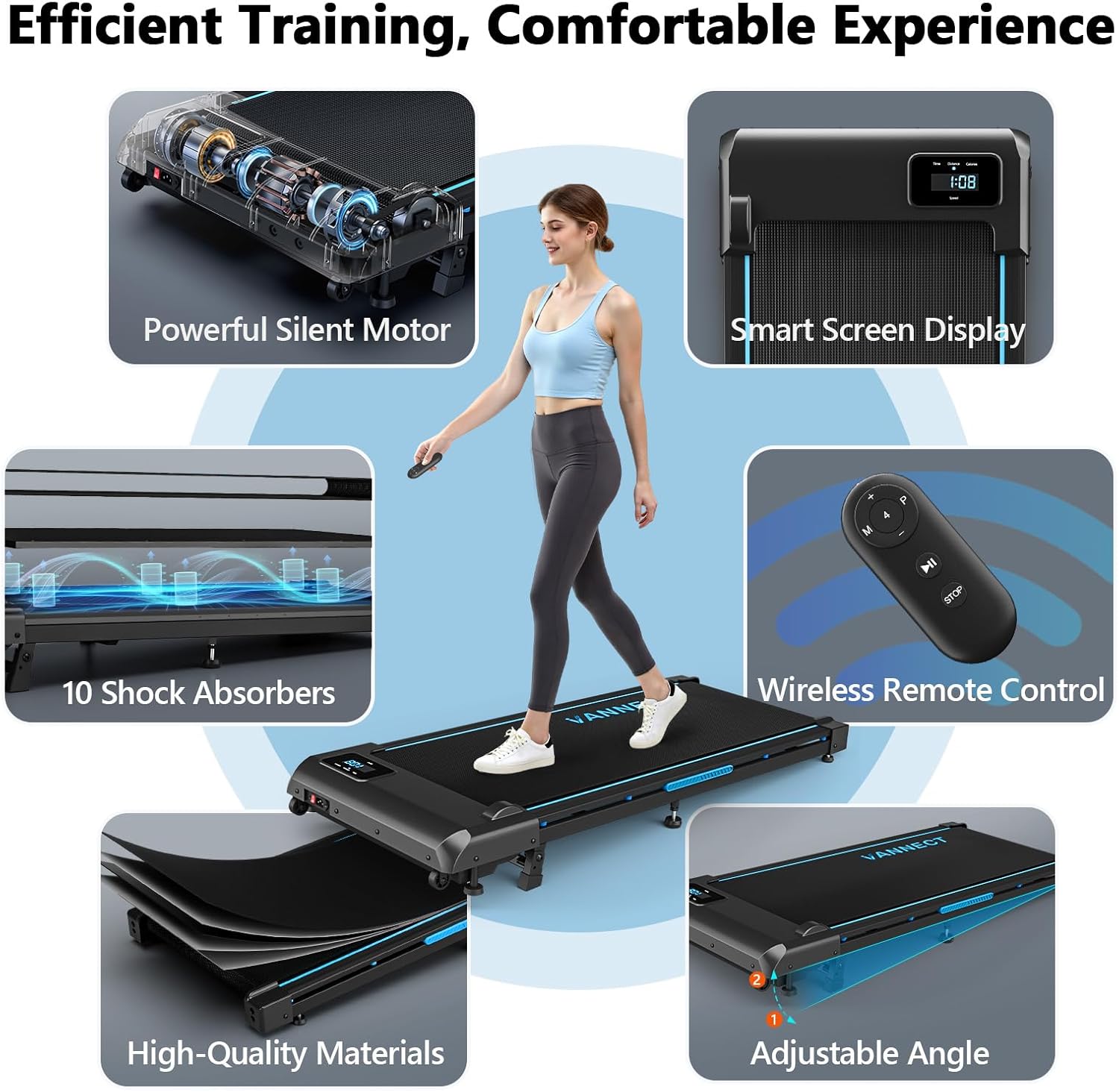
This collage illustrates key features such as the powerful silent motor, smart screen display, 10 shock absorbers, wireless remote control, high-quality materials, and adjustable angle.

This image highlights the advanced shock absorption system, featuring 10 silicone shock absorbers and a 5-layer anti-slip running belt designed for knee protection and a smoother workout.

This image demonstrates the walking pad's portability with built-in transport wheels and its compact design for easy storage under furniture.
Garantija ir palaikymas
For warranty information, technical assistance, or customer support, please refer to the contact details provided with your purchase documentation or visit the official vannect websvetainę.
The manufacturer, vannect, offers lifetime technical support on Amazon for a superior customer experience.
Gamintojas: vannect
Pirmą kartą pasiekiama data: 21 Kovo 2025 d