
Įvadas
This manual provides comprehensive instructions for the setup, operation, maintenance, and troubleshooting of your MASTER & DYNAMIC MH40 Wireless Over-Ear Headphones Gen II. Please read this manual carefully to ensure proper use and to maximize your listening experience.
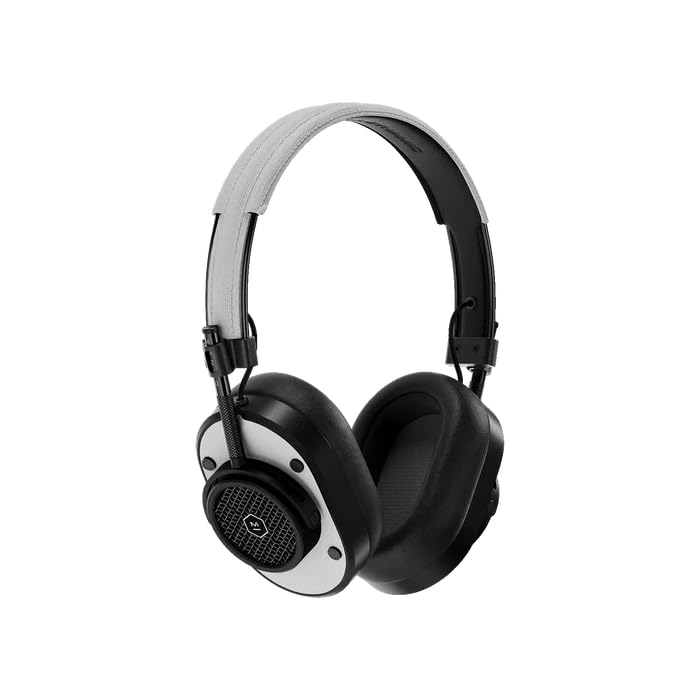
Priekyje view of the MH40 Wireless Over-Ear Headphones, showcasing the black metal frame and white leather earcups and headband.
Kas yra dėžutėje
- MASTER & DYNAMIC MH40 Wireless Over-Ear Headphones Gen II
- USB-C įkrovimo laidas
- USB-C iki 3.5 mm garso laidas
- Nešiojimo maišelis
- Vartotojo vadovas (šis dokumentas)
Produktas baigtasview
The MH40 Gen II headphones feature a timeless design with premium materials for durability and comfort. Key components include custom titanium drivers for enhanced sound, removable magnetic ear pads for superior noise isolation, and a lightweight anodized aluminum frame.
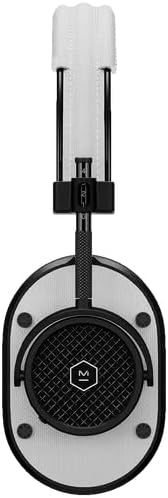
Iš arti view of the MH40 headphones, highlighting the detailed earcup design and the adjustable headband.

Išsamią view of the MH40's removable magnetic ear pads, showing the internal speaker grille and the 'Designed & Developed' inscription.

A close-up shot of the earcup, highlighting the control buttons and the metal mesh design.
Sąranka
1. Ausinių įkrovimas
Before first use, fully charge your MH40 Gen II headphones. Connect the USB-C charging cable to the headphone's charging port and to a USB power source. The LED indicator will show charging status. A full charge provides up to 30 hours of listening time. A quick 15-minute charge provides approximately 6 hours of listening.
2. „Bluetooth“ poravimas
- Įsitikinkite, kad ausinės yra išjungtos.
- Press and hold the power button until the LED indicator flashes blue, indicating pairing mode.
- Savo įrenginyje (išmaniajame telefone, planšetiniame kompiuteryje, kompiuteryje) įjunkite „Bluetooth“ ir ieškokite galimų įrenginių.
- Select "MH40 Gen II" from the list of devices.
- Prijungus, LED indikatorius ims šviesti baltai.
The MH40 Gen II uses Bluetooth 5.2 for a stable connection up to 30 meters (100 feet).
3. Laidinis ryšys (neprivaloma)
For a wired audio experience, connect the provided USB-C to 3.5mm audio cable to the headphone's USB-C port and to your audio source's 3.5mm jack. Digital audio up to 24-bit/96kHz is supported via USB-C to USB-C connection (cable sold separately).
Veikiantis
Maitinimo įjungimas/išjungimas
- Maitinimas: Paspauskite ir palaikykite maitinimo mygtuką, kol užsidegs LED indikatorius.
- Išjungti: Paspauskite ir palaikykite maitinimo mygtuką, kol užges LED indikatorius.
Muzikos atkūrimas
- Leisti / pristabdyti: Vieną kartą paspauskite daugiafunkcį mygtuką.
- Kitas takelis: Du kartus paspauskite daugiafunkcį mygtuką.
- Ankstesnis takelis: Tris kartus paspauskite daugiafunkcį mygtuką.
- Pagarsink: Paspauskite mygtuką „+“.
- Patildyti: Paspauskite mygtuką „-“.
Telefono skambučiai
The MH40 Gen II features a dual microphone array with wind noise reduction technology for clear calls.
- Atsiliepti / Baigti skambutį: Vieną kartą paspauskite daugiafunkcį mygtuką.
- Atmesti skambutį: Paspauskite ir palaikykite daugiafunkcį mygtuką.
Priežiūra
Valymas
- Ausines nuvalykite minkštu, sausu skudurėliu.
- Nenaudokite stiprių cheminių medžiagų ar abrazyvinių medžiagų.
- The magnetic ear pads can be removed for separate cleaning if necessary.
Sandėliavimas
- Kai nenaudojate, laikykite ausines pridėtame nešiojimo maišelyje, kad apsaugotumėte jas nuo dulkių ir įbrėžimų.
- Stenkitės, kad ausinės nepatektų į ekstremalią temperatūrą ar drėgmę.
Trikčių šalinimas
| Problema | Sprendimas |
|---|---|
| Ausinės neįsijungia | Įsitikinkite, kad ausinės įkrautos. Prijunkite prie maitinimo šaltinio naudodami USB-C laidą. |
| Nėra garso | Check if the headphones are paired correctly. Increase volume on both the headphones and the connected device. Ensure the audio source is playing. |
| Nepavyksta susieti per „Bluetooth“ | Ensure headphones are in pairing mode (flashing blue LED). Turn off and on Bluetooth on your device. Move closer to the device. Forget the device in your Bluetooth settings and try pairing again. |
| Prasta garso kokybė | Ensure the headphones are within Bluetooth range. Check for interference from other wireless devices. For wired connection, ensure the cable is fully inserted. |
Specifikacijos
| Funkcija | Detalė |
|---|---|
| Prekės ženklas | MASTER & DYNAMIC |
| Modelio pavadinimas | MH40 |
| Ausų išdėstymas | Virš ausies |
| Triukšmo valdymas | Garso izoliacija |
| Ryšio technologija | Belaidis ryšys („Bluetooth“) |
| Belaidė technologija | Bluetooth |
| Bluetooth versija | 5.2 |
| Bluetooth diapazonas | 30 metrai (100 pėdų) |
| Garso tvarkyklės tipas | Custom Titanium Drivers |
| Vidutinis akumuliatoriaus veikimo laikas | 30 valandų |
| Akumuliatoriaus įkrovimo laikas | 15 minučių, 6 valandų atkūrimas |
| Kontrolės metodas | Programėlė, mygtukai įrenginyje |
| Korpuso medžiaga | Aluminum, Leather, Canvas |
| Dažnių diapazonas | 20Hz - 20,000Hz |
| Papildomos funkcijos | Wind Noise Reduction Microphones |
| Suderinami įrenginiai | Laptops, Desktops, Tablets, Telephones, Smart Speaker, Television, Gaming Consoles |
Informacija apie garantiją
MASTER & DYNAMIC products are designed and built to last. Your MH40 Wireless Over-Ear Headphones Gen II are covered by a manufacturer's limited warranty against defects in materials and workmanship. For specific warranty terms, conditions, and registration, please refer to the warranty card included with your product or visit the official MASTER & DYNAMIC websvetainę.
Palaikymas
If you encounter any issues not covered in this manual or require further assistance, please visit the official MASTER & DYNAMIC support website for FAQs, additional resources, and contact information for customer service. You can typically find support details at www.masterdynamic.com/support.