
IQUNIX Magi65
IQUNIX Magi65 Low Profile Mechaninės klaviatūros vartotojo vadovas
Model: Magi65 | Brand: IQUNIX
Įvadas
The IQUNIX Magi65 is an ultra-slim, low-profile mechanical keyboard designed for a premium typing experience. Featuring a CNC-machined aluminum body, hot-swappable switches, RGB backlighting, and versatile tri-mode connectivity (Bluetooth, 2.4GHz, USB-C), it offers comfort and precision for both Mac and Windows users. This manual provides essential information for setup, operation, maintenance, and troubleshooting to ensure optimal performance of your Magi65 keyboard.
Kas yra dėžutėje
- Magi65 Keyboard
- USB kabelis
- Klaviatūros dangtelis ir jungiklio ištraukiklis
- Two Themed Aluminum Keycaps
- Extra Metal Keycaps for Customization

Image: The IQUNIX Magi65 Low Profile Mechanical Keyboard in Shadow Black.
Video: Unboxing the Magi65 Mechanical Keyboard, showing the contents of the box including the keyboard, cables, and accessories.
Pagrindinės savybės
- Sleek, Solid, and Ultra-Slim Design: CNC-machined aluminum body with a thickness of just 0.43 inches for ergonomic comfort and reduced wrist strain.
- Creamy Typing Feel: Features pre-lubed Gold Red linear switches with 30gf–50gf actuation for soft acoustics and effortless keystrokes, ideal for extended use.
- Trijų režimų ryšys: Offers seamless switching between up to 3 devices via Bluetooth, 2.4GHz wireless, or USB-C wired connection. The 2.4GHz mode provides ultra-low latency and a 1000Hz polling rate.
- Ilgas baterijos veikimo laikas: Equipped with a 3000mAh battery, providing up to 300 hours of use with RGB lighting off.
- Engineered Comfort: Innovative Le-tray mount, FR4 plate, and 6-layer foam stack deliver a cushioned, quiet typing experience, reducing fatigue and noise.
- Precision Personalization: VIA software compatibility allows for key remapping, macro setting, and fine-tuning of per-key RGB lighting without software installation. Includes extra keycaps for easy PC setup.
- Kompaktiškas išdėstymas: The 65% low-profile layout retains essential keys like arrows and Delete, optimizing desk space and enhancing mobility.

Vaizdas: Išsprogdintas view of the Magi65 keyboard components, highlighting the full aluminum case construction.
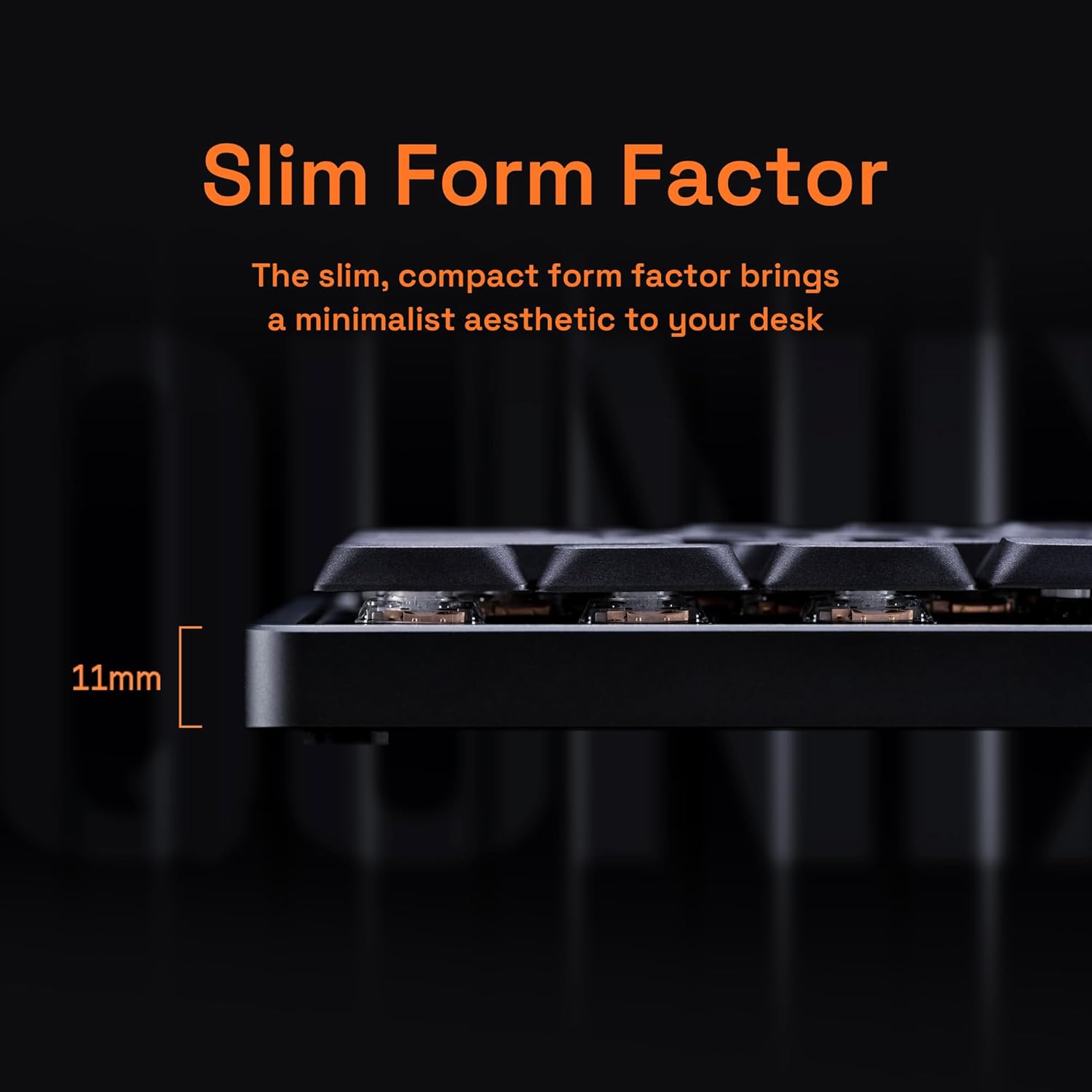
Paveikslėlis: Šoninis profesionalasfile of the Magi65 keyboard, illustrating its ultra-slim 11mm design.
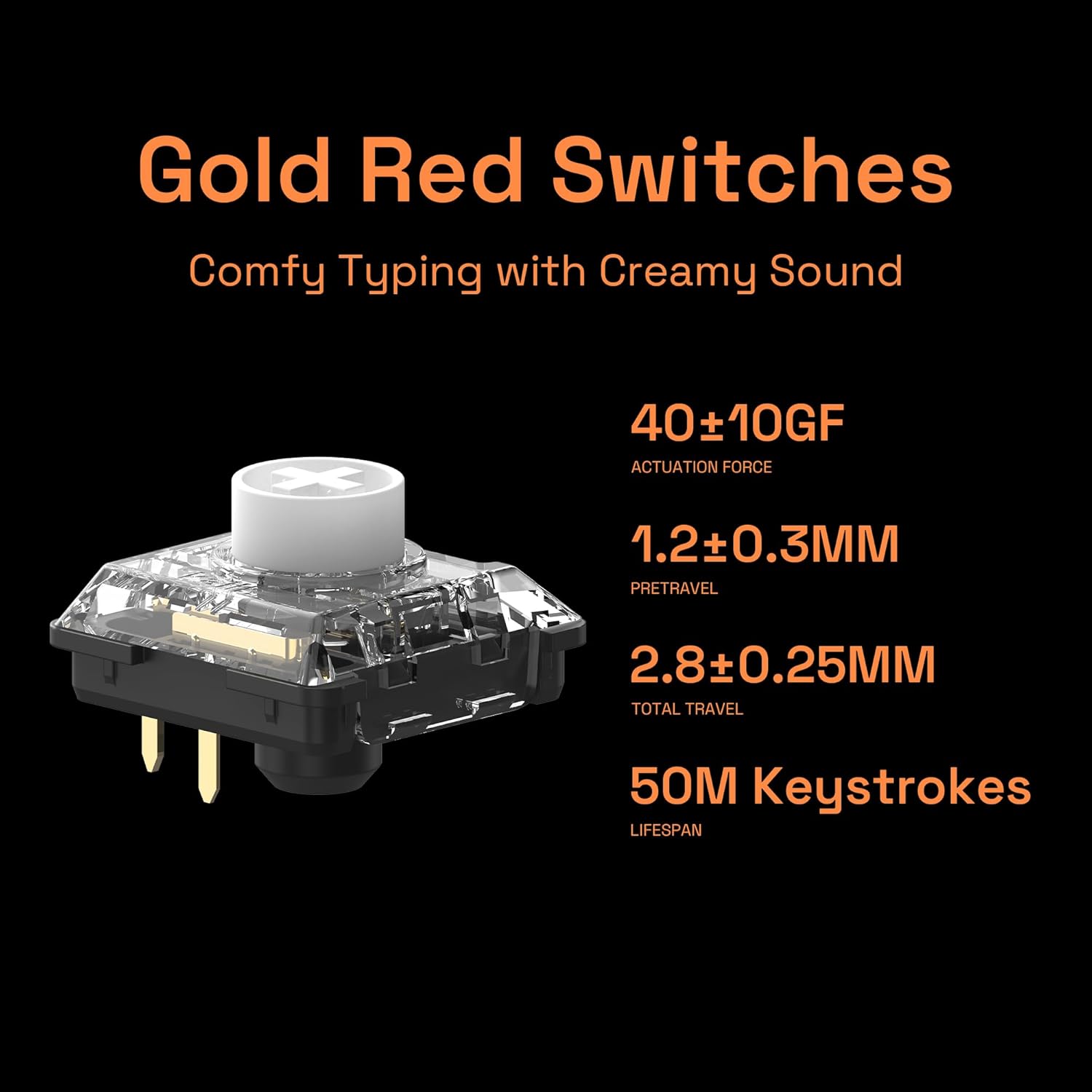
Image: Close-up of a Gold Red switch, detailing its actuation force, pretravel, total travel, and lifespan.

Image: Diagram showing the layered internal structure of the Magi65, including the Le-tray mount, FR4 plate, and foam stack.

Image: Close-up of the PBT keycaps, highlighting their stain-resistant coating.

Image: The Magi65 keyboard connected via tri-mode, showing icons for Bluetooth, 2.4GHz, USB Type-C, Windows, and macOS/iOS compatibility.
Video: Demonstrates the creamy typing feel of the IQUNIX Magi65 keyboard, highlighting the soft sound and satisfying keystrokes.
Vaizdo įrašas: trumpas įžanginis vaizdo įrašasview šouasing the creamy, cushioned typing experience of the IQUNIX Magi65 Keyboard.
Sąranka
Klaviatūros prijungimas
The Magi65 keyboard supports three connection modes: USB-C wired, 2.4GHz wireless, and Bluetooth. Ensure the keyboard is charged before initial wireless use.
- USB-C laidinis ryšys:
Connect the provided USB-C cable to the keyboard's USB-C port and the other end to your computer's USB port. The keyboard will be automatically recognized and ready for use.
- 2.4 GHz belaidis ryšys:
Locate the 2.4GHz USB receiver (dongle) included in the package. Plug the receiver into an available USB port on your computer. Turn on the keyboard and switch it to 2.4GHz mode (refer to the keyboard's physical switch or function key combination for mode selection). The keyboard should connect automatically. For optimal performance, ensure the receiver is close to the keyboard.
- „Bluetooth“ ryšys:
Turn on the keyboard and switch it to Bluetooth mode. On your computer or device, enable Bluetooth and search for new devices. Select "IQUNIX Magi65" (or similar name) from the list of available devices to pair. The keyboard can store up to 3 Bluetooth connections, allowing for quick switching between devices.
Naudojimo instrukcijos
Pagrindinės funkcijos
- Maitinimo įjungimas/išjungimas: Use the physical switch on the keyboard to turn it on or off.
- Režimo perjungimas: Use the dedicated switch or function key combinations (e.g., Fn + 1/2/3 for Bluetooth, Fn + 4 for 2.4GHz, Fn + 5 for wired) to switch between connectivity modes.
- Baterijos būsena: Indicators on the keyboard will show the current battery level. Charge the keyboard when the battery is low.
Customization with VIA Software
The Magi65 keyboard is compatible with VIA software, allowing for extensive customization without requiring a dedicated software installation. You can access VIA through a web naršyklė.
- Raktų pertvarkymas: Change the function of any key to suit your workflow.
- Makrokomandų kūrimas: Program complex sequences of keystrokes into a single key.
- RGB apšvietimo valdymas: Adjust backlight colors, effects, and brightness on a per-key basis.
- Sluoksniai: Utilize multiple layers for different key layouts, accessible via function keys.
For detailed instructions on using VIA, please refer to the official VIA software documentation or community guides.
Karštai keičiami jungikliai
The Magi65 features hot-swappable switches, allowing you to change switches without soldering. This enables customization of typing feel and sound.
- Klaviatūros dangtelių nuėmimas: Norėdami švelniai nuimti norimą klavišo dangtelį, naudokite pateiktą klavišo dangtelio traukiklį.
- Jungiklių nuėmimas: Use the switch puller to carefully grip the switch from the top and bottom clips, then pull it straight up.
- Naujų jungiklių diegimas: Align the pins of the new switch with the holes on the PCB. Press the switch firmly until it clicks into place. Ensure the pins are not bent.
- Klaviatūros dangtelių diegimas: Place the keycap over the switch stem and press down gently until it is secure.
Vaizdo įrašas: trumpas įžanginis vaizdo įrašasview demonstrating the hot-swappable feature of the IQUNIX Magi65 keyboard, showing how to remove and replace switches.
Priežiūra
Reguliarus klaviatūros valymas padeda prailginti jos tarnavimo laiką ir našumą.
- Klaviatūros dangtelių valymas: Naudokite minkštą, damp šluoste klavišų dangteliams nuvalyti. Norėdami giliau išvalyti, nuimkite klavišų dangtelius ir nuplaukite juos švelniu muilu bei vandeniu, prieš uždėdami juos visiškai išdžiovindami.
- Korpuso valymas: Wipe the aluminum case with a soft, dry cloth. Avoid abrasive cleaners or solvents.
- Dulkių šalinimas: Norėdami pašalinti dulkes ir šiukšles tarp klavišų dangtelių ir jungiklių, naudokite suslėgtą orą.
- Saugykla: Kai klaviatūra ilgesnį laiką nenaudojama, ją laikykite sausoje, vėsioje vietoje, apsaugotoje nuo tiesioginių saulės spindulių.
Trikčių šalinimas
| Problema | Galima priežastis | Sprendimas |
|---|---|---|
| Klaviatūra nereaguoja (laidinė) | Atsilaisvinęs kabelis, sugedęs USB prievadas, tvarkyklės problema. | Įsitikinkite, kad USB-C laidas yra tvirtai prijungtas. Išbandykite kitą USB prievadą arba laidą. Paleiskite kompiuterį iš naujo. |
| Keyboard not connecting (wireless) | Low battery, incorrect mode, interference, un-paired. | Charge the keyboard. Ensure the keyboard is in the correct wireless mode (2.4GHz or Bluetooth). Re-pair the Bluetooth connection or re-insert the 2.4GHz dongle. Move closer to the receiver/device. |
| Raktai neregistruojami arba įvedami du kartus | Dust/debris under keycap/switch, faulty switch. | Remove keycap and use compressed air to clean. If issue persists, replace the switch using the hot-swap feature. |
| RGB apšvietimas neveikia | Lighting turned off, low battery, software glitch. | Check keyboard lighting controls (Fn key combinations). Charge the keyboard. Reset keyboard settings via VIA software if necessary. |
| Keyboard feels "noisy" or "rattly" | Stabilizer issues, switch lubrication. | This keyboard is designed for a "creamy" sound. If excessive rattling, check stabilizers (spacebar, shift, enter) for proper seating. Lubrication of switches and stabilizers can further refine acoustics. |
Specifikacijos
| Funkcija | Detalė |
|---|---|
| Prekės ženklas | IQUNIX |
| Modelio numeris | Magi65 |
| Ryšio technologija | 2.4 GHz, „Bluetooth“, USB-C |
| Klaviatūros aprašymas | Mechaninis |
| Ypatingos savybės | Ergonomic, Backlit, Programmable Keys, Customizable Display Keys, Hot-Swappable |
| Spalva | Šešėlis Juodas |
| Raktų skaičius | 68 |
| Klaviatūros apšvietimas | RGB |
| Stilius | „Low Pro“file Klaviatūra |
| Gaminio matmenys | 14.06 x 4.25 x 1 colio |
| Prekės svoris | 3.6 svaro |
| Baterija | 3000mAh (up to 300 hours with RGB off) |
| Suderinami įrenginiai | Laptop, PC, Gaming Console, Tablet, Smartphone (Mac/Windows) |
Garantija ir palaikymas
For warranty information and technical support, please refer to the official IQUNIX websvetainėje arba susisiekite tiesiogiai su jų klientų aptarnavimo tarnyba. Išsaugokite pirkimo kvitą kaip pirkimo įrodymą bet kokiems garantiniams prašymams.
You can visit the IQUNIX Store on Amazon for more information: IQUNIX Amazon Store