
Nešiojamos elektrinės ALLPOWERS S300LUS naudotojo vadovas
Modelis: AP-SS-005
Thank you for choosing ALLPOWERS. Please read this manual carefully before use and retain it for future reference.
1. Saugos instrukcijos
To ensure safe operation and prolong the lifespan of your ALLPOWERS S300LUS Portable Power Station, please observe the following safety guidelines:
- Neardykite, neremontuokite ir nemodifikuokite įrenginio. Neteisingas surinkimas gali sukelti gaisrą arba susižaloti.
- Nelaikykite įrenginio atviroje ugnyje ar ekstremalioje temperatūroje (virš 60 °C / 140 °F).
- Do not use or store the unit in a bathroom or in areas exposed to water or high humidity.
- Do not use or store the unit near heat sources such as stoves or heaters.
- Venkite kritimo, stiprių smūgių ar vibracijos.
- Laikyti vaikams ir naminiams gyvūnėliams nepasiekiamoje vietoje.
- Naudokite tik originalius arba sertifikuotus priedus.
- If the unit emits unusual odors, generates heat, or shows any other abnormality, discontinue use immediately and contact customer support.
- Produktą išmeskite pagal vietinius reikalavimus. Nemeskite kartu su buitinėmis atliekomis.
2. Produktas baigtasview
The ALLPOWERS S300LUS is a compact and portable power station designed to provide reliable power for various devices. It features multiple output ports, wireless charging, and several recharging options.
Pakuotės turinys:
- 1 x ALLPOWERS Portable Power Station (S300LUS)
- 1 x AC Adapter and Charging Cable
- 1 x Vartotojo vadovas
Pagrindinės funkcijos:
- Talpa: 288 Wh / 78000 mAh
- Kintamosios srovės išėjimas: 300W (Pure Sine Wave, Peak 600W)
- Keli išėjimai: AC, USB-A, USB-C, 12V Car Charger, Wireless Charging
- Įkrovimo parinktys: AC, Solar, Car Charger, AC + Solar, AC + Car Charger
- Kompaktiškas dizainas: 8.1 x 6.5 x 4.3 inches, 8.8 pounds with built-in handle
- Avarinė lemputė: Integruota LED lemputė
- Išmanusis valdymas: Bluetooth app compatibility (iOS 9.0+, Android 4.3+)
- Sauga: Built-in Battery Management System (BMS) for protection against overcurrent, overload, overheating, and short circuits.
Komponento identifikavimas:

Vaizdas: priekis view of the ALLPOWERS S300LUS Portable Power Station, showing the display, AC outlet, USB ports, DC input, and handle.
- AC Output Port (US Standard)
- Belaidžio įkrovimo padėklas
- LCD ekranas
- Kintamosios srovės maitinimo mygtukas
- Nuolatinės srovės / USB maitinimo mygtukas
- USB-A išvesties prievadai (2x)
- USB-C išvesties prievadas (PD 100 W)
- 12V Car Charger Output
- Avarinė LED lemputė
- Rankena
3. Sąranka ir pirmasis naudojimas
Išpakavimas:
Carefully remove the power station and all accessories from the packaging. Inspect for any damage. If any components are missing or damaged, contact customer support immediately.
Pradinis įkrovimas:
Before first use, it is recommended to fully charge the ALLPOWERS S300LUS. This ensures optimal battery performance and calibration.
- Connect the provided AC adapter to the DC Input Port (9) on the power station.
- Įjunkite kintamosios srovės adapterį į standartinį sieninį lizdą.
- The LCD display (3) will show the charging status. The battery icon will animate, and the percentage padidės.
- Charging is complete when the battery icon is full and the display shows 100%.
Initial AC charging typically takes approximately 1.5 hours (Max. 200W).
4. Naudojimo instrukcijos
Įjungimas / išjungimas:
- To turn on the unit, press and hold the AC Power Button (4) or DC/USB Power Button (5) for 3 seconds. The LCD display will illuminate.
- To turn off the unit, press and hold the respective power button (AC or DC/USB) for 3 seconds.
- If no output is detected, the unit will automatically shut down after a period of inactivity to conserve power.
Naudojant kintamosios srovės išvestį:
- Press the AC Power Button (4) to activate the AC output. The AC icon will appear on the LCD display.
- Plug your AC device into the AC Output Port (1).
- Ensure your device's power consumption does not exceed 300W (or 600W peak). Overloading will trigger protection and shut down the AC output.
- When finished, press the AC Power Button (4) again to turn off the AC output.
Using DC/USB Outputs:
- Press the DC/USB Power Button (5) to activate the DC and USB outputs. The DC and USB icons will appear on the LCD display.
- Connect your devices to the USB-A Ports (6), USB-C Port (7), or 12V Car Charger Output (8).
- The USB-C port supports Power Delivery (PD) up to 100W.
- When finished, press the DC/USB Power Button (5) again to turn off these outputs.
Belaidis įkrovimas:
- Press the DC/USB Power Button (5) to activate the wireless charging function.
- Place your Qi-compatible device on the Wireless Charging Pad (2).
- Optimaliam įkrovimui įsitikinkite, kad įrenginys yra padėklo centre.
- When finished, press the DC/USB Power Button (5) again to turn off wireless charging.

Image: Visual representation of the six output options available on the power station, including AC, USB-C, USB-A, wireless charging, and car charger, with examples of devices being powered.
Avarinis LED apšvietimas:
- To turn on the LED light, short press the LED Light button (usually integrated with the DC/USB button or a separate button, refer to unit for exact location).
- Press again to cycle through brightness levels or SOS mode (if available).
- Press and hold to turn off the LED light.
Elektros stoties įkrovimas:
The S300LUS offers multiple ways to recharge:

Image: Infographic detailing the five different ways to recharge the power station: AC, Solar, Car Charger, AC+Solar, and AC+Car Charger, along with estimated charging times.
- AC Wall Outlet (Max. 200W): Connect the provided AC adapter to the DC Input Port (9) and a wall outlet. Approximately 1.5 hours.
- Solar Panel (Max. 100W MPPT): Connect a compatible solar panel (sold separately) to the DC Input Port (9). Ensure the solar panel is placed in direct sunlight. Approximately 3-4 hours (depending on sunlight intensity).
- Car Charger (Max. 100W): Connect a car charger adapter (not included, typically) to the DC Input Port (9) and your vehicle's 12V cigarette lighter socket. Approximately 3-4 hours.
- AC + Solar (Max. 300W): Combine AC wall charging and solar panel charging for faster recharge. Approximately 1 hour.
- AC + Car Charger (Max. 300W): Combine AC wall charging and car charger for faster recharge. Approximately 1 hour.
Note: Charging times are estimates and may vary based on environmental conditions and power source.
„Bluetooth“ programos valdymas:
The ALLPOWERS S300LUS can be controlled remotely via the ALLPOWERS app.
- Download the "ALLPOWERS" app from the App Store (iOS 9.0+) or Google Play Store (Android 4.3+).
- Įsitikinkite, kad jūsų išmaniajame telefone įjungtas „Bluetooth“.
- Open the app and follow the on-screen instructions to pair with your S300LUS power station.
- Once connected, you can monitor battery status, control outputs, and adjust settings within a 10-meter range.
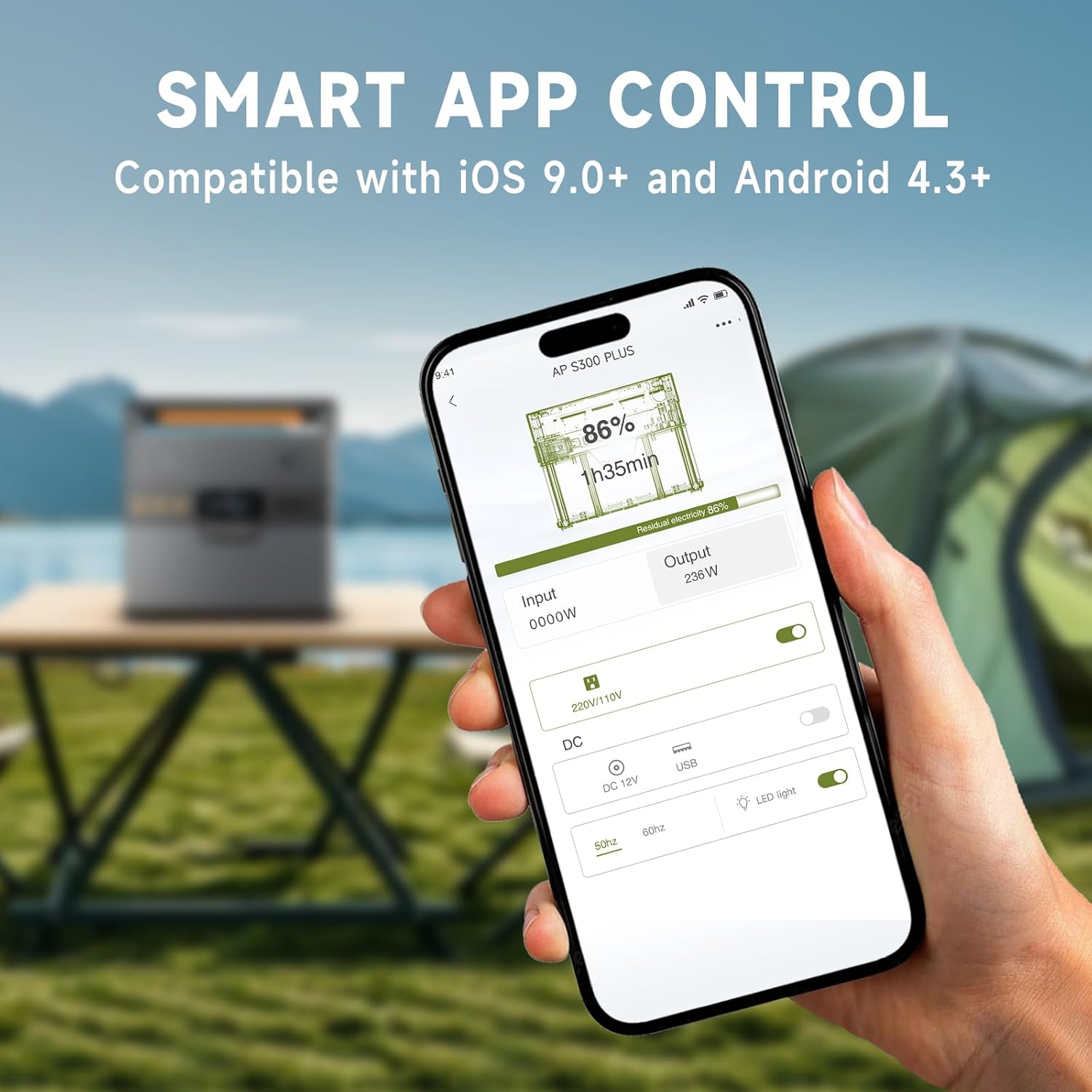
Image: A hand holding a smartphone showing the ALLPOWERS app interface, demonstrating remote control capabilities for the power station.
5. Priežiūra
Saugykla:
- Store the power station in a cool, dry place, away from direct sunlight and corrosive materials.
- Ilgalaikio sandėliavimo metu įkraukite įrenginį iki 50–80 % kas 3–6 mėnesius, kad palaikytumėte akumuliatoriaus veikimo laiką.
- Avoid storing in extreme temperatures (below -10°C / 14°F or above 45°C / 113°F).
Valymas:
- Išorę nuvalykite minkšta, sausa šluoste.
- Nenaudokite abrazyvinių valiklių ar tirpiklių.
- Įsitikinkite, kad visuose prievaduose nėra dulkių ir šiukšlių.
6. Problemų sprendimas
| Problema | Galima priežastis | Sprendimas |
|---|---|---|
| Įrenginys neįsijungia. | Baterija išsikrovusi. | Charge the power station using the AC adapter. |
| Kintamosios srovės išvestis neveikia. | AC output not activated; device exceeds 300W. | Press the AC Power Button. Reduce load or use a lower-power device. |
| USB/nuolatinės srovės išvestis neveikia. | DC/USB išvestis neaktyvuota. | Press the DC/USB Power Button. |
| Belaidis įkrovimas neveikia. | Device not Qi-compatible; device not centered; DC/USB output not activated. | Ensure device is Qi-compatible and correctly placed. Activate DC/USB output. |
| Slow charging via solar. | Insufficient sunlight; panel not correctly angled; panel not compatible. | Adjust panel angle for direct sunlight. Ensure panel is compatible and clean. |
| Bluetooth ryšio problemos. | Bluetooth off on phone; app not updated; unit too far. | Ensure phone Bluetooth is on. Update app. Move phone closer to unit (within 10m). |
Jei problema išlieka, susisiekite su ALLPOWERS klientų aptarnavimo tarnyba.
7. Specifikacijos
| Funkcija | Detalė |
|---|---|
| Modelio pavadinimas | AP-SS-005 |
| Baterijos talpa | 288 Wh / 78000 mAh |
| AC išvestis | 300W (Pure Sine Wave, Peak 600W) |
| USB-A išvestis | 2x18W |
| USB-C išvestis | 1 x 100W (QC3.0) |
| 12V Car Charger Output | 1 x 12V/10A |
| Belaidis įkrovimas | 1 x 5V/1A |
| AC įkrovimo įvestis | Maksimalus 200W |
| Saulės įkrovimo įvestis | Max. 100W (MPPT) |
| Gaminio matmenys | 8.1" ilgio x 6.5" pločio x 4.3" aukščio (20.5 cm x 16.5 cm x 10.9 cm) |
| Prekės svoris | 8.8 svarai (4 kg) |
| Baterijos tipas | Ličio polimeras |
8. Garantija ir palaikymas
Informacija apie garantiją:
The ALLPOWERS S300LUS Portable Power Station comes with a 10-year ALLPOWERS warranty. This warranty covers manufacturing defects and workmanship under normal use. Please retain your proof of purchase for warranty claims.
Garantija netaikoma žalai, atsiradusiai dėl netinkamo naudojimo, nelaimingų atsitikimų, neleistinų modifikacijų ar stichinių nelaimių.
Klientų aptarnavimas:
For technical assistance, warranty claims, or any questions regarding your ALLPOWERS S300LUS, please contact ALLPOWERS customer support through their official websvetainę arba perkant pateiktą kontaktinę informaciją.
Taip pat galite apsilankyti ALLPOWERS Store on Amazon daugiau informacijos apie produktą ir pagalbos išteklių.