
Įvadas
This manual provides detailed instructions for the installation, operation, and maintenance of your Montech Century II 1050W ATX Gaming Power Supply. Please read this manual thoroughly before installation and keep it for future reference.

Image: The Montech Century II 1050W Power Supply Unit, showcasing jo dizainą ir pagrindines savybes.
Saugos informacija
Visada laikykitės šių saugos priemonių, kad išvengtumėte sužalojimų ar įrangos sugadinimo:
- Prieš montuodami ar atlikdami techninę priežiūrą, įsitikinkite, kad maitinimo šaltinis yra atjungtas nuo pagrindinio maitinimo lizdo.
- Neatidarykite maitinimo bloko c.asing. Didelis tūristagViduje yra elektrostatinių elementų, kurie gali sukelti elektros smūgį.
- Maitinimo šaltinį įrenkite gerai vėdinamoje vietoje, atokiau nuo šilumos šaltinių ir tiesioginių saulės spindulių.
- Naudokite tik su šiuo maitinimo šaltiniu pateiktus modulinius kabelius. Naudojant nesuderinamus kabelius, galite sugadinti įrenginį arba prijungtus komponentus.
- Saugokite maitinimo šaltinį nuo drėgmės ar ekstremalių temperatūrų.
Pakuotės turinys
Patikrinkite, ar pakuotėje yra visi reikalingi daiktai:
- Montech Century II 1050W Power Supply Unit
- Kintamosios srovės maitinimo laidas
- Modulinis kabelių rinkinys (įskaitant 12 V-2x6 kabelį)
- Tvirtinimo varžtai
- Kabelių ryšiai
- Vartotojo vadovas (šis dokumentas)

Image: The Montech Century II Power Supply with its included flat and flexible modular cables, designed for a neat build.
Produktas baigtasview
The Montech Century II 1050W is a high-performance ATX gaming power supply designed for modern PC systems. It features 80 Plus Gold and Cybenetics Platinum efficiency ratings, ensuring stable and reliable power delivery. The fully modular design simplifies cable management, and its ATX 3.1 and PCIe 5.1 readiness, including a 12V-2x6 cable, provides compatibility with the latest hardware.
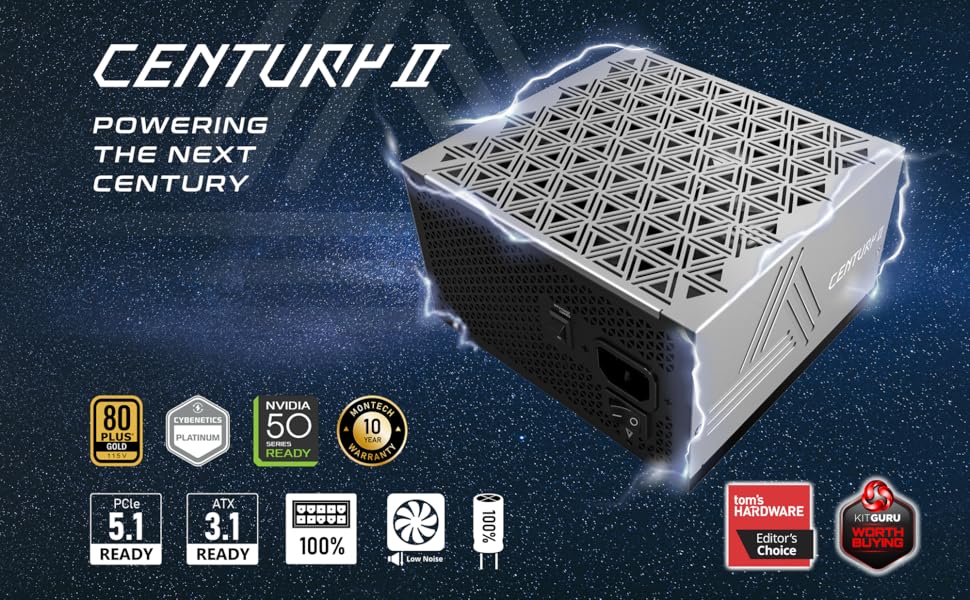
Vaizdas: Viršview of the Montech Century II Power Supply, highlighting its ATX 3.1 and PCIe 5.1 readiness.
Pagrindinės funkcijos:
- 80 Plus Gold & Cybenetics Platinum Certified: High efficiency for reduced power consumption and heat.
- Visiškai modulinis dizainas: Connect only the cables you need for improved airflow and cable management.
- ATX 3.1 ir PCIe 5.1 paruoštas: Future-proof compatibility with next-generation components, including a native 12V-2x6 cable.
- Smart Zero Fan Mode: Optimizes cooling and reduces noise by stopping the fan at low loads.
- 100 % japoniški kondensatoriai: Užtikrina ilgalaikį stabilumą ir patikimumą.
Sąranka ir diegimas
Follow these steps to install your Montech Century II 1050W Power Supply:
- Paruoškite savo sistemą: Ensure your computer is powered off and unplugged from the wall outlet. Open your PC case to access the power supply mounting area.
- Išimkite seną maitinimo šaltinį (jei taikoma): Atjunkite visus laidus nuo seno maitinimo šaltinio ir išimkite jį iš korpuso.
- Įdiekite naują maitinimo šaltinį: Carefully place the Montech Century II 1050W PSU into the designated bay in your PC case. Secure it with the provided mounting screws. Ensure the fan is oriented correctly (typically facing downwards if your case has a bottom vent, or upwards if not).
- Prijunkite modulinius kabelius: Identify the necessary cables for your motherboard, CPU, graphics card(s), and storage devices. Connect them to the corresponding ports on the power supply.
- Pagrindinė plokštė: Connect the 24-pin ATX cable.
- CPU: Connect the 4+4-pin or 8-pin EPS cables to your motherboard's CPU power connectors.
- Vaizdo plokštė (GPU): Use the appropriate PCIe cables. For modern GPUs requiring a 12V-2x6 connector, use the dedicated cable provided.
- Storage/Peripherals: Connect SATA power cables for SSDs/HDDs and Molex cables for other peripherals as needed.
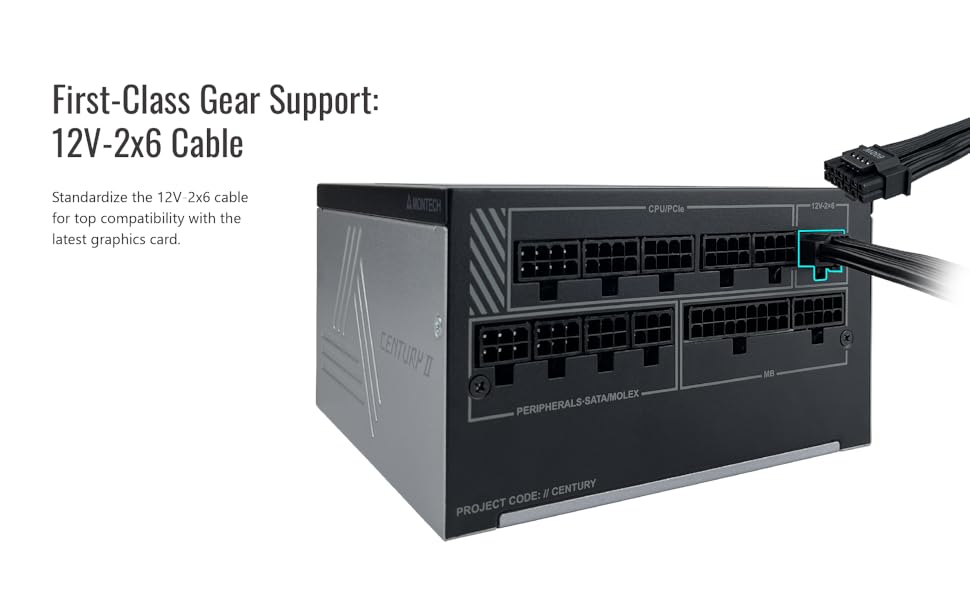
Image: A diagram illustrating the modular cable connection ports on the Montech Century II Power Supply, including the 12V-2x6 connector.
- Kabelių valdymas: Route cables neatly to improve airflow and aesthetics. Use the included cable ties to secure them.
- Prijunkite kintamosios srovės maitinimą: Prijunkite kintamosios srovės maitinimo laidą prie maitinimo šaltinio, o tada – prie sieninio lizdo.
- Maitinimas: Flip the main power switch on the back of the PSU to the "ON" position. You can then power on your computer.
Naudojimo instrukcijos
Smart Zero Fan Mode:
The Montech Century II 1050W features a Smart Zero Fan mode, which allows the power supply fan to remain off at low loads (typically below 30-40% of total wattage) for silent operation. The fan will automatically activate when the load increases to maintain optimal cooling.
To enable or disable this feature, use the "SMART ZERO FAN" switch located on the back of the power supply unit.
- ĮJUNGTA: Fan operates only when needed (Smart Zero Fan mode active).
- IŠJUNGTA: Fan runs continuously at a low speed, regardless of load.

Image: Rear panel of the Montech Century II Power Supply, highlighting the main power switch and the Smart Zero Fan toggle switch.
Priežiūra
Reguliarus aptarnavimas padeda užtikrinti jūsų maitinimo šaltinio ilgaamžiškumą ir optimalų veikimą:
- Dulkių šalinimas: Periodically clean the exterior of the power supply and its fan grille using compressed air or a soft brush to remove dust buildup. Ensure the PSU is powered off and unplugged before cleaning.
- Kabelio apžiūra: Occasionally check all modular cable connections to ensure they are securely seated.
- Aplinka: Maintain a clean, cool, and dry environment for your PC to prevent excessive heat and moisture exposure to the PSU.
Trikčių šalinimas
If you encounter issues with your Montech Century II 1050W Power Supply, refer to the following common problems and solutions:
Nėra galios:
- Patikrinkite maitinimo laidą: Įsitikinkite, kad kintamosios srovės maitinimo laidas yra tvirtai prijungtas tiek prie maitinimo bloko, tiek prie sieninio lizdo.
- Pagrindinis maitinimo jungiklis: Verify that the main power switch on the back of the PSU is in the "ON" position.
- Moduliniai kabeliai: Confirm all modular cables (especially the 24-pin motherboard and CPU power cables) are correctly and firmly connected.
- Sieninis lizdas: Test the wall outlet with another device to ensure it is functioning.
Sistemos nestabilumas / gedimai:
- Perkrova: Ensure your system's power requirements do not exceed the PSU's 1050W capacity. Use a power calculator if unsure.
- Kabelių jungtys: Recheck all power connections, particularly to the motherboard and graphics card, for secure fit.
- Komponentų problemos: Rule out other components (RAM, GPU, CPU) as potential causes by testing them if possible.
Fan Not Spinning (Smart Zero Fan ON):
- This is normal behavior if Smart Zero Fan mode is enabled and the system load is low. The fan will activate when the load increases.
- If the fan does not spin even under high load, try disabling Smart Zero Fan mode via the switch on the back of the PSU. If it still doesn't spin, contact support.
If problems persist after attempting these solutions, please contact Montech customer support.
Specifikacijos
Detailed technical specifications for the Montech Century II 1050W Power Supply:
| Funkcija | Specifikacija |
|---|---|
| Modelio pavadinimas | Century II 1050W |
| Vattage | 1050 vatų |
| Efektyvumo sertifikavimas | 80 Plus Gold & Cybenetics Platinum |
| Formos faktorius | ATX |
| Modulinis tipas | Visiškai modulinė |
| ATX versija | Paruošta ATX 3.1 |
| PCIe versija | PCIe 5.1 Ready (with 12V-2x6 Cable) |
| Aušinimo būdas | Air (135mm fan with Smart Zero Fan mode) |
| Kondensatoriai | 100% japoniški kondensatoriai |
| Gaminio matmenys (I x P x A) | 10 x 10 x 10 colio |
| Prekės svoris | 5.29 svaro |

Image: Graphs illustrating the efficiency curve and efficiency levels of the Montech Century II Power Supply, demonstrating its 80 Plus Gold and Cybenetics Platinum performance.

Vaizdas: Stambus planas view of the 100% Japanese capacitors used in the Montech Century II Power Supply, indicating high-quality internal components.
Garantija ir palaikymas
The Montech Century II 1050W Power Supply comes with a 10 metų garantija, ensuring long-term reliability and peace of mind. For warranty claims, technical support, or any inquiries not covered in this manual, please contact Montech customer service through their official websvetainę arba mažmenininką, iš kurio buvo pirktas produktas.
Prašome išsaugoti pirkimo įrodymą garantijos galiojimui.
Produkto vaizdo įrašasview
Vaizdo įrašas: išpakavimas ir viskasview of the Montech Century II 850W Power Supply. While this video features the 850W model, it provides a general look at the design, packaging, and modular cables common to the Century II series, including the 1050W model.