
THINKYA JA-318
THINKYA Vintage Bluetooth Stereo System
Modelis: JA-318
Įvadas
Thank you for choosing the THINKYA Vintage Bluetooth Stereo System. This manual provides essential information for setting up, operating, and maintaining your new audio system. Please read this manual thoroughly before using the product to ensure proper operation and to maximize your listening experience. Keep this manual for future reference.
Pakuotės turinys
Atidžiai patikrinkite pakuotės turinį. Jei trūksta kokių nors daiktų arba jie pažeisti, susisiekite su pardavėju.
- THINKYA Vintage Bluetooth Stereo System Unit
- Nuotolinio valdymo pultas
- Maitinimo adapteris
- FM Antenna (if applicable)
- Vartotojo vadovas (šis dokumentas)
Produktas baigtasview
Familiarize yourself with the components and features of your stereo system.

1 paveikslas: Priekyje view of the stereo system with the included remote control. The system features a top-loading CD player and integrated speakers.

2 paveikslas: The system supports Bluetooth 5.1 for wireless audio streaming, along with Aux and USB playback options. A smartphone is shown connected via Bluetooth.

3 paveikslas: The system features a premium 30W RMS sound system with dual 3-inch full-range units, designed for clear and powerful audio output.
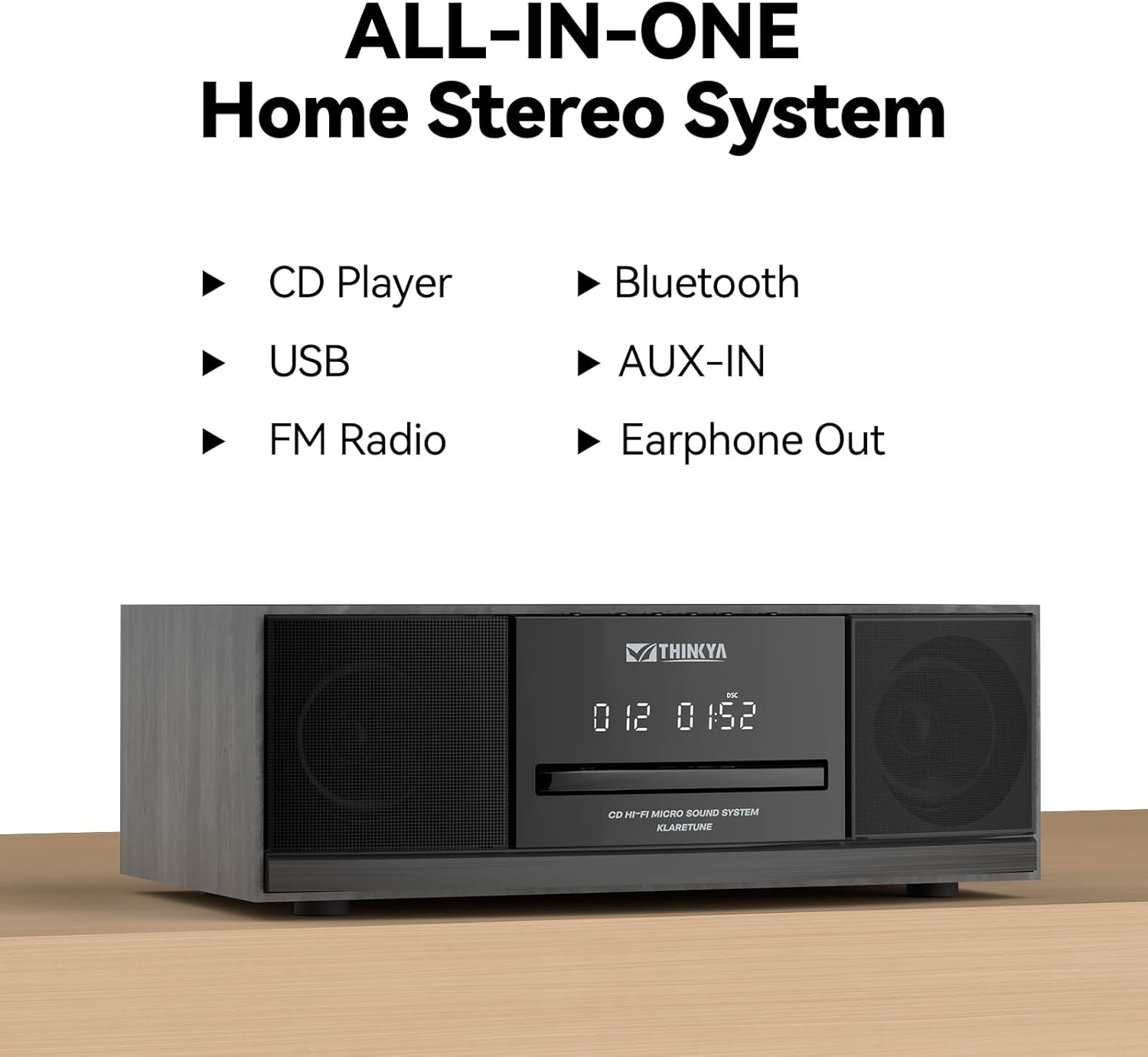
4 paveikslas: This all-in-one home stereo system integrates multiple audio sources including CD Player, USB, FM Radio, Bluetooth, AUX-IN, and Earphone Out.

5 paveikslas: The top-loading CD player supports various disc formats including CD, CD-R, CD-RW, and MP3 CDs. It also offers 5 EQ modes: Flat, Pop, Rock, Jazz, and Classic.

6 paveikslas: Rear panel connections include AUX Input (RCA and 3.5mm), USB Input, and Earphone Output for versatile connectivity.
Sąranka
1. Įdėjimas
Place the stereo system on a stable, flat surface away from direct sunlight, heat sources, and excessive dust or moisture. Ensure adequate ventilation around the unit.
2. Maitinimo prijungimas
- Prijunkite maitinimo adapterį prie nuolatinės srovės įvesties (DC IN) prievado, esančio įrenginio gale.
- Įjunkite maitinimo adapterį į standartinį sieninį lizdą.
3. FM antenos prijungimas
For optimal FM radio reception, connect the included FM antenna to the FM ANT port on the rear of the unit. Extend the antenna fully and adjust its position for the best signal.
Naudojimo instrukcijos
Maitinimo įjungimas/išjungimas
Paspauskite GALIA button on the unit or the remote control to turn the system on or off.
Režimo pasirinkimas
Paspauskite REŽIMAS button on the unit or remote control repeatedly to cycle through available modes: CD, Bluetooth, FM Radio, USB, and AUX-in.
CD grotuvo veikimas
- Pasirinkite CD režimą.
- Gently insert a CD into the top-loading CD slot with the label side facing up. The disc will be automatically detected and playback will begin.
- Naudokite PALEISTI / PAUZĖ, Praleisti pirmyn, ir PRAŠKITE ATGAL mygtukai, skirti valdyti atkūrimą.
- Paspauskite STOP mygtuką sustabdyti atkūrimą.
- Kartojimo režimai: Paspauskite KARTOT button to cycle through repeat one, repeat all, or random playback.
- EQ režimai: Paspauskite EQ button to select desired sound equalization: Flat, Classic, Rock, Pop, or Jazz.
"Bluetooth" poravimas
- Select Bluetooth mode. The display will show "BT" and flash, indicating it's in pairing mode.
- Įrenginyje su „Bluetooth“ funkcija (išmaniajame telefone, planšetiniame kompiuteryje ir kt.) įjunkite „Bluetooth“ ir ieškokite galimų įrenginių.
- Select "THINKYA JA-318" (or similar name) from the list.
- Once paired, the "BT" indicator will stop flashing and remain solid. You can now stream audio from your device to the stereo system.
- Note: This system is designed for receiving Bluetooth audio from devices and does not support connection to wireless headphones.
FM radijo veikimas
- Pasirinkite FM radijo režimą.
- Automatinis nuskaitymas: Paspauskite ir palaikykite PALEISTI / PAUZĖ mygtuką, kad automatiškai nuskaitytumėte ir išsaugotumėte galimas FM stotis.
- Rankinis derinimas: Naudokite Praleisti pirmyn or PRAŠKITE ATGAL mygtukais, kad rankiniu būdu nustatytumėte norimus dažnius.
- Iš anksto nustatytos stotys: Use the number buttons on the remote control to directly select saved preset stations.
USB atkūrimas
- Pasirinkite USB režimą.
- Įdėkite USB atmintinę su MP3 arba WMA garso įrašu files into the USB port on the rear of the unit.
- Playback will begin automatically. Use the playback controls (PLAY/PAUSE, SKIP FORWARD/BACKWARD) to navigate your music.
AUX-in Usage
- Select AUX-in mode.
- Connect an external audio device (e.g., smartphone, MP3 player) to the AUX-in port (3.5mm or RCA) on the rear of the unit using an appropriate audio cable (not included).
- Valdykite atkūrimą tiesiai iš prijungto išorinio įrenginio.
Nuotolinio valdymo pulto funkcijos

7 paveikslas: The included remote control allows convenient operation of all system functions from a distance.
The remote control provides full functionality for the stereo system. Ensure batteries are correctly inserted. Refer to the button labels on the remote for specific functions such as Power, Mode, Volume, Playback controls, EQ, and Number buttons for FM presets.
Priežiūra
Valymas
Wipe the unit with a soft, dry cloth. Do not use abrasive cleaners, waxes, or solvents as they may damage the finish. For the CD lens, use a specialized CD lens cleaner if necessary.
Sandėliavimas
Jei prietaisas ilgesnį laiką nebus naudojamas, atjunkite jį nuo elektros lizdo ir laikykite vėsioje, sausoje vietoje.
CD priežiūra
Handle CDs by their edges. Keep them clean and free of scratches. Store CDs in their cases when not in use.
Trikčių šalinimas
Jei kyla problemų, prieš kreipdamiesi į klientų aptarnavimo tarnybą, peržiūrėkite šią lentelę.
| Problema | Galima priežastis | Sprendimas |
|---|---|---|
| Nėra galios | Maitinimo laidas neprijungtas; Maitinimo lizdas neaktyvus. | Įsitikinkite, kad maitinimo laidas yra tvirtai prijungtas. Išbandykite kitą maitinimo lizdą. |
| Nėra garso | Volume too low; Incorrect mode selected; Mute function active. | Increase volume. Select the correct input mode (CD, BT, FM, USB, AUX). Press the MUTE button on the remote. |
| CD praleidžia arba negroja | Kompaktinis diskas nešvarus arba subraižytas; kompaktinis diskas įdėtas neteisingai. | Clean the CD with a soft, lint-free cloth. Ensure the CD is inserted label side up. Try a different CD. |
| Bluetooth neprisijungia | System not in pairing mode; Device Bluetooth off; Device too far. | Ensure system is in Bluetooth mode and "BT" is flashing. Enable Bluetooth on your device. Move device closer to the system (within 30 feet). |
| Prastas FM priėmimas | Antena neprijungta arba netinkamai pastatyta. | Prijunkite FM anteną ir pakoreguokite jos padėtį, kad signalas būtų geresnis. |
| Nuotolinio valdymo pultas neveikia | Baterijos išsikrovė arba įdėtos neteisingai; kliūtis tarp nuotolinio valdymo pulto ir įrenginio. | Replace batteries. Ensure correct polarity. Remove any obstructions. Point remote directly at the unit's sensor. |
Specifikacijos
| Funkcija | Detalė |
|---|---|
| Modelio numeris | JA-318 |
| Prekės ženklas | MĖVYTI |
| Gaminio matmenys (I x P x A) | 16 x 11 x 9 colio |
| Prekės svoris | 8.73 svaro |
| Ryšio technologija | Bluetooth |
| Garsiakalbio tipas | Stereo |
| Spalva | Juoda |
| RMS galios išėjimas | 30W (15W RMS per speaker) |
| CD suderinamumas | CD, CD-R/RW, MP3 CD |
| EQ režimai | Flat, Classic, Rock, Pop, Jazz |
| Išankstiniai FM nustatymai | 20 stočių |
| Įėjimai | USB Port, Aux-in (3.5mm, RCA) |
| Išėjimai | Ausinių prievadas |
Garantija ir palaikymas
For warranty information and technical support, please refer to the contact details provided with your purchase or visit the official THINKYA websvetainėje. Išsaugokite pirkimo įrodymą, jei prireiktų pateikti garantinį ieškinį.
Dėl papildomos pagalbos kreipkitės:
- Gamintojas: MĖVYTI
- Websvetainė: Search THINKYA on Amazon (or official website if available)
Ask a question about this manual
Ask about setup, troubleshooting, compatibility, parts, safety, or missing instructions. Manuals+ will review the question and use this page’s manual context to help answer it.