
1. Įvadas
This manual provides essential information for the safe and efficient use of your Philips B4000 Soundbar. Please read these instructions carefully before using the product and retain them for future reference. The Philips B4000 Soundbar is designed to enhance your television's audio experience with clear 2.0 channel sound and versatile connectivity options.

Image: The Philips B4000 Soundbar, its remote control, and a television displaying colorful content, illustrating the product in use.
2. Pakuotės turinys
Patikrinkite, ar pakuotėje yra visi reikalingi daiktai:
- Philips B4000 Soundbar
- Nuotolinio valdymo pultas
- 2 x AAA baterijos (nuotolinio valdymo pultui)
- Sieniniai laikikliai
- Greitos pradžios vadovas
- Garantijos kortelė
3. Produktas baigtasview
The Philips B4000 Soundbar features a compact design with integrated speakers and various input options for seamless integration with your home entertainment system.

Image: The Philips B4000 Soundbar positioned below a television in a living room, emphasizing its 2.0 channel audio, 60W maximum output power, and dual full-range speakers.
4. Sąranka ir diegimas
4.1 Įdėjimo parinktys
The soundbar offers flexible placement to suit your setup:
- TV stovo vieta: Place the soundbar on a flat surface directly in front of your TV. Ensure it does not obstruct the TV's remote sensor.
- Sieninis laikiklis: Use the included wall mount brackets to attach the soundbar to the wall below your TV. Refer to the Quick Start Guide for detailed wall mounting instructions.
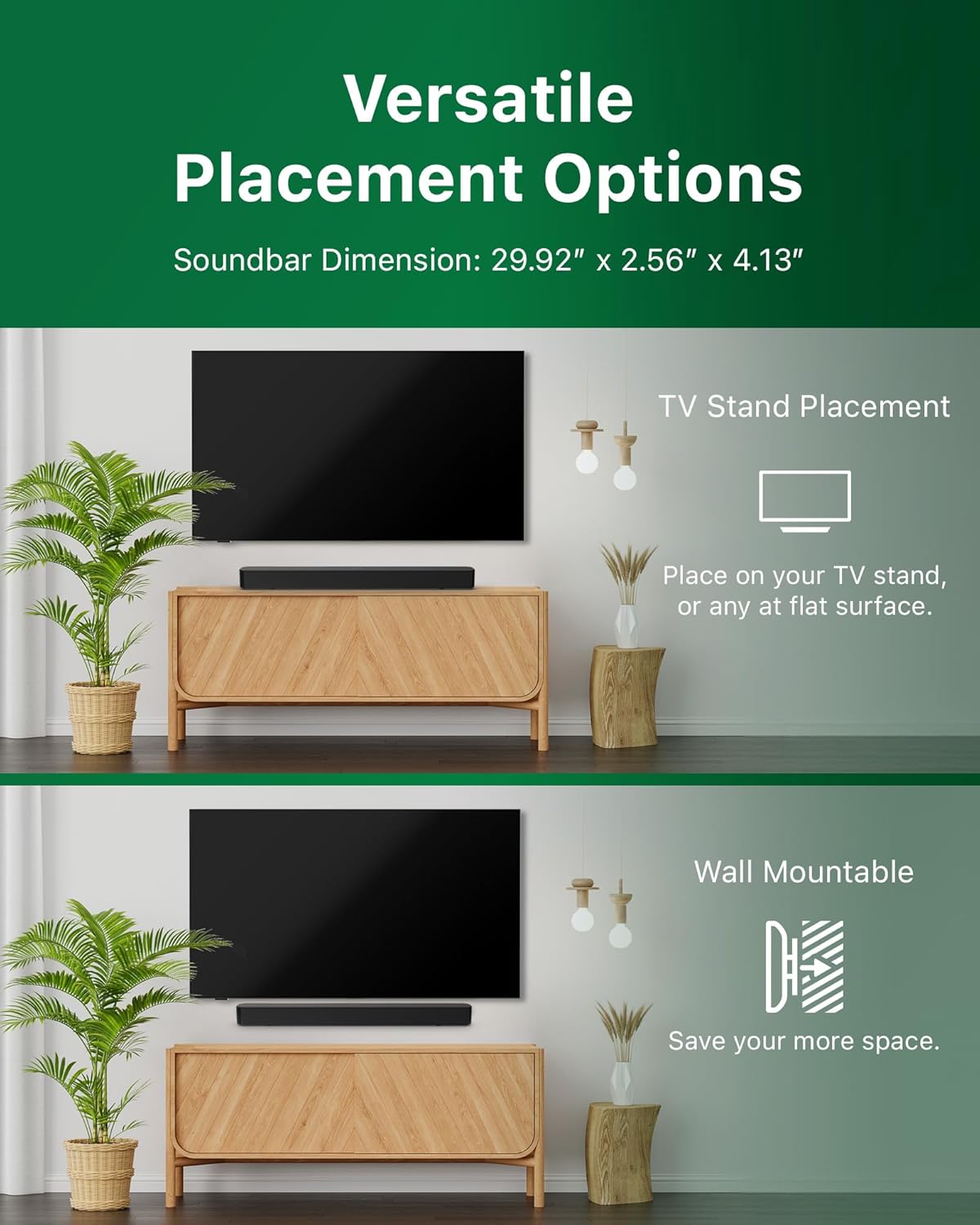
Image: Illustrations demonstrating the two primary placement methods for the soundbar: resting on a TV stand and securely mounted on a wall.
4.2 Prijungimas prie televizoriaus
The soundbar supports multiple connection types:
- HDMI ARC (rekomenduojama): Connect an HDMI cable (not included) from the HDMI ARC port on your TV to the HDMI ARC port on the soundbar. This allows for audio return and control via your TV remote.
- Bluetooth: For wireless audio streaming, pair your soundbar with a Bluetooth-enabled device.
- USB: Connect a USB device for audio playback.
- DC in: Connect the power adapter to the DC IN port.

Image: A visual representation of the soundbar's available audio input ports, including HDMI (ARC), USB, Bluetooth, and DC IN for power.
4.3 „Roku TV Ready“ sąranka
The Philips B4000 Soundbar is Roku TV Ready certified, simplifying setup and control when paired with a Roku TV.
- Connect the soundbar to your Roku TV via HDMI ARC.
- Your Roku TV should automatically detect and configure the soundbar.
- Use your Roku TV remote to control the soundbar's power and volume.

Image: The Philips B4000 Soundbar seamlessly integrated with a television, illustrating its 'Roku TV Ready' certification for simplified setup and control.
4.4 Nuotolinio valdymo pulto sąranka
Insert the two included AAA batteries into the remote control, ensuring correct polarity.
5. Operacija
5.1 Maitinimo įjungimas/išjungimas
Norėdami įjungti arba išjungti įrenginį, paspauskite garso juostos arba nuotolinio valdymo pulto maitinimo mygtuką.
5.2 Įvesties pasirinkimas
Press the 'Source' button on the remote control to cycle through available input sources (HDMI ARC, Bluetooth, USB).
5.3 Garsumo valdymas
Use the 'Volume Up' and 'Volume Down' buttons on the remote control to adjust the audio level. If connected via HDMI ARC to a Roku TV, your TV remote may also control the volume.
5.4 Bluetooth poravimas
- Press the 'Bluetooth' button on the remote control to enter Bluetooth pairing mode. The indicator light on the soundbar will flash.
- On your mobile device, search for Bluetooth devices and select 'Philips B4000'.
- Susiejus, indikatoriaus lemputė ims šviesti nuolat ir galėsite transliuoti garsą belaidžiu būdu.
5.5 Garso režimai ir ekvalaizeris
The soundbar may offer various sound modes or equalizer settings to optimize audio for different content types (e.g., Movie, Music, News). Use the remote control to access and adjust these settings. While specific equalizer details are not extensively documented, experimentation with available settings is encouraged to find your preferred audio profile.

Image: The Philips soundbar remote control in the foreground, with a television screen in the background displaying the EasyLink 2.0 menu for adjusting sound styles, including Bass, Treble, and Custom Equalize options.
6. Priežiūra
Norėdami užtikrinti garso juostos ilgaamžiškumą ir optimalų veikimą, laikykitės šių priežiūros nurodymų:
- Valymas: Garso juostos paviršių valykite minkštu, sausu skudurėliu. Nenaudokite skystų valiklių ar abrazyvinių medžiagų, nes jos gali pažeisti apdailą.
- Vėdinimas: Įsitikinkite, kad garso juostos ventiliacijos angos nėra užblokuotos. Tinkamas oro srautas apsaugo nuo perkaitimo.
- Saugykla: Jei garso juostą ilgesnį laiką nenaudosite, atjunkite ją nuo maitinimo šaltinio ir laikykite vėsioje, sausoje vietoje.
7. Problemų sprendimas
If you encounter issues with your Philips B4000 Soundbar, refer to the following common problems and solutions:
| Problema | Galima priežastis | Sprendimas |
|---|---|---|
| Nėra garso iš garso juostos |
|
|
| Statinis arba iškraipytas garsas |
|
|
| Bluetooth poravimo problemos |
|
|
| Nuotolinio valdymo pultas neveikia |
|
|
8. Specifikacijos
| Funkcija | Detalė |
|---|---|
| Modelio pavadinimas | TAB4000/37 |
| Garsiakalbio tipas | Garso juosta |
| Erdvinio garso kanalo konfigūracija | 2.0 |
| Didžiausia garsiakalbio išėjimo galia | 60 vatų |
| Ryšio technologija | Bluetooth (5.4), HDMI ARC, USB |
| Ypatingos savybės | Advanced Bluetooth 5.4 Connectivity, Bass Boost, Roku TV Ready™ Certification, Wall mountable |
| Gaminio matmenys | 4.1 "D x 30" P x 2.56" A |
| Prekės svoris | 4.89 svaro (2.22 kilogramo) |
| Maitinimo šaltinis | Battery Powered (for remote), AC Power (for soundbar) |
| Įvesties tomastage | 120 voltų |
| Įtraukti komponentai | Battery, Quick Start Guide, Remote, Wall Mount Bracket, Warranty Card |
9. Garantija ir palaikymas
9.1 Informacija apie garantiją
The Philips B4000 Soundbar comes with a Limited Warranty. Please refer to the included Warranty Card for specific terms, conditions, and duration of coverage. Retain your proof of purchase for warranty claims.
9.2 Pagalba klientams
Dėl papildomos pagalbos, techninės pagalbos ar paslaugų klausimų apsilankykite oficialioje „Philips“ pagalbos svetainėje website or contact their customer service. Contact details can typically be found on the Philips websvetainėje arba greitojo paleidimo vadove.