
1. Įvadas
This manual provides instructions for the safe and efficient use of your Brother CP2160F Computerized Sewing Machine. Please read this manual thoroughly before operating the machine to ensure proper function and to prevent damage or injury. Keep this manual in a safe place for future reference.
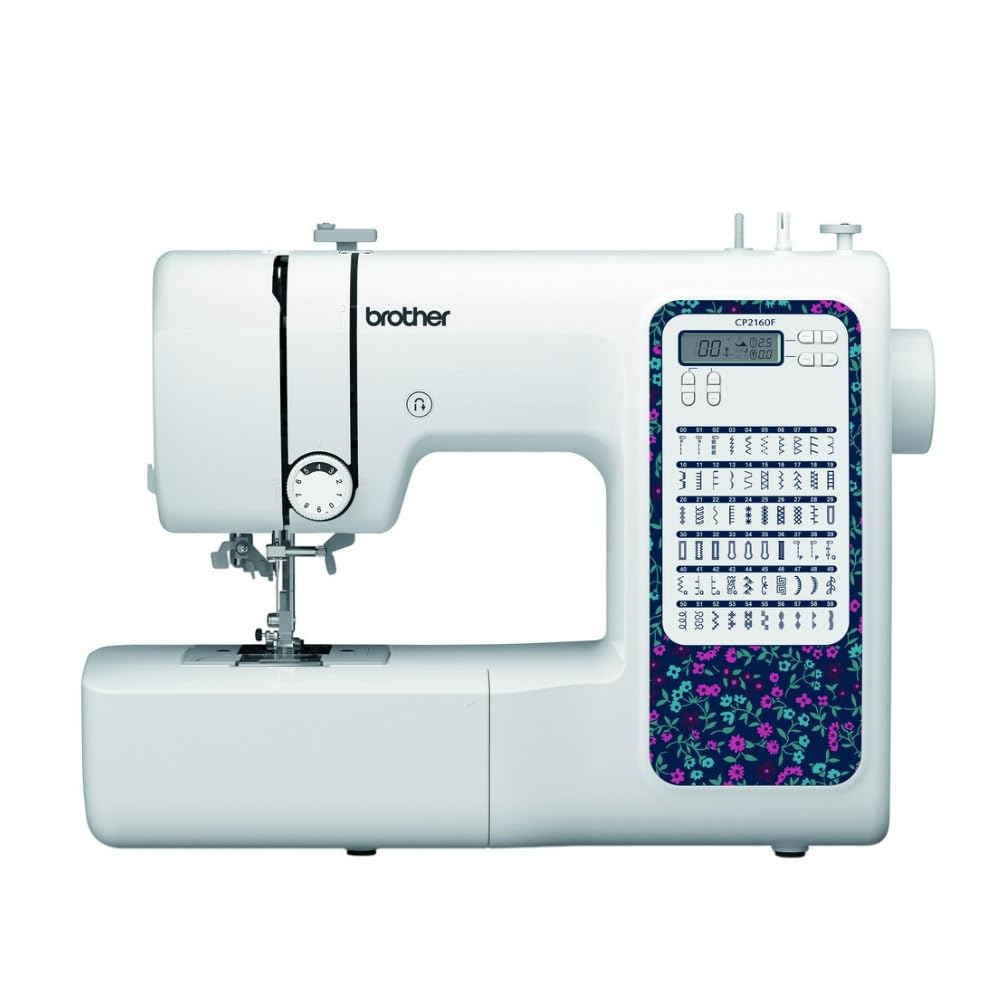
Figure 1: Brother CP2160F Computerized Sewing Machine. This image shows the overall view of the sewing machine, highlighting its compact design and the LCD screen for stitch selection.
2. Svarbios saugos instrukcijos
Naudojant elektrinį prietaisą, visada reikia laikytis pagrindinių saugos priemonių, įskaitant:
- Prieš naudodami siuvimo mašiną, perskaitykite visas instrukcijas.
- Pirštus laikykite toliau nuo visų judančių dalių. Siuvimo mašinos adata turi būti ypač atsargi.
- Visada naudokite tinkamą adatos plokštelę. Dėl netinkamos plokštelės adata gali nulūžti.
- Išjunkite siuvimo mašiną, kai atliekate bet kokius pakeitimus adatos srityje, pavyzdžiui, įveriate siūlo siūlą, keičiate adatą, įveriate ritinėlį arba keičiate prispaudimo pėdelę.
- Visada ištraukite siuvimo mašinos kištuką iš elektros lizdo, kai nuimate dangčius, tepate arba atliekate bet kokius kitus naudotojo priežiūros reguliavimus, nurodytus naudojimo vadove.
- Niekada nemeskite ir neįkiškite jokio daikto į jokią angą.
- Nenaudoti lauke.
- Nedirbkite ten, kur naudojami aerozoliniai (purškiami) produktai arba kur įvedamas deguonis.
- Norėdami atjungti, pasukite visus valdiklius į išjungimo padėtį, tada ištraukite kištuką iš lizdo.
3. Pakuotės turinys
Patikrinkite, ar pakuotėje yra visi komponentai:
- Brother CP2160F Computerized Sewing Machine
- Maitinimo laidas
- Pėdų valdiklis
- Accessory Bag (containing bobbins, needle set, twin needle, screwdriver, spool caps, extra spool pin, seam ripper, cleaning brush)
- 7 siuvimo pėdelės: Buttonhole foot, Zipper foot, Blind stitch foot, Button sewing foot, Overcasting foot, Monogramming foot, Zigzag foot (on machine)
- Instrukcijų vadovas (šis dokumentas)
4. Sąranka
4.1 Maitinimo jungtis
- Pastatykite mašiną ant stabilaus, lygaus paviršiaus.
- Insert the machine plug into the jack on the right side of the machine.
- Insert the power supply plug into a standard electrical outlet.
- Turn on the main power switch, located on the right side of the machine. The LCD screen will illuminate.
4.2 Ritės apvija
- Uždėkite siūlų ritę ant ritės kaiščio.
- Guide the thread through the upper thread guide and around the pre-tension disc.
- Place an empty bobbin onto the bobbin winder shaft and push it to the right.
- Kelis kartus apvyniokite siūlą aplink ritę pagal laikrodžio rodyklę.
- Press the foot controller (or Start/Stop button) to begin winding. The machine will stop automatically when the bobbin is full.
- Cut the thread, push the bobbin winder shaft to the left, and remove the wound bobbin.
4.3 Siūlo įvėrimas (viršutinis siūlas)
- Pakelkite spaustuvo kojos svirtį.
- Uždėkite siūlų ritę ant ritės kaiščio.
- Prakiškite siūlą per viršutinį siūlo kreipiklį.
- Follow the numbered threading path indicated on the machine, ensuring the thread passes through the tension discs and takes up lever.
- Use the advanced needle threading system: Lower the presser foot, lower the needle, then push down the needle threader lever to engage it. Guide the thread through the hook and release the lever.
- Pull the thread loop through the needle eye.
4.4 Adatos įdėjimas
- Išjunkite mašinos maitinimą.
- Atlaisvinkite adatą clamp screw by turning it counter-clockwise.
- Nuimkite seną adatą.
- Įkiškite naują adatą plokščiąja puse į mašinos galą ir stumkite ją aukštyn kiek įmanoma aukščiau.
- Priveržkite adatą clamp tvirtai prisukite.
5. Operacija
5.1 Dygsnio pasirinkimas
The CP2160F features 60 built-in stitches. Use the stitch selector buttons (usually '+' and '-') to navigate through the stitch patterns displayed on the LCD screen. The recommended stitch length and width will be displayed automatically, but can be adjusted if desired.
5.2 Automatinės kilpos
This machine includes 7 auto-size buttonhole styles. Attach the buttonhole foot. Place the button you wish to match into the buttonhole foot's holder. Select the desired buttonhole stitch. The machine will automatically sew a buttonhole to the correct size.
5.3 Free-Arm Sewing
To convert to free-arm sewing, slide off the accessory box located at the front of the machine. This exposes the free arm, ideal for sewing cylindrical items like cuffs, sleeves, and pant hems.
5.4 Storų audinių siuvimas
The CP2160F's robust feed system and fixed needle bar are designed to handle thick materials such as denim and tweed. Ensure you use the correct needle type and size for the fabric thickness to prevent needle breakage and ensure smooth feeding.
5.5 Using Included Sewing Feet
The machine comes with seven specialized sewing feet. Refer to the specific stitch instructions for which foot to use. To change a presser foot:
- Pakelkite adatą ir pėdelę.
- Paspauskite juodą svirtį, esančią pėdelės laikiklio gale, kad atleistumėte dabartinę pėdelę.
- Align the new foot with the pin on the presser foot holder and lower the presser foot lever until it snaps into place.
6. Priežiūra
6.1 Įrenginio valymas
Regular cleaning helps maintain optimal performance. Always unplug the machine before cleaning.
- Pašariniai šunys: Remove the needle plate and use the cleaning brush to remove lint and dust from the feed dogs and bobbin area.
- Hook Race: Carefully remove the bobbin case and clean the hook race area with the brush.
- Išorė: Wipe the exterior surfaces with a soft, dry cloth. Do not use liquid cleaners or harsh chemicals.
Note: This machine does not require user lubrication.
7. Problemų sprendimas
Prieš kreipdamiesi į klientų aptarnavimo tarnybą, dar kartąview šios dažniausios problemos ir jų sprendimai:
| Problema | Galima priežastis | Sprendimas |
|---|---|---|
| Adatų pertraukėlės | Incorrect needle size/type for fabric; bent needle; needle not fully inserted; pulling fabric while sewing. | Use correct needle; replace bent needle; re-insert needle correctly; guide fabric gently. |
| Praleistos siūlės | Needle bent or dull; incorrect needle insertion; improper threading; wrong needle for fabric. | Replace needle; re-insert needle; re-thread machine; use appropriate needle. |
| Thread jams | Improper threading; lint in bobbin case; bobbin wound unevenly. | Re-thread machine; clean bobbin area; re-wind bobbin evenly. |
| Mašina neįsijungia | Power cord not connected; power switch off; electrical outlet issue. | Check power cord connections; ensure switch is ON; test outlet with another appliance. |
8. Specifikacijos
- Modelis: Brother CP2160F
- Dygsnių skaičius: 60 įmontuotų siūlių
- Sagų skylutės: 7 One-step auto-size buttonholes
- Adatos įvėriklis: Advanced Needle Threading System
- Ekranas: LCD ekranas
- Sewing Area: Free-arm capability
- Maitinimo sistema: Exceptional feed for thick fabrics
- Included Feet: 7 (Buttonhole, Zipper, Blind Stitch, Button Sewing, Overcasting, Monogramming, Zigzag)
- Spalva: Baltas
- Medžiaga: Metalas, Plastikas
- Gaminio matmenys (G x P x A): 6.65" x 12.2" x 16.26"
- Prekės svoris: 226 uncijos (apie 14.1 svaro)
- Maitinimo šaltinis: Su laidu elektra
- UPC: 196271536956
9. Klientų aptarnavimas ir garantija
For technical assistance, warranty information, or service inquiries, please contact Brother customer support. Refer to the official Brother webNaujausią kontaktinę informaciją ir garantijos sąlygas rasite svetainėje arba prie pirkimo pridėtoje dokumentacijoje.
Palaikymas internetu: www.brother-usa.com/support
Pastaba: garantijos sąlygos gali skirtis priklausomai nuo regiono ir pardavėjo. Išsaugokite pirkimo įrodymą, jei prireiktų pateikti pretenzijas dėl garantijos.