
Įvadas
This manual provides instructions for the ZWP Replacement Remote Control, designed for use with various smart projectors. Please read this manual carefully before using the remote control to ensure proper operation and longevity.
Compatible Projector Models: WiMiUS K9, VOPLLS P1E M10, DBPOWER G01, YABER V12, TOPTRO X9, MECOOL KP2, Xiaomi, Wanbo TT, Blitzwolf BW-V6, Yaber U12, FUDONI S1 Smart Projector.
Sąranka
1. Akumuliatoriaus įdėjimas
Nuotolinio valdymo pultui reikalingos dvi AAA baterijos (nepridedamos). Norėdami jas įdėti, atlikite šiuos veiksmus:
- Nuotolinio valdymo pulto gale raskite baterijų skyriaus dangtelį.
- Norėdami atidaryti, stumkite dangtelį žemyn arba paspauskite fiksatorių.
- Įdėkite dvi AAA tipo baterijas, užtikrindami, kad teigiamas (+) ir neigiamas (-) poliai teisingai sutaptų su žymėjimais baterijų skyriuje.
- Saugiai uždarykite akumuliatoriaus skyriaus dangtelį.

1 paveikslas: Battery installation diagram. Ensure correct polarity when inserting AAA batteries.
2. Nuotolinio valdymo pulto suporavimas
To establish a connection between the remote control and your projector, follow the pairing procedure:
- Ensure your projector is powered on and within range.
- Vienu metu paspauskite ir palaikykite [Gerai] mygtuką ir [Volume Down (-)] nuotolinio valdymo pulto mygtuką.
- Hold both buttons until the pairing indicator (if available on your specific remote model) flashes or your projector displays a confirmation message.
- Release the buttons once pairing is complete. The remote control should now be ready for use.

2 paveikslas: Baigėsiview of the remote control's design and key features, emphasizing its build quality.
Nuotolinio valdymo pulto valdymas
This remote control features an ergonomic design for comfortable use and provides quick response times. It supports multi-angle induction for stable transmission.
Pagrindinės funkcijos:
- Maitinimo mygtukas: Įjungia arba išjungia projektorių.
- Navigation Pad (OK button and directional arrows): Naudojamas naršyti meniu ir pasirinkti parinktis.
- Garsumo mygtukai (+/-): Adjusts the audio volume of the projector.
- Quick Access Buttons (Netflix, YouTube, Prime Video, Open): Provides direct access to popular streaming applications.
- Skaičių klaviatūra: For direct input or channel selection, if supported by the projector.
- Grįžimo / atgal mygtukas: Grįžta į ankstesnį ekraną arba meniu.
- Meniu mygtukas: Accesses the projector's main menu or settings.

3 paveikslas: Remote control responsiveness and signal strength indicators.
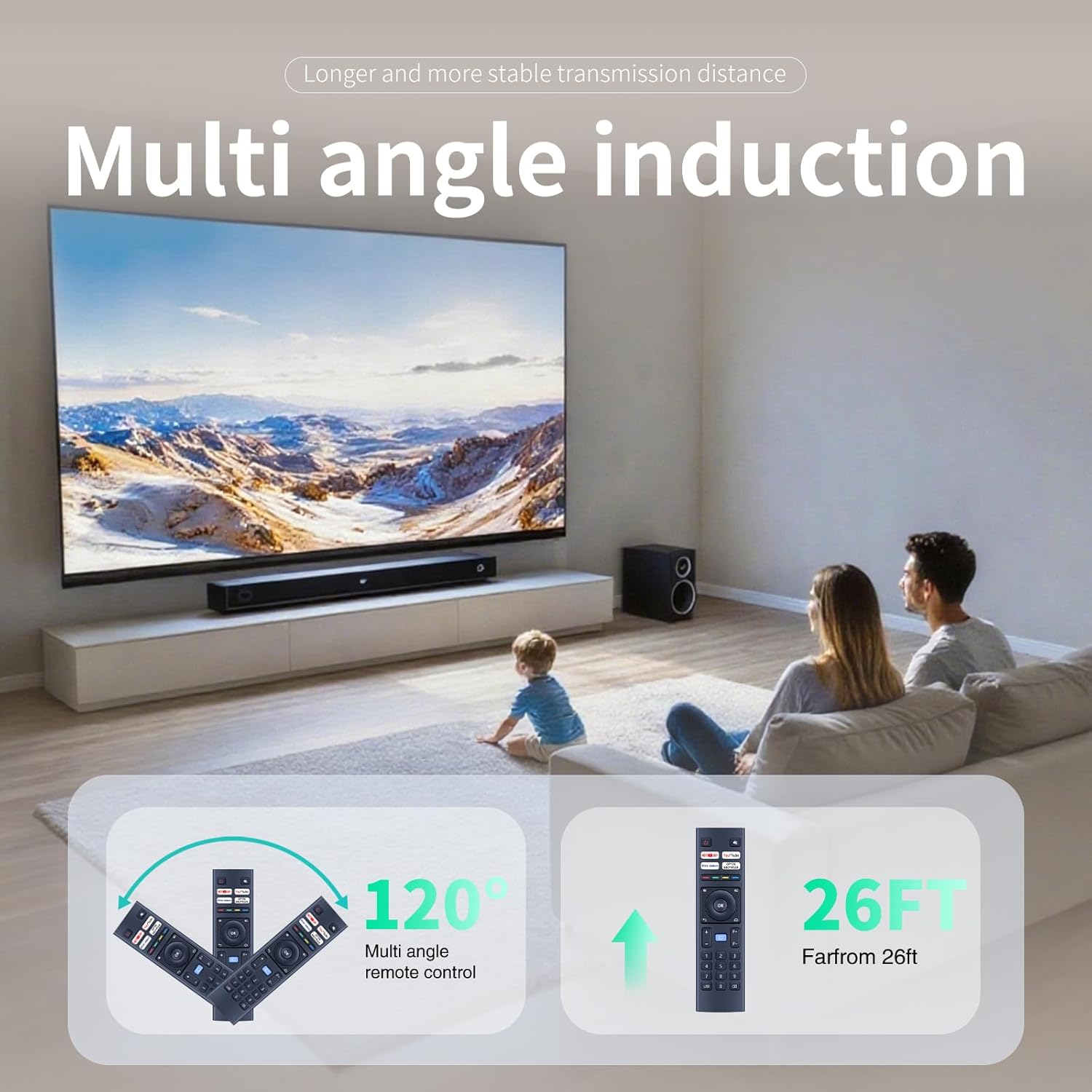
4 paveikslas: Multi-angle induction and effective operating range of the remote control.
Priežiūra
Valymas
Norėdami išlaikyti nuotolinio valdymo pulto išvaizdą ir funkcionalumą:
- Nuvalykite paviršių minkšta, sausa šluoste.
- Nenaudokite abrazyvinių valiklių, tirpiklių ar alkoholio, nes jie gali pažeisti apdailą.
- Avoid getting liquids inside the remote control.
Baterijos keitimas
Replace batteries when the remote control becomes unresponsive or its range decreases significantly. Refer to the "Battery Installation" section for instructions.
Sandėliavimas
Jei nuotolinio valdymo pultas nebus naudojamas ilgesnį laiką, išimkite baterijas, kad išvengtumėte ištekėjimo ir galimos žalos.
Trikčių šalinimas
- Nuotolinio valdymo pultas nereaguoja:
- Patikrinkite, ar baterijos tinkamai įdėtos ir ar jos pakankamai įkrautos. Jei reikia, pakeiskite jas.
- Įsitikinkite, kad tarp nuotolinio valdymo pulto ir projektoriaus nėra jokių kliūčių.
- Re-pair the remote control with the projector as described in the "Pairing the Remote Control" section.
- Trumpas veikimo diapazonas:
- Pakeiskite baterijas naujomis.
- Įsitikinkite, kad esate efektyviame veikimo diapazone (maždaug 26 pėdų).
- Sumažinkite kitų elektroninių prietaisų keliamus trukdžius.
- Neveikia tam tikri mygtukai:
- Nuvalykite nuotolinio valdymo pulto paviršių, ypač aplink nereaguojančius mygtukus, kad pašalintumėte nešvarumus ar šiukšles.
- If only specific quick access buttons (e.g., Netflix) are not working, ensure your projector's software is up to date and supports these functions.
Specifikacijos
| Funkcija | Detalė |
|---|---|
| Modelio numeris | B0F4KCQ2SD |
| Prekės ženklas | ZWP |
| Suderinami įrenginiai | Projectors (WiMiUS K9, VOPLLS P1E M10, DBPOWER G01, YABER V12, TOPTRO X9, MECOOL KP2, Xiaomi, Wanbo TT, Blitzwolf BW-V6, Yaber U12, FUDONI S1) |
| Maitinimo šaltinis | 2 x AAA baterijos (į komplektą neįeina) |
| Ypatinga funkcija | Ergonomiškas dizainas |
| Spalva | Juoda |
| Prekės svoris | 2.08 uncijos (apie 59 gramų) |
| Pakuotės matmenys | 6.8 x 2.3 x 1 colio (maždaug 17.3 x 5.8 x 2.5 cm) |
| Maksimalus palaikomų įrenginių skaičius | 1 |
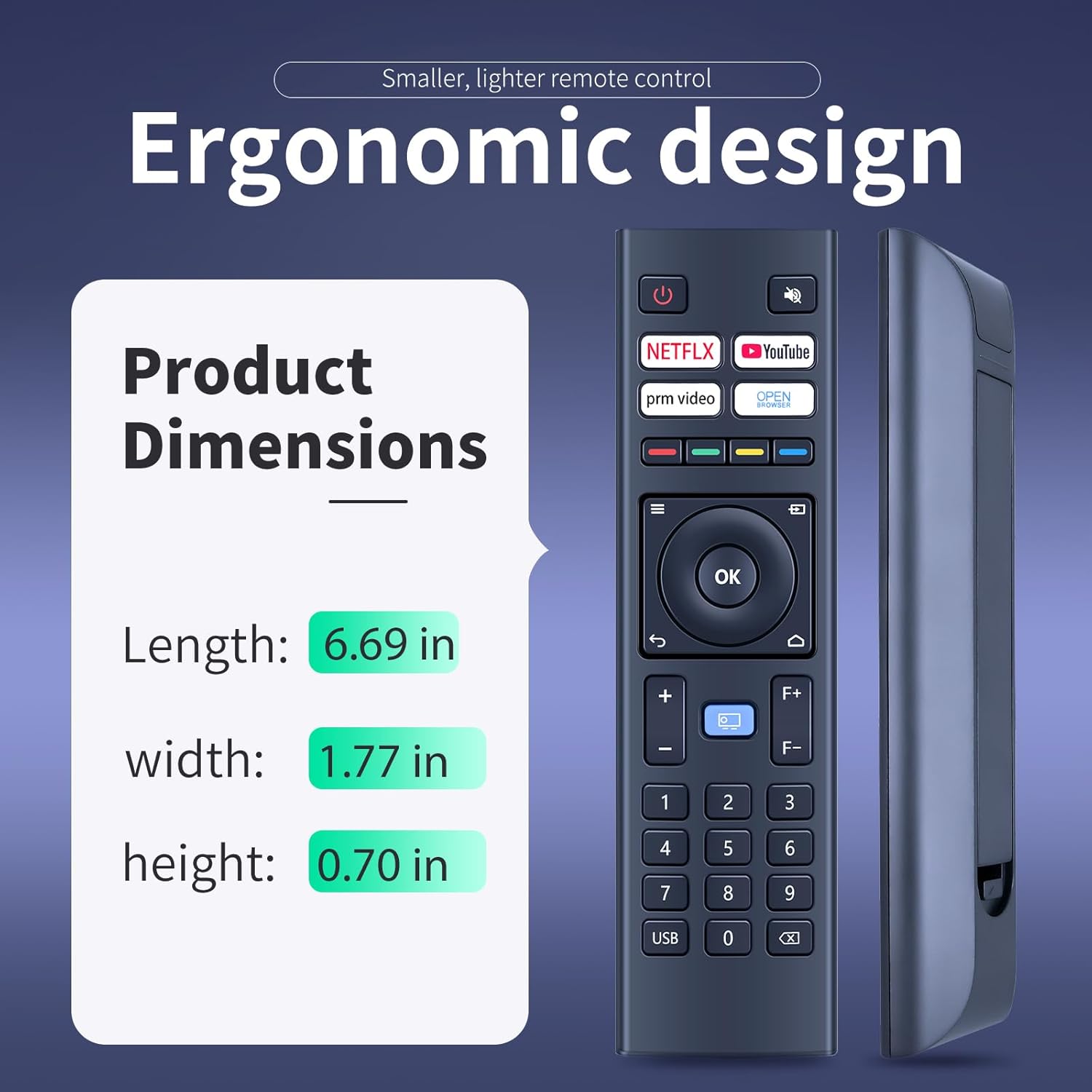
5 paveikslas: Ergonomic design and physical dimensions of the remote control.
Garantija ir palaikymas
This product is designed for durability and reliable performance. While specific warranty details are not provided in this manual, ZWP is committed to customer satisfaction.
For any questions, concerns, or assistance with your ZWP Replacement Remote Control, please do not hesitate to contact us. We are dedicated to helping you resolve any issues you may encounter.
You can typically find contact information for ZWP through the retailer where you purchased the product or by visiting the ZWP brand store online.