
1. Įvadas
This manual provides essential information for setting up, operating, maintaining, and troubleshooting your GIGABYTE AORUS Elite 16 BWH gaming laptop. The AORUS Elite 16 BWH is designed for high-performance gaming and demanding applications, featuring an Intel Core Ultra 9 processor, NVIDIA GeForce RTX 5070 laptop GPU, a 16-inch WQXGA 165Hz display, and Windows 11 Pro.
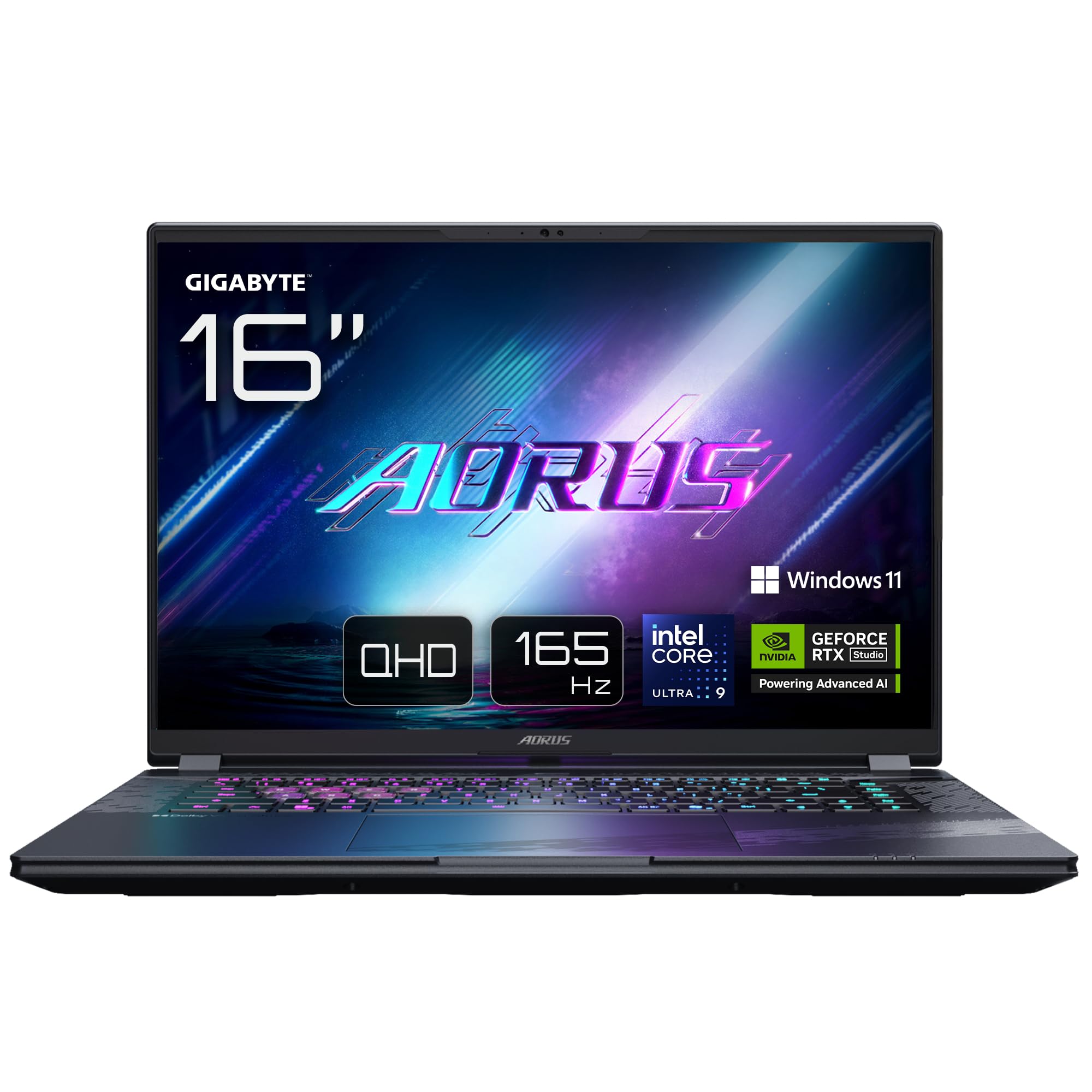
Image: The GIGABYTE AORUS Elite 16 BWH gaming laptop, showcasing its open display and keyboard.
2. Sąranka
2.1 Išpakavimas ir pirminė apžiūra
Atsargiai išimkite nešiojamąjį kompiuterį ir visus priedus iš pakuotės. Patikrinkite, ar yra visi komponentai, išvardyti skyriuje „Kas yra dėžutėje“, ir ar jie nepažeisti.
- GIGABYTE AORUS ELITE 16 BWHC3FRC65SP Laptop
- Maitinimo adapteris ir laidas
- Dokumentacija (šis vadovas, garantijos kortelė)
2.2 Maitinimo prijungimas
Connect the power adapter to the laptop's power input port and then plug the power cable into an electrical outlet. It is recommended to fully charge the battery before initial use.
2.3 Pirmasis įjungimas
Paspauskite maitinimo mygtuką, kad įjungtumėte nešiojamąjį kompiuterį. Vykdykite ekrane pateikiamus nurodymus, kad užbaigtumėte „Windows 11 Pro“ sąrankos procesą, įskaitant kalbos pasirinkimą, tinklo ryšį ir vartotojo paskyros kūrimą.
2.4 Connecting Peripherals and Network
The laptop features various ports for connecting external devices and networks.
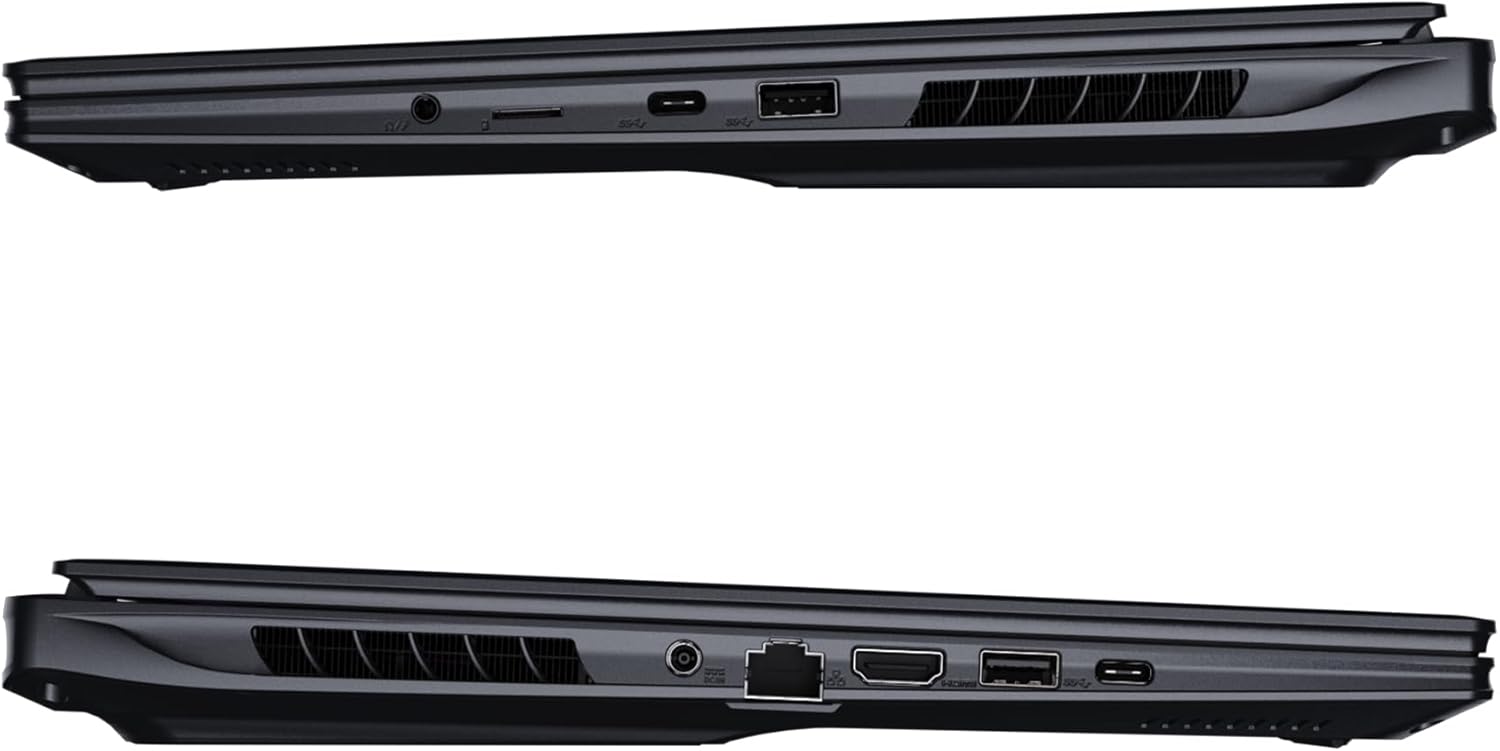
Vaizdas: Šoninė view of the laptop illustrating the available ports for connectivity.
- USB prievadai: Connect USB devices such as mice, keyboards, or external storage.
- HDMI prievadas: Prijunkite prie išorinio ekrano arba televizoriaus.
- „Thunderbolt 4“ prievadas: Didelės spartos duomenų perdavimui ir vaizdo išvesčiai.
- Ethernet prievadas: Laidinio tinklo ryšiui.
- Ausinių lizdas: Garso išvesčiai į ausines arba išorinius garsiakalbius.
- „Wi-Fi 7“: Connect to wireless networks via the integrated Wi-Fi 7 module.
- "Bluetooth 5.4": Susieti su „Bluetooth“ palaikančiais įrenginiais.
3. Nešiojamojo kompiuterio valdymas
3.1 Ekrano funkcijos
Your AORUS Elite 16 BWH features a 16-inch WQXGA (2560x1600) IPS display with a 165Hz refresh rate and 16:10 aspect ratio, offering a wide viewing experience. It supports Dolby Vision for enhanced visual quality and is Pantone validated for color accuracy.

Image: The laptop's 16:10 aspect ratio display, highlighting its IPS panel and Pantone validation.
3.2 Klaviatūra ir jutiklinė planšetė
The laptop is equipped with a backlit keyboard for comfortable typing in various lighting conditions and a responsive touchpad for navigation.
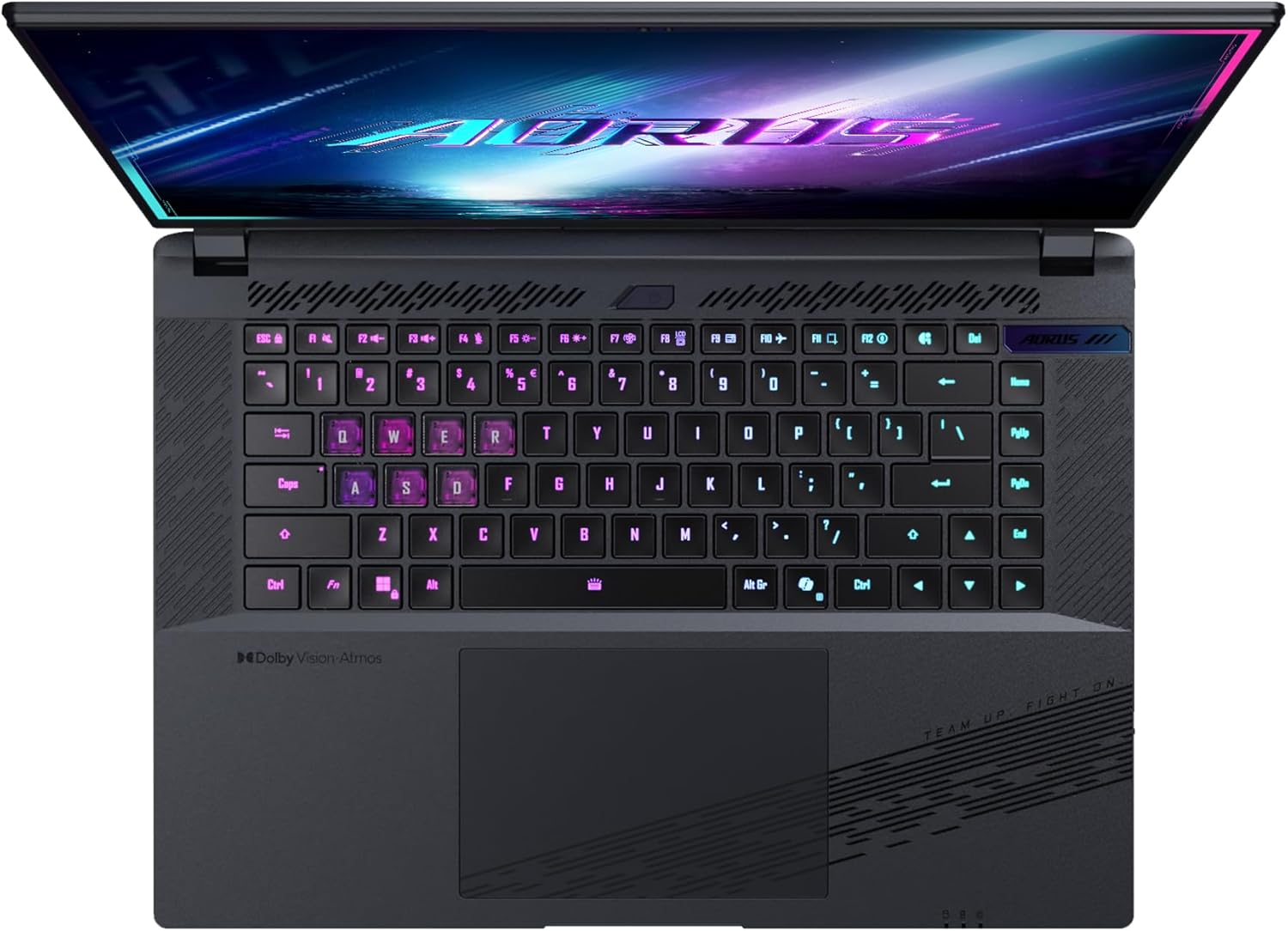
Vaizdas: Iš viršaus į apačią view nešiojamojo kompiuterio klaviatūros, parodykiteasing its backlit keys.
The keyboard also features a dedicated Copilot Key for quick access to AI functionalities in Windows 11.

Image: Close-up of the keyboard, highlighting the Copilot Key for AI features.
3.3 Garso sistema
Experience immersive audio with Dolby Atmos support and integrated 2W speakers. The laptop also includes a built-in microphone for communication.

Image: Visual representation of Dolby Atmos and Dolby Vision audio and visual enhancements.
3.4 Veikimo ypatybės
The AORUS Elite 16 BWH is powered by an Intel Core Ultra 9 processor with an integrated NPU for AI acceleration and an NVIDIA GeForce RTX 5070 laptop GPU, ensuring high performance for gaming and demanding tasks. It also features Advanced Optimus with DDS Technology for optimized graphics performance.

Paveikslėlis: detalus view of the Intel Core Ultra 9 processor chip.

Paveikslėlis: detalus view of the NVIDIA GeForce RTX 50 Series laptop GPU chip.
3.5 GiMATE AI Agent
Utilize GiMATE, your personal AI agent, to optimize performance, manage smart cooling, enhance privacy, control power settings, and improve audio and voice functionalities.

Image: GiMATE AI Agent interface showing various optimization features.
4. Priežiūra
4.1 Aušinimo sistema
The laptop features the WINDFORCE Infinity cooling system to maintain optimal temperatures during intensive use. Ensure the vents are clear of obstructions to allow proper airflow.

Image: Representation of the WINDFORCE Infinity cooling system.
4.2 Valymas
Ekraną ir išorinius paviršius valykite minkštu, nepūkuotu audiniu. Jei dėmės sunkiai įveikiamos,ampŠluostę lengvai sudrėkinkite vandeniu arba ekrano valymo tirpalu. Venkite stiprių cheminių medžiagų.
4.3 Akumuliatoriaus priežiūra
To prolong battery life, avoid extreme temperatures and do not leave the laptop fully charged or fully discharged for extended periods.
4.4 Programinės įrangos naujiniai
Regularly update your Windows operating system, drivers, and GIGABYTE software to ensure optimal performance and security.
5. Problemų sprendimas
5.1 Maitinimo problemos
- Nešiojamasis kompiuteris neįsijungia: Įsitikinkite, kad maitinimo adapteris yra tvirtai prijungtas ir lizdas veikia. Patikrinkite akumuliatoriaus įkrovos lygį.
- Baterija nekraunama: Patikrinkite, ar maitinimo adapteris ir laidas nepažeisti. Pabandykite naudoti kitą lizdą.
5.2 Ekrano problemos
- Nėra ekrano: Connect an external monitor to check if the issue is with the laptop's screen. Ensure the laptop is powered on.
- Mirgantis arba iškraipytas ekranas: Atnaujinkite grafikos tvarkykles. Patikrinkite ekrano kabelio jungtis, jei naudojate išorinį monitorių.
5.3 Ryšio problemos
- „Wi-Fi“ neprisijungia: Patikrinkite, ar „Windows“ nustatymuose įjungtas „Wi-Fi“. Paleiskite maršrutizatorių ir nešiojamąjį kompiuterį iš naujo.
- „Bluetooth“ įrenginys nesusijungia: Ensure the device is in pairing mode and within range. Update Bluetooth drivers.
5.4 Bendrosios našumo problemos
- Lėtas veikimas: Close unnecessary applications. Check for malware. Ensure sufficient free disk space.
- Perkaitimas: Ensure cooling vents are clear. Use the laptop on a hard, flat surface.
For more complex issues, refer to the GIGABYTE support websvetainėje arba susisiekite su klientų aptarnavimo tarnyba.
6. Specifikacijos
| Funkcija | Detalė |
|---|---|
| Prekės ženklas | GIGABITAS |
| Modelio pavadinimas | AORUS ELITE 16 BWHC3FRC65SP |
| Ekrano dydis | 16 colių |
| Spalva | Pilka |
| Kietojo disko dydis | 2000 GB (2x 1TB SSD Gen4) |
| CPU modelis | Intel Core Ultra 9 275HX |
| Įdiegtos RAM dydis | 32 GB DDR5 |
| Operacinė sistema | Windows 11 Pro |
| Ypatinga funkcija | Backlit Keyboard, Memory Card Slot |
| Vaizdo plokštės aprašymas | Skirta |
| Grafikos koprocesorius | NVIDIA GeForce RTX 5070 |
| Hard Disk Technology | SSD |
| Prekės svoris | 2300 gramų |
| Webkameros galimybė | Yes (Frontal) |
| Vaizdo plokštės RAM dydis | 8 GB GDDR6 |
| Maksimali palaikoma RAM | 64 GB |
| Baterijos energijos kiekis | 99 Watt-hours (Lithium-polymer, 4 cells) |
| Ryšys | Bluetooth 5.4, Ethernet (10/1000 Mbit/s), HDMI (1 port), Thunderbolt 4 (1 port), USB 3.2 Gen 2 (2 ports), Wi-Fi 7 (802.11.be) |
| Procesoriaus greitis | 2.7 GHz (Max 5.4 GHz) |
| Procesorių skaičius | 24 |
| Ekrano raiška | 2560 x 1600 pikselių (WQXGA) |
| Ekrano tipas | IPS LCD |
| Garso funkcijos | Dolby Atmos, 2x 2W Integrated Speakers, Integrated Microphone |
7. Informacija apie garantiją
Your GIGABYTE AORUS Elite 16 BWH laptop comes with a 2 metų ribota garantija. This warranty covers manufacturing defects and hardware malfunctions under normal use. Please retain your proof of purchase for warranty claims. For detailed terms and conditions, refer to the warranty card included with your product or visit the official GIGABYTE websvetainę.
8. Parama
For technical assistance, driver downloads, and further product information, please visit the official GIGABYTE support websvetainė. Ten taip pat rasite DUK ir bendruomenės forumus.
- Oficialus GIGABYTE atstovas Websvetainė: www.gigabyte.com
- Klientų aptarnavimas: Refer to your regional GIGABYTE webvietinės kontaktinės informacijos svetainė.