
1. Įvadas
This manual provides detailed instructions for the installation, operation, and maintenance of your UNITOPSCI 2G+64G Android Car Stereo Radio. Please read this manual thoroughly before installation and use to ensure proper function and safety.
The UNITOPSCI 2G+64G Android Car Stereo Radio is an advanced in-dash multimedia system featuring a 7-inch capacitive touchscreen, Android 13 operating system, 2GB RAM, and 64GB ROM. It integrates wireless CarPlay, Android Auto, GPS navigation, Bluetooth, FM/RDS radio, and supports a backup camera and steering wheel controls.
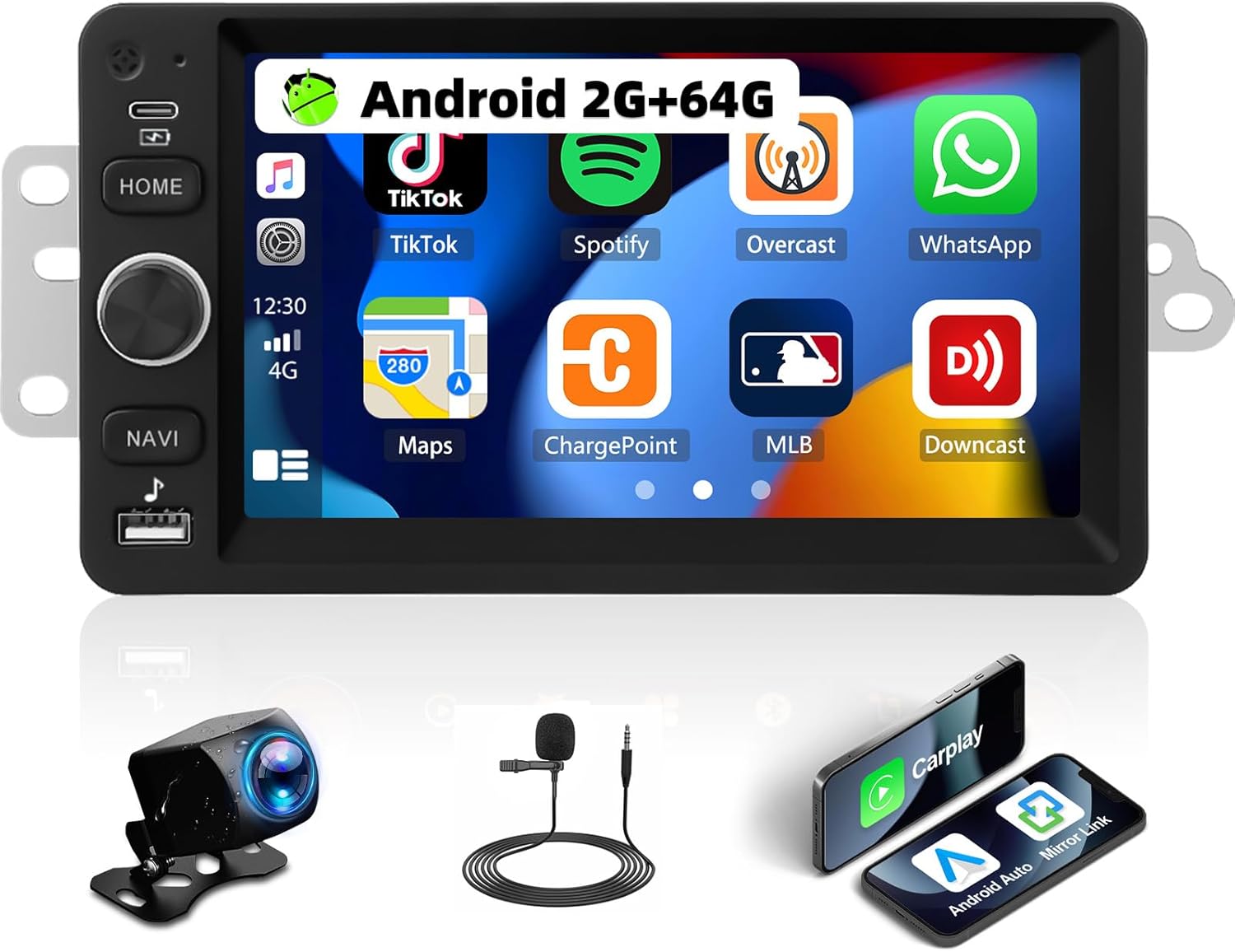
Image 1.1: UNITOPSCI 2G+64G Android Car Stereo Radio and included components.
2. Transporto priemonių suderinamumas
This Android car stereo is designed to fit specific vehicle models. Please verify your vehicle's compatibility before proceeding with installation.
- Chevy Chevrolet: Silverado, SSR, Tahoe (2003-2006)
- GMC: Siera, Yukon (2003-2006)
- Hummer: (2003–2006)
It is recommended to measure the size and shape of your original radio in the car's center console to confirm fitment.

Image 2.1: Visual comparison of a vehicle's dashboard before and after installing the UNITOPSCI car stereo.

Image 2.2: Detailed list of compatible Chevrolet, GMC, Hummer, Isuzu, Oldsmobile, Saturn, Pontiac, Buick, and Cadillac models and their respective years.
Special Note for Bose Audio System Owners:
If your vehicle is factory-equipped with a Bose premium audio system, a high-end wiring harness and a Bose-specific CANBUS decoder are required for proper function of all features, including the audio system and steering wheel controls. Consult with a professional or the manufacturer for accessory recommendations if unsure.
3. Sąranka ir diegimas
3.1. Pakuotės turinys
Patikrinkite, ar pakuotėje yra visi komponentai:
- „Android“ automobilio stereofoninis įrenginys
- Maitinimo kabelis (-iai)
- RCA kabelis
- Galinės kameros įvesties kabelis
- Fotoaparatas
- GPS antena
- Canbus Box
- USB laidas (-ai)
- Small Horn (External Microphone)
- Antenos adapteris
- Radijo antena
- Vartotojo vadovas

Image 3.1: Illustration of all items included in the product package.
3.2. Laidų schema
Refer to the following diagrams for correct wiring connections. Incorrect wiring can damage the unit or vehicle electronics.

Image 3.2: Comprehensive wiring diagram illustrating connections for power, RCA, USB, camera, GPS, and CANBUS.
- Maitinimo kabelis: Prijunkite prie transporto priemonės maitinimo šaltinio (ACC, B+, GND).
- RCA kabelis: For audio output (FR OUT, FL OUT, RR OUT, RL OUT, SUBWOOFER) and auxiliary input (AUX IN L/R), video output (VIDEO OUT), and camera input (CVBS IN).
- USB kabelis: Skirta USB įrenginiams prijungti.
- Galinio kameros įvesties kabelis: Connects the backup camera.
- GPS antena: Sumontuokite vietoje su skaidria view dangaus optimaliam signalo priėmimui.
- „Canbus“ dėžutė: Connect for vehicle data communication, especially for steering wheel controls and vehicle information.
- Radijo antena: Prijunkite FM/AM radijo imtuvui.
Svarbios montavimo pastabos:
- Įsitikinkite, kad visos jungtys yra tvirtos, kad išvengtumėte atsitiktinių problemų.
- If your vehicle does not provide an Ignition (IGN) wire, a manual switch may be required to power the unit.
- For vehicles with complex wiring or premium sound systems, professional installation is recommended.
4. Naudojimo instrukcijos
4.1. Pagrindinė operacija
- Maitinimo įjungimas/išjungimas: Press and hold the power button (usually labeled HOME or a dedicated power icon) to turn the unit on or off. A short press typically mutes or returns to the home screen.
- Garsumo valdymas: Garsumo reguliavimui naudokite fizinę rankenėlę arba ekrane rodomus valdiklius.
- Jutiklinis ekranas: 7 colio talpinis jutiklinis ekranas reaguoja į lietimo gestus naršant ir valdant.
4.2. Belaidis „CarPlay“ ir „Android Auto“
Connect your smartphone wirelessly to access navigation, music, calls, and messages through the car stereo interface.
- Įsitikinkite, kad jūsų išmaniajame telefone įjungti „Bluetooth“ ir „Wi-Fi“.
- Automobilio stereo sistemoje pasirinkite programėlę „CarPlay“ arba „Android Auto“.
- Vykdykite ekrane pateikiamus nurodymus, kad susietumėte savo įrenginį.
- Voice control functions (Siri for CarPlay, Google Assistant for Android Auto) are supported.

Image 4.1: Demonstrates the user interfaces for Wireless CarPlay, Android Auto, and Mirror Link functionality.
4.3. Veidrodinis saitas
Mirror your smartphone screen to the car stereo display for video and map viewing.
- Compatible with both Android and iOS devices.
- Access the Mirror Link application on the stereo and follow the pairing instructions.
4.4. „Wi-Fi“ ir GPS navigacija
The unit features built-in WiFi and GPS for online and offline navigation.
- WiFi: Connect to a Wi-Fi hotspot to access online functions such as streaming videos (YouTube), online TV, music, and downloading applications.
- GPS: Preloaded with free offline maps. Connect to Wi-Fi to download updated maps via applications like Here WeGo. Supports online real-time navigation.

Image 4.2: Displays the interfaces for WiFi connectivity, GPS navigation, FM/RDS radio, and the audio equalizer settings.
4.5. „Bluetooth“
Įjunkite skambinimą laisvų rankų įranga ir garso transliaciją per „Bluetooth“.
- Susiekite telefoną su stereo sistema per „Bluetooth“ nustatymus.
- Supports hands-free calling, Bluetooth audio streaming, and automatic phone book download.
- An external microphone can be added for improved call quality.
4.6. FM/RDS radijas
Enjoy radio broadcasts with 18 preset stations.
- Tune to your preferred FM stations.
- RDS (radijo duomenų sistema) teikia papildomos informacijos, pvz., stoties pavadinimą ir dainos pavadinimą, jei tokia yra.
4.7. EQ Audio Settings
Tinkinkite garso patirtį naudodami integruotą ekvalaizerį.
- Adjust various frequency bands to match your audio preferences.
- Pre-set EQ modes may also be available.
4.8. Padalinto ekrano funkcionalumas
Display two applications simultaneously on the screen.
- Pavyzdžiui,ampt. y. vienoje pusėje naudokite navigaciją, o kitoje – muzikos atkūrimą.
- Easily switch between applications.

Image 4.3: Illustrates the Bluetooth interface, split-screen mode, various UI themes, and the clarity of the HD touchscreen.
4.9. Galinio vaizdo kamera
The system supports a backup camera for safer parking.
- Automatically switches to the clear reversing image when the vehicle is in reverse.
- The included camera features a 170-degree wide viewing angle, night vision, and is waterproof.

Image 4.4: Shows the clear reversing image from the backup camera and the interface for setting up steering wheel controls.
4.10. Vairo valdymas (SWC)
Configure your vehicle's steering wheel buttons to control the stereo functions.
- Access the SWC settings menu on the stereo.
- Follow the on-screen instructions to map functions (e.g., volume, track skip, mode) to your steering wheel buttons.
4.11. Vaizdo išvestis
Share video content with rear-seat passengers.
- The unit can work with a headrest monitor to display the same video content.
- A USB video output box may be required (not included).

Image 4.5: Depicts the video output feature, allowing rear-seat passengers to view content on separate monitors.
4.12. Kelios vartotojo sąsajos temos
Personalize the stereo's appearance with various user interface themes.
- Choose from 26 available UI themes to match your preference.
5. Priežiūra
Norėdami užtikrinti automobilio garso sistemos ilgaamžiškumą ir optimalų veikimą, laikykitės šių priežiūros nurodymų:
- Valymas: Jutiklinį ekraną ir įrenginio išorę valykite minkšta, sausa šluoste. Venkite abrazyvinių valiklių ar tirpiklių.
- Programinės įrangos atnaujinimai: Periodically check for and install software updates provided by UNITOPSCI to enhance features and improve stability.
- Aplinkos sąlygos: Venkite įrenginio ilgalaikio laikymo tiesioginiuose saulės spinduliuose, itin aukštose temperatūrose ar drėgmės.
- Kabelių valdymas: Įsitikinkite, kad visi kabeliai yra tinkamai nukreipti ir pritvirtinti, kad nebūtų pažeisti dėl vibracijos ar užsikabinimo.
6. Problemų sprendimas
If you encounter issues with your UNITOPSCI car stereo, refer to the following common problems and solutions:
6.1. Nėra elektros
- Patikrinkite maitinimo jungtis: Ensure the power cable is securely connected to the vehicle's power supply (ACC, B+, GND).
- Transporto priemonės saugiklis: Inspect the vehicle's fuse box for any blown fuses related to the radio or accessory power.
- Uždegimo laidas: If your vehicle lacks a dedicated IGN wire, verify that any custom wiring for ignition is correctly implemented.
6.2. Nėra garso
- Garsiakalbių jungtys: Verify that all speaker wires are correctly connected to the stereo and the vehicle's speaker harness.
- Garsumo lygis: Įsitikinkite, kad garsas nėra išjungtas arba nustatytas labai žemas.
- Bose sistema: If your vehicle has a Bose audio system, confirm that the correct wiring harness and CANBUS decoder are installed.
- Garso šaltinis: Check if the correct audio source (e.g., Radio, Bluetooth, CarPlay) is selected.
6.3. Neveikia vairo valdikliai
- CANBUS jungtis: Ensure the CANBUS box is correctly connected and configured in the stereo's settings.
- SWC mokymasis: Re-perform the steering wheel control learning process in the stereo's settings menu.
- Suderinamumas su transporto priemone: Confirm that your vehicle's steering wheel control system is compatible with the stereo's CANBUS.
6.4. GPS signalo problemos
- Antenos vieta: Įsitikinkite, kad GPS antena sumontuota vietoje, kurioje nėra jokių kliūčių view dangaus.
- Antenos jungtis: Check that the GPS antenna is securely connected to the stereo.
- Žemėlapio duomenys: Verify that offline maps are downloaded and up-to-date, or that a stable internet connection is available for online maps.
6.5. Jutiklinis ekranas nereaguoja
- Paleiskite įrenginį iš naujo: Try restarting the car stereo.
- Švarus ekranas: Įsitikinkite, kad ekranas yra švarus ir be dulkių ar drėgmės.
Jei problemos išlieka, susisiekite su klientų aptarnavimo tarnyba.
7. Specifikacijos
| Funkcija | Detalė |
|---|---|
| Modelis | 2G + 64G „Android“ automobilio stereofoninis grotuvas |
| Operacinė sistema | Android 13 |
| RAM | 2 GB |
| ROM | 64 GB |
| Ekrano dydis | 7 colių |
| Ekrano raiška | 1024*600 |
| Ryšio technologija | „Bluetooth“, „Wi-Fi“ |
| Ypatingos savybės | Wireless CarPlay, Android Auto, Mirror Link, Built-in GPS, FM/RDS Radio, EQ Audio, Split Screen, Backup Camera Support, Steering Wheel Control |
| Garso išvesties režimas | Stereo |
| Montavimo tipas | Prietaisų skydelio laikiklis |
| Prekės svoris | 0.634 uncijos |
| Pakuotės matmenys | 13.54 x 9.06 x 4.25 colio |
8. Informacija apie garantiją
The UNITOPSCI 2G+64G Android Car Stereo Radio comes with a 1 metų garantija from the date of purchase. Additionally, a replacement is available within 24 months for eligible issues.
This warranty covers manufacturing defects and malfunctions under normal use. It does not cover damage caused by improper installation, misuse, accidents, unauthorized repairs, or external factors.
Išsaugokite pirkimo įrodymą, kad galėtumėte kreiptis dėl garantijos.
9. Pagalba klientams
For any questions, technical assistance, or warranty claims, please contact UNITOPSCI customer support:
- El. paštas: UNITOPSCI@126.com
- Atsakymo laikas: Quick responses typically within 16 hours.
- Pagalba po pardavimo: Lifetime after-sales consultation and technical support are provided.
- Grąžinimai: 60-day no-worry return policy.