
1. Įvadas
Ačiū, kad pirkoteasing the JVC XS-N1154B Bluetooth Speaker. This manual provides essential information for the safe and efficient operation of your device. Please read it thoroughly before use and retain it for future reference.
2. Saugos informacija
- Nelaikykite garsiakalbio ekstremaliose temperatūrose, tiesioginiuose saulės spinduliuose ar didelėje drėgmėje.
- Stenkitės, kad garsiakalbis nenumestų ar nepatirtų stipraus smūgio.
- Nebandykite ardyti ar modifikuoti garsiakalbio. Tai panaikins garantiją.
- Nepaisant atsparumo vandeniui įvertinimo, laikykite garsiakalbį atokiai nuo vandens ir skysčių, kad nepažeistumėte vidinių komponentų.
- Naudokite tik nurodytą įkrovimo laidą ir maitinimo adapterį.
- Garsiakalbį valykite minkšta, sausa šluoste. Nenaudokite abrazyvinių valiklių ar tirpiklių.
3. Pakuotės turinys
Įsitikinkite, kad pakuotėje yra visi daiktai:
- JVC XS-N1154B Bluetooth Speaker
- Įkrovimo kabelis
- Vartotojo vadovas
- Nuotolinio valdymo pultas (jei yra)
4. Produktas baigtasview
Susipažinkite su garsiakalbio komponentais ir valdikliais.
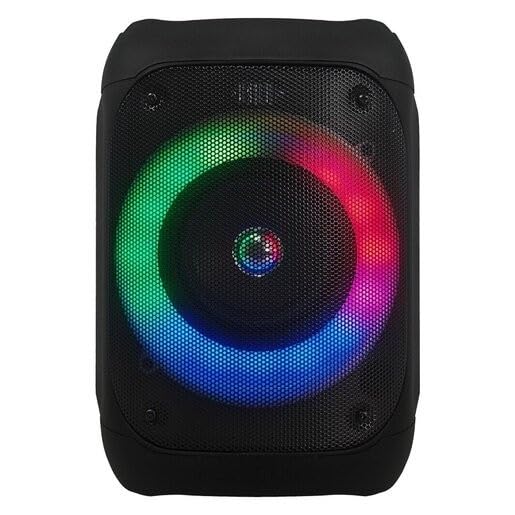
1 paveikslas: Priekyje view of the JVC XS-N1154B Bluetooth Speaker, showcasing the speaker grille and integrated music-activated LED lights.
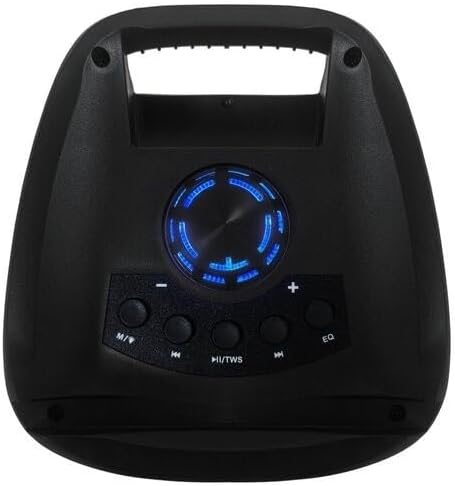
2 paveikslas: Į viršų view of the JVC XS-N1154B Bluetooth Speaker, displaying the control panel with various buttons and the volume knob.
Valdymo skydelio funkcijos:
- Maitinimo mygtukas: Įjungia arba išjungia garsiakalbį.
- Režimo (M) mygtukas: Switches between Bluetooth, USB, SD Card, and FM Radio modes.
- Play/Pause (►||) / TWS Button: Plays or pauses audio. Long press for TWS (True Wireless Stereo) pairing.
- Previous Track (◀◀) Button: Skips to the previous track or tunes down in FM mode.
- Next Track (►►) Button: Skips to the next track or tunes up in FM mode.
- EQ mygtukas: Perjungia iš anksto nustatytus ekvalaizerio parametrus.
- Garsumo rankenėlė: Rotates to adjust the volume level.
5. Sąranka
5.1 Garsiakalbio įkrovimas
- Prijunkite įkrovimo laidą prie garsiakalbio įkrovimo prievado.
- Kitą laido galą prijunkite prie tinkamo USB maitinimo adapterio (nepridedamas) arba maitinamo USB prievado.
- Įkrovimo metu šviečia įkrovimo indikatoriaus lemputė, paprastai raudona.
- Once fully charged, the indicator light may change color (e.g., turn off or turn blue/green). Disconnect the speaker from the power source.
5.2 Įjungimas / išjungimas
- Norėdami įjungti: Press and hold the Power button until the speaker powers on and you hear an audible prompt.
- Norėdami išjungti: Dar kartą paspauskite ir palaikykite maitinimo mygtuką, kol garsiakalbis išsijungs.
6. Naudojimo instrukcijos
6.1 Bluetooth poravimas
- Ensure the speaker is powered on and in Bluetooth mode. If not, press the Mode (M) button to switch to Bluetooth mode. The speaker will indicate it is ready for pairing (e.g., a blinking LED or audible prompt).
- Mobiliajame įrenginyje (išmaniajame telefone, planšetiniame kompiuteryje, nešiojamajame kompiuteryje) įjunkite „Bluetooth“ ir ieškokite galimų įrenginių.
- Select "JVC XS-N1154B" from the list of devices.
- Once paired, the speaker will provide an audible confirmation, and the Bluetooth indicator light will become solid.
- Dabar galite leisti garsą iš savo įrenginio per garsiakalbį.
6.2 USB / SD kortelės atkūrimas
- Įdėkite USB atmintinę arba SD kortelę (su palaikoma garso įranga) files) into the corresponding port on the speaker.
- The speaker will automatically switch to USB or SD card mode and begin playing audio. If not, press the Mode (M) button to select the correct input.
- Use the Previous Track (◀◀), Next Track (►►), and Play/Pause (►||) buttons to control playback.
6.3 FM radijo veikimas
- Norėdami perjungti į FM radijo režimą, paspauskite režimo (M) mygtuką.
- To auto-scan and save available stations, press and hold the Play/Pause (►||) button. The speaker will scan and store stations automatically.
- Use the Previous Track (◀◀) and Next Track (►►) buttons to navigate between saved FM stations.
6.4 LED šviesos režimų
The speaker features music-activated LED lights. These lights typically synchronize with the audio playback. There may be an additional button or a combination of buttons to cycle through different light modes or to turn them off. Refer to the remote control section for specific controls if available.
6.5 Garsumo valdymas
Rotate the Volume Knob on the top panel clockwise to increase volume and counter-clockwise to decrease volume.
6.6 Nuotolinio valdymo pulto naudojimas
If your package includes a remote control, it provides convenient access to various functions:
- Galia: Įjungta/Išjungta
- Režimas: Switch input sources (Bluetooth, USB, SD, FM)
- Tūris +/-: Sureguliuokite garsumą
- Leisti / pristabdyti: Valdykite atkūrimą
- Ankstesnis Kitas: Skip tracks/stations
- EQ: Change equalizer presets
- LED: Control LED light modes (if applicable)
7. Priežiūra
7.1 Valymas
Wipe the speaker's exterior with a soft, dry, lint-free cloth. Do not use liquid cleaners, sprays, or solvents, as these may damage the finish or internal components. Ensure all ports are dry before use, especially given its waterproof nature.
7.2 Saugykla
When not in use for extended periods, store the speaker in a cool, dry place, away from direct sunlight and extreme temperatures. It is recommended to charge the battery periodically to maintain its lifespan.
8. Problemų sprendimas
| Problema | Galima priežastis | Sprendimas |
|---|---|---|
| Garsiakalbis neįsijungia. | Baterija išsikrovusi. | Visiškai įkraukite garsiakalbį. |
| Nėra garso. | Volume is too low or muted. Device not paired correctly. | Increase volume. Re-pair Bluetooth device. Check audio source. |
| „Bluetooth“ susiejimas nepavyksta. | Garsiakalbis nėra susiejimo režime. Įrenginys yra per toli. Trikdžiai. | Ensure speaker is in Bluetooth pairing mode. Move device closer. Turn off other Bluetooth devices. |
| USB / SD kortelė neveikia. | Neteisinga file formatuoti. Kortelė / diskas įdėtas netinkamai. | Užtikrinkite garsą files are in a supported format. Reinsert the USB drive/SD card. Press Mode button to select correct input. |
| Prastas FM radijo priėmimas. | Silpnas signalas. | Perkelkite garsiakalbį į vietą, kurioje geresnis signalas. |
9. Specifikacijos
- Modelis: XS-N1154B
- Prekinis ženklas: JVC
- Ryšys: Bluetooth, USB, SD kortelė
- Radijas: Skaitmeninis FM radijas
- Galia: 4 vatų
- Garso išvesties režimas: Stereo
- Kontrolės metodas: Nuotolinis
- Medžiaga: Plastikiniai
- Atsparus vandeniui: Taip
- Maitinimo šaltinis: Maitinamas baterijomis
- Matmenys: Maždaug 18.6 cm gylio x 18.9 cm pločio x 25.5 cm aukščio
- Svoris: Maždaug 1.2 kg
- Suderinami įrenginiai: Nešiojamasis kompiuteris, išmanusis telefonas
10. Garantija ir palaikymas
10.1 Informacija apie garantiją
This JVC XS-N1154B Bluetooth Speaker comes with a 1 metų garantija nuo įsigijimo datos. Ši garantija taikoma gamybos defektams ir gedimams įprasto naudojimo sąlygomis. Ji netaikoma žalai, atsiradusiai dėl netinkamo naudojimo, nelaimingų atsitikimų, neleistinų modifikacijų ar įprasto nusidėvėjimo.
10.2 Pagalba klientams
For technical assistance, warranty claims, or further inquiries, please contact JVC customer support through their official website or the retailer where the product was purchased. Please have your product model number (XS-N1154B) and proof of purchase ready when contacting support.