
1. Įvadas
Thank you for choosing the Altera Homestep Walking Pad. This manual provides essential information for the safe and efficient use of your new walking pad. Please read all instructions carefully before operation and retain this manual for future reference.
2. Saugos instrukcijos
To reduce the risk of serious injury, read all important precautions and instructions in this manual and on your walking pad before use.
- Always place the walking pad on a level, stable surface.
- Eksploatacijos metu laikykite vaikus ir naminius gyvūnus atokiau nuo vaikščiojimo kilimėlio.
- Ensure adequate clear space around the walking pad (at least 0.6 meters on all sides).
- Do not use the walking pad if you weigh more than 90 kg (198 lbs).
- Avėkite tinkamą sportinę avalynę.
- Always attach the safety key clip to your clothing before starting the walking pad.
- Jei jaučiate silpnumą, galvos svaigimą ar skausmą, nedelsdami nutraukite pratimą.
- Atjunkite vaikščiojimo kilimėlį nuo elektros lizdo, kai jo nenaudojate arba prieš valydami / atlikdami techninę priežiūrą.
- Nenaudokite vaikščiojimo kilimėlio, jei jo laidas ar kištukas yra pažeistas arba jei jis neveikia tinkamai.
3. Pakuotės turinys
- Altera Homestep Walking Pad
- Nuotolinio valdymo pultas
- Maitinimo kabelis
- Vartotojo vadovas (šis dokumentas)
4. Produktas baigtasview
Familiarize yourself with the main components and features of your Altera Homestep Walking Pad.

Image 4.1: The Altera Homestep Walking Pad shown with its remote control.

4.2 pav.: Išsamus view of the LED display and remote control buttons. The display shows Time, Speed, Distance, and Calories. The remote has buttons for Speed Control (+/-), Mode (M), Start/Hold, and Stop.

Image 4.3: Diagram illustrating remote control functions: '+' to increase speed, 'M' to change mode, '-' to reduce speed, 'START/HOLD' to start/continue, and 'STOP' to pause.

4.4 vaizdas: View of the walking pad's underside, highlighting anti-slip leveling feet, transport wheels, and the manual power switch.

Image 4.5: Diagram showing the multi-layered running belt construction, including wear-resistant surface, noise reduction, impact absorption, and high-resistance support layers.
5. Sąranka
- Išpakuoti: Carefully remove the walking pad and all components from the packaging.
- Vieta: Place the walking pad on a flat, stable, and non-slip surface. Ensure there is sufficient space around the unit for safe operation.
- Maitinimo jungtis: Connect the power cable to the walking pad and then to a grounded electrical outlet.
- Saugos raktas: Locate the safety key. This key must be in place for the walking pad to operate. Attach the clip of the safety key to your clothing before starting.
- Maitinimas: Flip the manual power switch (refer to Image 4.4) to the 'ON' position. The LED display should illuminate.
6. Naudojimo instrukcijos
6.1 Nuotolinio valdymo pulto naudojimas
The walking pad is controlled via the included remote control. Ensure the remote has working batteries.
- Start/Hold: Press the "START/HOLD" button to begin or resume your workout. The walking pad will start at a low speed.
- Sustabdyti: Press the "STOP" button to pause or end your workout.
- Greičio reguliavimas: Use the "+" button to increase speed and the "-" button to decrease speed. The speed range is 1 km/h to 6 km/h.
- Režimo pasirinkimas: Press the "M" button to cycle through different display modes (Time, Speed, Distance, Calories).
6.2 LED ekranai
The integrated LED display provides real-time feedback on your workout progress (refer to Image 4.2).
- LAIKAS: Rodo jūsų treniruotės trukmę.
- GREITIS: Shows your current walking speed in km/h.
- DIST: Indicates the distance you have walked.
- KPL: Apskaičiuoja per sesiją sudegintas kalorijas.
6.3 Adjustable Incline
The Altera Homestep Walking Pad features two manual incline positions to vary your workout intensity.
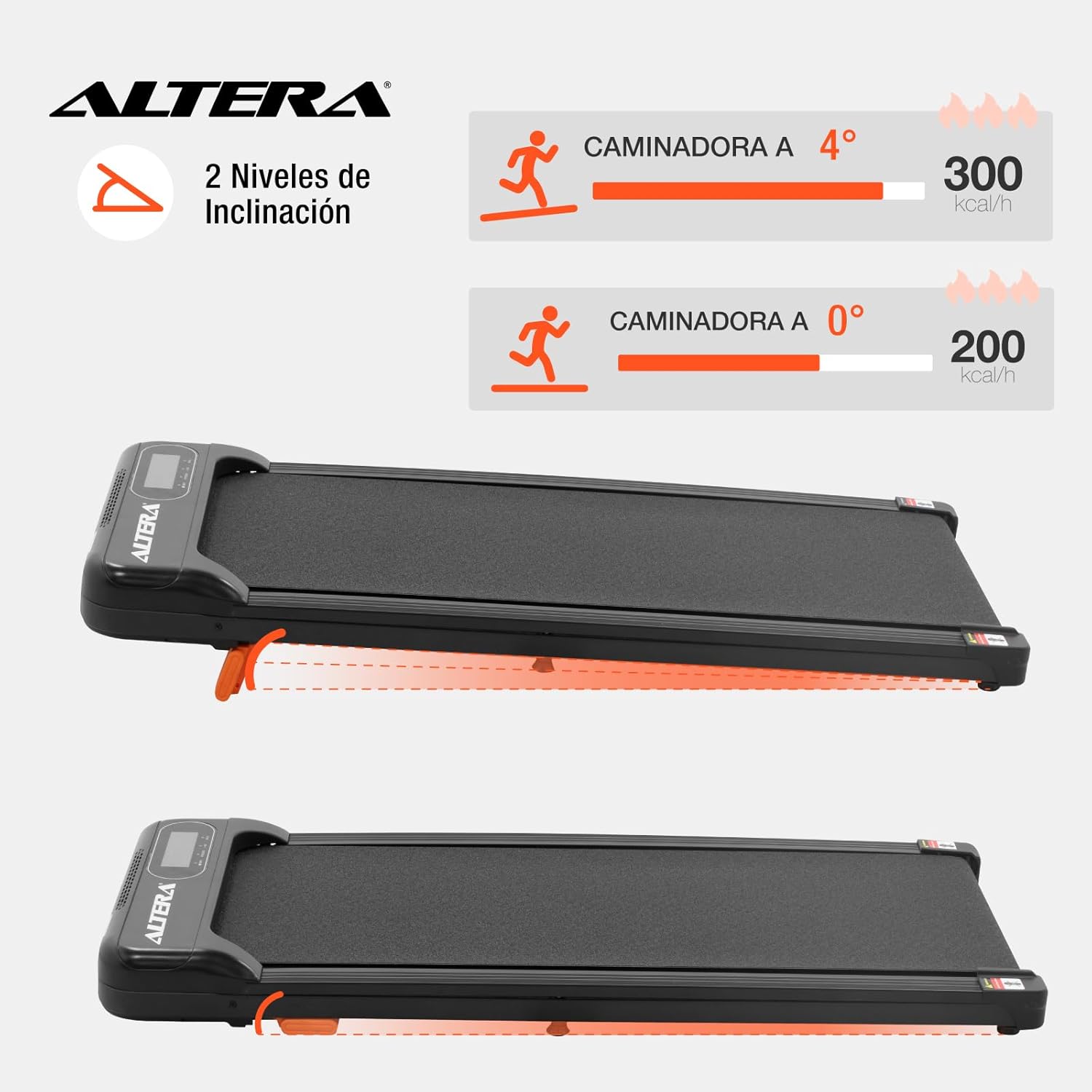
Image 6.1: Illustration of the two incline levels: 0 degrees (flat) and 4 degrees (inclined), showing estimated calorie burn difference.
Norėdami reguliuoti nuolydį:
- Ensure the walking pad is turned off and unplugged.
- Carefully lift the front of the walking pad.
- Deploy or retract the small orange support feet located at the front underside of the unit to select your desired incline level.
- Ensure the support feet are securely locked in place before resuming use.
6.4 Transportavimas ir sandėliavimas
The walking pad is designed for easy storage and portability.
- To move the unit, ensure it is powered off and unplugged.
- Lift the front end slightly to engage the transport wheels (refer to Image 4.4).
- Roll the walking pad to your desired storage location. Its compact design allows it to fit in small spaces.
7. Priežiūra
Reguliarus valymas užtikrina jūsų vaikščiojimo kilimėlio ilgaamžiškumą ir optimalų veikimą.
- Valymas: Nuvalykite vaikščiojimo kilimėlį reklamaamp po kiekvieno naudojimo nuvalykite šluoste. Nenaudokite abrazyvinių valiklių ar tirpiklių.
- Diržo tepimas: The walking belt may require lubrication periodically. Refer to the manufacturer's guidelines for specific lubrication instructions and recommended lubricants.
- Diržo įtempimas: Check the walking belt tension regularly. If the belt slips or feels loose, it may need adjustment. Consult a qualified technician if you are unsure how to adjust it.
- Saugykla: Store the walking pad in a dry, cool place away from direct sunlight and moisture.
8. Problemų sprendimas
| Problema | Galima priežastis | Sprendimas |
|---|---|---|
| Ėjimo kilimėlis neužsiveda. |
|
|
| Diržas slysta arba dvejoja. |
|
|
| Nuotolinio valdymo pultas nereaguoja. |
|
|
9. Specifikacijos

Image 9.1: Technical specifications table and dimensional diagram of the Altera Homestep Walking Pad.
| Funkcija | Detalė |
|---|---|
| Modelio numeris | CAM-HOM-02 |
| Variklio galia | 1.5 AG |
| Greičio diapazonas | 1–6 km/val. |
| Maksimalus vartotojo svoris | 90 kg (198 svaro) |
| Nuolydžio lygiai | 2 (manual, up to 4 degrees) |
| Bėgimo juostos matmenys | 95 cm x 36 cm |
| Gaminio matmenys (I x P x A) | 110 x 46 x 10 cm |
| Produkto svoris | 17 kg |
| Medžiaga | Metalas, Plastikas |
| Savybės | Bluetooth, Portable, LED Display, Anti-slip belt, Transport wheels |
| Maitinimo šaltinis | Electric Cord (110V) |
10. Garantija ir palaikymas
For warranty information or technical support, please refer to the contact details provided with your purchase or visit the official Altera websvetainėje. Išsaugokite pirkimo įrodymą garantiniams reikalavimams.