
1. Įvadas
This manual provides essential instructions for the safe and efficient operation of your VOLTCRAFT DOV1004 Digital Oscilloscope. The DOV1004 is a compact, high-performance digital storage oscilloscope featuring a 12-bit analog-to-digital converter (ADC), a 7-inch touchscreen with gesture control, and multiple connectivity options including USB, LAN, and HDMI. It is designed for precise measurement and analysis of electronic signals in various applications. Please read this manual thoroughly before using the device and keep it for future reference.
2. Saugos informacija
Always observe the following safety precautions to prevent injury and damage to the device.
- Maitinimas: Use only the provided USB Type-C power adapter. Ensure the voltage atitinka įrenginio reikalavimus (12 voltų).
- Aplinka: Operate the oscilloscope in a dry, well-ventilated area, away from direct sunlight, extreme temperatures, and high humidity. Avoid dusty or corrosive environments.
- Zondai: Always use properly rated probes for the voltage and frequency being measured. Ensure probes are correctly connected before taking measurements.
- Įžeminimas: Ensure the oscilloscope is properly grounded to prevent electric shock.
- Priežiūra: Nebandykite patys atidaryti ar taisyti įrenginio. Visus techninės priežiūros darbus patikėkite kvalifikuotiems specialistams.
- Valymas: Prieš valydami atjunkite maitinimą. Naudokite minkštą, sausą šluostę. Nenaudokite skystų ar aerozolinių valiklių.
3. Pakuotės turinys
Verify that all items listed below are present in your package. If any items are missing or damaged, contact your supplier.
- VOLTCRAFT DOV1004 Digital Oscilloscope (1 unit)
- USB tipo C maitinimo adapteris
- USB kabelis
- Probe Tips (4 units)
- Sample Voltage Sets (2 units)
- Software CD with English User Manual
- Glaustas vartotojo vadovas
4. Produktas baigtasview
The VOLTCRAFT DOV1004 features a user-friendly interface and robust design for accurate signal analysis.
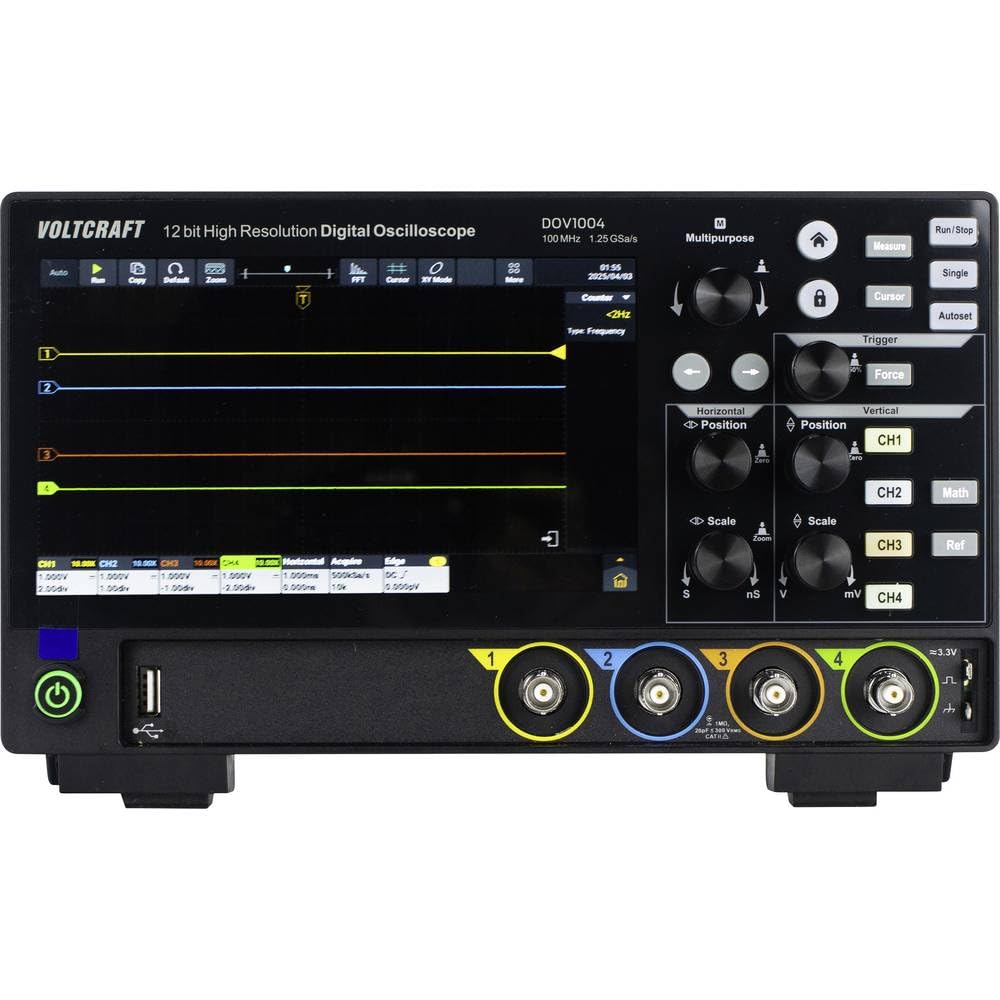
4.1 pav.: priekis View of DOV1004 Oscilloscope
This image displays the front panel of the VOLTCRAFT DOV1004 Digital Oscilloscope. Key features visible include the large 7-inch touchscreen display, various control knobs for horizontal and vertical adjustments, trigger settings, and the four analog input channels (CH1 to CH4) at the bottom right. A USB port is also visible on the front.
4.1 Front Panel Controls and Connectors
- 7 colių jutiklinis ekranas: High-resolution (1024 x 600 pixels) interface for waveform visualization and menu navigation. Supports touch and gesture control.
- Horizontalūs valdikliai: Knobs for adjusting horizontal position and scale (time/div).
- Vertikalūs valdikliai: Knobs for adjusting vertical position and scale (volts/div) for each channel.
- Trigerio valdikliai: Buttons and knobs for setting trigger type, level, and mode.
- Channel Inputs (CH1-CH4): BNC jungtys osciloskopo zondams prijungti.
- USB prievadai: For data transfer and connecting peripherals.
- Maitinimo mygtukas: Norėdami įjungti/išjungti įrenginį.

4.2 pav.: šonas View of DOV1004 Oscilloscope
Šiame paveikslėlyje parodytas šoninis profile of the VOLTCRAFT DOV1004 Digital Oscilloscope. Visible features include ventilation grilles for heat dissipation and potential side-mounted connectivity ports (though not clearly visible in this specific angle, typical for such devices).
4.2 Galinis skydelis ir jungtys
The rear panel typically houses additional connectivity options for advanced functionality.
- USB Type-C Power Input: Maitinimo adapterio prijungimui.
- LAN prievadas: Tinklo ryšiui ir nuotoliniam valdymui.
- HDMI išvestis: Skirta išoriniam ekranui prijungti.
- USB Host/Device Ports: Additional USB ports for connecting to a PC or external storage.
5. Sąranka
Follow these steps to set up your VOLTCRAFT DOV1004 oscilloscope for the first time.
- Išpakavimas: Carefully remove the oscilloscope and all accessories from the packaging. Retain the packaging for future transport or storage.
- Maitinimo jungtis: Connect the USB Type-C power adapter to the power input port on the rear of the oscilloscope and then plug the adapter into a suitable power outlet.
- Maitinimas: Press the power button on the front panel to turn on the oscilloscope. The display should illuminate.
- Zondo jungtis: Connect the oscilloscope probes to the desired input channels (CH1-CH4) using the BNC connectors. Ensure a secure connection.
- Zondo kompensacija: Before taking measurements, it is recommended to compensate your probes. Connect the probe to the probe compensation output (usually a dedicated terminal on the front panel, often labeled "Probe Comp" or similar, or use a known square wave source). Adjust the probe's compensation trimmer until a flat-top square wave is displayed on the screen.
- Pradiniai nustatymai: The oscilloscope may perform an automatic self-calibration upon first power-on. You can adjust basic settings like language, date, and time through the system menu on the touchscreen.
6. Operacija
This section covers the basic operation and key features of the VOLTCRAFT DOV1004 oscilloscope.
6.1 Pagrindinis matavimas
- Prijungimo signalas: Connect the compensated probe to the circuit point you wish to measure.
- Automatinis nustatymas: Paspauskite Auto button (if available) to automatically adjust horizontal and vertical settings for a stable waveform display.
- Rankinis reguliavimas:
- Naudokite Vertical Scale (V/div) rankenėlės reguliuoti ampbangos formos apšvietimas.
- Naudokite Vertikali padėtis knobs to move the waveform up or down.
- Naudokite Horizontalus mastelis (s/div) knob to adjust the time base.
- Naudokite Horizontali padėtis knob to move the waveform left or right.
- Trigger Setup:
- Select the trigger source (e.g., CH1, CH2).
- Choose the trigger type (e.g., Edge, Pulse, Video).
- Adjust the trigger level to stabilize the waveform.
6.2 Išplėstinės funkcijos
- Touchscreen and Gesture Control: Utilize the 7-inch touchscreen for intuitive navigation. Pinch-to-zoom and swipe gestures can be used for waveform manipulation, eliminating tedious menu navigation.
- High-Resolution ADC: The 12-bit ADC provides enhanced vertical resolution for more precise measurements.
- Aukštas Šamplingo kaina: With a maximum sampling rate of 1.25 GSa/s (single channel), the oscilloscope can capture fast-changing signals accurately.
- Deep Memory: A record length of 50 Mpts allows for capturing long signal durations at high sample tarifus.
- Bangos formos fiksavimo greitis: Real-time waveform capture of 50,000 wfms/s and segment capture of 700,000 wfms/s enable the observation of infrequent events.
- Multiple Trigger Types: Supports a wide range of trigger types including Edge, Video, Pulse, Slope, Runt, Window, Timeout, Nth, Logic, RS232/UART, I2C, SPI, CAN, and LIN for isolating specific events.
- Ryšys: USB, LAN, and HDMI interfaces allow for data transfer, remote control, and external display connection. Real-time signal display on a computer is possible.
7. Priežiūra
Proper maintenance ensures the longevity and optimal performance of your oscilloscope.
- Valymas: Regularly clean the exterior of the oscilloscope with a soft, dry, lint-free cloth. For stubborn dirt, slightly damplt audinį supilkite vandeniu. Do not use abrasive cleaners, solvents, or alcohol. Prieš valydami įsitikinkite, kad prietaisas yra išjungtas ir atjungtas.
- Ekrano priežiūra: The touchscreen is a sensitive component. Clean it gently with a microfiber cloth. Avoid pressing too hard or using sharp objects.
- Saugykla: When not in use for extended periods, store the oscilloscope in a cool, dry place, away from direct sunlight and extreme temperatures. Use the original packaging if available.
- Zondų priežiūra: Inspect probes regularly for damage to cables or connectors. Replace damaged probes immediately.
- Vėdinimas: Įsitikinkite, kad ventiliacijos grotelės nėra dulkės ir neužsikimšusios, kad neperkaistų.
8. Problemų sprendimas
Šiame skyriuje pateikiami dažniausiai pasitaikančių problemų, su kuriomis galite susidurti, sprendimai.
| Problema | Galima priežastis | Sprendimas |
|---|---|---|
| Nėra galios | Maitinimo adapteris neprijungtas arba sugedęs. Maitinimo lizdas neveikia. | Ensure the power adapter is securely connected to the oscilloscope and a working power outlet. Test the outlet with another device. |
| No Waveform Displayed | Probe not connected. Signal too small or too large. Incorrect trigger settings. Channel turned off. | Check probe connections. Adjust Vertical Scale (V/div) and Horizontal Scale (s/div). Press the Auto button. Verify trigger source and level. Ensure the channel is enabled. |
| Unstable Waveform | Incorrect trigger level or mode. No trigger source selected. | Adjust the trigger level. Select an appropriate trigger source and type (e.g., Edge trigger for repetitive signals). |
| Distorted Waveform | Probe compensation incorrect. Probe faulty. Signal exceeding input limits. | Perform probe compensation. Try a different probe. Ensure the input signal voltage does not exceed the oscilloscope's maximum input rating. |
| Jutiklinis ekranas nereaguoja | Temporary software glitch. Screen dirty. | Restart the oscilloscope. Clean the screen with a soft, dry cloth. If the issue persists, contact support. |
9. Specifikacijos
Detailed technical specifications for the VOLTCRAFT DOV1004 Digital Oscilloscope.
| Funkcija | Specifikacija |
|---|---|
| Modelio numeris | DOV1004 (VC-16753920) |
| Prekės ženklas | VOLTRAFTAS |
| Pralaidumas | 100 MHz |
| Analoginiai kanalai | 4 |
| Max. Real-time Sample Įvertinkite | 1.25 GSa/s (single channel), 625 MSa/s (two channels or all channels) |
| Įrašo ilgis | 50 Mpts |
| Vertikali skiriamoji geba | 12 bitų ADC |
| Bangos formos fiksavimo greitis | 50,000 wfms/s (real-time), 700,000 wfms/s (segment) |
| Horizontalus šlavimo diapazonas | 1 ns/div to 1000 s/div (1-2-5 steps) |
| Vertikalus jautrumas | 500 µV/div to 10 V/div |
| Ekranas | 7-inch Touchscreen, 1024 x 600 pixels, gesture control |
| Trigerių tipai | Edge, Video, Pulse, Slope, Runt, Window, Timeout, Nth, Logic, RS232/UART, I2C, SPI, CAN, LIN |
| Sąsajos | USB, LAN, HDMI |
| Maitinimo šaltinis | 12 Volts (via USB Type-C adapter) |
| Matmenys (I x P x A) | 16 x 26 x 7.8 cm |
10. Palaikymas ir garantija
For technical assistance, troubleshooting beyond this manual, or warranty inquiries, please refer to the following resources:
- Included Software CD: Contains a comprehensive English user manual and additional software.
- Gamintojas Websvetainė: Visit the official VOLTCRAFT website for the latest documentation, software updates, and support contact information.
- Klientų aptarnavimas: Contact your point of purchase or VOLTCRAFT customer service for direct support.
Warranty information is typically provided with the product documentation or available on the manufacturer's websvetainėje. Prašome išsaugoti pirkimo įrodymą garantiniams reikalavimams.