
1. Įvadas
This manual provides essential information for the safe and efficient operation of your Voltcraft DOV704 Digital Oscilloscope. The DOV704 is a high-quality, innovative, and compact 4-channel digital storage oscilloscope featuring a 70 MHz bandwidth, 1.25 GSa/s maximum sampling rate, and a 12-bit analog-to-digital converter. It is equipped with a 7-inch touchscreen display supporting gesture control, USB, LAN, and HDMI interfaces. Please read this manual thoroughly before using the device.
2. Saugos informacija
Visada laikykitės šių saugos priemonių, kad išvengtumėte sužalojimų ir įrenginio pažeidimų:
- Užtikrinkite maitinimo šaltinio ttage atitinka įrenginyje nurodytus reikalavimus.
- Nenaudokite osciloskopo drėgnoje ar sausoje vietoje.amp sąlygas.
- Saugokite, kad prietaisas nepatektų į tiesioginius saulės spindulius arba ekstremalią temperatūrą.
- Naudokite tik pateiktą maitinimo adapterį ir priedus.
- Nebandykite atidaryti ar modifikuoti įrenginio. Visus techninės priežiūros darbus patikėkite kvalifikuotiems darbuotojams.
- Before making any connections, ensure the device is powered off.
3. Pakuotės turinys
Patikrinkite, ar jūsų pakuotėje yra visi toliau išvardyti daiktai:
- Voltcraft DOV704 Digital Oscilloscope
- USB tipo C maitinimo adapteris
- USB kabelis
- Four (4) Test Probes
- Two (2) Probe Adjustment Kits
- Software with English Manual (on CD)
- Greitos pradžios vadovas
- Produkto duomenų lapas
4. Produktas baigtasview
The Voltcraft DOV704 is designed for precise signal analysis. Below are key features and a visual representation of the device.
4.1 Pagrindinės savybės
- 70 MHz pralaidumas
- 4 Analog Input Channels
- 7-inch (17.78 cm) Touchscreen Display with Gesture Control (1024 x 600 pixels)
- 12-bit Analog-to-Digital Converter
- Maksimalus S.ampling Rate: 1.25 GSa/s
- Real-time Waveform Capture Rate: 50,000 wfms/s
- Segmented Waveform Capture Rate: 700,000 wfms/s
- Record Length: 50 Mpts
- Horizontal Scan Speed: 1 ns/div to 1000 s/div (1-2-5 steps)
- Vertical Sensitivity: 500 µV/div to 10 V/div
- Multiple Trigger Functions: Edge, Video, Pulse, Slope, Runt, Window, Timeout, Nth, Logic, RS232/UART, I2C, SPI, CAN, LIN
- Connectivity: USB, LAN, HDMI
4.2 Įrenginio išdėstymas
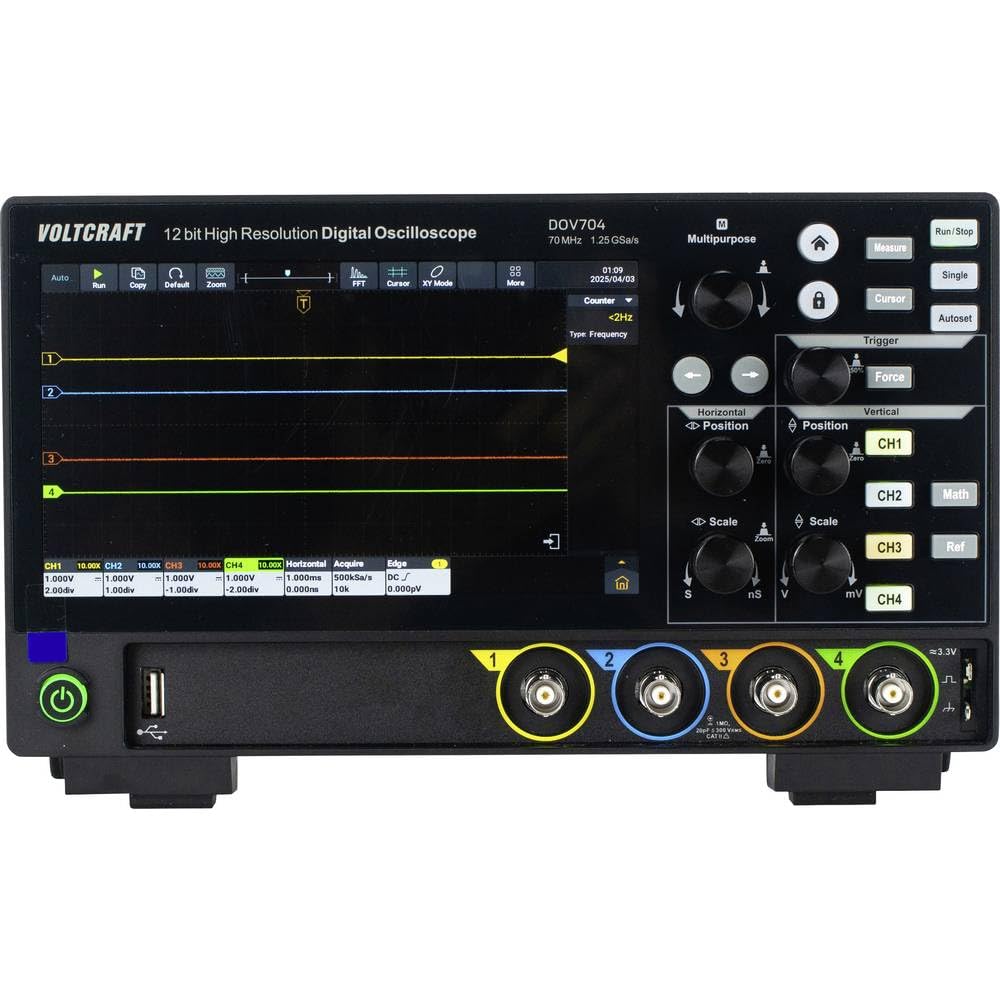
1 paveikslas: Priekyje view of the Voltcraft DOV704 Digital Oscilloscope, showing the 7-inch touchscreen display, control knobs, buttons, and four BNC input connectors at the bottom. The power button and USB ports are also visible.

2 paveikslas: Kampinis priekis view of the Voltcraft DOV704 Digital Oscilloscope, providing a clearer perspective of the control panel and input ports. The screen displays a waveform.

3 paveikslas: Šoninė view of the Voltcraft DOV704 Digital Oscilloscope, illustrating its compact profile ir ventiliacijos grotelės.
5. Sąranka
5.1 Įrenginio įjungimas
- Connect the USB Type-C power adapter to the oscilloscope's power input port.
- Įkiškite maitinimo adapterį į tinkamą elektros lizdą.
- Press the power button located on the front panel to turn on the oscilloscope. The display will illuminate.
5.2 Zondo prijungimas ir kompensavimas
- Connect a test probe to one of the BNC input channels (CH1-CH4) on the front panel.
- Attach the probe tip to the probe compensation output (usually a square wave signal output on the front or side).
- Adjust the probe compensation screw (located on the probe body) until the square wave displayed on the screen has flat tops and bottoms, without overshoot or undershoot.
- Repeat this process for all probes you intend to use.
6. Naudojimo instrukcijos
6.1 Pagrindinis bangos formos ekranas
- Kanalo pasirinkimas: Press the CH1, CH2, CH3, or CH4 buttons to enable or disable a channel.
- Vertical Scale: Naudokite Vertikali skalė knob to adjust the volts per division (V/div) for the selected channel.
- Vertikali padėtis: Naudokite Vertikali padėtis knob to move the waveform up or down on the screen.
- Horizontalus mastelis: Naudokite Horizontali skalė knob to adjust the time per division (s/div).
- Horizontali padėtis: Naudokite Horizontali padėtis knob to shift the waveform left or right.
6.2 Trigger Functions
The oscilloscope offers various trigger types to stabilize and capture specific parts of a waveform.
- Paspauskite Trigeris button to access trigger settings.
- Select the desired trigger type (e.g., Edge, Pulse, Video) from the menu.
- Adjust the trigger level using the dedicated Triggerio lygis knob or via the touchscreen.
- Choose the trigger source (CH1-CH4) as needed.
6.3 Touchscreen and Gesture Control
The 7-inch touchscreen allows for intuitive control.
- Bakstelėkite: Select menu items, buttons, or adjust settings.
- Žiupsnelis, norint priartinti: Use two fingers to zoom in or out on waveforms (horizontal and vertical scaling).
- Vilkite: Move waveforms or menu elements across the screen.
6.4 Data Storage and Connectivity
The DOV704 supports various methods for data storage and external connectivity.
- USB: Connect a USB flash drive to save waveform data, screenshots, or settings. Use the USB cable to connect to a computer for data transfer.
- LAN: Connect the oscilloscope to a network for remote control and data access using the provided software.
- HDMI: Connect an external display via the HDMI port for larger viewing of waveforms.
7. Priežiūra
7.1 Valymas
- Prieš valydami atjunkite maitinimą.
- Prietaiso išorę nuvalykite minkšta, sausa šluoste.
- For the touchscreen, use a soft, lint-free cloth slightly dampened with a screen cleaner. Avoid abrasive cleaners.
- Neleiskite skysčiams patekti į prietaisą.
7.2 Saugykla
Kai nenaudojate, laikykite osciloskopą švarioje, sausoje vietoje, toliau nuo tiesioginių saulės spindulių ir ekstremalių temperatūrų.
8. Problemų sprendimas
| Problema | Galima priežastis | Sprendimas |
|---|---|---|
| Įrenginys neįsijungia. | Power cable not connected or faulty. | Check power cable connection. Ensure power outlet is functional. Use the provided power adapter. |
| Nerodoma bangos forma. | Channel disabled, probe not connected, or signal too weak/strong. | Ensure the desired channel is enabled. Check probe connection. Adjust vertical scale (V/div) and horizontal scale (s/div). Check trigger settings. |
| Bangos forma nestabili. | Incorrect trigger settings. | Adjust trigger level and trigger type. Ensure trigger source is correctly selected. |
| Jutiklinis ekranas nereaguoja. | Laikinas programinės įrangos triktis. | Restart the device. If the problem persists, contact support. |
9. Specifikacijos
| Parametras | Vertė |
|---|---|
| Modelio numeris | VC-16753910 |
| Pralaidumas | 70 MHz |
| Analoginiai kanalai | 4 |
| Maks. Samplingo norma | 1.25 GSa/s |
| Įrašo ilgis | 50 Mpts |
| ADC rezoliucija | 12 bitų |
| Waveform Capture Rate (Real-time) | 50,000 XNUMX wfms/s |
| Waveform Capture Rate (Segmented) | 700,000 XNUMX wfms/s |
| Ekranas | 7-inch Touchscreen (1024 x 600 pixels) |
| Horizontal Scan Speed | 1 ns/div to 1000 s/div |
| Vertikalus jautrumas | 500 µV/div to 10 V/div |
| Sąsajos | USB, LAN, HDMI |
| Produkto matmenys (P x G x A) | 26 x 7.8 x 16 cm |
| Svoris | 2.71 kg |
10. Garantija ir palaikymas
For warranty information, please refer to the product data sheet included in your package or visit the official VOLTCRAFT website. For technical support, troubleshooting assistance beyond this manual, or service inquiries, please contact VOLTCRAFT customer service. Contact details can typically be found on the manufacturer's websvetainėje arba dokumentuose, pateiktuose kartu su jūsų produktu.