
Įvadas
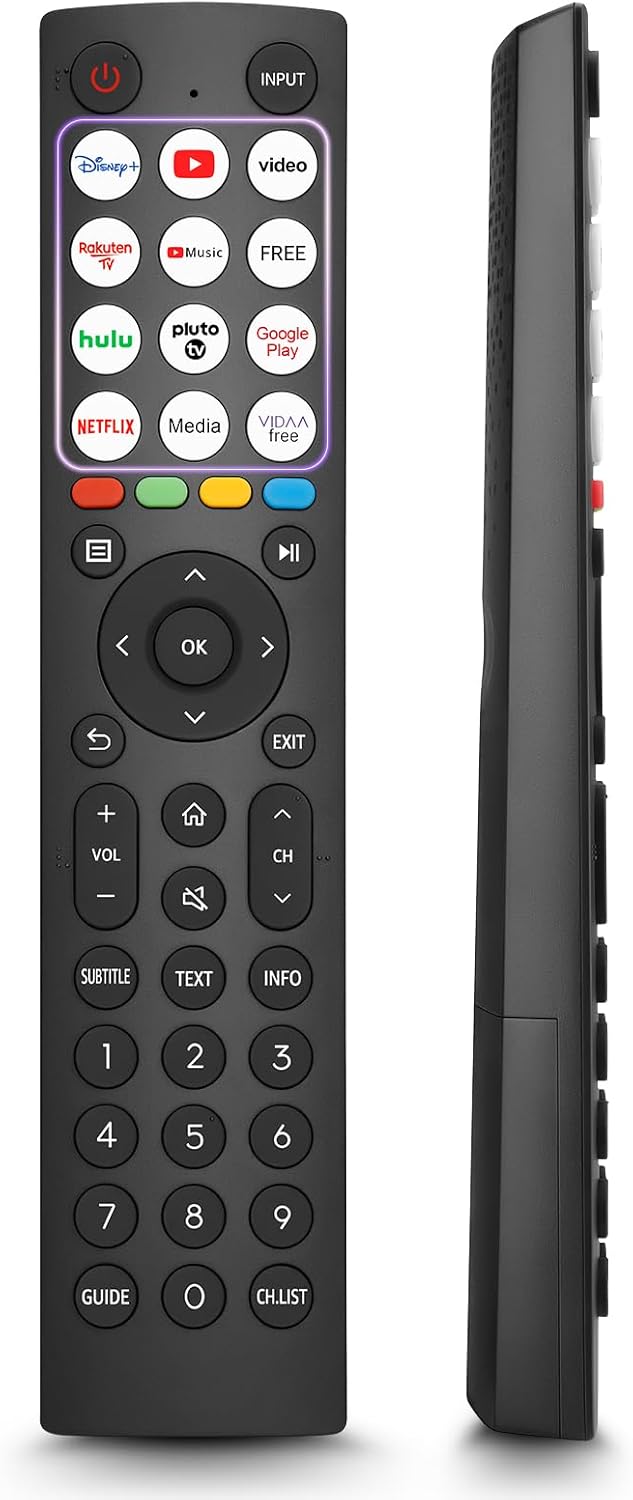
This manual provides comprehensive instructions for the OMAIC EN2Q36H replacement remote control, designed for Hisense Smart TVs. It covers essential information regarding setup, operation, and maintenance to ensure optimal performance and user experience. This remote offers a direct replacement solution without the need for complex programming.
Sąranka
The OMAIC EN2Q36H remote control is designed for immediate use with compatible Hisense Smart TVs. No programming or pairing is required.
Akumuliatoriaus montavimas
- Nuotolinio valdymo pulto gale raskite baterijų skyrių.
- Norėdami atidaryti akumuliatoriaus dangtelį, stumkite jį žemyn arba rodyklės nurodyta kryptimi.
- Įdėkite dvi AAA šarmines baterijas (nepridedamos), užtikrindami, kad teigiamas (+) ir neigiamas (-) poliai teisingai sutaptų su žymėjimais skyriaus viduje.
- Uždėkite akumuliatoriaus dangtelį, stumdami jį atgal į vietą, kol jis tvirtai spragtelės.
Once batteries are installed, the remote is ready to operate your Hisense Smart TV.

Naudojimo instrukcijos
This remote control utilizes infrared (IR) technology for communication with your Hisense Smart TV. Ensure a clear line of sight between the remote and the TV's IR receiver for optimal performance.
Pagrindinės savybės
- 12 spartieji mygtukai: Quickly access popular streaming services and applications with dedicated buttons.
- Strong IR Signal: Provides a longer transmission distance and quick response without noticeable delay.
- Patvari konstrukcija: Made from high-quality ABS and silicone materials for extended lifespan.

Mygtukų funkcijos
Familiarize yourself with the functions of each button on your OMAIC EN2Q36H remote control:
| Mygtukas | Funkcija |
|---|---|
| GALIA | Switches the TV on or into standby mode. |
| ĮVESTIS | Pasirenka įvesties šaltinius (HDMI, AV ir kt.). |
| APP Buttons | Quick access buttons for specific applications (e.g., Disney+, Netflix, YouTube). |
| MENIU | Displays the Quick Setup menu. |
| MEDIA valdymas | Buttons for Play, Pause, Stop, Fast Forward, Rewind. |
| Navigacija (aukštyn / žemyn / kairėn / dešinėn) | Navigates on-screen menus and adjusts system settings. |
| OK | Confirms selection in on-screen menus. |
| ATGAL | Grįžta į ankstesnį meniu. |
| EXIT | Išeina iš esamo meniu. |
| VOL +/- | Reguliuoja garsumo lygį. |
| NAMAI | Enters the Home screen. |
| Nutildyti | Nutildo arba atkuria televizoriaus garsą. |
| CH ^/v | Switches channels. |
| Subtitrai | Activates or deactivates subtitle mode. |
| TEKSTAS | Turns teletext function on and off. |
| INFORMACIJA | Rodo dabartinės programos informaciją. |
| NUMBER Buttons (0-9) | Direct channel selection or number input. |
| VADOVAS | Displays the Electronic Programme Guide (DTV input). |
| CH.SĄRAŠAS | Displays the Channel List on the screen. |

Compatible Hisense TV Models
The OMAIC EN2Q36H replacement remote control is compatible with the following Hisense VIDAA 4K HDTV Smart TV series:
- 32A4K, 40A4K, 43A4K
- 32A5KQ, 40A5KQ
- 43A6K, 50A6K, 55A6K, 58A6K, 65A6K, 70A6K, 75A6K, 85A6K
- 55U6KQ, 65U6KQ
- 43A7KQ, 50A7KQ, 55A7KQ, 65A7KQ, 75A7KQ
- 43E7KQ, 50E7KQ, 55E7KQ, 65E7KQ, 75E7KQ
Priežiūra
Kad jūsų nuotolinio valdymo pultas tarnautų ilgai ir tinkamai veiktų, laikykitės šių priežiūros nurodymų:
- Valymas: Use a soft, dry cloth to clean the remote. Avoid using liquid cleaners or abrasive materials, as they may damage the surface or internal components.
- Baterijos keitimas: Pakeiskite baterijas, kai nuotolinio valdymo pultas reaguoja lėtai arba nustoja veikti. Visada keiskite abi baterijas vienu metu naujomis to paties tipo (AAA šarminėmis).
- Saugykla: Laikykite nuotolinio valdymo pultą vėsioje, sausoje vietoje, toliau nuo tiesioginių saulės spindulių, ekstremalių temperatūrų ir didelės drėgmės.
- Venkite lašų: Saugokite nuotolinio valdymo pultą nuo fizinių smūgių, nes kritimas gali pažeisti vidines grandines.
Trikčių šalinimas
If you encounter issues with your remote control, refer to the following troubleshooting steps:
| Problema | Galima priežastis | Sprendimas |
|---|---|---|
| Nuotolinis nereaguoja | Išsikrovusios arba neteisingai įdėtos baterijos. | Pakeiskite baterijas naujomis AAA šarminėmis baterijomis, užtikrindami teisingą poliškumą. |
| Nuotolinis nereaguoja | Kliūtis tarp nuotolinio valdymo pulto ir televizoriaus. | Ensure a clear line of sight to the TV's IR receiver. Remove any objects blocking the path. |
| Nuotolinis nereaguoja | Nuotolinio valdymo pultas yra per toli nuo televizoriaus. | Move closer to the TV. The remote has an extended range, but extreme distances may affect performance. |
| Mygtukai lipni arba nereaguoja | Nešvarumai arba šiukšlės po mygtukais. | Gently clean around the buttons with a soft, dry cloth. Avoid liquids. |
| Specific functions not working | TV model incompatibility (rare). | Verify your Hisense TV model is listed in the 'Compatible Hisense TV Models' section. |
Specifikacijos
| Funkcija | Detalė |
|---|---|
| Modelio pavadinimas | EN2Q36H |
| Prekės ženklas | OMAIC |
| Suderinami įrenginiai | Hisense Smart TVs |
| Ryšio technologija | Infraraudonųjų spindulių (IR) |
| Mygtukų skaičius | 48 |
| Valdymo tipas | Mygtukų valdymas |
| Ypatingos savybės | Universal, Comfortable |
| Spalva | Juoda |
| Baterijos aprašymas | AAA (Alkaline) |
| Supported Devices (Max) | 1 |
| Produkto matmenys (apytiksliai) | 34.7 x 24.7 x 2.2 cm |
| Produkto svoris (apytiksliai) | 80 gramų |

Garantija ir palaikymas
OMAIC is committed to the quality and compatibility of its replacement remote controls. We provide professional after-sales support to ensure customer satisfaction.
If you have any questions or concerns regarding your OMAIC EN2Q36H remote control or your order, please contact us directly. Our support team aims to respond to inquiries within 12 working hours.