
1. Įvadas
Thank you for choosing the Kinglucky ClipFree Open-Ear Headphones Model A8. These innovative headphones combine high-quality audio with a unique jewelry-inspired design, featuring detachable butterfly earrings. Designed for comfort and awareness, they provide a secure fit without blocking your ear canal, allowing you to enjoy your audio while staying connected to your surroundings. This manual will guide you through the setup, operation, and maintenance of your new headphones.
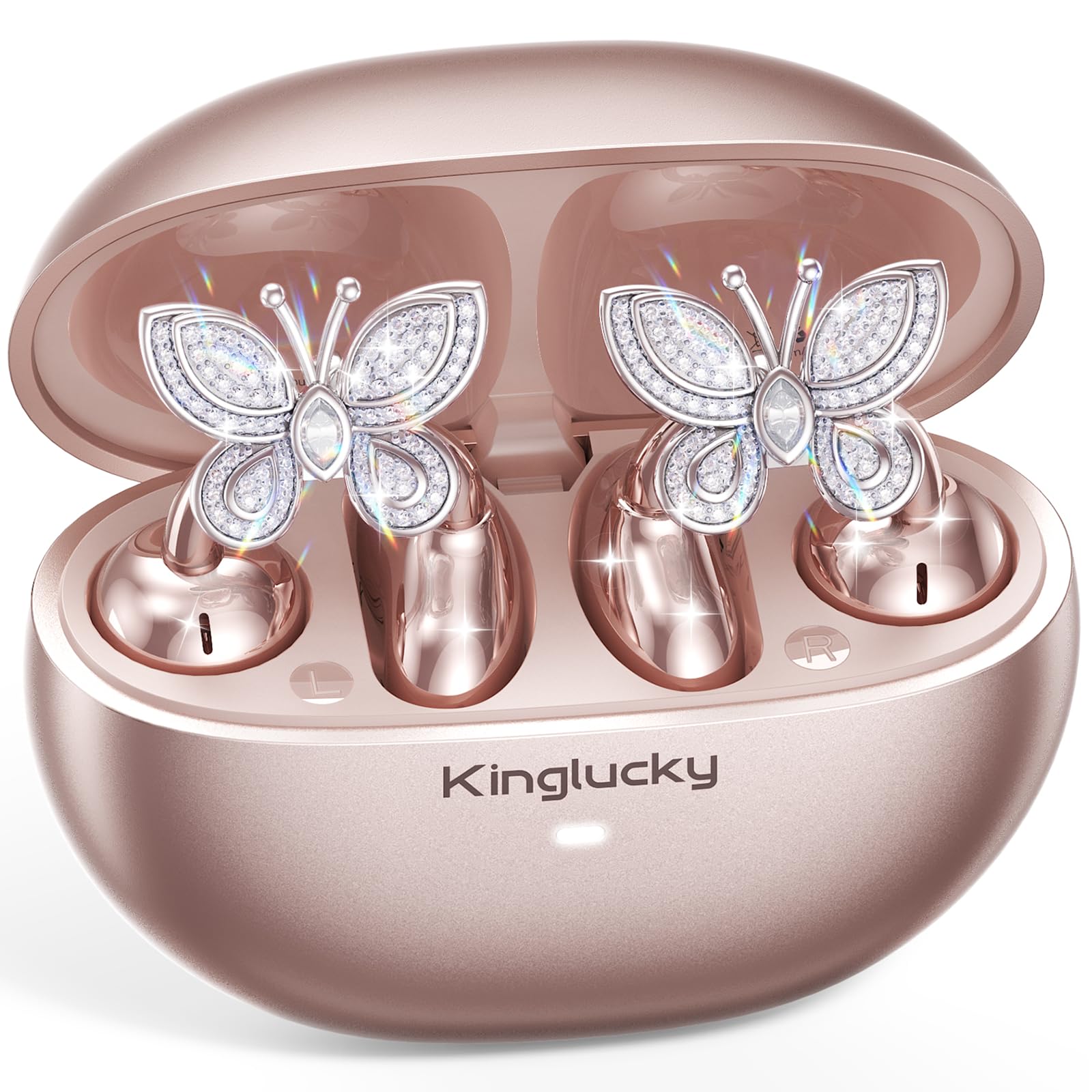
Image: Kinglucky ClipFree Open-Ear Headphones Model A8 in Rose Gold charging case.
2. Kas yra dėžutėje
Your Kinglucky ClipFree Open-Ear Headphones package includes the following items:
- Kinglucky OpenEarRing A8 Headphones (Rose Gold)
- Įkrovimo dėklas
- Crystal Butterfly Ear Clip Charms (Detachable)
- USB-C įkrovimo laidas
- Vartotojo vadovas (šis dokumentas)

Image: All components included in the Kinglucky ClipFree Open-Ear Headphones package.
3. Setup: First-Time Pairing
Follow these steps to pair your Kinglucky headphones with your device for the first time:
- Nuimkite apsaugines plėveles: Carefully remove any protective films from the charging contacts on the earbuds.
- Place in Charging Case: Place both ear clips into the charging case and close the lid. Ensure they are seated correctly.
- Open Lid & Pair: Open the charging case lid. The earbuds will automatically enter pairing mode. On your device (smartphone, tablet, etc.), go to Bluetooth settings and select "Kinglucky Earbuds" from the list of available devices to connect.

Image: Visual guide for the initial pairing process of the earbuds.
4. Wearing the Earbuds & Attaching Charms
The Kinglucky ClipFree headphones are designed for an open-ear fit, resting gently on your ear without entering the ear canal. This ensures comfort and situational awareness.
4.1 Ausinių dėvėjimas
Gently place the ear clip over the helix (the outer rim) of your ear. Adjust for a secure and comfortable fit. The speaker component should be positioned near your ear canal for optimal sound delivery.

Image: The C-shaped design ensures a comfortable and stable fit on the ear.
4.2 Attaching the Butterfly Charms
To personalize your headphones, you can attach the included crystal butterfly charms:
- Gently Open Ear Cuff: Locate the small opening on the earbud's cuff.
- Clip onto Earphone Stem: Carefully clip the butterfly charm onto the stem of the earphone.
- Padėtis: Place the earbud with the attached charm over your ear. Ensure the charm is securely fastened.
The silicone pad helps secure the charm. The charms are detachable and not stored in the charging case.

Image: Step-by-step guide to attaching the butterfly charms to your earbuds.
5. Naudojimo instrukcijos
5.1 Jutikliniai valdikliai
Ausinės turi intuityvius jutiklinius valdiklius, skirtus valdyti garsą ir skambučius:
- Leisti / pristabdyti: Vieną kartą bakstelėkite bet kurią ausinę.
- Atsiliepti / Baigti skambutį: Vieną kartą bakstelėkite bet kurią ausinę.
- Kitas takelis: Dukart palieskite dešinįjį ausinės antgalį.
- Ankstesnis takelis: Dukart palieskite kairįjį ausinės antgalį.
- Pagarsink: Tris kartus palieskite dešinįjį ausinės antgalį.
- Patildyti: Tris kartus palieskite kairįjį ausinės antgalį.
- Suaktyvinti „Voice Assistant“: Long press (2 seconds) on either earbud.
5.2 Įkrovimas
To charge your earbuds and charging case:
- Earbuds: Įdėkite ausines į įkrovimo dėklą. Jos automatiškai pradės krautis. Dėklo indikatoriaus lemputė rodys įkrovimo būseną.
- Įkrovimo dėklas: Connect the provided USB-C charging cable to the port on the back of the charging case and to a power source. The indicator light will show charging progress.
Pilnai įkrautas, su įkrovimo dėklu galima klausytis muzikos iki 50 valandų.

Image: The charging case provides extended battery life for your earbuds.
5.3 MultiPoint Pairing
Your Kinglucky headphones support MultiPoint Pairing, allowing seamless connection to two devices simultaneously. This enables you to effortlessly switch between your phone, tablet, smartwatch, or computer without re-pairing.

Image: MultiPoint Pairing allows connection to two devices simultaneously.
6. Features & Benefits
- Jewelry-Inspired Design: Unique clip-on open-ear earbuds with detachable crystal butterfly earrings, offering both audio and style.
- Secure & Comfortable Open-Ear Fit: Weighing just 4.0g each, they rest gently on the ear without blocking the canal, providing a pressure-free and stable fit. Ideal for small ears, long hair, or glasses.
- Aiški garso kokybė: Tuned for clear vocals and balanced sound, allowing you to enjoy podcasts, calls, and music without the fatigue of in-ear headphones.
- "Bluetooth 6.0": Užtikrina greitą susiejimą ir stabilų belaidį ryšį.
- IP56 atsparumas vandeniui: Designed to withstand sweat and rain, making them suitable for daily commutes, office calls, and light workouts.
- Prailgintas grojimo laikas: Up to 50 hours of listening time with the portable charging case.
- Dirbtinio intelekto valdomas skambučių aiškumas: Equipped with 2 beamforming microphones and advanced noise-canceling technology for crisp conversations.

Image: The unique design blends elegance with everyday comfort and functionality.
7. Specifikacijos
| Funkcija | Detalė |
|---|---|
| Modelio pavadinimas | A8 |
| Prekės ženklas | Kinglucky |
| Ryšio technologija | Belaidis ryšys („Bluetooth 6.0“) |
| Ausų išdėstymas | Atidarykite ausį |
| Formos faktorius | Tikras belaidis ryšys |
| Baterijos veikimo laikas | Iki 50 valandų (su įkrovimo dėklu) |
| Atsparumo vandeniui lygis | IP56 (atsparus prakaitui ir lietui) |
| Kontrolės metodas | Palieskite |
| Medžiaga | Plastic, Metal, Rhinestones |
| Prekės svoris | 3.17 uncijos |
| Įtraukti komponentai | USB-C kabelis |
8. Priežiūra
To ensure the longevity and optimal performance of your Kinglucky headphones, follow these maintenance guidelines:
- Valymas: Ausinėms ir įkrovimo dėklui valyti naudokite minkštą, sausą šluostę. Venkite naudoti stiprias chemines medžiagas ar abrazyvines medžiagas.
- Įkrovimo kontaktai: Periodiškai valykite ausinių ir dėklo vidaus įkrovimo kontaktus sausu vatos tamponėliu, kad užtikrintumėte gerą kontaktą.
- Saugykla: Kai nenaudojate, laikykite ausines įkrovimo dėkle, kad apsaugotumėte jas nuo dulkių ir pažeidimų.
- Vandens ekspozicija: While IP56 rated for sweat and rain, avoid submerging the headphones in water. Dry them thoroughly if they get wet.
- Charms: Handle the detachable charms with care to prevent damage to the crystals or clips.
9. Problemų sprendimas
If you encounter any issues with your Kinglucky headphones, refer to the following common solutions:
- Ausinės nesusijungia:
- Įsitikinkite, kad abi ausinės yra visiškai įkrautos.
- Išjunkite „Bluetooth“ savo įrenginyje, tada vėl jį įjunkite.
- Forget "Kinglucky Earbuds" from your device's Bluetooth list and attempt to re-pair.
- Place earbuds back in the case, close the lid for 5 seconds, then open to reset pairing mode.
- Nėra garso arba garsas per mažas:
- Check the volume levels on both your device and the earbuds (using touch controls).
- Ensure earbuds are correctly seated on your ears.
- Confirm the earbuds are connected to the correct device.
- Viena ausinė neveikia:
- Įdėkite abi ausines atgal į įkrovimo dėklą, uždarykite dangtelį, tada vėl atidarykite.
- Įsitikinkite, kad abi ausinės yra įkrautos.
- Try resetting the earbuds (refer to the full manual for specific reset instructions if available).
- Įkrovimo problemos:
- Įsitikinkite, kad USB-C laidas yra tvirtai prijungtas prie dėklo ir maitinimo šaltinio.
- Patikrinkite, ar ausinių ir dėklo įkrovimo kontaktai švarūs ir be šiukšlių.
- Išbandykite kitą USB-C laidą arba maitinimo adapterį.
10. Garantija ir palaikymas
Kinglucky is committed to providing quality products and customer satisfaction. Your Kinglucky ClipFree Open-Ear Headphones Model A8 come with the following:
- 18 mėnesių garantija: Scan the QR code on the product packaging to activate your warranty within 14 days of purchase.
- 180 dienų garantija: Enjoy peace of mind with our extended guarantee.
- Nemokamas pakeitimas: In case of eligible issues, a free replacement will be provided.
- Greitas palaikymas visą parą: For any questions, concerns, or assistance, please contact Kinglucky customer support.
If you encounter issues such as a used item, no sound, inability to pair, or charging problems, please reach out to our support team for hassle-free assistance.

Image: Kinglucky customer care details for support and warranty.