
1. Įvadas
The RX-350 Infrared Thermal Imager is a high-performance device designed for precise temperature measurements using infrared technology. It is ideal for monitoring areas where identifying temperature variations is crucial. The RX-350 offers excellent thermal resolution, allowing detection of even small temperature differences on objects and surfaces.
This manual provides essential information for the safe and effective operation of your thermal imager. Please read it thoroughly before use and keep it for future reference.

2. Saugos informacija
Always observe the following safety precautions to prevent injury and avoid damage to the device:
- Do not point the camera directly at high-intensity light sources (e.g., sun, lasers) as this may damage the infrared sensor.
- Venkite įrenginio laikymo ekstremaliose temperatūrose, drėgmėje ar korozinėje aplinkoje.
- Nebandykite ardyti ar modifikuoti įrenginio. Visus techninės priežiūros darbus patikėkite kvalifikuotiems darbuotojams.
- Use only the provided charger and battery type.
- Prietaisą laikykite vaikams nepasiekiamoje vietoje.
3. Produktas baigtasview
3.1. Komponentai ir valdikliai

Familiarize yourself with the following parts:
- Infraraudonųjų spindulių objektyvas: Fiksuoja šiluminę spinduliuotę.
- Digital Camera Lens: Captures visible light images for fusion mode.
- LED šviesa: Provides illumination for visible light photography in dark environments.
- Camera Screen: Displays thermal and visible images, menu, and data.
- Power ON/OFF Key: Įjungia arba išjungia įrenginį.
- Meniu klavišas: Accesses the device's settings and options.
- Selection/Enter Key: Patvirtina meniu pasirinkimus.
- Naršymo klavišai (aukštyn, žemyn, kairėn, dešinėn): Naršo meniu parinktis.
- Suaktyvinimas: Used to capture images or videos.
- „Micro USB“ prievadas: For charging and data export to a computer.
- Riešo dirželis: For secure handling.
3.2. Screen Elements Explanation

The screen displays various information during operation:
- Spinduliuotė: Current emissivity setting.
- Baterijos lygis: Rodo likusį akumuliatoriaus įkrovą.
- Highest Temperature Cursor: Marks the hottest point in the image.
- Spalvos kodas: Represents the temperature scale.
- Central Point Temperature Cursor: Displays temperature at the center of the screen.
- Laikas: Dabartinis laikas.
- Data: Dabartinė data.
- Lowest Temperature Cursor: Marks the coldest point in the image.
- Central Temperature: Numerical value of the central point temperature.
3.3. Spalvų paletės aprašymas
The device offers several color palettes to visualize temperature differences:
- Vaivorykštė: A common palette showing a full spectrum of colors for temperature variations.
- Iron Oxide Red: Highlights hotter areas in red/yellow tones.
- Rock Red: Similar to Iron Oxide Red, with slightly different color mapping.
- Balta šiluma: Displays hotter areas as white and colder areas as black.
- Juoda šiluma: Displays hotter areas as black and colder areas as white.
- Cold Color: Emphasizes colder temperatures.
The radiation coefficient (emissivity) can be adjusted to increase the measurement accuracy of objects with half-reflection surfaces. The highest and lowest temperature cursors guide users to areas with the highest and lowest temperatures in the thermal images. Selectable color palettes are provided to meet various imaging needs.
4. Sąranka
4.1. Išpakavimas ir pirminė apžiūra
Upon receiving your RX-350 Thermal Imager, carefully unpack all components and inspect them for any signs of damage. The package should contain:
- 1x RX-350 Thermal Imager
- 1x apsauginis dėklas
- 1x Charger (Power Adapter)
- 1x USB Cable (Micro USB)
- 1x Naudotojo vadovas (šis dokumentas)

4.2. Akumuliatoriaus įkrovimas
Before first use, fully charge the device's removable 18650 Lithium Battery. Connect the Micro USB cable to the camera's USB port and the other end to the charger. Plug the charger into a power outlet. The charging indicator on the screen will show the charging status. A full charge typically takes 2 to 3 hours.

4.3. Įjungimas/išjungimas
- Norėdami įjungti: Press and hold the Power ON/OFF key until the screen illuminates.
- Norėdami išjungti: Press and hold the Power ON/OFF key until the device shuts down.
The device features an automatic shutdown function, configurable for 5 minutes, 20 minutes, or disabled.
5. Naudojimo instrukcijos
5.1. Basic Temperature Measurement
Once powered on, the camera will display a thermal image. Point the infrared lens towards the object or area you wish to measure. The screen will show real-time temperature readings, including the central point temperature, and the highest and lowest temperatures detected within the field of view.
5.2. Emisijos reguliavimas
Emissivity is a crucial setting for accurate temperature measurement. Different materials have different emissivities. To adjust:
- Paspauskite Meniu raktas.
- Navigate to the 'Emissivity' setting using the Navigation keys.
- Paspauskite Selection/Enter raktas.
- Adjust the value between 0.01 and 1.00 using the Navigation keys.
- Paspauskite Selection/Enter patvirtinimo klavišą.
Consult a reference table for common material emissivities if precise measurements are required.
5.3. Changing Color Palettes
To change the visual representation of temperature:
- Paspauskite Meniu raktas.
- Navigate to the 'Color Palette' setting.
- Paspauskite Selection/Enter raktas.
- Select your desired palette (e.g., Rainbow, Iron, Cold Color, White Hot, Black Hot) using the Navigation keys.
- Paspauskite Selection/Enter patvirtinimo klavišą.
5.4. Image/Video Capture and Storage
The device supports image (JPG) and video (MP4) storage on its built-in 4GB eMMC memory (approximately 3GB user available space).
- To Capture an Image: Aim the camera and press the Trigeris trumpai mygtuką.
- Norėdami įrašyti vaizdo įrašą: Paspauskite ir palaikykite Trigeris button to start recording, and press it again to stop.
5.5. Connecting to PC for Data Export
To export captured images and videos:
- Connect the camera to your computer using the provided Micro USB cable.
- The camera will appear as a removable storage device on your computer.
- You can then copy the JPG images and MP4 videos to your computer.
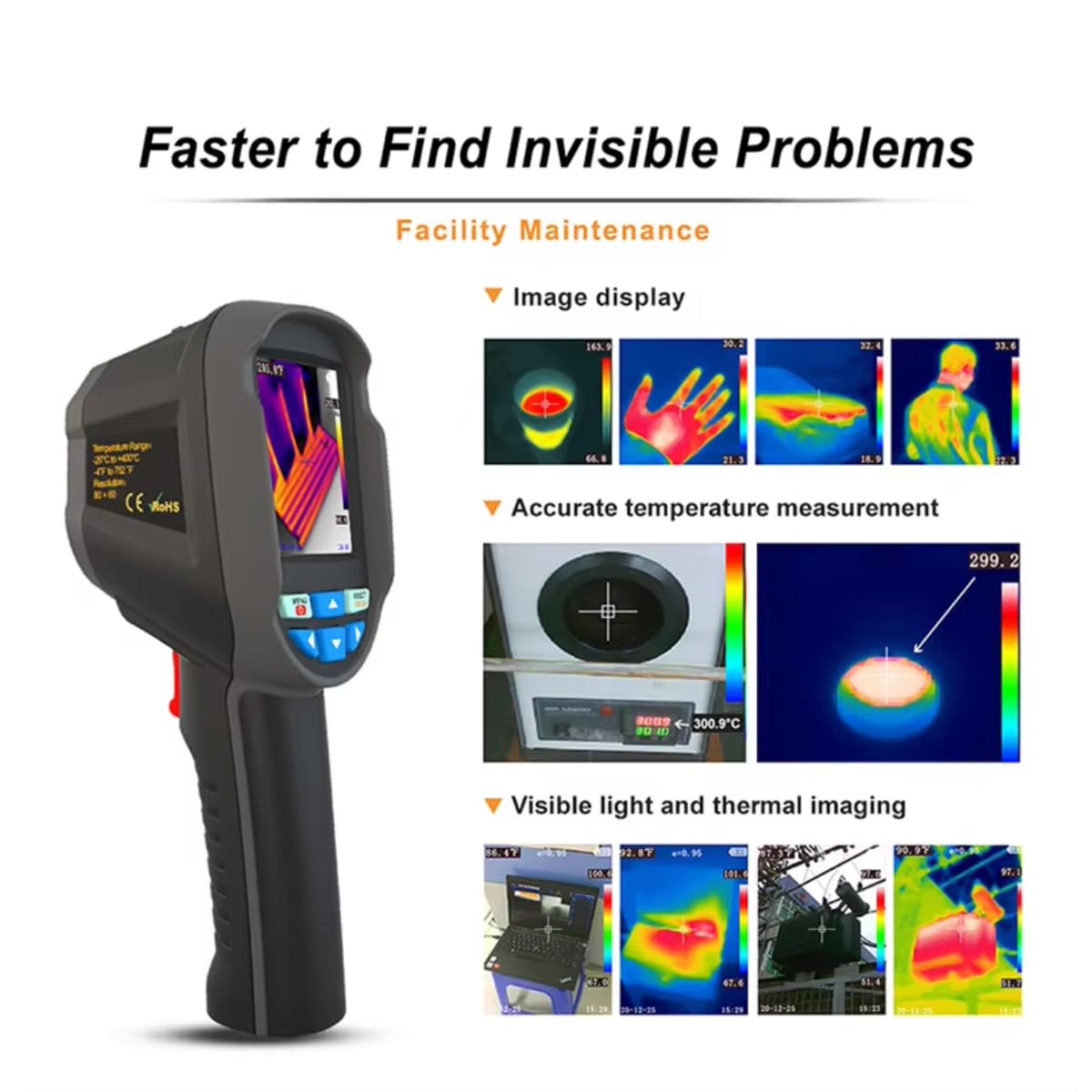
The device also supports standalone image analysis on a PC.

6. Priežiūra
6.1. Valymas
- Įrenginio korpusą valykite minkštu, sausu skudurėliu.
- Objektyvui valyti naudokite specializuotą šluostę ir tirpalą, kad išvengtumėte įbrėžimų.
- Nenaudokite abrazyvinių valiklių ar tirpiklių.
6.2. Akumuliatoriaus priežiūra
- Reguliariai įkraukite akumuliatorių, net jei įrenginys nenaudojamas, kad palaikytumėte jo būklę.
- Store the device with a partially charged battery (around 50%) if it will not be used for an extended period.
- Venkite dažnai visiškai iškrauti akumuliatorių.
7. Problemų sprendimas
If you encounter issues with your RX-350 Thermal Imager, try the following:
- Įrenginys neįsijungia: Ensure the battery is fully charged. Try connecting the charger and powering on.
- Netikslūs temperatūros rodmenys: Patikrinkite matuojamos medžiagos spinduliavimo gebos nustatymą. Įsitikinkite, kad lęšis švarus.
- Ekranas tuščias arba užstrigo: Try restarting the device by holding the power button. If unresponsive, allow the battery to fully discharge and then recharge.
- Nepavyksta prisijungti prie kompiuterio: Ensure the USB cable is securely connected to both the camera and the computer. Try a different USB port or cable.
Jei problemos išlieka, kreipkitės pagalbos į klientų aptarnavimo tarnybą.
8. Specifikacijos
| Funkcija | Specifikacija |
|---|---|
| Modelis | RX-350 |
| Infraraudonųjų spindulių raiška | 160x120 (19200 pixels) |
| Laukas View (FOV) | 35° (aukštis) × 27° (vertikalus) |
| Spektrinio atsako juosta | 8 ~ 14um |
| Pikselių dydis | 12 um |
| NETD (triukšmo ekvivalentinės temperatūros skirtumas) | ≤ 50 mK |
| Kadrų dažnis | 25 Hz |
| Temperatūros matavimo diapazonas | -20 ℃ ~ +550 ℃ (-4 ℉ ~ +1022 ℉) |
| Matavimo tikslumas | (-15 ℃ ~ +550 ℃) ± 2 ℃ or ± 2%; (-20 ℃ ~ -15 ℃) ± 4 ℃ or ± 4% |
| Matavimo vienetai | ℃ / ℉ |
| Objektyvo židinio nuotolis | 3.2 mm |
| Spinduliavimo nustatymas | Adjustable from 0.01 ~ 1.00 |
| Measurable Distance | 0m ~ 3m |
| Optimal Measurable Distance | 0.5 ~ 1.2m |
| Fokusavimo režimas | Nemokamas fokusavimas |
| Temperature Measurement Points | Center point / Hot spot and Cold spot |
| Spalvų paletės | Rainbow, Iron, Cold Color, White Hot, Black Hot |
| Ekrano dydis | 2.8 inches (240 × 320) |
| Vaizdo rodymo režimas | Infrared / Visible Light / Dual Fusion |
| Apšvietimo sistema | LED užpildymo lemputė |
| Įrenginio saugykla | 4GB built-in eMMC (approx. 3GB user available) |
| Vaizdo / vaizdo įrašo formatas | JPG / MP4 |
| Image/Video Export Method | USB jungtis prie kompiuterio |
| Image Analysis Function | Supports standalone analysis on PC |
| Meniu kalba | English, German, Italian, Chinese |
| Baterijos tipas | Išimama įkraunama ličio baterija (18650) |
| Baterijos talpa | 2000 mAh |
| Naudojimo laikas | 2-3 valandas |
| Maitinimo sąsaja | Mikro USB |
| Automatinio išjungimo nustatymai | 5 minutes / 20 minutes / None |
| Darbinė temperatūra | -10 ℃ ~ +45 ℃ (-14 ℉ ~ +122 ℉) |
| Laikymo temperatūra | -20 ℃ ~ +60 ℃ (-4 ℉ ~ +140 ℉) |
| Santykinė drėgmė | 10% ~ 85% RH (be kondensacijos) |
| Produkto svoris | 375g |
| Gaminio matmenys | 9.6 × 7.2 × 22.6 cm |
9. Garantija ir palaikymas
Dėl garantijos informacijos ir techninės pagalbos žr. kartu su pirkiniu pateiktus dokumentus arba susisiekite tiesiogiai su pardavėju. Išsaugokite pirkimo įrodymą, jei prireiktų pateikti garantijos pretenziją.