
Montech HS02 PRO Glass Black with Fans
MONTECH HS02 PRO ATX Mid-Tower PC Case User Manual
Model: HS02 PRO Glass Black with Fans (HS02PB)
Brand: Montech
1. Saugos informacija
Please read and understand all safety instructions before installing or using the MONTECH HS02 PRO PC Case. Failure to follow these instructions may result in damage to the product, personal injury, or voiding of the warranty.
- Elektros sauga: Ensure all power components are properly grounded and connected. Disconnect power before performing any installation or maintenance.
- Tvarkymas: The case contains tempered glass panels. Handle with care to prevent breakage. Avoid dropping or subjecting the case to strong impacts.
- Vėdinimas: Užtikrinkite pakankamą oro cirkuliaciją aplink korpusą, kad išvengtumėte perkaitimo. Neužblokuokite ventiliacijos angų.
- Aplinka: Operate the case in a dry, stable environment. Avoid extreme temperatures, humidity, and direct sunlight.
- Vaikai ir augintiniai: Keep the product and its components out of reach of children and pets. Small parts can be a choking hazard.
2. Pakuotės turinys
Verify that all items listed below are present in your package. If any items are missing or damaged, please contact Montech customer support.
- MONTECH HS02 PRO ATX Mid-Tower PC Case
- Priedų dėžutė (varžtai, užtrauktukai, tarpinės ir kt.)
- Vartotojo vadovas (šis dokumentas)
- Pre-installed GF120 V2 ARGB Fans (5x)
3. Produktas baigtasview
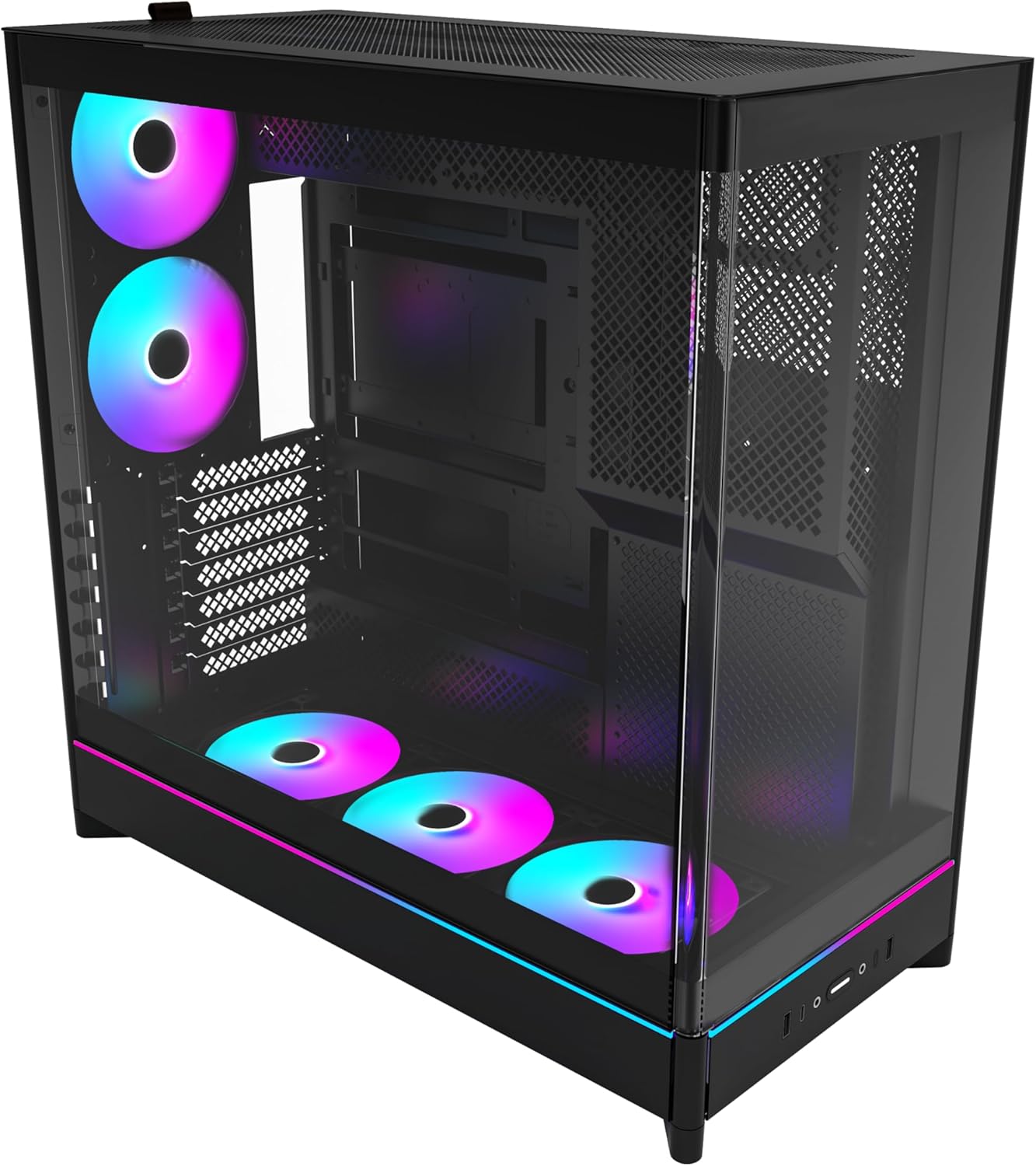
The MONTECH HS02 PRO is a high-airflow ATX mid-tower PC case designed for optimal thermal performance and aesthetic appeal. It features a unique reversible layout and a sturdy curved tempered glass front panel.
Pagrindinės funkcijos:
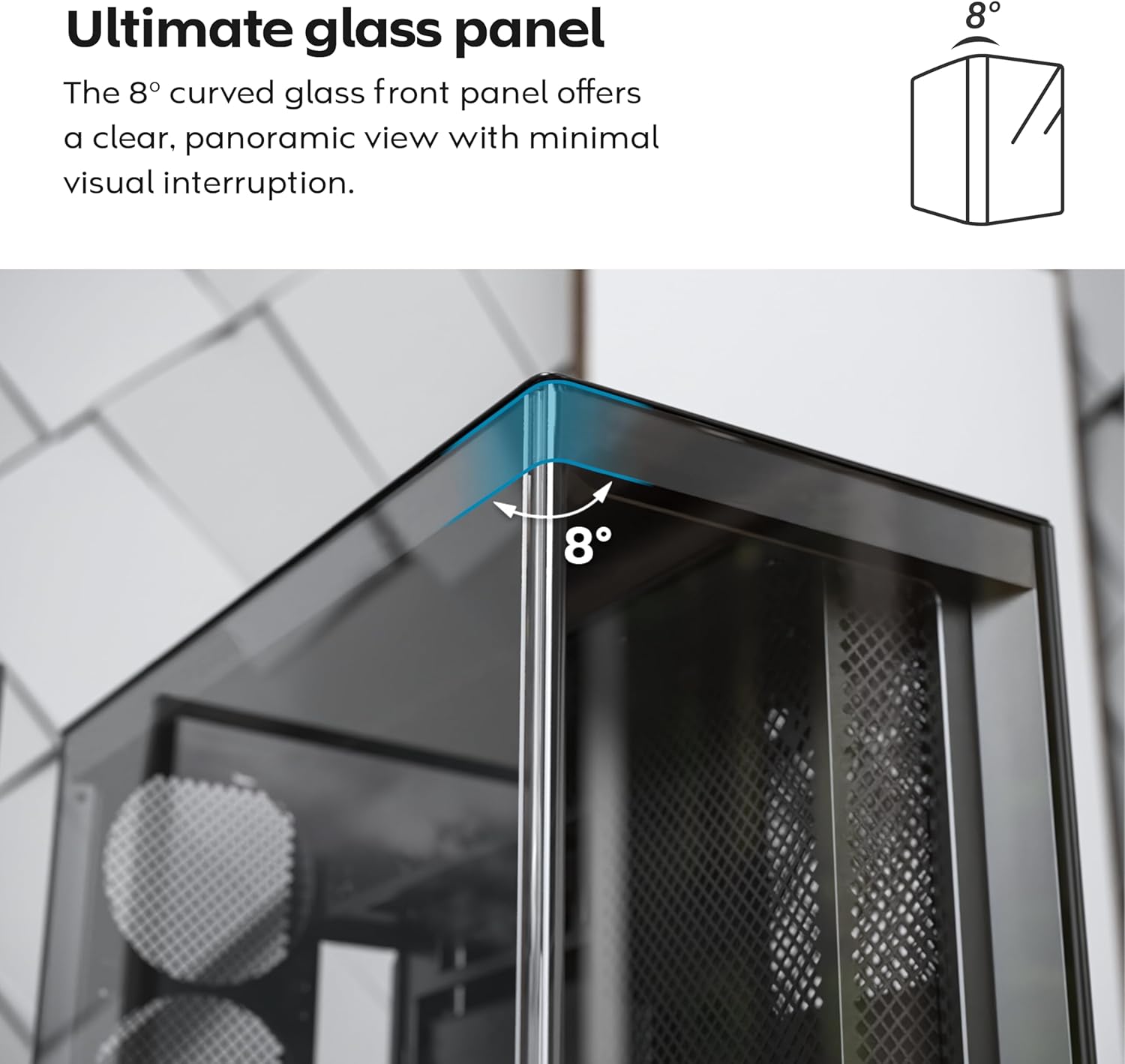
- 8-Degree Curved Glass Panel: The front tempered glass panel features a subtle 8-degree curved edge, offering a distinctive and refined view of the interior with minimal visual distortion.
- Apverčiamas dizainas: A top-down reversible layout allows the entire setup to be positioned on either the left or right side, showcasing your build from your preferred angle.
- Vertical Ventilation: Bottom air intake and top exhaust create a natural chimney effect for efficient heat dissipation.
- Vertical GPU Ready: Rotatable PCIe slots enable an instant vertical GPU setup without requiring an extra holder or stand.
- Sink-In Design: A recessed bottom fan and motherboard layout maintain a clean, unobstructed side view.
- Pre-installed ARGB PWM Fans: Comes with 5 pre-installed GF120 V2 ARGB fans, fully syncable with motherboard lighting control.
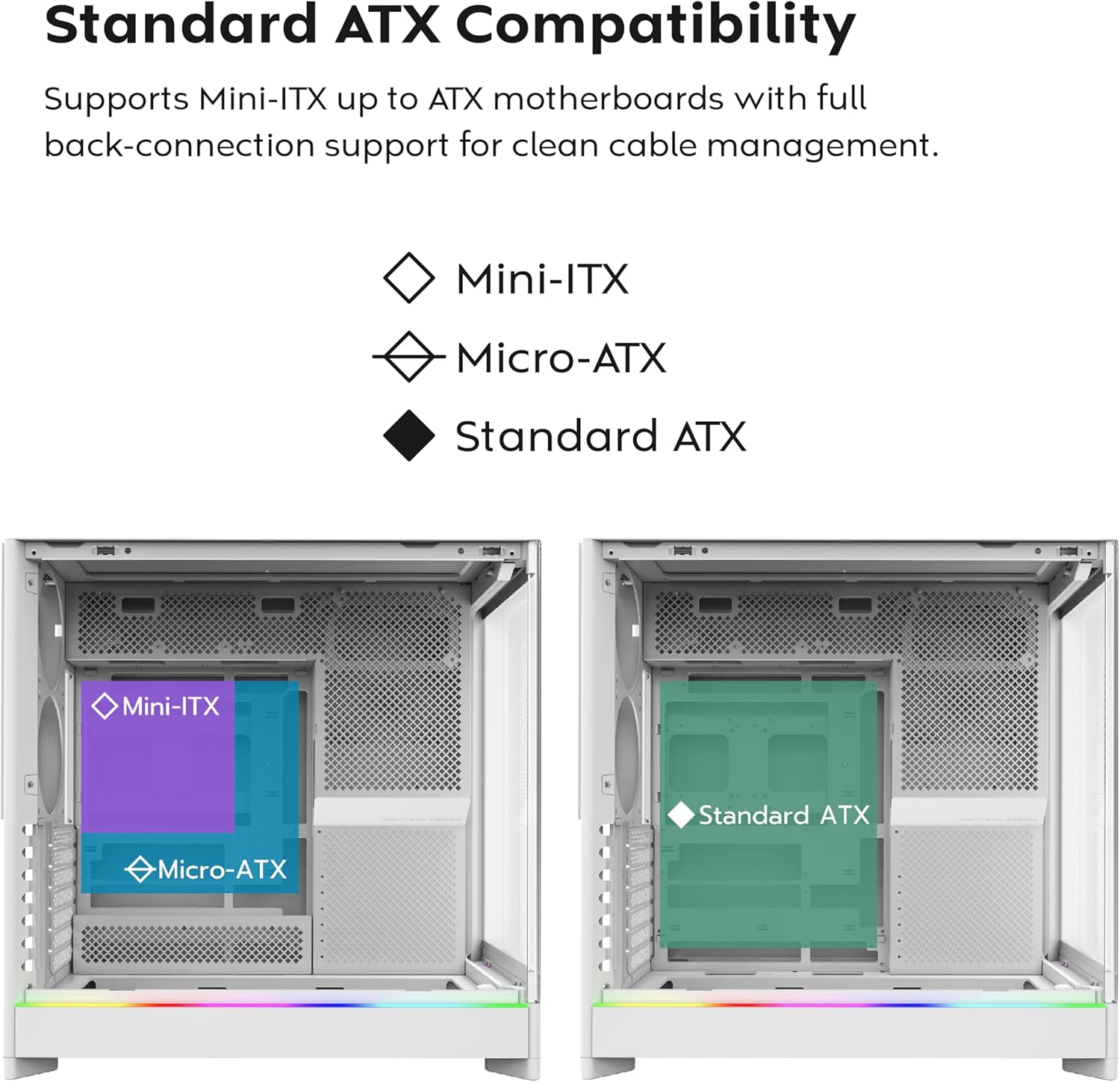
- Paruošta pagrindinei plokštei su „Back-Connect“ jungtimi: Supports standard and back-connect motherboards, including MSI Project Zero, ASUS BTF, and more.
- Ample Saugyklos talpa: Supports multiple storage drives (HDD/SSD) for flexible and expandable storage options.
Komponento identifikavimas:





4. Sąranka ir diegimas
This section provides general guidelines for setting up your MONTECH HS02 PRO PC case. For detailed component-specific instructions, refer to your motherboard, GPU, and PSU manuals.
4.1 Bylos parengimas
- Išpakavimas: Atsargiai išimkite dėklą iš pakuotės. Patikrinkite, ar nėra jokių transportavimo pažeidimų.
- Skydelio pašalinimas: Gently remove the tempered glass side panel and the rear metal side panel. The tempered glass panel is secured with toolless latches.
- Priedų dėžutė: Dėklo viduje raskite priedų dėžutę, kurioje yra visi reikalingi varžtai ir tvirtinimo detalės.
4.2 Pagrindinės plokštės montavimas
- Atkaklios pozicijos: Ensure the correct standoffs are installed for your motherboard form factor (Mini-ITX, Micro-ATX, or ATX). Adjust if necessary.
- Įvesties/išvesties skydas: Įdėkite pagrindinės plokštės I/O skydą į korpuso galinę angą.
- Montavimas: Carefully align your motherboard with the standoffs and gently lower it into place. Secure it with the provided screws.
- Back-Connect Motherboards: If using a back-connect motherboard, ensure proper alignment with the designated cutouts for cable routing.
4.3 Maitinimo bloko (PSU) montavimas
- Montavimas: The PSU mounts at the bottom of the case. Slide the PSU into its designated bay from the rear.
- Apsauga: Pritvirtinkite maitinimo bloką varžtais iš korpuso galo.
- Kabeliai: Route necessary power cables through the cable management cutouts to the motherboard and other components.
4.4 Atminties disko (HDD/SSD) diegimas
- Važiavimo įlankos: Utilize the designated drive bays for 3.5" HDDs and 2.5" SSDs.
- Montavimas: Secure drives using the provided screws or toolless mechanisms where applicable.
4.5 Vaizdo plokštės (GPU) diegimas
- PCIe lizdai: Nuimkite reikiamus PCIe lizdų dangtelius.
- Horizontalus montavimas: Insert the GPU into the primary PCIe slot on your motherboard and secure it with screws.
- Vertical Installation (Optional): The rotatable PCIe slots allow for vertical GPU mounting. Rotate the bracket and install your GPU vertically. A PCIe riser cable (not included) is required for vertical mounting.
4.6 Aušinimo sistemos įrengimas (ventiliatoriai / radiatoriai)
- Iš anksto įdiegti ventiliatoriai: The case comes with 5 pre-installed ARGB PWM fans. Connect their power and ARGB cables to your motherboard or a fan controller.
- Additional Fans/Radiators: The case supports additional fans and radiators at the top, rear, and bottom. Refer to the specifications for supported sizes.
- AIO Cooler: Install your All-in-One (AIO) liquid cooler radiator and fans according to the cooler's instructions, utilizing the available mounting points.
4.7 Kabelių valdymas
Pasinaudokite ample space behind the motherboard tray and the cable management cutouts to route and secure cables. This improves airflow and aesthetics.
5. Naudojimo instrukcijos
Once all components are installed and secured, you can power on your system.
5.1 Įjungimas
- Prijunkite išorinius įrenginius: Connect your monitor, keyboard, mouse, and other peripherals to your system.
- Maitinimo kabelis: Connect the PSU power cable to a wall outlet and flip the PSU's power switch to the 'ON' position.
- Maitinimo mygtukas: Press the power button on the front I/O panel of the case.
5.2 Priekinio įvesties / išvesties skydelio funkcijos
- USB 3.0 prievadai: Skirta prijungti įrenginius, suderinamus su USB 3.0.
- C tipo USB prievadas: For connecting USB Type-C compatible devices.
- Garso lizdas: Ausinėms ar garsiakalbiams.
- Mikrofono lizdas: Mikrofono prijungimui.
- Maitinimo mygtukas: Norėdami įjungti arba išjungti sistemą.
- LED mygtukas: To cycle through the 29 ARGB lighting modes for the pre-installed fans and integrated light strip.
6. Priežiūra
Reguliarus techninis aptarnavimas padeda užtikrinti optimalų kompiuterio komponentų veikimą ir ilgaamžiškumą.
- Dulkių valymas: Periodically clean dust filters (top, bottom, front) to maintain optimal airflow. Use compressed air to remove dust from internal components.
- Glass Panel Cleaning: Use a soft, lint-free cloth and a non-abrasive glass cleaner to clean the tempered glass panels. Avoid harsh chemicals.
- Kabelių valdymas: Periodiškai patikrinkite laidų išdėstymą, kad įsitikintumėte, jog jie netrukdo oro srautui ar ventiliatoriaus mentėms.
- Ventiliatoriaus patikrinimas: Ensure all fans are spinning freely and quietly. Clean fan blades if dust buildup is significant.
7. Problemų sprendimas
This section addresses common issues you might encounter. For more complex problems, consult Montech customer support or a qualified technician.
Dažnos problemos ir sprendimai:
| Problema | Galima priežastis | Sprendimas |
|---|---|---|
| Sistema neįsijungia. | PSU switch off, power cables loose, faulty PSU/motherboard. | Ensure PSU switch is ON. Check all power connections (24-pin, CPU, GPU). Test PSU if possible. |
| Fans are not spinning or RGB is not working. | Fan cables disconnected, ARGB cables disconnected, faulty fan/controller. | Verify fan power and ARGB headers are securely connected to motherboard/controller. Use the LED button to cycle modes. |
| Prastas oro srautas arba aukšta temperatūra. | Dust buildup, obstructed vents, incorrect fan orientation. | Clean dust filters and internal components. Ensure fans are oriented correctly for intake/exhaust. Check for cable obstructions. |
| Priekiniai įvesties / išvesties prievadai neveikia. | Front panel connectors loose or incorrectly connected to motherboard. | Refer to your motherboard manual to ensure all front panel headers (USB, audio) are correctly connected. |
8. Specifikacijos
Detailed technical specifications for the MONTECH HS02 PRO ATX Mid-Tower PC Case.
| Funkcija | Specifikacija |
|---|---|
| Modelio pavadinimas | HS02 PRO Glass Black with Fans |
| Modelio numeris | HS02PB |
| Atvejo tipas | Mid Tower |
| Pagrindinės plokštės suderinamumas | ATX, Micro-ATX, Mini-ITX (with back-connect support) |
| Matmenys (IxPxH) | 32 x 52.4 x 58.8 colio (apytiksliai 81.3 x 133.1 x 149.4 cm) |
| Prekės svoris | 24.2 svaro (apie 10.98 kg) |
| Priekinis skydelis | Curved Tempered Glass (8-degree) |
| Iš anksto įdiegti ventiliatoriai | 5x GF120 V2 ARGB PWM Fans |
| Aušinimo būdas | Air (Vertical Ventilation / Chimney Effect) |
| Maitinimo šaltinio tvirtinimo tipas | Apatinis kalnas |
| Priekinės įvesties / išvesties prievadai | 2x USB 3.0, 1x USB Type-C, Audio, Mic, Power Button, LED Button |
| GPU klirensas | Up to 420mm (supports vertical GPU with rotatable PCIe slots) |
| Sandėliavimo skyriai | Multiple HDD/SSD support |
| Spalva | Juoda |
9. Garantija ir palaikymas
For warranty information and technical support, please refer to the official Montech websvetainėje arba susisiekite tiesiogiai su jų klientų aptarnavimo tarnyba. Išsaugokite pirkimo įrodymą garantiniams reikalavimams.
- Montech Official Websvetainė: www.montechpc.com
- Klientų aptarnavimas: Žr websvetainėje rasite kontaktinę informaciją, įskaitant el. pašto ir telefono palaikymą.
Ask a question about this manual
Ask about setup, troubleshooting, compatibility, parts, safety, or missing instructions. Manuals+ will review the question and use this page’s manual context to help answer it.