
DigiLand MID1057-MX
DigiLand MID1057-MX 10.1-inch Android 14 Tablet
Naudotojo instrukcija
Įvadas
This manual provides essential information for the proper setup, operation, and maintenance of your DigiLand MID1057-MX 10.1-inch Android 14 Tablet. Please read this manual thoroughly before using the device to ensure optimal performance and longevity.

Image: DigiLand MID1057-MX Android 14 Tablet.
Sąranka
1. Pakuotės turinys
Patikrinkite, ar pakuotėje yra visi reikalingi daiktai:
- DigiLand MID1057-MX Tablet
- C tipo USB kabelis
- Maitinimo adapteris
- Apsauginis dėklas
- Greitos pradžios vadovas
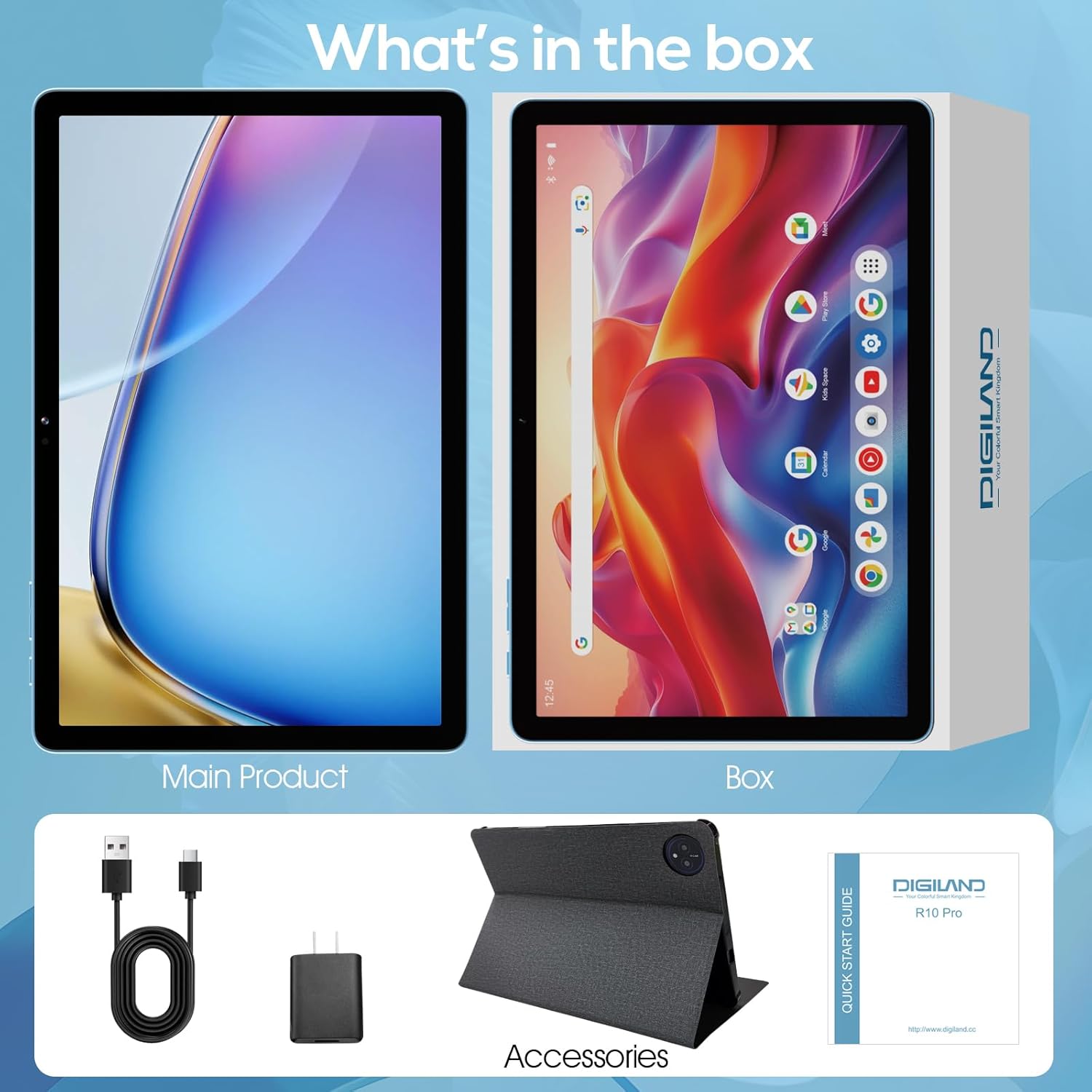
Image: Package contents of the DigiLand MID1057-MX Tablet.
2. Įrenginio išdėstymas
Susipažinkite su planšetinio kompiuterio fizinėmis savybėmis:
- Maitinimo mygtukas: Esantis šone, naudojamas įrenginiui įjungti / išjungti arba ekranui pažadinti / užmigdyti.
- Garsumo mygtukai: Sureguliuokite garso lygius.
- C tipo USB prievadas: Įkrovimui ir duomenų perdavimui.
- Ausinių lizdas: Ausinėms prijungti.
- MicroSD kortelės lizdas: For expandable storage (up to 1TB).
- Priekinė kamera: Vaizdo skambučiams ir asmenukėms.
- Galinė kamera: Nuotraukų ir vaizdo įrašų fotografavimui.

Vaizdas: Viršview of tablet ports and buttons.
3. Pradinis mokestis
Before first use, fully charge the tablet. Connect the USB Type-C cable to the tablet's port and the power adapter to a wall outlet. The battery indicator on the screen will show charging status.
4. Maitinimo įjungimas/išjungimas
- Norėdami įjungti: Press and hold the Power button until the DigiLand logo appears.
- Norėdami išjungti: Paspauskite ir palaikykite maitinimo mygtuką, kol pasirodys maitinimo parinkčių meniu, tada pasirinkite „Išjungti“.
- Miegui / pabudimui: Trumpai paspauskite maitinimo mygtuką.
5. Pradinė sąranka
Pirmą kartą įjungę įrenginį, vykdykite ekrane pateikiamus nurodymus:
- Pasirinkite savo kalbą.
- Prisijunkite prie „Wi-Fi“ tinklo.
- Prisijunkite naudodami „Google“ paskyrą arba sukurkite naują.
- Nustatykite ekrano užraktą ir kitas saugos funkcijas.
Veikiantis
1. Jutiklinio ekrano gestai
Navigate the tablet using standard Android gestures:
- Bakstelėkite: Pasirinkite elementą arba atidarykite programą.
- Palieskite ir palaikykite: Pasiekite kontekstinius meniu arba perkelkite piktogramas.
- Perbraukimas: Slinkite per puslapius arba naršykite tarp ekranų.
- Žiupsnelis: Priartinkite arba atitolinkite vaizdus ir web puslapių.
2. Prisijungimas prie Wi-Fi
- Eikite į Nustatymai > Tinklas ir internetas > Wi-Fi.
- Perjungti „Wi-Fi“ On.
- Iš sąrašo pasirinkite norimą tinklą.
- Jei būsite paraginti, įveskite slaptažodį, tada palieskite Prisijunkite.
3. „Bluetooth“ poravimas
- Eikite į Nustatymai > Prijungti įrenginiai > Bluetooth.
- Perjungti Bluetooth On.
- Įsitikinkite, kad jūsų „Bluetooth“ įrenginys veikia susiejimo režimu.
- Select the device from the list and follow any on-screen prompts to complete pairing.
4. Programų diegimas ir pašalinimas
- Įdiegti: Open the Google Play Store app, search for the desired application, and tap Įdiegti.
- Pašalinti: Eikite į Nustatymai > Programėlės > Žr. visas programas, pasirinkite programėlę ir palieskite Pašalinkite.
5. Saugyklos valdymas
Your tablet comes with 128GB of internal storage. You can expand this by up to 1TB using a MicroSD card (not included).
- To Insert MicroSD Card: Locate the MicroSD card slot, gently insert the card until it clicks into place.
- To Remove MicroSD Card: Eikite į Nustatymai > Sandėliavimas, tap on the SD card, and select Išstumti before physically removing it.

Image: Storage capacity and expansion.
6. Kameros naudojimas
The tablet features a 13MP rear camera and an 8MP front camera.
- Atidarykite Fotoaparatas programėlė.
- Norėdami nufotografuoti, palieskite užrakto mygtuką.
- Norėdami įrašyti vaizdo įrašą, palieskite vaizdo įrašo piktogramą.
- Norėdami perjungti priekinę ir galinę kameras, naudokite kameros perjungimo piktogramą.

Image: Dual camera features and examples.
7. Baterijos valdymas
The 6000mAh battery provides extended usage time. To optimize battery life:
- Sureguliuokite ekrano ryškumą iki patogaus lygio.
- Išjunkite „Wi-Fi“ ir „Bluetooth“, kai jų nenaudojate.
- Uždarykite nenaudojamas programas, veikiančias fone.
- Įjunkite akumuliatoriaus taupymo režimą Nustatymai > Baterija.

Image: Battery capacity and usage estimates.
Priežiūra
1. Prietaiso valymas
Planšetinio kompiuterio ekraną ir korpusą valykite minkštu, nepūkuotu audiniu. Venkite naudoti stiprias chemines medžiagas ar abrazyvines medžiagas.
2. Programinės įrangos atnaujinimai
Regularly check for and install system updates to ensure your tablet has the latest features and security patches. Go to Nustatymai > Sistema > Sistemos atnaujinimas.
3. Saugyklos optimizavimas
Periodiškai review ir ištrinkite nereikalingus files, photos, and applications to free up storage space and maintain performance. Consider moving large media fileį išorinę „MicroSD“ kortelę.
Trikčių šalinimas
Dažniausiai pasitaikančias problemas ir jų sprendimus rasite toliau pateiktoje lentelėje:
| problema | Galimas sprendimas |
|---|---|
| Planšetinis kompiuteris neįsijungia | Įsitikinkite, kad akumuliatorius įkrautas. Prijunkite prie įkroviklio bent 30 minučių, tada bandykite vėl įjungti. |
| Wi-Fi ryšio problemos | Iš naujo paleiskite planšetinį kompiuterį ir „Wi-Fi“ maršrutizatorių. Nustatymuose pamirškite tinklą ir prijunkite iš naujo. |
| Lėtas veikimas | Close unused apps. Clear cache for frequently used apps. Check for system updates. Free up storage space. |
| Baterija greitai išsikrauna | Reduce screen brightness. Disable Wi-Fi/Bluetooth when not in use. Limit background app activity. |
| Programėlės stringa arba užstringa | Restart the app. Clear the app's cache and data in settings. Reinstall the app. |
Specifikacijos
Key technical specifications for the DigiLand MID1057-MX Tablet:
| Funkcija | Specifikacija |
|---|---|
| Modelis | MID1057-MX |
| Operacinė sistema | Android 14 |
| Ekrano dydis | 10.1 colių |
| Ekrano raiška | 1280 x 800 pikselių (IPS HD) |
| Procesorius | MTK Helio G80 Octa-Core (A523, Cortex A55@1.8 GHz, 22nm) |
| RAM | 12 GB (4 GB fizinė + 8 GB išplėtimo kortelė) |
| Vidinė saugykla | 128 GB ROM |
| Išplečiama saugykla | Up to 1TB via MicroSD card (TF card slot) |
| Baterijos talpa | 6000 mAh |
| Priekinė kamera | 8 MP |
| Galinė kamera | 13 MP |
| Ryšys | Dual-band Wi-Fi (2.4G+5G), Bluetooth 5.0, USB Type-C (OTG) |
| Matmenys (IxPxH) | 9.5 x 6.3 x 0.3 colio |
| Prekės svoris | 2.79 pounds (485g for tablet only) |

Paveikslėlis: Išsamios produkto specifikacijos.
Garantija ir palaikymas
1. Informacija apie garantiją
Please refer to the warranty card included with your product for specific warranty terms and conditions. DigiLand provides after-sales support to address any product-related concerns.
2. Pagalba klientams
For technical assistance, troubleshooting, or any questions regarding your DigiLand MID1057-MX Tablet, please contact DigiLand customer support through the contact information provided in your Quick Start Guide or on the official DigiLand websvetainę.
Ask a question about this manual
Ask about setup, troubleshooting, compatibility, parts, safety, or missing instructions. Manuals+ will review the question and use this page’s manual context to help answer it.