
1. Įvadas
Ačiū, kad pirkoteasing the Greadio CD-W16 Multifunction Portable CD Player. This device offers a comprehensive audio experience with multiple playback options including CD, cassette, FM radio, Bluetooth 5.1, USB, AUX, and TF/SD card. Designed for ease of use and portability, it features a rechargeable battery, remote control, and high-quality stereo sound. Please read this manual carefully to ensure proper operation and to fully enjoy all the features of your new audio system.
2. Saugos informacija
- Saugokite įrenginį nuo lietaus ar drėgmės, kad išvengtumėte gaisro ar elektros smūgio.
- Neatidarykite casing. Techninę priežiūrą patikėkite tik kvalifikuotiems darbuotojams.
- Venkite įrenginio statyti šalia šilumos šaltinių arba tiesioginiuose saulės spinduliuose.
- Naudokite tik nurodytą maitinimo adapterį ir laidus.
- Laikyti vaikams nepasiekiamoje vietoje.
3. Pakuotės turinys
- Greadio CD-W16 CD Radio Cassette Player x 1
- AUX kabelis x 1
- C tipo kabelis x 1
- Nuotolinio valdymo pultas x 1
- Vartotojo vadovas x 1
4. Produktas baigtasview
The Greadio CD-W16 is a versatile audio system designed for various listening preferences. It combines classic and modern features in a compact, portable design.
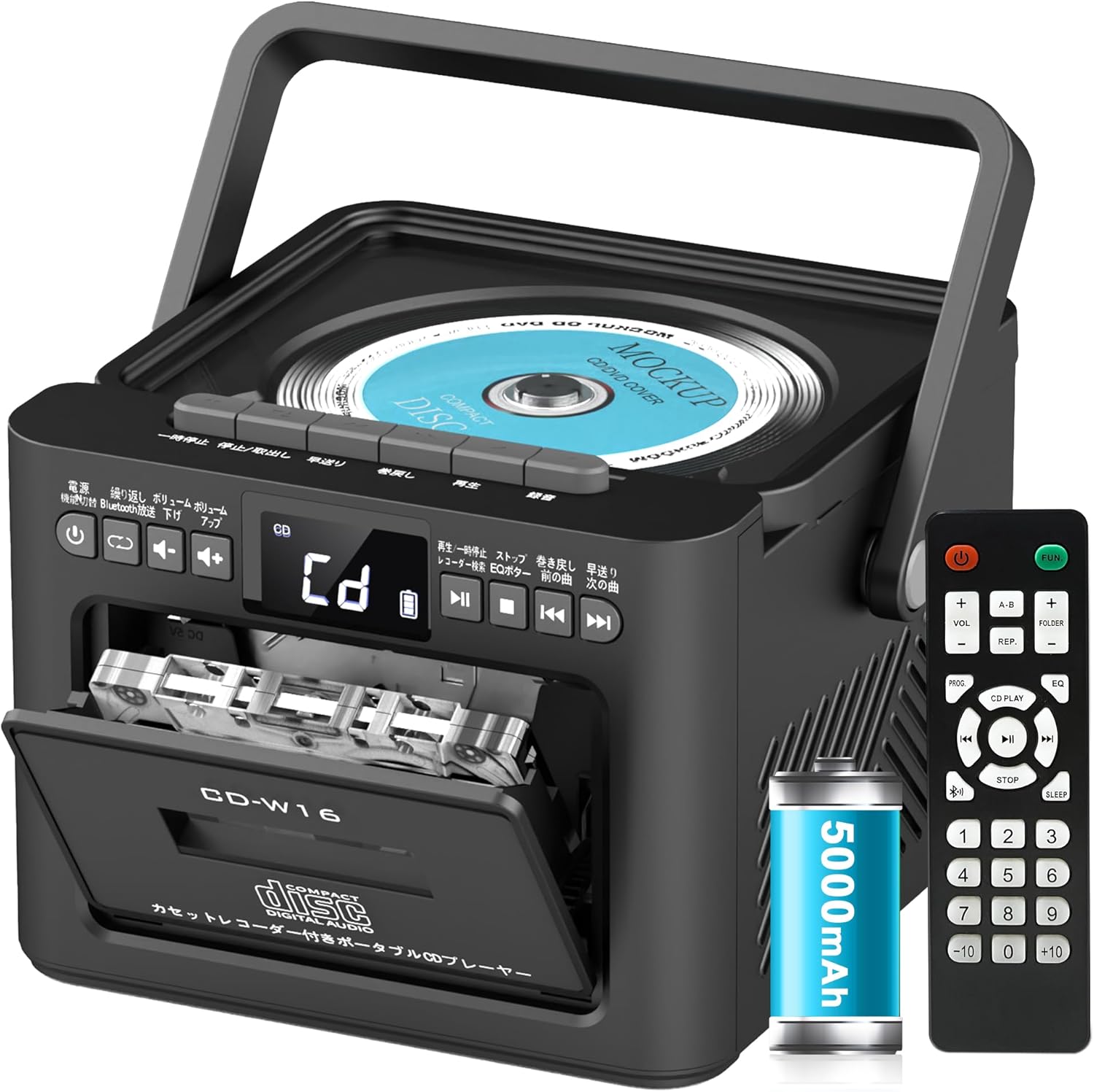
Pagrindinės funkcijos:
- CD Player (CD, CD-R, CD-RW compatible)
- Cassette Player & Recorder
- FM Radio (76-108MHz)
- Bluetooth 5.1 (Transmitter & Receiver)
- USB atkūrimas
- AUX įvestis
- TF/SD Card Playback
- 5000 XNUMX mAh įkraunama baterija
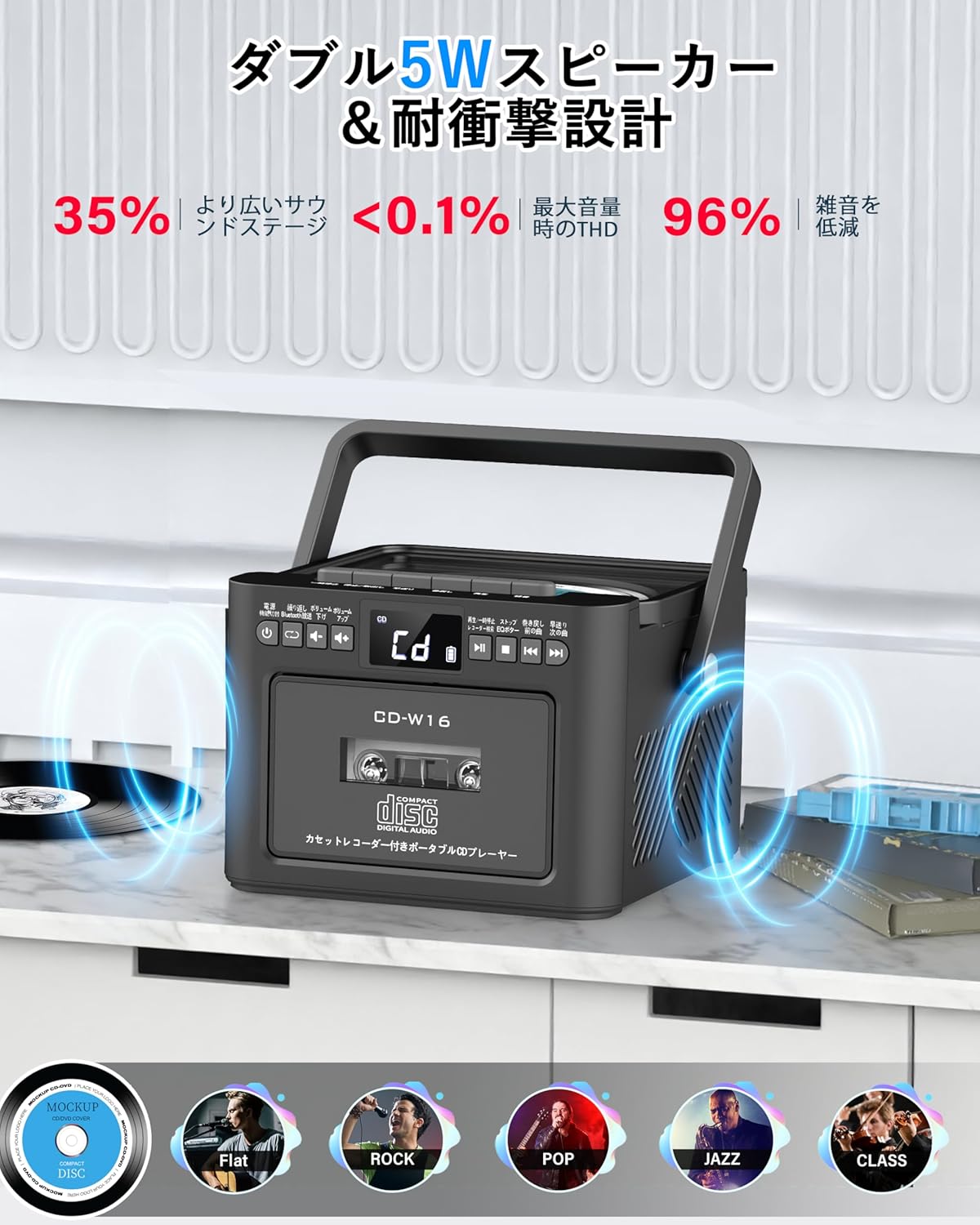
- Dvi 5W stereo garsiakalbiai
- Nuotolinio valdymo pultas
- Miego laikmatis
- 5 EQ garso režimai

5. Sąranka
5.1. Akumuliatoriaus įkrovimas
The Greadio CD-W16 is equipped with a built-in 5000mAh rechargeable battery. To charge the device:
- Connect the provided Type-C cable to the charging port on the unit.
- Connect the other end of the Type-C cable to a 5V/2A USB power adapter (not included).
- The charging indicator will illuminate. A full charge takes approximately 3 hours and provides up to 16 hours of playback.

5.2. Maitinimo įjungimas/išjungimas
To power on or off the CD player:
- Paspauskite ir palaikykite Maitinimo mygtukas on the unit or the remote control for 2 seconds.
- Arba trumpai paspauskite Maitinimo mygtukas on the remote control to toggle the CD player on/off.
6. Naudojimo instrukcijos
6.1. General Controls (Remote Control)
The remote control provides convenient access to all functions. Refer to the video below for a demonstration of remote control operations.
- Maitinimo įjungimas/išjungimas: Trumpai paspauskite Maitinimo mygtukas.
- Funkcijos režimo pasirinkimas: Trumpai paspauskite FUNC. mygtuką to cycle through CD, Bluetooth, Radio, Cassette, AUX, USB, and TF/SD card modes.
- Garso reguliavimas: Trumpas paspaudimas VOL+ or VOL- mygtukai.
- Maršruto navigacija: Trumpas paspaudimas NEXT (>>|) for the next track or PREV (|<<) ankstesniam takeliui.
- Greitas atsukimas pirmyn/atgal: Ilgai paspauskite NEXT (>>|) for fast forward or PREV (|<<) for rewind.
- Tiesioginis takelio pasirinkimas: In CD mode, input 0-9 on the remote to quickly skip to the desired track.
- EQ režimas: Trumpai paspauskite EQ mygtukas to cycle through NORMAL, ROCK, POP, JAZZ, and CLASS sound modes.
- Kartojimo Režimas: Trumpai paspauskite REP mygtukas to cycle through repeat options (ONE, FOLDER, ALL, SHUFFLE, OFF).
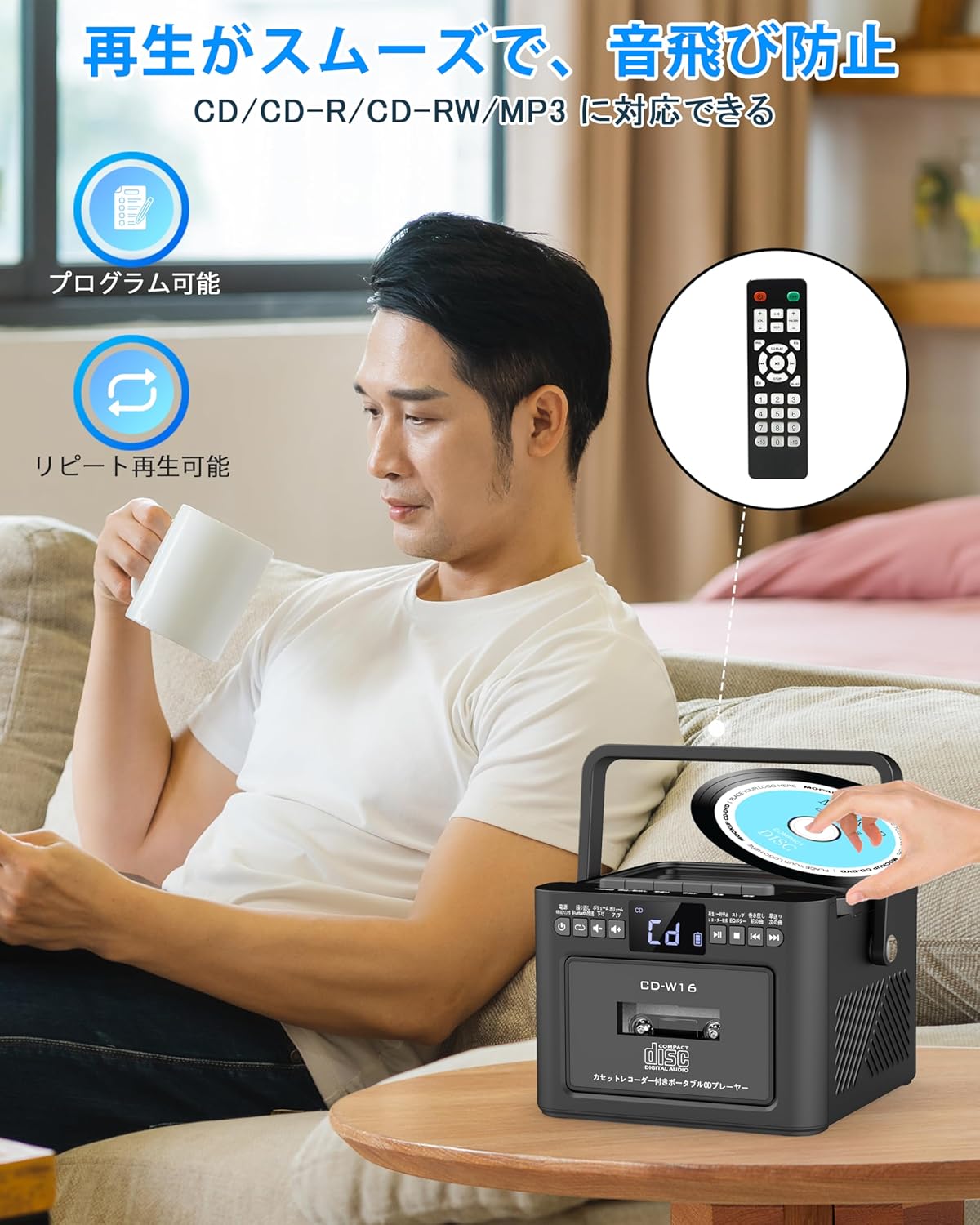
6.2. CD grojimas
- Įsitikinkite, kad įrenginys įjungtas.
- Trumpai paspauskite FUNC. mygtuką to select CD mode. The display will show "CD".
- Atidarykite CD skyriaus dangtelį švelniai jį pakeldami.
- Place a CD (CD, CD-R, CD-RW compatible) onto the spindle with the label side facing up.
- Close the CD compartment lid. The CD will begin playing automatically.
- Naudokite Play/Pause (||) button for temporary stop/resume.
- Naudokite NEXT (>>|) ir PREV (|<<) mygtukai takelio naršymui.
6.3. Cassette Playback & Recording
- Trumpai paspauskite FUNC. mygtuką to select Tape mode. The display will show "TAPE".
- Paspauskite STOP/EJ. button to open the cassette compartment.
- Insert a cassette tape into the compartment and close the lid.
- Paspauskite PLAY mygtukas to start cassette playback.
- To fast forward or rewind, long press the FFWD or FREW mygtukus atitinkamai.
- To stop playback, short press the STOP/EJ. button.
Kasetės įrašymas:
To record audio from other modes (CD, FM Radio, USB, AUX, TF/SD) onto a blank cassette:
- Insert a blank cassette into the cassette compartment.
- Select the desired source mode (e.g., CD, FM Radio).
- Vienu metu paspauskite ŽAISTI ir REC (įrašas) buttons. Recording will begin.
- Paspauskite STOP/EJ. button norėdami sustabdyti įrašymą.

6.4. FM radijo veikimas
- Trumpai paspauskite FUNC. mygtuką to select FM Radio mode. The display will show the FM frequency.
- Ištieskite teleskopinę anteną, kad signalas būtų geresnis.
Auto Scan & Preset Stations:
- Ilgai paspauskite mygtuką SCAN mygtukas to automatically scan and save available FM stations. The unit can store up to 30 preset stations.
- Trumpai paspauskite SCAN mygtukas to recall preset stations (P01, P02, etc.).
Rankinis derinimas:
- Trumpai paspauskite NEXT (>>|) or PREV (|<<) mygtukus, kad rankiniu būdu nustatytumėte norimą dažnį.

6.5. Bluetooth veikimas
The Greadio CD-W16 supports Bluetooth 5.1 for both transmitting and receiving audio.
„Bluetooth“ siųstuvo režimas:
To transmit audio from the CD player to a Bluetooth speaker or headphones:
- Ilgai paspauskite mygtuką Bluetooth mygtukas on the unit or remote to activate Bluetooth transmission mode. The display will show "BT".
- Ensure your Bluetooth receiving device (speaker, headphones) is in pairing mode.
- The CD-W16 will automatically search for nearby Bluetooth devices. Once found, it will connect.

Bluetooth imtuvo režimas:
To play audio from your smartphone or other Bluetooth device through the CD player's speakers:
- Trumpai paspauskite FUNC. mygtuką to select Bluetooth mode. The display will show "BLUE".
- Išmaniajame telefone arba „Bluetooth“ įrenginyje įjunkite „Bluetooth“ ir ieškokite galimų įrenginių.
- Select "CD-W16" from the list to connect.
- Once connected, you can play music from your device, and the audio will output through the CD-W16 speakers.
6.6. USB & TF/SD Card Playback
The unit supports playback from USB drives and TF/SD cards (up to 32GB, not included).
- Trumpai paspauskite FUNC. mygtuką to select USB mode or TF/SD card mode. The display will show "USB" or "TF" respectively.
- Insert your USB drive into the USB port or your TF/SD card into the card slot.
- The unit will automatically detect and begin playing MP3 audio files.
- Naudokite NEXT (>>|) ir PREV (|<<) mygtukai takelio naršymui.

6.7. AUX įvestis
To play audio from an external device via AUX cable:
- Trumpai paspauskite FUNC. mygtuką to select AUX mode. The display will show "LINE".
- Connect one end of the provided AUX cable to the AUX port on the CD-W16.
- Kitą galą prijunkite prie išorinio įrenginio (pvz., išmaniojo telefono, MP3 grotuvo) garso išvesties.
- Play audio on your external device, and it will be output through the CD-W16 speakers.
6.8. Miego laikmatis
The sleep timer allows you to set a duration after which the unit will automatically power off.
- Trumpai paspauskite SLEEP mygtukas on the remote control. The display will show the current sleep timer setting (e.g., 10, 20, 30 minutes).
- Naudokite NEXT (>>|) or PREV (|<<) buttons to adjust the sleep timer duration (10-120 minutes).
- Trumpai paspauskite SLEEP mygtukas dar kartą, kad patvirtintumėte nustatymą.

6.9. EQ garso režimai
Customize your audio experience with five different EQ sound modes.
- Trumpai paspauskite EQ mygtukas on the unit or remote control to cycle through the available modes: NORMAL, ROCK, POP, JAZZ, and CLASS.
7. Priežiūra
7.1. Valymas
- Nuvalykite įrenginį minkštu, sausu skudurėliu. Nenaudokite abrazyvinių valiklių ar tirpiklių.
- CD lęšiui naudokite specializuotą CD lęšių valiklį.
- Keep the cassette head clean to ensure optimal playback and recording quality.
7.2. Sandėliavimas
- Įrenginį laikykite vėsioje, sausoje vietoje, apsaugotoje nuo tiesioginių saulės spindulių ir ekstremalių temperatūrų.
- Remove batteries from the remote control if not used for extended periods.
8. Problemų sprendimas
| Problema | Galima priežastis | Sprendimas |
|---|---|---|
| Nėra galios | Battery depleted or power cable not connected. | Charge the unit or ensure the power cable is securely connected. |
| CD negroja | CD inserted incorrectly, dirty, scratched, or incompatible format. | Reinsert CD correctly, clean the CD, try a different CD. Ensure it's CD/CD-R/CD-RW. |
| Kasetė negroja / neįrašo | Cassette inserted incorrectly, tape damaged, or dirty head. | Reinsert cassette, try a different tape, clean the cassette head. |
| Prastas FM radijo priėmimas | Antena neištiesta arba silpno signalo zona. | Visiškai ištieskite teleskopinę anteną. Pabandykite pakeisti įrenginio padėtį. |
| Bluetooth neprisijungia | Įrenginys nėra susiejimo režime, yra per toli arba jau prijungtas prie kito įrenginio. | Ensure both devices are in pairing mode and within range. Disconnect from other devices. |
| USB/TF/SD card not recognized | Card/drive not inserted correctly, incompatible format, or damaged. | Reinsert, ensure files are MP3 format, try a different card/drive. |
9. Specifikacijos
- Prekinis ženklas: Greadio
- Modelis: CD-W16
- Ryšio technologija: AUX, „Bluetooth“, USB
- Spalva: Juoda
- Garsiakalbio tipas: Stereo
- Maitinimo šaltinis: Maitinamas baterijomis
- Suderinami įrenginiai: Smartphones, Tablets, PCs
- Vattage: 5 W (Dual 5W speakers)
- Palaikomi garso formatai: CD/CD-R/CD-RW
- Garsiakalbių skaičius: 2
- Garso išvesties režimas: Stereo
- Baterijos talpa: 5000 mAh
- Įkrovimo laikas: apytiksliai 3 valandas
- Atkūrimo laikas: Iki 16 valandų
- FM dažnio diapazonas: 76-108MHz
10. Garantija ir palaikymas
This product comes with a 1-year manufacturer's warranty. For any issues or support inquiries, please contact Greadio customer service.