
1. Svarbios saugos instrukcijos
Please read these instructions carefully before using the Audizio Canzo DAB+ Internet Radio. Keep this manual for future reference.
- Saugokite įrenginį nuo lietaus ar drėgmės, kad išvengtumėte gaisro ar elektros smūgio.
- Neatidarykite casing. Viduje nėra dalių, kurias galėtų aptarnauti vartotojas. Visus techninės priežiūros darbus patikėkite kvalifikuotiems darbuotojams.
- Naudokite tik su prietaisu pateiktą maitinimo adapterį.
- Užtikrinkite tinkamą vėdinimą aplink įrenginį. Neužblokuokite ventiliacijos angų.
- Venkite įrenginio statyti šalia šilumos šaltinių arba tiesioginiuose saulės spinduliuose.
- Clean the unit only with a dry, soft cloth. Do not use liquid cleaners.
2. Produktas baigtasview
The Audizio Canzo is a versatile DAB+ Internet Radio designed for high-quality audio reception and playback. It features multiple connectivity options including Wi-Fi, Bluetooth 5.3, AUX, and USB, along with a remote control for convenient operation. The elegant wooden finish and clear display make it suitable for various home environments.
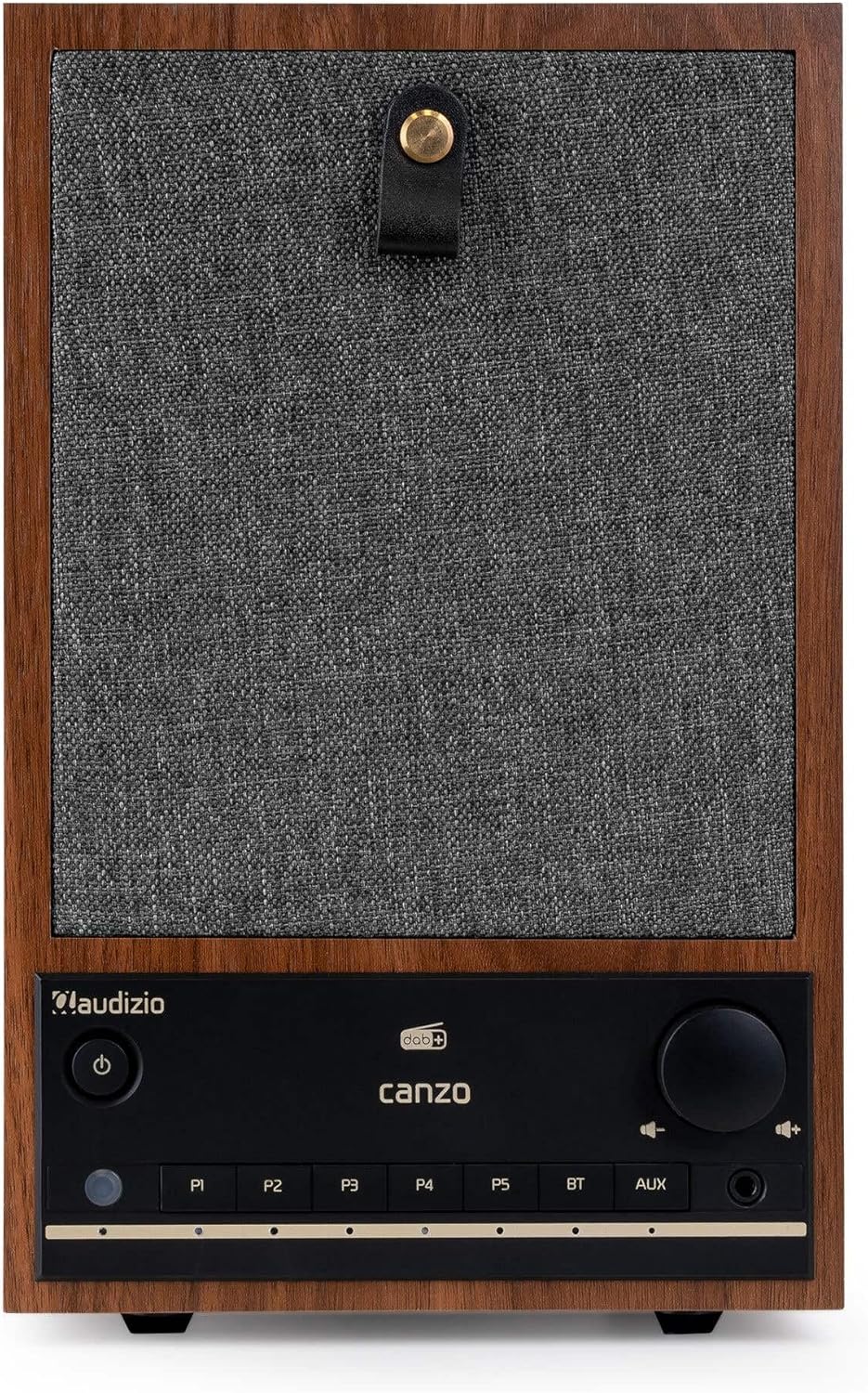
2.1 pav.: priekis view of the Audizio Canzo DAB+ Internet Radio in walnut finish.

2.2 pav.: priekis view with speaker grille removed, highlighting the speaker, display, and control panel.
3. Kas yra dėžutėje
Atsargiai išpakuokite dėžę ir įsitikinkite, kad joje yra visi daiktai:
- Audizio Canzo DAB+ Internet Radio
- Maitinimo adapteris
- Nuotolinio valdymo pultas
- Greitos pradžios vadovas
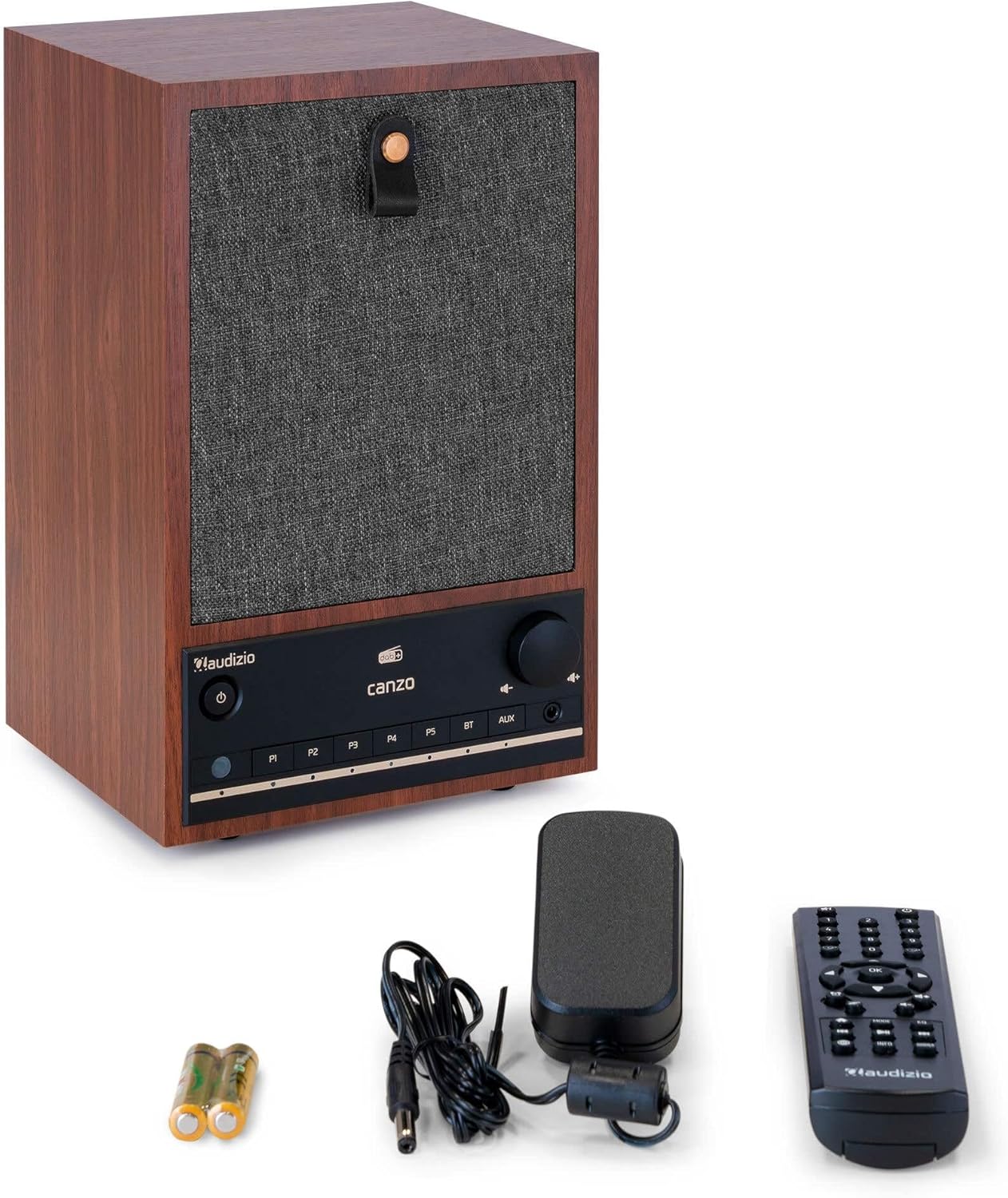
Figure 3.1: Audizio Canzo radio with its accessories.
4. Sąranka
4.1 Maitinimo prijungimas
- Insert the DC plug of the power adapter into the DC IN port on the back of the radio.
- Plug the power adapter into a standard wall outlet (220V).
- Apverskite ĮJUNGTA/IŠJUNGTA switch on the back of the unit to the ON padėtis.
4.2 Antenos prijungimas
For optimal DAB+ and FM reception, extend the telescopic antenna located on the back of the unit. Adjust its position for the best signal.

Figure 4.1: Rear panel with power input, audio ports, USB, LAN, and antenna.
4.3 Pradinis įjungimas ir tinklo sąranka
- Paspauskite Galia button on the front panel or remote control to turn on the radio.
- The display will show the Audizio logo and then guide you through the initial setup wizard.
- Pasirinkite norimą kalbą.
- The radio will prompt you to connect to a network. Choose Wi-Fi or LAN.
- „Wi-Fi“: Select your Wi-Fi network from the list and enter the password using the navigation buttons and OK mygtuką.
- For LAN: Prijunkite Ethernet kabelį nuo maršrutizatoriaus prie LAN port on the back of the radio. The connection should be established automatically.
- Once connected, the radio will update the time and date automatically.
5. Naudojimo instrukcijos
5.1 Pagrindiniai valdikliai
The front panel features a power button, preset buttons (P1-P5), Bluetooth (BT) and AUX input buttons, a volume knob, and navigation controls. The remote control provides full access to all functions.
5.2 Režimo pasirinkimas
Paspauskite REŽIMAS button on the radio or remote control to cycle through available modes: Internet Radio, DAB+, FM, Bluetooth, AUX, and USB Playback.
5.3 Interneto radijas
- Pasirinkite Interneto radijas režimu.
- Use the navigation buttons to browse stations by location, genre, or search.
- Paspauskite OK norėdami pasirinkti stotį.
- Norėdami išsaugoti stotį kaip iš anksto nustatytą, paspauskite ir palaikykite vieną iš P1-P5 buttons until the display confirms.
5.4 DAB+ radijas
- Pasirinkite DAB+ režimu.
- Radijas automatiškai ieškos prieinamų DAB+ stočių.
- Use the navigation buttons to scroll through the list of found stations.
- Paspauskite OK norėdami pasirinkti stotį.
- Norėdami išsaugoti stotį kaip iš anksto nustatytą, paspauskite ir palaikykite vieną iš P1-P5 mygtukai.
5.5 FM radijas
- Pasirinkite FM režimu.
- Paspauskite ir palaikykite Nuskaityti button (usually on the remote or via menu) to auto-scan for FM stations.
- Use the navigation buttons to tune manually or select from scanned stations.
- Norėdami išsaugoti stotį kaip iš anksto nustatytą, paspauskite ir palaikykite vieną iš P1-P5 mygtukai.
5.6 „Bluetooth“ atkūrimas
- Pasirinkite Bluetooth mode. The radio will enter pairing mode, indicated on the display.
- Išmaniajame telefone arba planšetiniame kompiuteryje įjunkite Bluetooth ir ieškokite galimų įrenginių.
- Select "Audizio Canzo" from the list to pair.
- Susiejus, galite leisti garsą iš savo įrenginio per radiją.
5.7 AUX įvestis
- Prijunkite išorinį garso įrenginį (pvz., MP3 grotuvą) prie Aux in port on the back of the radio using a 3.5mm audio cable.
- Pasirinkite AUX režimu.
- Audio from the connected device will now play through the radio.
5.8 USB atkūrimas
- Įdėkite USB atmintinę su garso įrašu files į USB ATKŪRIMAS port on the back of the radio.
- Pasirinkite USB režimu.
- Use the navigation buttons to browse and select audio files atkūrimui.
5.9 Žadintuvas ir miego laikmatis
- Signalizacija: Access the Alarm settings via the menu. Set up to two alarms with desired time, source (buzzer, radio), and volume.
- Miego laikmatis: Access the Sleep Timer settings via the menu. Set a duration (e.g., 15, 30, 60 minutes) after which the radio will automatically turn off.
- Snausti: Kai suskamba žadintuvas, paspauskite Snausti button on the remote or radio to temporarily silence it.
6. Priežiūra
6.1 Valymas
To clean the radio, use a soft, dry, lint-free cloth. Do not use abrasive cleaners, waxes, or solvents as they may damage the finish or internal components.
6.2 Saugykla
Jei įrenginį ilgesnį laiką sandėliuosite, atjunkite jį nuo maitinimo lizdo ir laikykite vėsioje, sausoje vietoje, apsaugotoje nuo tiesioginių saulės spindulių ir ekstremalių temperatūrų.
7. Problemų sprendimas
| Problema | Galima priežastis | Sprendimas |
|---|---|---|
| Nėra galios | Power adapter not connected; ON/OFF switch is OFF. | Ensure power adapter is securely connected and ON/OFF switch is ON. |
| Nėra garso | Per mažas garsumas; pasirinktas neteisingas šaltinis; prijungtos ausinės. | Increase volume; select correct input mode; disconnect headphones. |
| Nepavyksta prisijungti prie „Wi-Fi“. | Incorrect password; router too far; network issue. | Verify Wi-Fi password; move radio closer to router; restart router. |
| Prastas DAB+/FM priėmimas | Antena neištiesta; silpno signalo zona. | Fully extend and adjust the telescopic antenna; try repositioning the radio. |
| Nuotolinio valdymo pultas neveikia | Išsikrovusios baterijos; kliūtis tarp nuotolinio valdymo pulto ir radijo imtuvo. | Replace remote control batteries; ensure clear line of sight to the radio's sensor. |
8. Specifikacijos
| Funkcija | Specifikacija |
|---|---|
| Modelio numeris | Canzo |
| Gaminio matmenys | 22.5 x 20.5 x 34 cm |
| Prekės svoris | 2.9 kilogramo |
| Spalva | Riešutas |
| Ekrano dydis | 2.4 colių |
| Ryšio technologija | Aux, Bluetooth, Wi-Fi, LAN |
| Bluetooth versija | 5.3 |
| Palaikomos radijo dažnių juostos | DAB+, FM, interneto radijas |
| Maitinimo šaltinis | Corded Electric (220 Volt) |
| Ypatingos savybės | Integrated Clock, Sleep Timer, Alarm, Remote Control, Preset Stations |
| Suderinami įrenginiai | Smartphone, Tablet, Headphones, MP3 Player, USB Storage Device |
9. Garantija ir palaikymas
Dėl garantijos informacijos ir techninės pagalbos žr. prie gaminio pridėtą garantinę kortelę arba susisiekite su pardavėju. Išsaugokite pirkimo įrodymą, jei prireiktų pateikti garantinį ieškinį.