
1. Įvadas
This manual provides detailed instructions for the installation, operation, and maintenance of your Potegrap Outdoor Security Camera (Model T-CQ1052-W20V). Please read this manual thoroughly before using the product to ensure proper function and safety. Keep this manual for future reference.
The Potegrap T-CQ1052-W20V is a high-definition outdoor security camera designed for comprehensive home surveillance. It features 2K resolution, dual-band 2.4GHz and 5GHz WiFi connectivity, 360-degree pan and tilt functionality, advanced motion detection with tracking, color night vision, two-way audio, and optional AI-powered features with cloud storage.
2. Saugos informacija
- Ensure the power adapter is suitable for your local power supply and is properly grounded.
- Do not expose the camera to extreme temperatures outside its operating range (-4°F to 122°F / -20°C to 50°C).
- Venkite laikyti fotoaparatą šalia stiprių elektromagnetinių laukų.
- Nebandykite ardyti ar modifikuoti kameros. Tai panaikins garantiją.
- Laikykite fotoaparatą ir jo priedus vaikams nepasiekiamoje vietoje.
- Clean the camera lens with a soft, dry cloth only.
3. Pakuotės turinys
Patikrinkite pakuotę, ar joje yra šie daiktai:
- Potegrap Outdoor Security Camera (Model T-CQ1052-W20V) - 2 units
- Maitinimo adapteriai
- Montavimo varžtai ir inkarai
- Montavimo šablonas
- Vartotojo vadovas (šis dokumentas)

3.1 paveikslas: Two Potegrap T-CQ1052-W20V outdoor security cameras, highlighting their 2K resolution, 5G WiFi capability, and US-based cloud storage option. A smartphone screen displays a live view iš fotoaparato.
4. Produktas baigtasview
4.1 Pagrindinės savybės
- 2K HD raiška: Pateikia aiškų ir detalų vaizdo įrašątage (2560x1440).
- Dviejų juostų WiFi: Supports both 2.4GHz and 5GHz networks for flexible and stable connectivity.
- 360° aprėptis: Features 355° horizontal pan and 90° vertical tilt for comprehensive area monitoring.
- Advanced Motion Detection & Tracking: Automatically detects and follows moving objects.
- Spalvotas naktinis matymas: Provides full-color video even in low-light conditions.
- Dvipusis garsas: Integruotas mikrofonas ir garsiakalbis bendravimui realiuoju laiku.
- Privatumo režimas: Physically rotates the camera lens for enhanced privacy when needed.
- Lankstus saugojimas: Supports local TF (Micro SD) card storage (up to 128GB, not included) and optional US-based cloud storage.
- AI Features (Subscription Required): Includes person, vehicle, and animal detection, along with a 911 emergency alarm integration.
- Atsparus oro sąlygoms: Designed to operate in various outdoor conditions, from -4°F to 122°F (-20°C to 50°C).

4.1 paveikslas: A banner image promoting the Potegrap AI-Powered WiFi Camera, emphasizing its smart and safe features including 911 Emergency Alarm, US-Based Cloud storage, and integrated AI capabilities.

4.2 paveikslas: This image explains the camera's dual-band WiFi support, indicating that it can connect to both 2.4GHz (longer transmission distance) and 5GHz (superior network performance) networks.
5. Sąranka
5.1 Programėlės diegimas ir paskyros sukūrimas
- Download the official Potegrap security camera application from your smartphone's app store (available for iOS and Android).
- Atidarykite programėlę ir vykdykite ekrane pateikiamus nurodymus, kad sukurtumėte naują paskyrą arba prisijunkite, jei jau turite.
5.2 Fizinis įrengimas
The camera is designed for both indoor and outdoor use. Choose a location that provides the desired viewing angle and has access to a power outlet.
- Use the provided mounting template to mark the drill holes on your chosen surface (wall or ceiling).
- Drill holes and insert the wall anchors if mounting on drywall or masonry.
- Secure the camera's mounting bracket using the provided screws.
- Pritvirtinkite fotoaparatą prie tvirtinimo laikiklio.
- Prijunkite maitinimo adapterį prie fotoaparato ir įjunkite jį į elektros lizdą.

5.1 paveikslas: This banner emphasizes the camera's easy installation for both indoor and outdoor environments, showing a person installing it outdoors and examples of its placement inside a home and outside.
5.3 Prisijungimas prie „Wi-Fi“.
- Ensure your smartphone is connected to the same Wi-Fi network (2.4GHz or 5GHz) you intend to connect the camera to.
- Programėlėje palieskite „Pridėti įrenginį“ arba piktogramą „+“.
- Select your camera model and follow the in-app instructions, which typically involve scanning a QR code displayed on your phone with the camera or entering Wi-Fi credentials.
- Wait for the camera to connect to the network. A voice prompt or LED indicator will confirm successful connection.
5.4 SD Card Installation (Optional)
For local storage, insert a TF (Micro SD) card (up to 128GB, not included) into the designated slot on the camera. Ensure the camera is powered off before inserting or removing the card. Format the SD card via the app after installation for optimal performance.
6. Fotoaparato valdymas
6.1 Tiesiogiai View ir panoraminio/pakreipimo valdymas
Open the Potegrap app and select your camera to access the live view. Norėdami reguliuoti kameros objektyvą, naudokite ekrane rodomus valdiklius, kad jį pasuktumėte horizontaliai 355° ir pakreiptumėte vertikaliai 90°. viewing kampas.
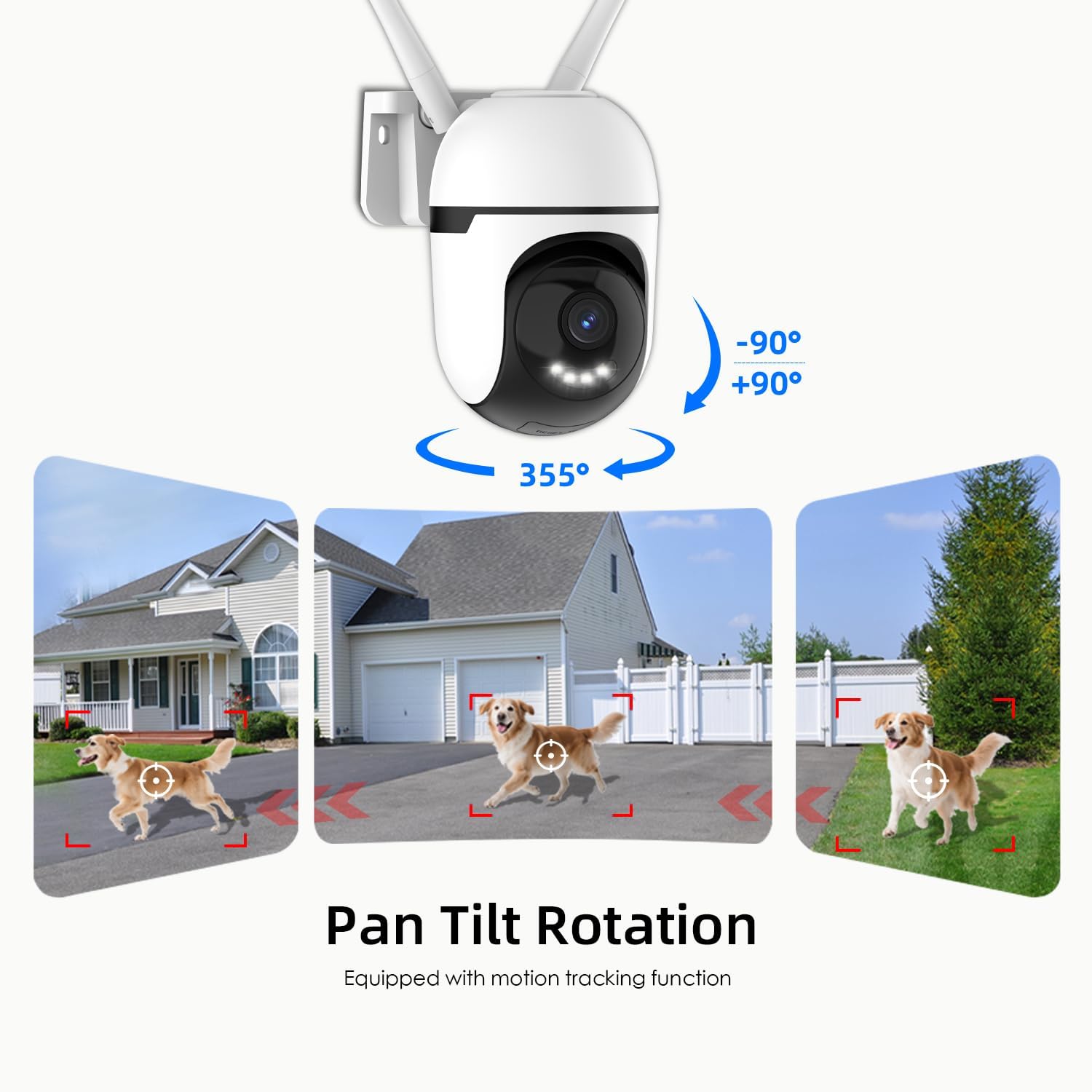
6.1 paveikslas: This graphic demonstrates the camera's pan and tilt functionality, allowing for a 360-degree horizontal view (355°) and vertical adjustment (90°), illustrated by different perspectives of a dog in a yard.

6.2 paveikslas: This image highlights the camera's 360-degree coverage (355° pan, 90° tilt) and motion tracking, showing its ability to monitor a wide area including children playing and a dog.
6.2 Judesio aptikimas ir sekimas
The camera can detect motion and automatically track moving objects within its field of view. You will receive real-time alerts on your smartphone when motion is detected.
- Įjungti / išjungti: Access camera settings in the app to turn motion detection on or off.
- Jautrumas: Sureguliuokite judesio aptikimo jautrumą, kad sumažintumėte klaidingų aliarmų skaičių.
- Aptikimo zonos: Nustatykite konkrečias sritis kameros viduje view for motion detection to focus on, ignoring irrelevant areas.

6.3 paveikslas: This image illustrates the camera's auto-tracking motion detection, showing the camera following a moving subject (a child) within its field of view.

6.4 paveikslas: An illustration of how to set up custom detection zones to reduce unnecessary alerts, showing a dog within a defined zone and a corresponding motion detection notification.
6.3 2-Way Talk
Norėdami bendrauti su šalia kameros esančiais asmenimis, naudokite dvipusio garso funkciją. Tiesioginio vaizdo transliacijoje palieskite mikrofono piktogramą. view kalbėti ir klausytis per kameros garsiakalbį.

6.5 paveikslas: This image illustrates the two-way talk feature, enabling real-time audio communication between a person near the camera outdoors and another person using the mobile app indoors.
6.4 Naktinis matymas
The camera offers multiple night vision modes:
- Classic IR Night Vision: Standard black and white infrared view.
- Spalvotas naktinis matymas: Utilizes built-in lights to provide full-color video in low-light conditions.
- Pažangus naktinis matymas: Stays in IR mode and switches to color night vision upon detection of motion.
Adjust night vision settings in the app to suit your preferences.

6.6 paveikslas: This image compares the camera's night vision capabilities: classic infrared (black and white), full-color night vision, and intelligent night vision that activates color upon detection.
6.5 Privatumo režimas
Activate Privacy Mode via the app to physically rotate the camera lens downwards, ensuring your privacy when the camera is not needed for surveillance.

6.7 paveikslas: The camera's privacy mode is shown, where the lens physically rotates to obscure the view, and the mobile application confirms the mode is active.
6.6 Įrašymas ir saugojimas
Kamera palaiko nepertraukiamą įrašymą visą parą ir įvykių suaktyvinamą įrašymą.tage galima saugoti dviem būdais:
- Vietinė TF kortelių saugykla: Insert a Micro SD card (up to 128GB) for local storage without a subscription. Ensure the card is formatted through the app.
- US-Based Cloud Storage: An optional subscription service provides cloud storage, often including advanced AI analysis features.
Prieiga įrašyta footage through the playback section of the Potegrap app.

6.8 paveikslas: This image details the storage options: US-based cloud storage (subscription needed for AI functions) and local TF card storage (up to 128GB, not included) for secure data.
6.7 AI Features (Subscription Required)
Enhance your security with AI-powered features, available with a cloud storage subscription:
- Asmens aptikimas: Differentiates human shapes from other moving objects.
- Transporto priemonės aptikimas: Identifies vehicles, reducing irrelevant alerts.
- Gyvūnų aptikimas: Recognizes animals, useful for pet monitoring or filtering wildlife alerts.
- 911 Emergency Alarm: Integrates with emergency services for rapid response during critical events.

6.9 paveikslas: The camera's intelligent alarm feature is depicted, showing a detected person and an option within the mobile application to initiate a 911 emergency call.
7. Priežiūra
- Valymas: Regularly wipe the camera lens and body with a soft, dry cloth to remove dust and dirt. Do not use harsh chemicals or abrasive cleaners.
- Firmware atnaujinimai: Check the app periodically for firmware updates. Keeping your camera's firmware updated ensures optimal performance and security.
- Maitinimo ciklas: Jei kyla problemų dėl fotoaparato veikimo, pabandykite jį 10 sekundžių atjungti nuo maitinimo šaltinio ir vėl prijungti.
8. Problemų sprendimas
| Problema | Galima priežastis | Sprendimas |
|---|---|---|
| Kamerai nepavyksta prisijungti prie „Wi-Fi“. | Incorrect Wi-Fi password; camera too far from router; router settings (e.g., firewall). | Verify Wi-Fi password. Move camera closer to router. Ensure router supports 2.4GHz or 5GHz. Temporarily disable firewall for setup. Reset camera and try again. |
| Prasta vaizdo kokybė arba neryškus vaizdas. | Nešvarus objektyvas; nepakankamas apšvietimas; tinklo pralaidumo problemos. | Clean the camera lens. Ensure adequate lighting for optimal color night vision. Check your internet speed. |
| Judesio aptikimo įspėjimai skamba per dažnai arba neveikia. | Sensitivity set too high/low; detection zone not configured correctly. | Adjust motion detection sensitivity in the app. Configure specific detection zones to focus on relevant areas. |
| Negaliu view įrašytas footage from SD card. | SD card not formatted; SD card full or corrupted; app issue. | Ensure the SD card is correctly inserted and formatted via the app. Check if the SD card is full. Some advanced playback features or continuous recording may require a cloud subscription. |
| AI features (person/vehicle detection, 911 alarm) are not active. | Subscription required for AI features. | These advanced AI features typically require an active cloud storage subscription. Check your subscription status in the app. |
| Kamera nereaguoja. | Maitinimo problema; programinės įrangos triktis. | Check power connection. Perform a power cycle (unplug and replug). If issues persist, perform a factory reset (refer to app for instructions). |
9. Specifikacijos
| Funkcija | Detalė |
|---|---|
| Modelio numeris | T-CQ1052-W20V |
| Prekės ženklas | Potegrap |
| Rezoliucija | 2K HD (2560x1440), 3 MP |
| Ryšys | Dual-band 2.4GHz & 5GHz WiFi |
| Maitinimo šaltinis | Su laidu elektra |
| Panardinimo / pakreipimo diapazonas | 355° horizontaliai, 90° vertikaliai |
| Naktinis matymas | Color Night Vision, IR Night Vision, Intelligent Night Vision |
| Saugojimo parinktys | TF (Micro SD) Card (up to 128GB, not included), US-Based Cloud Storage (subscription required) |
| Garsas | Two-Way Talk (Built-in microphone and speaker) |
| Darbinė temperatūra | -4°F iki 122°F (nuo -20°C iki 50°C) |
| Matmenys (I x P x A) | 3.9 x 3.1 x 4.3 colio |
| Prekės svoris | 1.57 svaro (0.71 kilogramo) |
| Suderinami įrenginiai | Išmanusis telefonas („iOS“, „Android“) |
10. Garantija ir palaikymas
For warranty information, please refer to the documentation included with your purchase or contact Potegrap customer support. Protection plans may be available for extended coverage.
If you encounter any issues or have questions regarding your Potegrap security camera, please contact our customer support team through the official Potegrap websvetainėje arba programėlėje pateiktą kontaktinę informaciją.