
Įvadas
Thank you for choosing the Ledwood ACCESS130 Portable HiFi Speaker. This manual provides essential information for the safe and efficient operation of your device. The ACCESS130 is a versatile portable speaker featuring dynamic RGB LED effects, Bluetooth 5.3 connectivity, USB input, and a karaoke function with an included wireless microphone. It is designed to deliver a powerful audio experience for various occasions.
Saugos informacija
- Prieš naudodami gaminį, atidžiai perskaitykite visas instrukcijas.
- Saugokite garsiakalbį nuo vandens ar per didelės drėgmės. Šis gaminys nėra atsparus vandeniui.
- Garsiakalbį laikykite atokiau nuo šilumos šaltinių, tiesioginių saulės spindulių ir degių medžiagų.
- Nebandykite ardyti, remontuoti ar modifikuoti įrenginio. Visus techninės priežiūros darbus patikėkite kvalifikuotiems darbuotojams.
- Naudokite tik pridedamą USB-C įkrovimo laidą.
- Venkite klausytis dideliu garsu ilgą laiką, kad nepažeistumėte klausos.
- Laikyti vaikams nepasiekiamoje vietoje.
Pakuotės turinys
Patikrinkite pakuotę, ar joje yra šie daiktai:
- Ledwood ACCESS130 Portable HiFi Speaker
- USB-C įkrovimo laidas
- Belaidis mikrofonas
- Nešiojimo dirželis
Produktas baigtasview
Familiarize yourself with the components and controls of your Ledwood ACCESS130 speaker.
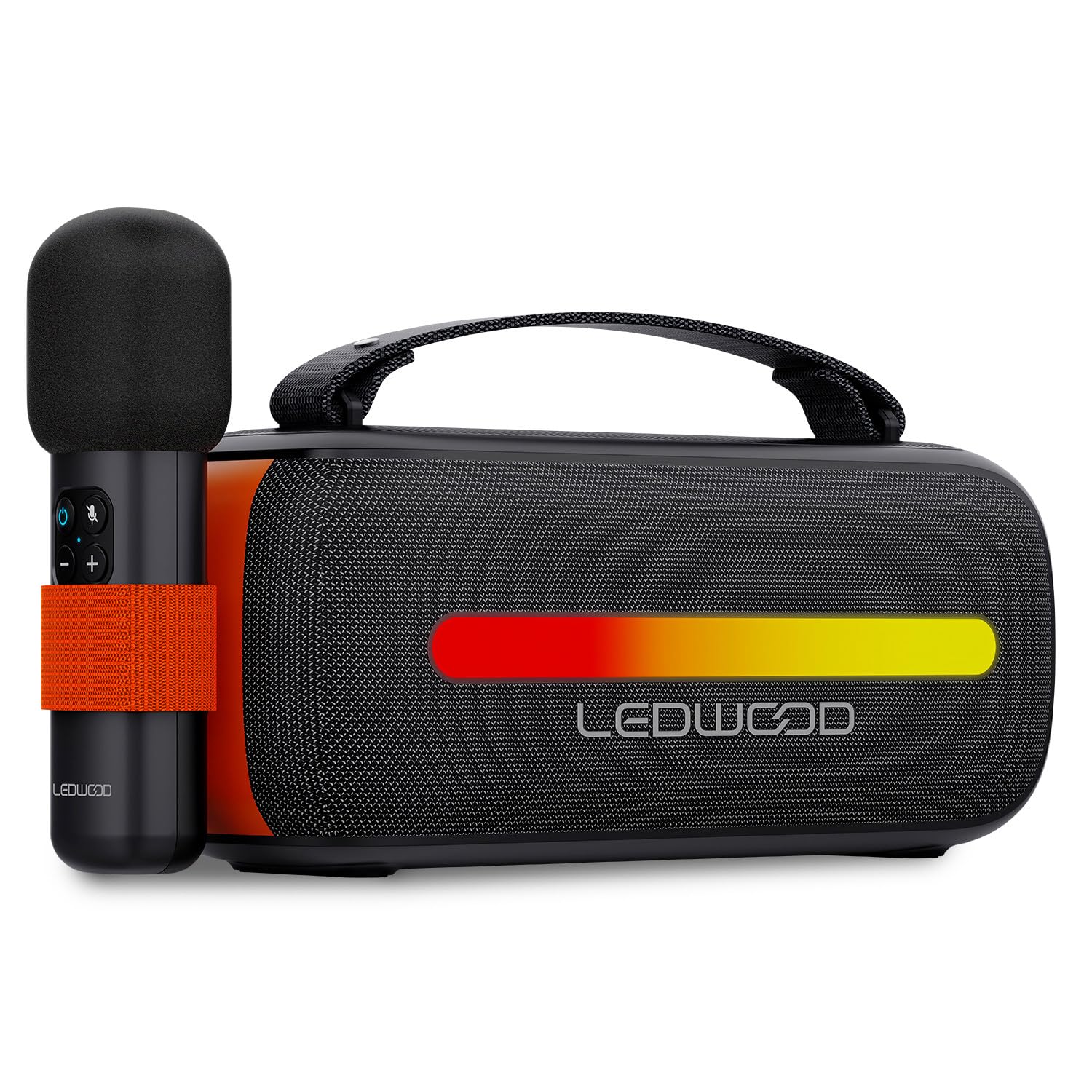
Image: The Ledwood ACCESS130 portable speaker shown with its wireless microphone attached to the side. The speaker features a black mesh grille and an illuminated LED strip on the front.
Valdikliai ir prievadai

Paveikslėlis: Iš viršaus į apačią view of the Ledwood ACCESS130 speaker, highlighting the control panel with buttons for power, volume, mode, and LED effects. Icons for LED colors, microphone, karaoke function, USB-C, and wireless connection are also visible.
- Maitinimo mygtukas: Paspauskite ir palaikykite, kad įjungtumėte/išjungtumėte garsiakalbį.
- Režimo mygtukas (M): Press to switch between Bluetooth, USB, and other input modes.
- Garsumo padidinimas (+): Padidinti garsumą.
- Sumažinti garsumą (-): Sumažinti garsumą.
- Atkūrimo / pristabdymo mygtukas: Paleisti arba pristabdyti garso atkūrimą.
- LED Effect Button: Cycle through different LED lighting modes or turn them off.
- USB-C prievadas: Garsiakalbio įkrovimui.
- USB-A prievadas: For USB audio playback.
Sąranka
1. Įkraukite garsiakalbį
- Prijunkite pridėtą USB-C įkrovimo laidą prie garsiakalbio USB-C prievado.
- Kitą laido galą prijunkite prie suderinamo USB maitinimo adapterio (nepridedamas) arba kompiuterio USB prievado.
- The LED indicator will show charging status. A full charge takes approximately [Charging Time - not specified in input, omit if not available].
2. Įjungimas/išjungimas
- Norėdami įjungti garsiakalbį, paspauskite ir palaikykite maitinimo mygtuką, kol jis įsijungs.
- Norėdami išjungti, dar kartą paspauskite ir palaikykite nuspaudę maitinimo mygtuką, kol garsiakalbis išsijungs.
3. „Bluetooth“ poravimas
- Ensure the speaker is powered on and in Bluetooth mode (indicated by a flashing Bluetooth LED). If not, press the 'M' (Mode) button to switch to Bluetooth mode.
- Išmaniajame telefone, planšetiniame kompiuteryje arba kompiuteryje įjunkite „Bluetooth“ ir ieškokite galimų įrenginių.
- Select "Ledwood ACCESS130" from the list of devices.
- Once paired, the Bluetooth LED will stop flashing and remain solid, indicating a successful connection.
4. Belaidžio mikrofono prijungimas
- Ensure the wireless microphone is charged and powered on.
- The microphone should automatically connect to the speaker when both are powered on and within range.
- Test the microphone by speaking into it to confirm audio output from the speaker.
Veikiantis
1. „Bluetooth“ atkūrimas
- Sėkmingai suporavę „Bluetooth“, atidarykite muzikos programą prijungtame įrenginyje.
- Start playing audio. The sound will be transmitted wirelessly to the ACCESS130 speaker.
- Garso lygiui reguliuoti naudokite garsiakalbio arba prijungto įrenginio garsumo mygtukus.
- Press the Play/Pause button on the speaker to control playback.
2. USB atkūrimas
- Įdėkite USB atmintinę su garso įrašu files (e.g., MP3) into the speaker's USB-A port.
- Press the 'M' (Mode) button to switch to USB mode.
- Garsiakalbis automatiškai pradės leisti garsą iš USB atmintinės.
- Use the speaker's controls to adjust volume and navigate tracks.
3. Karaoke funkcija
- Ensure the wireless microphone is connected to the speaker as described in the Setup section.
- Play your desired instrumental track via Bluetooth or USB.
- Kalbėkite arba dainuokite į mikrofoną. Jūsų balsas bus amplified through the speaker, mixing with the music.
4. LED šviesos efektai
- Press the LED Effect button to cycle through various dynamic RGB lighting modes.
- Continue pressing the button to select your preferred lighting effect or to turn the LEDs off.
Priežiūra
- Valymas: Garsiakalbio paviršių valykite minkštu, sausu skudurėliu. Nenaudokite abrazyvinių valiklių ar tirpiklių.
- Saugykla: Kai garsiakalbio nenaudojate ilgesnį laiką, laikykite jį vėsioje, sausoje vietoje, toliau nuo tiesioginių saulės spindulių ir ekstremalių temperatūrų.
- Akumuliatoriaus priežiūra: Norėdami pailginti baterijos veikimo laiką, prieš pirmą kartą naudodami garsiakalbį visiškai įkraukite jį ir, jei nenaudojate reguliariai, įkraukite jį bent kartą per tris mėnesius. Venkite visiškai iškrauti bateriją.
Trikčių šalinimas
| Problema | Galima priežastis | Sprendimas |
|---|---|---|
| Garsiakalbis neįsijungia. | Senka baterija. | Įkraukite garsiakalbį naudodami pateiktą USB-C laidą. |
| Nėra Bluetooth ryšio. | Speaker not in pairing mode; device out of range; previously connected device. | Įsitikinkite, kad garsiakalbis veikia „Bluetooth“ susiejimo režimu. Perkelkite įrenginį arčiau. Atjunkite nuo kitų įrenginių. |
| Nėra garso iš mikrofono. | Microphone not powered on; microphone not paired. | Ensure microphone is charged and powered on. Check if it automatically connects. |
| USB atkūrimas neveikia. | Neteisingas režimas; nepalaikomas file format; corrupted USB drive. | Press 'M' button to select USB mode. Ensure files are MP3. Try a different USB drive. |
| Neveikia LED lemputės. | LED effects turned off. | Press the LED Effect button to cycle through modes. |
Specifikacijos
| Modelio pavadinimas: | PRIEIGA130 |
| Prekinis ženklas: | Ledwood |
| Garsiakalbio tipas: | Nešiojamasis garsiakalbis |
| Didžiausia garsiakalbio išėjimo galia: | 130 Watts (12W RMS) |
| Garso išvesties režimas: | Stereo |
| Belaidžio ryšio technologija: | Bluetooth 5.3 |
| „Bluetooth“ didžiausia galia: | -6-4dBm |
| Signalo ir triukšmo santykis: | ≥80dB |
| Maitinimo šaltinis: | Maitinamas baterijomis |
| Baterija: | 3.7V - 3600mAh |
| Total Playtime (50% volume): | 6 valandos 30 minučių |
| Kontrolės metodas: | Application, Touch |
| Jungtys: | Bluetooth 5.3, USB-A |
| Dimensions (H x D x L): | 12.04 cm x 9.9 cm x 26.1 cm |
| Svoris: | 1 kg |
| Atsparus vandeniui: | Nr |
| Įtraukti komponentai: | USB-C charging cable, Wireless microphone, Carrying strap |
Garantija ir palaikymas
For warranty information or technical support, please refer to the documentation provided at the time of purchase or contact your retailer. You may also visit the official Ledwood webSvetainė, kurioje rasite tolesnę pagalbą.


