
1. Įvadas
Thank you for choosing the KLIM KLCD-0582 CD Cassette Boombox. This versatile audio system combines classic and modern features, allowing you to enjoy music from various sources including CDs, cassette tapes, AM/FM radio, Bluetooth-enabled devices, USB drives, and auxiliary input. This manual provides detailed instructions for safe operation, setup, and maintenance of your device. Please read it thoroughly before use and retain it for future reference.
2. Svarbios saugos instrukcijos
- Prieš naudodami įrenginį, atidžiai perskaitykite šias instrukcijas.
- Išsaugokite šias instrukcijas, kad galėtumėte pasinaudoti ateityje.
- Atkreipkite dėmesį į visus įspėjimus ant gaminio ir naudojimo instrukcijose.
- Vykdykite visas instrukcijas.
- Nenaudokite šio prietaiso šalia vandens.
- Valykite tik sausa šluoste.
- Neužblokuokite jokių ventiliacijos angų. Montuokite pagal gamintojo instrukcijas.
- Nemontuokite šalia jokių šilumos šaltinių, pvz., radiatorių, šilumokaičių, viryklių ar kitų įrenginių (įskaitant ampkeltuvai), kurie gamina šilumą.
- Saugokite maitinimo laidą, kad ant jo neužeitų ar nesuspaustų, ypač prie kištukų, patogių lizdų ir toje vietoje, kur jie išeina iš aparato.
- Naudokite tik gamintojo nurodytus priedus/priedus.
- Atjunkite šį įrenginį žaibuojant arba kai nenaudojate ilgą laiką.
- Visus techninės priežiūros darbus patikėkite kvalifikuotam techninės priežiūros personalui. Techninė priežiūra reikalinga, kai aparatas buvo kaip nors pažeistas, pvz., pažeistas maitinimo laidas arba kištukas, į aparatą išsiliejo skystis ar įkrito daiktai, aparatas buvo paveiktas lietaus ar drėgmės, neveikia normaliai. , arba buvo numestas.
3. Pakuotės turinys
Patikrinkite pakuotę, ar joje yra šie daiktai:
- KLIM CD Cassette Player (KLCD-0582)
- Maitinimo laidas (kintamosios srovės laidas)
- AAA alkaline batteries * 2 (for remote control)
- KLIM envelope
- Naudojimo instrukcija (šis dokumentas)
4. Produktas baigtasview
Familiarize yourself with the main components and controls of your KLIM KLCD-0582 boombox.
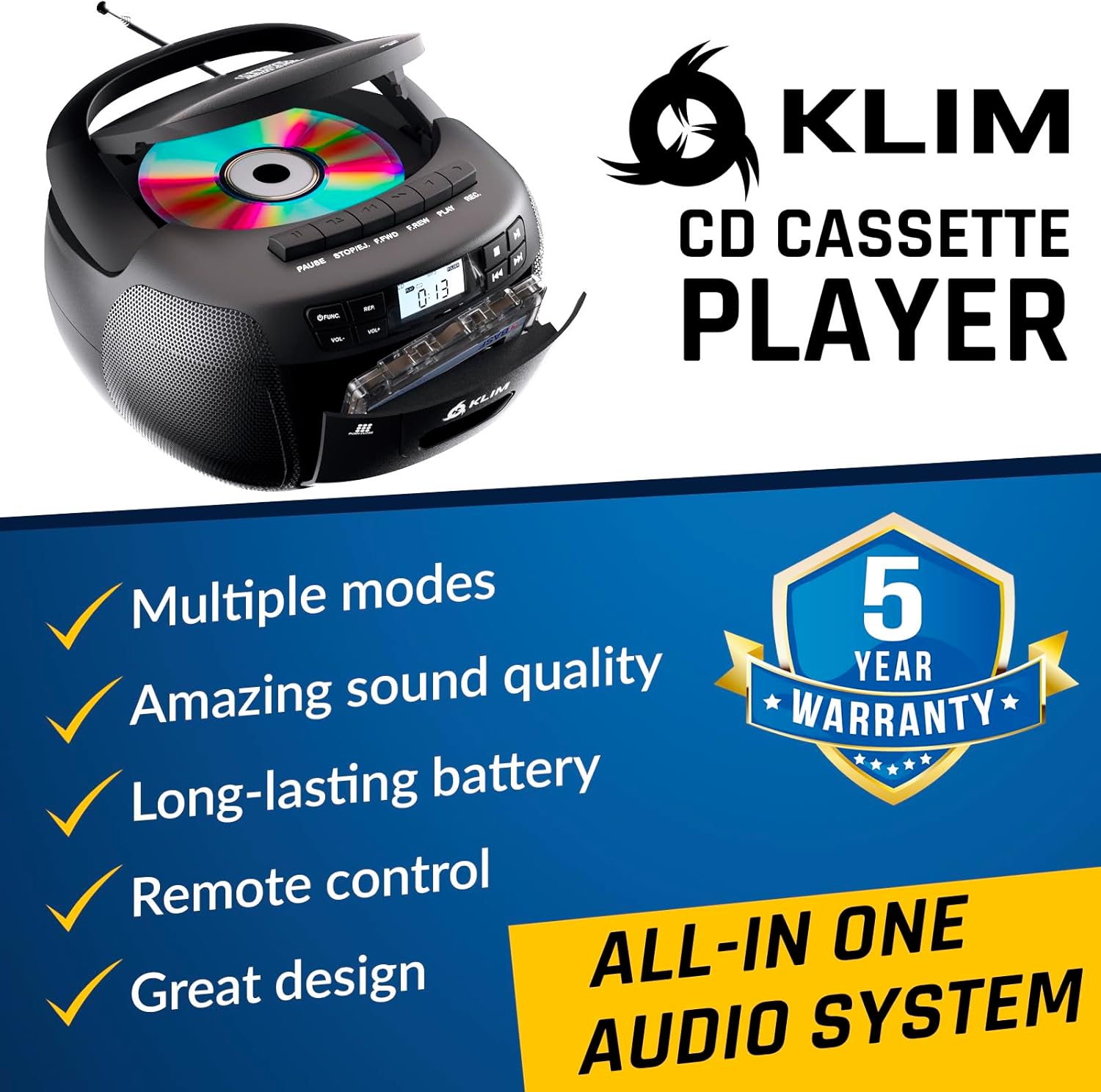
4.1 pav.: priekis view of the KLIM KLCD-0582 CD Cassette Boombox, showing the CD lid, cassette deck, and control buttons.
Priekinio skydelio valdikliai:
- Maitinimo mygtukas: Įjungia arba išjungia įrenginį.
- Function/Mode Button: Switches between CD, Cassette, Radio, Bluetooth, USB, and AUX modes.
- Volume Control (VOL+/-): Reguliuoja atkūrimo garsumą.
- Play/Pause Button (CD/USB): Starts or pauses CD/USB playback.
- Stop Button (CD/USB/Cassette): Sustabdo atkūrimą.
- Praleidimo / paieškos mygtukai (<< / >>): Skips tracks or searches within a track (CD/USB). Tunes radio stations.
- Repeat Button (CD/USB): Kartoja dabartinį takelį arba visus takelius.
- Program Button (CD/USB): Programs track order for CD/USB playback.
- Record Button (Cassette): Initiates recording to cassette tape.
- Eject Button (Cassette): Opens the cassette deck.
- LCD ekranas: Rodo dabartinį režimą, takelio numerį, radijo dažnį ir kt.

4.2 pav. Išsamus view of the LCD display and speaker area, highlighting the digital interface.
Side/Rear Panel Connections:
- Kintamosios srovės įvestis: Prijungia kintamosios srovės maitinimo laidą.
- Baterijų skyrius: Holds 6 C-size batteries for portable use.
- USB prievadas: Garso įrašams leisti files iš USB atmintinės.
- AUX įvestis (3.5 mm): Prijungia išorinius garso įrenginius.
- Ausinių lizdas (3.5 mm): Privačiam pasiklausymui.
- Teleskopinė antena: AM/FM radijo imtuvui.

Figure 4.3: Product label on the bottom of the unit, indicating model number and electrical ratings.
5. Sąranka
5.1 Įrenginio maitinimas
Jūsų magnetola gali būti maitinama kintamosios srovės šaltiniu arba baterijomis.
Kintamoji srovė (naudojimas patalpose):
- Įsitikinkite, kad įrenginys išjungtas.
- Connect the supplied AC power cord to the AC power input on the rear of the boombox.
- Plug the other end of the AC power cord into a standard wall outlet (110-120V, 60Hz).
DC Power (Battery Operation - Portable Use):
- Įsitikinkite, kad įrenginys yra išjungtas ir atjungtas nuo kintamosios srovės maitinimo.
- Atidarykite baterijų skyriaus dangtelį, esantį įrenginio apačioje.
- Insert 6 C-size (UM-2) batteries, ensuring correct polarity (+/-) as indicated inside the compartment.
- Saugiai uždarykite akumuliatoriaus skyriaus dangtelį.
Pastaba: Jei prietaisas nebus naudojamas ilgesnį laiką, išimkite baterijas, kad išvengtumėte ištekėjimo ir pažeidimų.
5.2 Nuotolinio valdymo pulto baterijų įdėjimas
- Atidarykite baterijų skyrių, esantį nuotolinio valdymo pulto gale.
- Insert 2 AAA alkaline batteries, observing the correct polarity.
- Uždarykite akumuliatoriaus skyriaus dangtelį.

Figure 5.1: The boombox shown with its remote control, which requires AAA batteries.
5.3 Antenos sąranka
Optimaliam FM radijo priėmimui visiškai ištieskite teleskopinę anteną. AM priėmimui pasukite įrenginį, kad gautumėte geriausią signalą.
6. Operacija
6.1 Pagrindiniai valdikliai
- Maitinimo įjungimas/išjungimas: Paspauskite GALIA mygtuką.
- Pasirinkite režimą: Paspauskite FUNKCIJA or REŽIMAS button repeatedly to cycle through CD, Cassette, Radio (AM/FM), Bluetooth, USB, and AUX modes.
- Reguliuoti garsumą: Naudokite VOL+ ir VOL- mygtukai.
6.2 CD atkūrimas
- Paspauskite FUNKCIJA mygtuką, norėdami pasirinkti CD režimą.
- Atidarykite CD skyriaus dangtelį.
- Place a CD (audio CD or MP3/WMA CD) with the label side facing up.
- Close the CD compartment lid. The unit will read the disc and begin playback automatically or display the total number of tracks.
- Paspauskite PALEISTI / PAUZĖ , kad pradėtumėte arba pristabdytumėte atkūrimą.
- Paspauskite STOP norėdami sustabdyti atkūrimą.
- Naudokite SKIP (<< / >>) buttons to skip tracks. Hold to fast forward/rewind within a track.
- Programos atkūrimas: Sustabdymo režimu paspauskite PROGRAMA. Naudokite PRALEISTI to select desired tracks, then press PROGRAMA again to confirm each track. Press ŽAISTI , kad pradėtumėte užprogramuotą atkūrimą.
- Pakartokite žaidimą: Paspauskite KARTOT once for single track repeat, twice for all tracks repeat.
6.3 Kasečių atkūrimas ir įrašymas
- Paspauskite FUNKCIJA mygtuką, kad pasirinktumėte TAPE režimą.
- Paspauskite IŠMETIMAS button to open the cassette deck.
- Insert a cassette tape and close the deck.
- Paspauskite ŽAISTI norėdami pradėti atkūrimą.
- Naudokite FAST FORWARD (FFWD) or ATSKINTI ATGAL (REW) mygtukai juostai naršyti.
- Paspauskite STOP norėdami sustabdyti atkūrimą.
Įrašymas į kasetę:
- Įdėkite tuščią, įrašomą kasetę.
- Select the desired source (CD, Radio, AUX, Bluetooth, USB).
- Pradėkite atkūrimą šaltinyje (pvz., paleiskite kompaktinio disko takelį, įjunkite radijo stotį).
- Paspauskite ĮRAŠAS mygtuką ant magnetofono. ŽAISTI Mygtukas taip pat įsijungs. Prasidės įrašymas.
- Paspauskite STOP įrašymui baigti.
Svarbu: Ensure the cassette tape has its record-protection tabs intact for recording.
6.4 AM/FM radijas
- Paspauskite FUNKCIJA mygtuką, kad pasirinktumėte RADIO režimą.
- Extend the telescopic antenna for FM reception. For AM, rotate the unit.
- Naudokite TUNINGAS rankenėlė arba SKIP (<< / >>) buttons to tune to your desired station. The frequency will be displayed on the LCD.
6.5 Bluetooth ryšys
- Paspauskite FUNKCIJA button to select BLUETOOTH mode. The LCD will display "BT" and the unit will enter pairing mode, indicated by a flashing Bluetooth icon.
- Savo „Bluetooth“ įrenginyje (pvz., išmaniajame telefone, planšetiniame kompiuteryje) įjunkite „Bluetooth“ ir ieškokite galimų įrenginių.
- Select "KLIM Boombox" from the list of devices.
- Once paired, the Bluetooth icon on the boombox's LCD will stop flashing. You can now play audio from your device through the boombox.
- Control playback (play/pause, skip tracks) either from your connected device or using the boombox's controls.
6.6 USB atkūrimas
- Įkiškite USB atmintinę į USB prievadą.
- Paspauskite FUNKCIJA button to select USB mode. The unit will automatically detect and begin playing compatible audio files (MP3/WMA).
- Naudokite PALEISTI / PAUZĖ, STOP, ir SKIP (<< / >>) buttons to control playback, similar to CD mode.
- Programos atkūrimas: Sustabdymo režimu paspauskite PROGRAMA. Naudokite PRALEISTI to select desired tracks, then press PROGRAMA again to confirm each track. Press ŽAISTI , kad pradėtumėte užprogramuotą atkūrimą.
6.7 AUX įvestis
- Connect an external audio device (e.g., MP3 player, smartphone) to the AUX input jack using a 3.5mm audio cable (not included).
- Paspauskite FUNKCIJA button to select AUX mode. The LCD will display "AUX".
- Pradėkite atkūrimą išoriniame įrenginyje. Garsas bus transliuojamas per „boombox“ garsiakalbius.
- Volume can be adjusted on both the boombox and the external device. Playback controls are managed on the external device.
6.8 Nuotolinio valdymo pulto naudojimas
The included remote control allows convenient operation from a distance of up to 20 feet. Ensure line of sight to the boombox's front panel.
- Maitinimas (raudonas mygtukas): Įjungia/išjungia įrenginį.
- Nutildyti: Nutildo / įjungia garsą.
- VOL +/-: Reguliuoja garsumą.
- FUNC.: Cycles through modes (CD, TAPE, FM, AM, BT, USB, AUX).
- REP: Repeat function for CD/USB.
- PROGRAMA: Program function for CD/USB.
- PLAY/PAUSE, STOP, FFWD, REW: Playback controls for CD/USB/Cassette.
- Number Buttons (0-9, -10, +10): Direct track selection for CD/USB.
7. Priežiūra
7.1 Įrenginio valymas
- Prieš valydami, visada atjunkite įrenginį nuo maitinimo šaltinio.
- Išoriniams paviršiams valyti naudokite minkštą, sausą šluostę.
- Nenaudokite abrazyvinių valiklių, vaško ar tirpiklių, nes jie gali pažeisti apdailą.
- CD lęšiui naudokite specialų CD lęšių valymo diską.
- Kasečių grotuvą periodiškai valykite juostų galvutes ir prispaudimo volelius lengvai nuvalydami vatos tamponėliu.ampsu izopropilo alkoholiu.
7.2 Saugykla
When not in use for extended periods, store the unit in a cool, dry place away from direct sunlight and extreme temperatures. Remove batteries from both the main unit and the remote control to prevent leakage.
8. Problemų sprendimas
If you encounter issues with your boombox, please refer to the following common problems and solutions before contacting support.
| Problema | Galima priežastis | Sprendimas |
|---|---|---|
| Nėra galios | Neprijungtas kintamosios srovės laidas; Baterijos išsikrovusios arba neteisingai įdėtos. | Patikrinkite kintamosios srovės laido jungtį; Pakeiskite baterijas arba įsitikinkite, kad jos tinkamai sujungtos. |
| Nėra garso | Per mažas garsumas; Įjungta nutildymo funkcija; Pasirinktas neteisingas režimas; Prijungtos ausinės. | Increase volume; Press MUTE on remote; Select correct mode; Disconnect headphones. |
| Kompaktinis diskas negrojamas / klaida „NĖRA DISKO“ | CD inserted incorrectly; CD dirty or scratched; CD compartment not closed; Unit in wrong mode. | Insert CD label side up; Clean or replace CD; Close CD lid securely; Select CD mode. |
| Kasetė negroja / neįrašo | Tape inserted incorrectly; Tape damaged; Record-protection tab missing (for recording); Unit in wrong mode. | Insert tape correctly; Use a new tape; Cover record-protection tab with tape; Select TAPE mode. |
| Prastas radijo priėmimas | Antena neišskleista; įrenginio padėtis. | Fully extend FM antenna; Rotate unit for better AM reception. |
| „Bluetooth“ susiejimo sutrikimas | „Boombox“ neįjungtas susiejimo režimu; įrenginio „Bluetooth“ išjungtas; įrenginys per toli. | Ensure boombox is in BT mode and flashing; Enable Bluetooth on device; Move device closer (within 30 ft). |
| Nuotolinio valdymo pultas neveikia | Batteries depleted or incorrectly inserted; Obstruction between remote and unit. | Replace batteries; Ensure clear line of sight to the unit's front panel. |
9. Specifikacijos
| Funkcija | Detalė |
|---|---|
| Modelio numeris | KLCD-0582 |
| Prekės ženklas | KLIM |
| Ryšio technologija | Pagalbinis, „Bluetooth 5.1“, USB |
| Spalva | Juoda |
| Prekės matmenys (I x P x A) | 8.5 x 8.39 x 4.92 colio |
| Prekės svoris | 1.5 kilogramo |
| Maitinimo šaltinis | Corded Electric (AC 110-120V/60Hz), 6 x C-size batteries (DC 9V) |
| Suderinami įrenginiai | MP3 grotuvas, „Bluetooth“ įrenginiai |
| Palaikomi standartai | CD, MP3, WMA |
| Palaikomas garso formatas | CD-DA, MP3, WMA |
| Garsiakalbiai | 3W Dual Speakers |
| Radijo grupės | AM/FM |
10. Garantija ir palaikymas
10.1 Informacija apie garantiją
The KLIM KLCD-0582 CD Cassette Boombox comes with a 5 metų garantija. This warranty covers manufacturing defects and ensures the product meets its specified performance. Please retain your proof of purchase for warranty claims.
10.2 Pagalba klientams
For any questions, technical assistance, or warranty claims, please contact KLIM customer support. You can typically find contact information on the manufacturer's website or through the retailer where you purchased the product. KLIM offers 24/7 customer support to assist you.
For more information, visit the official KLIM websvetainėje arba žr. kontaktinę informaciją, pateiktą ant produkto pakuotės.