
SINBEN SINBEN-1
SINBEN Hidden Camera Detector User Manual
Model: SINBEN-1
1. Įvadas
The SINBEN Hidden Camera Detector is a versatile device designed to enhance your privacy and security by detecting various hidden surveillance equipment. This includes hidden cameras, listening devices, and GPS trackers. Its advanced technology and user-friendly interface make it an essential tool for personal and professional use in various environments such as hotels, homes, offices, and vehicles.
2. Saugos informacija
- Nelaikykite prietaiso ekstremaliose temperatūrose, tiesioginiuose saulės spinduliuose ar didelėje drėgmėje.
- Saugokite prietaisą nuo vandens ir kitų skysčių.
- Nebandykite patys ardyti ar taisyti įrenginio. Kreipkitės į kvalifikuotus techninės priežiūros darbuotojus.
- Use only the specified charging cable and adapter to prevent damage.
- Laikyti vaikams nepasiekiamoje vietoje.
3. Produktas baigtasview
3.1. Pakuotės turinys
The SINBEN Hidden Camera Detector package includes:
- 1 x fotoaparato detektorius
- 1x įkrovimo laidas
- 1 x Naudotojo vadovas (šis dokumentas)
3.2. Įrenginio išdėstymas ir valdikliai
Familiarize yourself with the various parts and controls of your SINBEN Hidden Camera Detector:

Figure 3.2.1: Device Layout and Controls
- Antena: Extends for RF signal detection.
- Šviesa: Built-in flashlight for low-light environments.
- Viewieškiklis: Used for optical detection of hidden camera lenses.
- LED lemputės: Infrared LEDs for illuminating hidden camera lenses during optical detection.
- Magnetinio lauko aptikimas: Indicator for magnetic field detection mode.
- Signal Detection Sensitivity: LED indicators showing signal strength.
- Magnetic Mode Light: Indicates when magnetic detection mode is active.
- Įkrovimo indikatoriaus lemputė: Rodo įkrovimo būseną.
- Funkcijų perjungimo mygtukas: Toggles between detection modes (RF, Optical, Magnetic).
- Signal Strength Adjustment Button: Adjusts sensitivity for RF detection.
- ĮJUNGIMO/IŠJUNGIMO mygtukas: Įjungia arba išjungia įrenginį.
- Įkrovimo prievadas: Įkrovimo laido prijungimui.
4. Sąranka
4.1. Pradinis įkrovimas
Before first use, fully charge the device. Connect the charging cable to the charging port on the detector and plug the other end into a USB power source. The charging indicator light will illuminate during charging and turn off when fully charged. A full charge typically takes approximately 1 hour and provides up to 25 hours of continuous use or 30 days of standby time.
4.2. Įjungimas/išjungimas
Norėdami įjungti įrenginį, paspauskite ir palaikykite ON/OFF mygtukas until the indicators light up. To power off, press and hold the ON/OFF mygtukas again until the indicators turn off.
5. Naudojimo instrukcijos
The SINBEN Hidden Camera Detector offers multiple detection modes to identify various types of hidden devices.
5.1. Hidden Camera Detection (Optical/IR Mode)
This mode is used to visually locate hidden camera lenses, including pinhole cameras, by reflecting light off their lenses.
- Įjunkite įrenginį.
- Paspauskite Funkcijų perjungimo mygtukas to select the optical detection mode. The LED lights on the front of the detector will flash.
- Pažiūrėkite per Viewieškiklis on the top of the detector.
- Slowly scan the area you suspect might contain a hidden camera. Pay close attention to common hiding spots such as smoke detectors, light fixtures, power outlets, and decorative items.
- If a hidden camera lens is present, it will appear as a bright red dot when viewed per viewieškiklis.

Figure 5.1.1: Hidden Camera Optical Detection
5.2. RF Wireless Signal Detection
This mode detects wireless signals emitted by hidden cameras, eavesdropping devices, and other RF-emitting bugs.
- Įjunkite įrenginį.
- Išplėskite Antena pilnai.
- Paspauskite Funkcijų perjungimo mygtukas to enter RF detection mode. The signal detection sensitivity LEDs will activate.
- Adjust the sensitivity using the Signal Strength Adjustment Button. Start with lower sensitivity to narrow down the search area, then increase it for broader scanning.
- Slowly sweep the detector around the room. As you approach a hidden wireless device, more signal detection sensitivity LEDs will light up, and the device may emit an audible alert.
- Follow the increasing signal strength to pinpoint the exact location of the hidden device.

Figure 5.2.1: RF Wireless Signal Detection
5.3. Magnetic Field Signal Detection (GPS Tracker Detection)
This mode is specifically designed to detect magnetic GPS trackers, which are often covertly attached to vehicles using magnets.
- Įjunkite įrenginį.
- Paspauskite Funkcijų perjungimo mygtukas iki Magnetic Mode Light illuminates, indicating magnetic detection mode.
- Slowly move the detector along surfaces where magnetic trackers might be hidden, such as under vehicles, inside car bumpers, or under desks.
- If a magnetic field is detected, the device will vibrate and/or emit an audible alarm, and the magnetic mode light may change intensity or color.

Figure 5.3.1: Magnetic Field Signal Detection
5.4. Žibintuvėlio režimas
The device includes a built-in flashlight for use in dark environments or to aid in visual inspection.
- To activate the flashlight, briefly press the dedicated Šviesa button (if available, otherwise refer to the function switching button for flashlight mode).
- Paspauskite dar kartą, kad išjungtumėte.
6. Priežiūra
6.1. Valymas
Nuvalykite įrenginį minkštu, sausu skudurėliu. Nenaudokite abrazyvinių valiklių ar tirpiklių, nes jie gali pažeisti paviršių ar vidinius komponentus.
6.2. Sandėliavimas
When not in use, store the detector in a cool, dry place, away from direct sunlight and extreme temperatures. Ensure the device is powered off before storing.
6.3. Akumuliatoriaus priežiūra
Norėdami pailginti akumuliatoriaus veikimo laiką, venkite dažnai visiškai jį iškrauti. Jei ilgą laiką nenaudosite akumuliatoriaus, kas kelis mėnesius įkraukite jį maždaug iki 50 %.
7. Problemų sprendimas
| Problema | Galima priežastis | Sprendimas |
|---|---|---|
| Įrenginys neįsijungia. | Senka baterija. | Visiškai įkraukite įrenginį. |
| No signal detected in RF mode. | Sensitivity too low; no active wireless signals. | Increase sensitivity. Ensure there are active wireless devices to detect. |
| Cannot find hidden camera in optical mode. | Incorrect scanning technique; camera too well hidden. | Scan slowly and thoroughly. Check all potential hiding spots. Ensure the room is dark enough for optimal reflection. |
| False alarms in RF mode. | High sensitivity; interference from legitimate wireless devices (Wi-Fi, Bluetooth). | Lower sensitivity. Temporarily turn off known wireless devices in the area if possible. |
8. Specifikacijos
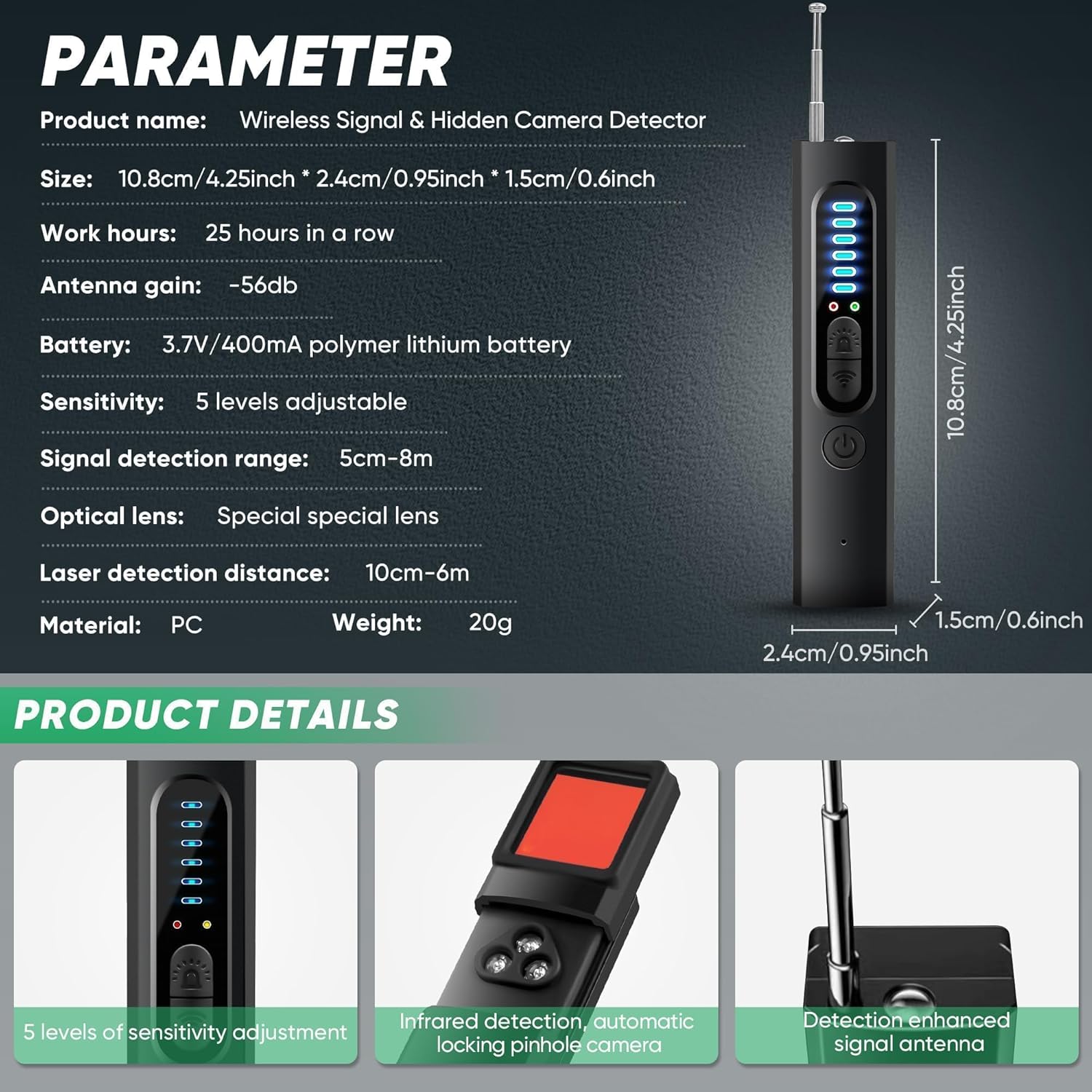
8.1.1 pav.: Produkto specifikacijosview
| Funkcija | Detalė |
|---|---|
| Produkto pavadinimas | Wireless Signal & Hidden Camera Detector |
| Modelio pavadinimas | SINBEN-1 |
| Matmenys (I x P x A) | 10.8 cm x 2.4 cm x 1.5 cm (4.25 x 0.95 x 0.6 colio) |
| Prekės svoris | 20 g (0.7 uncijos) |
| Baterija | 3.7V/400mA Polymer Lithium Battery |
| Darbo valandos | Iki 25 valandų (nuolatinis naudojimas) |
| Budėjimo laikas | Iki 30 dienų |
| Antenos Pelnas | -56 dB |
| Jautrumo lygiai | Reguliuojama 5 lygių |
| Signal Detection Range | 5cm - 8m (depending on signal strength) |
| Optinis objektyvas | Special optical lens |
| Laser Detection Distance | 10cm - 6m |
| Medžiaga | PC |
| Ryšio technologija | Belaidis, „Bluetooth“ |
| Maitinimo šaltinis | Maitinamas baterijomis |
| Įtraukti komponentai | Camera detector |
9. Garantija ir palaikymas
9.1. Informacija apie garantiją
The SINBEN Hidden Camera Detector comes with a standard manufacturer's warranty. Please refer to the product packaging or contact customer support for specific warranty terms and conditions.
9.2. Pagalba klientams
For any questions, technical assistance, or warranty claims, please contact SINBEN customer support. Contact details can typically be found on the product packaging or the official SINBEN websvetainę.
Ask a question about this manual
Ask about setup, troubleshooting, compatibility, parts, safety, or missing instructions. Manuals+ will review the question and use this page’s manual context to help answer it.