
1. Įvadas
This manual provides essential instructions for setting up, operating, and maintaining your CONSUMER CELLULAR Iris Connect smartphone. The Iris Connect is designed for reliable performance, featuring a 6.5-inch display, 32GB of storage, and running on Android 13. Please read this manual thoroughly to ensure proper use and to maximize your device's capabilities.
2. Kas yra dėžutėje
Upon unboxing your CONSUMER CELLULAR Iris Connect, verify that all the following items are included:
- CONSUMER CELLULAR Iris Connect Smartphone
- USB kabelis
- Greitos pradžios vadovas
3. Įrenginys baigtasview
Familiarize yourself with the physical components of your Iris Connect smartphone.

3.1 paveikslas: Priekyje ir gale view of the Iris Connect smartphone, highlighting its sleek design and camera placement.

3.2 paveikslas: Priekyje view of the Iris Connect, showcasing the 6.5-inch display and front-facing camera.
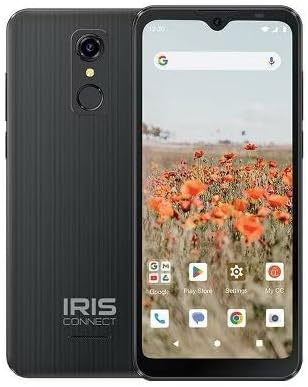
3.3 paveikslas: Atgal view of the Iris Connect, showing the main camera, flash, and fingerprint sensor.
Pagrindiniai komponentai:
- 6.5 colių ekranas: High Definition+ screen for clear visuals.
- Priekinė kamera (8MP): Įsikūręs ekrano viršuje, skirtas asmenukėms ir vaizdo skambučiams.
- Pagrindinė kamera (13 MP): Located on the rear, for high-resolution photos and videos.
- Pirštų atspaudų skaitytuvas: Integrated on the rear for secure unlocking.
- Maitinimo mygtukas: Typically on the right side, used to turn the device on/off or wake/sleep the screen.
- Garsumo mygtukai: Šalia maitinimo mygtuko, skirtas garso lygiams reguliuoti.
- USB-C prievadas: Apačioje, skirta įkrovimui ir duomenų perdavimui.
- 3.5 mm garso lizdas: Ausinėms prijungti.
4. Sąranka
4.1. SIM kortelės ir „MicroSD“ kortelės įdėjimas
- Suraskite SIM kortelės dėklą savo įrenginio šone.
- Insert the SIM ejector tool (not included, use a thin paperclip) into the small hole next to the tray and press gently until the tray pops out.
- Place your Nano-SIM card(s) into the designated slots with the gold contacts facing down.
- If desired, insert a microSD card (up to 256GB) into its dedicated slot for expanded storage.
- Atsargiai įstatykite dėklą atgal į įrenginį, kol jis spragtelėdamas užsifiksuos.
4.2. Pradinis įjungimo ir sąrankos vedlys
- Paspauskite ir palaikykite Maitinimo mygtukas kol ekranas užsidega.
- Vykdykite ekrane pateikiamus nurodymus, kad pasirinktumėte kalbą, prisijunkite prie „Wi-Fi“ tinklo ir sukonfigūruotumėte „Google“ paskyrą.
- You may be prompted to transfer data from an old device or set up security features like the fingerprint scanner.
4.3. Įrenginio įkrovimas
Before first use, it is recommended to fully charge your device. The Iris Connect features a 3500 mAh battery with an approximate charging time of 2.5 hours.
- Prijunkite USB laidą prie telefono apačioje esančio USB-C prievado.
- Connect the other end of the USB cable to a compatible power adapter (not included) and plug it into a wall outlet.
- Ekrane pasirodys įkrovimo indikatorius.
5. Naudojimo instrukcijos
5.1. Pagrindinė navigacija
- Palieskite: Palieskite piktogramą, kad atidarytumėte programėlę arba pasirinktumėte elementą.
- Perbraukimas: Norėdami slinkti arba naršyti tarp ekranų, braukite pirštu per ekraną.
- Žiupsnelis: Nuotraukoms priartinti arba atitolinti naudokite du pirštus ir web puslapių.
- Pagrindinis ekranas: Centrinis jūsų programėlių ir valdiklių centras.
- Programėlių stalčius: Braukite aukštyn iš pagrindinio ekrano, kad pasiektumėte visas įdiegtas programas.
5.2. Skambinimas
- Bakstelėkite Telefonas piktogramą pagrindiniame ekrane arba programėlių stalčiuje.
- Įveskite telefono numerį naudodami numerio rinkiklį arba pasirinkite kontaktą iš savo adresų knygos.
- Bakstelėkite Skambinti mygtuką, kad pradėtumėte skambutį.
5.3. Žinučių siuntimas
- Atidarykite Žinutės programėlė.
- Bakstelėkite Pradėti pokalbį or Nauja žinutė piktogramą.
- Įveskite gavėjo numerį arba pasirinkite iš kontaktų, tada įveskite savo žinutę.
- Bakstelėkite Siųsti mygtuką.
5.4. Prisijungimas prie Wi-Fi
- Eikite į Nustatymai > Tinklas ir internetas > Internetas.
- Perjungti „Wi-Fi“ On.
- Iš sąrašo pasirinkite norimą „Wi-Fi“ tinklą ir, jei būsite paraginti, įveskite slaptažodį.
5.5. „Bluetooth“ poravimas
- Eikite į Nustatymai > Prijungti įrenginiai > Ryšio nuostatos > Bluetooth.
- Perjungti Bluetooth On.
- Pasirinkite Suporuokite naują įrenginį and choose your desired device from the list. Follow any on-screen prompts to complete pairing.
5.6. Kameros naudojimas
The Iris Connect features a 13MP main camera and an 8MP front-facing camera.
- Atidarykite Fotoaparatas programėlė.
- Bakstelėkite Užraktas mygtuką, kad padarytumėte nuotrauką.
- Naudodami ekrane rodomas piktogramas, perjunkite fotografavimo ir filmavimo režimus arba priekinę ir galinę kameras.
5.7. Pirštų atspaudų skaitytuvas
To set up the fingerprint scanner for secure unlocking:
- Eikite į Nustatymai > Saugumas ir privatumas > Įrenginio atrakinimas > Pirštų atspaudas.
- Vykdykite ekrane pateikiamus nurodymus, kad užregistruotumėte savo piršto atspaudą (-us).
6. Priežiūra
6.1. Prietaiso valymas
To keep your device clean and functional:
- Ekraną ir korpusą nuvalykite minkštu, nepūkuotu audiniu.
- Venkite naudoti stiprias chemines medžiagas, abrazyvinius valiklius ar aerozolinius purškalus.
- Įsitikinkite, kad prievaduose nėra dulkių ir šiukšlių.
6.2. Akumuliatoriaus priežiūra
To optimize your battery life (up to 26 hours of use):
- Venkite ekstremalių temperatūrų.
- Do not leave the device charging for extended periods after it's full.
- Adjust screen brightness and close unused apps to conserve power.
6.3. Programinės įrangos atnaujinimai
Reguliariai tikrinkite, ar yra programinės įrangos atnaujinimų, kad įsitikintumėte, jog jūsų įrenginyje yra naujausios funkcijos ir saugos pataisymai:
- Eikite į Nustatymai > Sistema > Sistemos atnaujinimas.
- Vykdykite ekrane pateikiamus nurodymus, kad atsisiųstumėte ir įdiegtumėte visus galimus naujinimus.
7. Problemų sprendimas
This section addresses common issues you might encounter with your Iris Connect smartphone.
- Įrenginys neįsijungia: Įsitikinkite, kad akumuliatorius įkrautas. Prijunkite įkroviklį ir palaukite kelias minutes, prieš bandydami vėl įjungti.
- Nėra tinklo signalo: Check if your SIM card is correctly inserted. Verify that Airplane Mode is off (swipe down from the top of the screen to check quick settings). Contact your service provider if the issue persists.
- Programėlės stringa arba užstringa: Try restarting the app. If the issue continues, restart the phone. You may also clear the app's cache or data via Nustatymai > Programėlės > [Programėlės pavadinimas] > Saugykla ir talpykla.
- Lėtas veikimas: Close unused apps, clear cache, or consider uninstalling rarely used applications to free up storage.
- Unable to connect to Wi-Fi/Bluetooth: Ensure Wi-Fi/Bluetooth is enabled in settings. Try forgetting the network/device and reconnecting. Restart your phone and the router/Bluetooth device.
- Forgot screen lock password/pattern: Jei turite susietą „Google“ paskyrą, galite ją atkurti. Priešingu atveju gali tekti atkurti gamyklinius nustatymus (tai ištrins visus duomenis).
For more complex issues, please refer to the official CONSUMER CELLULAR support resources or contact their customer service.
8. Specifikacijos
Detailed technical specifications for the CONSUMER CELLULAR Iris Connect smartphone (Model: SH4650).
| Funkcija | Specifikacija |
|---|---|
| Modelio pavadinimas | Iris Connect |
| Modelio numeris | SH4650 |
| Operacinė sistema | Android 13.0 |
| Ekrano dydis | 6.5 colių |
| Ekrano raiška | 1440 x 810 |
| CPU modelis | Snapdragon 710 |
| CPU greitis | 2 GHz |
| Įdiegtos RAM atminties dydis | 3 GB |
| Vidinė saugykla | 32 GB |
| Išplečiama saugykla | Iki 256 GB per „microSD“ |
| Pagrindinė kamera | 13 MP |
| Priekinė kamera | 8 MP |
| Baterijos talpa | 3500 milijonųamp Valandos |
| Akumuliatoriaus galios įvertinimas | 3600 (likely Wh or similar unit, as mAh is 3500) |
| Įkrovimo laikas | 2.5 valandų |
| Ryšys | 4G LTE, „Bluetooth“, „Wi-Fi“ |
| Ypatingos savybės | Dual Camera, Expandable Storage, Fingerprint Scanner, Long Battery Life |
| Garso lizdas | 3.5 milimetro |
| Matmenys | 8 x 6 x 3 colio |
| Prekės svoris | 6.5 uncijos |
9. Garantija ir palaikymas
For information regarding your product's warranty, please refer to the warranty card included with your purchase or visit the official CONSUMER CELLULAR website. For technical assistance, troubleshooting beyond this manual, or customer service inquiries, please contact CONSUMER CELLULAR support directly.
CONSUMER CELLULAR Official Websvetainė: www.consumercellular.com