
1. Įvadas
Thank you for choosing the Ctronics 4K Outdoor PTZ Security Camera (Model 550C-4K-Z30). This manual provides essential information for the proper installation, operation, and maintenance of your new security camera. Please read this manual thoroughly before using the product and retain it for future reference. This camera is designed to provide high-resolution surveillance with advanced features such as 30x optical zoom, AI-powered detection, and comprehensive night vision capabilities, ensuring robust security for your property.
2. Saugos informacija
- Maitinimas: Use only the provided power adapter. Ensure the power source meets the camera's voltage reikalavimus (12V).
- Montavimas: Install the camera securely to prevent it from falling. Ensure all cables are properly routed and protected from damage.
- Atsparumas vandeniui: The camera is IP66 weatherproof, suitable for outdoor use. However, avoid submerging it in water or exposing it to extreme conditions beyond its rating.
- Darbinė temperatūra: Do not operate the camera outside its specified temperature range to prevent damage.
- Valymas: Prieš valydami atjunkite maitinimą. Naudokite minkštą, sausą šluostę. Venkite stiprių cheminių medžiagų ar abrazyvinių valiklių.
- Išardymas: Nebandykite ardyti ar modifikuoti fotoaparato. Tai panaikins garantiją ir gali sukelti žalos ar sužalojimų.
- Trikdžiai: Keep the camera away from strong electromagnetic fields that may interfere with its operation.
3. Pakuotės turinys
Patikrinkite pakuotę, ar joje yra šie daiktai:
- Ctronics 4K Outdoor PTZ Security Camera (Model 550C-4K-Z30)
- Montavimo stovas
- Tvirtinimo varžtai
- Maitinimo adapteris
- Instrukcijų vadovas (šis dokumentas)
- Security Sticker (for deterrence)
4. Produktas baigtasview
The Ctronics 4K Outdoor PTZ Security Camera is a robust surveillance solution featuring a durable metal body and advanced imaging capabilities. It is designed for both wall and ceiling mounting, offering flexible installation options.
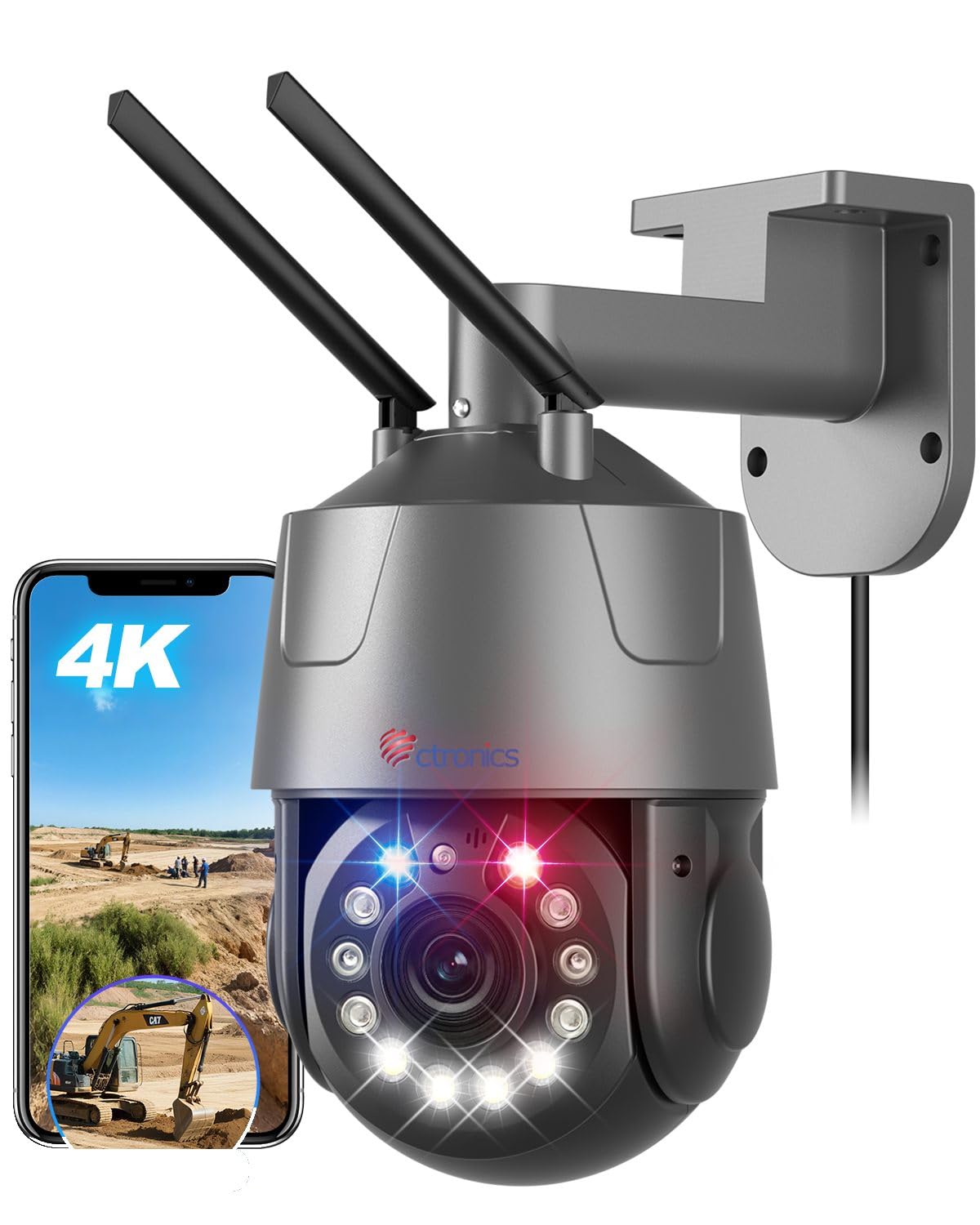
Figure 1: Ctronics 4K Outdoor PTZ Security Camera (Model 550C-4K-Z30)
Pagrindiniai komponentai:
- Kameros objektyvas: High-resolution 4K (3840x2160) lens with 30x optical zoom.
- Infraraudonųjų spindulių šviesos diodai: For black and white night vision up to 150m.
- Balti šviesos diodai: For full-color night vision up to 50m and warning lights.
- Mikrofonas: Garso įvesčiai dvipusio ryšio metu.
- Pranešėjas: Garso išvesčiai dvipusio ryšio ir signalizacijos metu.
- Antenos: For 2.4GHz/5GHz Wi-Fi connectivity.
- Ethernet prievadas: For wired LAN connection.
- Maitinimo įvestis: DC 12V power connection.
- MicroSD kortelės lizdas: Palaiko iki 256 GB vietinei saugyklai.
5. Sąranka
5.1. Kameros montavimas
The camera can be mounted on a wall or ceiling. Choose a location that provides the desired viewing angle and is within range of your Wi-Fi network or Ethernet cable.
- Pažymėkite gręžimo skyles: Use the mounting stand as a template to mark the positions for drilling.
- Gręžimo skylės: Pažymėtose vietose išgręžkite skyles. Jei tvirtinate prie mūro, įkiškite sieninius kaiščius.
- Attach Mounting Stand: Secure the mounting stand to the wall or ceiling using the provided screws.
- Prijunkite kamerą: Mount the camera onto the secured stand. Adjust the angle as needed.

Figure 2: Flexible mounting options for wall or ceiling installation.
5.2. Maitinimo prijungimas
Connect the provided power adapter to the camera's power input port and then plug it into a power outlet. The camera will power on and initiate its startup sequence.
5.3. Programėlės atsisiuntimas ir pradinė sąranka
Download the 'Ctronics Pro' app from your smartphone's app store (iOS or Android). Follow the in-app instructions for initial setup. The camera supports one-click Bluetooth setup for easy pairing.
Video 1: QR Code Connection Guide. This video demonstrates the process of connecting the camera using a QR code via the mobile application.
5.4. Network Connection (Wi-Fi / LAN)
The camera supports both 2.4GHz and 5GHz Wi-Fi, as well as a wired LAN connection.
- „Wi-Fi“ ryšys: Follow the 'Ctronics Pro' app instructions to connect the camera to your Wi-Fi network. Ensure your phone is connected to the same Wi-Fi network during setup.
- LAN jungtis: Connect an Ethernet cable from your router to the camera's Ethernet port. The camera will automatically establish a wired connection.

Figure 3: The camera supports both 2.4GHz and 5GHz Wi-Fi for stable and fast connections.
6. Naudojimo instrukcijos
6.1. Gyvai View ir PTZ valdymas
Open the 'Ctronics Pro' app to access the live view. Use the on-screen controls to pan (355° horizontally) and tilt (90° vertically) the camera. Tap on the screen to activate the 3D zoom feature, which automatically focuses on the selected area.

Figure 4: Control the camera's pan and tilt movements and set up to 30 preset positions for quick viewing.
6.2. Priartinimo funkcija
The camera features a powerful 30x optical zoom. Pinch to zoom in/out on the live view to see distant objects in detail without loss of clarity. The intelligent 3D zoom allows you to tap on an area to automatically zoom and center it.

Figure 5: Experience clear, detailed views with 30x optical zoom, allowing identification of distant objects like vehicle license plates.
6.3. Naktinio matymo režimai
The camera offers multiple night vision modes:
- Spalvotas naktinis matymas: Utilizes high-brightness white LEDs to provide color images up to 50m in low-light conditions.
- Infraraudonųjų spindulių (IR) naktinis matymas: Uses enhanced IR lights for clear black and white images up to 150m in complete darkness.
- "Smart Mode": Automatically switches between IR and full-color night vision based on detected motion or light conditions.

Figure 6: Comparison of IR night vision (top) and full-color night vision (bottom) in 4K resolution.
6.4. AI Detection and Auto Tracking
The camera's AI capabilities allow it to distinguish between humans, pets, and vehicles, reducing false alarms. When a target is detected, the camera can automatically track its movement and zoom in.

Figure 7: AI detection identifies humans, pets, and vehicles, sending accurate notifications.

Figure 8: The camera automatically tracks moving subjects and adjusts focus dynamically.
6.5. Signalizavimo funkcijos
Configure alarm settings in the app. The camera features red and blue warning lights and a customizable sound alarm to deter intruders. You can define specific detection areas to minimize unwanted alerts.

Figure 9: The camera's red and blue warning lights and customizable sound alarm act as a strong deterrent against intruders.
6.6. Dvipusis garsas
Use the two-way audio feature via the app to communicate with visitors or deter unwanted guests. The built-in microphone and speaker provide clear audio transmission.
6.7. Įrašymas ir saugojimas
Kamera palaiko kelias įrašymo parinktis:
- „MicroSD“ kortelė: Insert a microSD card (up to 256GB, sold separately) into the camera's slot for local continuous or event-triggered recording.
- Saugykla debesyje: Subscribe to cloud storage services via the app for secure off-site recording.
- NVR/NAS/FTP: The camera supports ONVIF, RTSP, FTP, and NAS protocols for integration with compatible network video recorders or storage solutions.
7. Pagrindinės savybės
- 4K UHD raiška: Equipped with a SONY IMX415 sensor, delivering true 4K (3840x2160) resolution for crisp, clear images and videos.
- 30x optinis priartinimas: Provides lossless 30x optical zoom for detailed viewing of distant objects, combined with intelligent 3D zoom technology for automatic focus and tracking.
- Pažangus naktinis matymas: Features 50m full-color night vision and 150m infrared night vision, ensuring comprehensive surveillance day and night.
- Intelligent AI Detection: Accurately detects humans, pets, and vehicles, reducing false alarms and enabling precise auto-tracking.
- Pritaikomi aliarmai: Includes high-brightness red and blue warning lights and a customizable sound alarm to deter intruders effectively.
- Dual-Band Wi-Fi & LAN: Supports both 2.4GHz and 5GHz Wi-Fi for flexible and stable network connectivity, along with a wired LAN option.
- Nuotolinė prieiga ir valdymas: Monitor and control the camera from anywhere using the 'Ctronics Pro' mobile app or PC client.
- Dvipusis garsas: Integruotas mikrofonas ir garsiakalbis leidžia bendrauti realiuoju laiku.
- Kelios saugojimo parinktys: Supports up to 256GB microSD card, cloud storage, and integration with NVR/NAS/FTP via ONVIF/RTSP protocols.
- Patvarus ir atsparus oro sąlygoms: Constructed with a metal body and IP66 rating, ensuring reliable operation in various outdoor weather conditions.
8. Priežiūra
- Valymas: Regularly clean the camera lens with a soft, lint-free cloth to ensure optimal image clarity. Do not use abrasive materials or harsh chemicals.
- Firmware atnaujinimai: Check the 'Ctronics Pro' app periodically for available firmware updates. Keeping your camera's firmware up-to-date ensures optimal performance, new features, and security enhancements.
- Kabelio apžiūra: Periodically inspect all cables for any signs of wear, damage, or corrosion. Replace damaged cables immediately.
- Montavimo apsauga: Ensure the camera remains securely mounted. Tighten screws if necessary.
9. Problemų sprendimas
| Problema | Galima priežastis | Sprendimas |
|---|---|---|
| Kamera neįsijungia | No power, faulty adapter, loose connection | Check power outlet, ensure adapter is connected correctly, try a different outlet. |
| Nepavyko prisijungti prie „Wi-Fi“. | Incorrect Wi-Fi password, camera too far from router, router issues, incorrect band (2.4/5GHz) | Verify Wi-Fi password, move camera closer to router, restart router, ensure correct Wi-Fi band is selected during setup. |
| Prasta vaizdo kokybė | Dirty lens, low network bandwidth, incorrect resolution settings | Clean the lens, ensure stable internet connection, set video quality to 4K in app settings. |
| Dažni klaidingi aliarmai | Sensitive detection settings, objects outside detection area triggering alerts | Adjust AI detection sensitivity, define specific detection zones to exclude irrelevant areas. |
| Neveikia dvipusis garsas | Microphone/speaker disabled in app, low volume, network issues | Enable microphone/speaker in app, adjust volume, check network stability. |
10. Specifikacijos
| Funkcija | Detalė |
|---|---|
| Modelio pavadinimas | 550C-4K-Z30 |
| Rekomenduojamas naudojimas | Lauko apsauga |
| Ryšio technologija | Wired, Wireless (Bluetooth, Wi-Fi 2.4/5GHz) |
| Ypatingos savybės | 4K UHD, PTZ Technology, Motion Sensor, Night Vision |
| Naudojimas viduje / lauke | Lauke |
| Suderinami įrenginiai | Išmanieji telefonai, planšetiniai kompiuteriai, nešiojamieji kompiuteriai |
| Maitinimo šaltinis | Laidinis elektrinis (12 V, 12 W) |
| Ryšio protokolai | Ethernet, ONVIF, RTSP, Wi-Fi |
| Montavimo tipas | Wall Mount (also Ceiling Mount supported) |
| Product Exterior Material | Metalas |
| Atsparumo vandeniui įvertinimas | IP66 |
| Signalo tipas | Audio & Motion |
| Veiksminga nejudančioji raiška | 8 MP |
| Vaizdo jutiklio skiriamoji geba | 8 MP |
| Vaizdo įrašų kodavimo formatas | H.265 |
| Vaizdo įrašymo formatas | MP4 |
| Naktinio matymo diapazonas | 150 meters (IR), 50 meters (Color) |
| IR šviesos diodų skaičius | 4 |
| Gaminio matmenys | 30 x 15 x 31 cm |
| Efektyvi vaizdo raiška | 3840P |
| Kadrų dažnis | 15 kadrų per sekundę |
| Laukas View | 90 laipsnių |
| Optinio priartinimo santykis | 30x |
| Fokusavimo funkcija | Automatinis fokusavimas |
| Max Flash Memory Support | 256 GB (microSD) |
11. Informacija apie garantiją
Ctronics products typically come with a manufacturer's warranty. Please refer to the warranty card included in your package or visit the official Ctronics webIšsamias garantijos sąlygas ir nuostatas rasite svetainėje. Išsaugokite pirkimo kvitą kaip pirkimo įrodymą garantijos pretenzijoms.
12. Pagalba klientams
If you encounter any issues or have questions regarding your Ctronics 4K Outdoor PTZ Security Camera, please contact our customer support team:
- El. paštas: support@ctronics.com (Pvzample)
- Websvetainė: Visit the official Ctronics webDUK, trikčių šalinimo vadovų ir kontaktinių formų svetainė.
Please have your model number (550C-4K-Z30) and purchase details ready when contacting support.