
1. Produktas baigtasview
The ZWP GYKQ-78 is a direct replacement remote control designed for a range of Pioneer Diamante Air Conditioner models. This remote offers full functionality without the need for complex programming, providing a convenient solution for controlling your air conditioning unit.

Image 1.1: The ZWP GYKQ-78 replacement remote control, showcasing its ergonomic design and clear button layout.
Pagrindinės funkcijos:
- Nereikia programuoti: Ready to use directly after battery installation.
- Patvari konstrukcija: Made from high-quality, wear-resistant ABS material for long-lasting use.
- Ergonomiškas dizainas: Patogu laikyti ir valdyti.
- Platus suderinamumas: Compatible with numerous Pioneer Diamante Air Conditioner models.
Suderinami oro kondicionierių modeliai:
- WYT020GLHI22M2
- WYT012GLFI19RL
- WYT009ALFI19RL
- WYT009GLFI19RL
- WYT012ALFI19RL
- WYT018GLFI19RL
- WYT024GLFI19RL
- WYT036GLFI19RL
- WYT009ALFI22RL
- WYT009GLFI22RL
- WYT024GLFI22RL
- WYT012GLFI22RL
- WYT012ALFI22RL
- WYT030GLHI22M3
2. Sąranka ir akumuliatoriaus įdėjimas
The ZWP GYKQ-78 remote control requires two AAA batteries (not included) for operation. No programming or pairing is necessary; simply install the batteries, and the remote is ready for use.
- Atidarykite akumuliatoriaus skyrių: Nuotolinio valdymo pulto gale suraskite baterijų dangtelį. Pastumkite dangtelį žemyn arba paspauskite skląstį ir pakelkite, kad atidarytumėte.
- Įdėkite baterijas: Insert two new AAA batteries into the compartment, ensuring the positive (+) and negative (-) terminals align correctly with the markings inside the compartment.
- Uždarykite akumuliatoriaus skyrių: Uždėkite akumuliatoriaus dangtelį, stumdami jį atgal į vietą, kol jis tvirtai spragtelės.

Image 2.1: Illustration showing the battery compartment and the requirement for two AAA batteries (not included).
Important: Ensure correct battery polarity. Remove batteries if the remote will not be used for an extended period to prevent leakage.
3. Naudojimo instrukcijos
This section details the functions of the buttons on your ZWP GYKQ-78 remote control. The remote features an LED luminous display for clear visibility, even in low light conditions.

Image 3.1: The remote control's LED luminous display, which ensures buttons and screen are clearly visible without needing external light.
3.1 Mygtukų funkcijos
| Mygtukas | Funkcija |
|---|---|
| GALIA () | ĮJUNGIA arba IŠJUNGIA oro kondicionierių. |
| REŽIMAS | Cycles through operating modes: Cool, Heat, Dry, Fan, Auto, Sleep, ECO. |
| TEMP () | Reguliuoja norimą temperatūros nustatymą. |
| TURBO | Activates or deactivates the Turbo function for rapid cooling or heating. |
| VENTILIATORIUS | Reguliuoja ventiliatoriaus greitį (mažas, vidutinis, didelis, automatinis). |
| SWING | Valdo vertikalių žaliuzių svyravimo funkciją. |
| Nutildyti | Mutes or unmutes the air conditioner's operational sounds. |
| EKO | Activates or deactivates the energy-saving ECO mode. |
| LAIKMATIS | Sets the ON/OFF timer for the air conditioner. |
| MIEGAS | Įjungia arba išjungia miego režimą, kad būtų patogu naudoti naktį. |
| AŠ JAUČIU | Activates the "I Feel" function, which senses the temperature at the remote's location. |
| EKRANAS | Turns the air conditioner's display ON or OFF. |
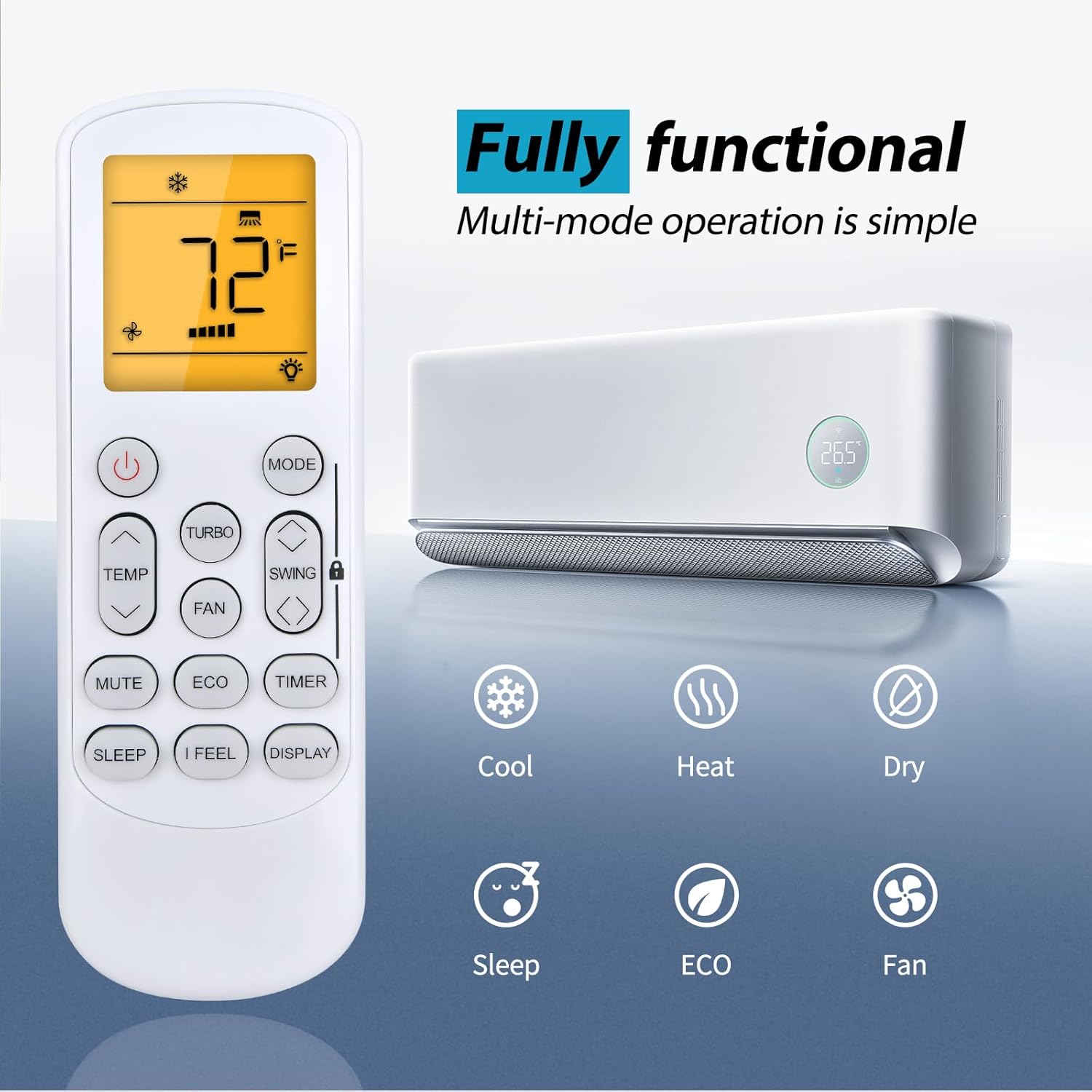
Image 3.2: The remote control displaying various functional modes such as Cool, Heat, Dry, Sleep, ECO, and Fan.
3.2 Nuotolinio valdymo pulto veikimo nuotolis
The ZWP GYKQ-78 remote control is designed for sensitive and precise control from a distance. It operates effectively up to 40 feet (approximately 12 meters) with a 180-degree multi-angle range, allowing flexible control within your room.

Image 3.3: Illustration demonstrating the remote control's effective operating range of up to 40 feet and 180-degree angle.
4. Priežiūra
To ensure the longevity and optimal performance of your ZWP GYKQ-78 remote control, follow these maintenance guidelines:
- Valymas: Nuotolinio valdymo pultą valykite minkštu, sausu skudurėliu. Nenaudokite skystų valiklių, abrazyvinių medžiagų ar cheminių tirpiklių, nes jie gali pažeisti paviršių ar vidinius komponentus.
- Baterijos keitimas: Replace batteries promptly when the remote's performance degrades or the display becomes dim. Always replace both batteries at the same time with new ones of the same type (AAA).
- Saugykla: If the remote control will not be used for an extended period (e.g., more than one month), remove the batteries to prevent potential leakage and damage to the remote. Store the remote in a cool, dry place away from direct sunlight and extreme temperatures.
- Venkite kritimų ir smūgių: Protect the remote from physical shocks, as internal components can be sensitive to damage from drops.
5. Problemų sprendimas
If you encounter issues with your ZWP GYKQ-78 remote control, refer to the following common troubleshooting steps:
- Nuotolinio valdymo pultas nereaguoja:
- Patikrinkite, ar baterijos įdėtos teisingai, laikantis teisingo poliškumo (+/-).
- Pakeiskite senas baterijas naujomis AAA baterijomis.
- Įsitikinkite, kad tarp nuotolinio valdymo pulto ir oro kondicionieriaus imtuvo nėra jokių kliūčių.
- Confirm you are within the effective operating range (up to 40 feet).
- Ekranas pritemdytas arba tuščias:
- Tai paprastai rodo, kad baterijos išsikrovė. Pakeiskite baterijas.
- Air Conditioner Not Responding to Specific Functions:
- Ensure the remote is pointed directly at the air conditioner.
- Some functions may be specific to certain air conditioner models or operating modes. Refer to your air conditioner's manual for specific feature compatibility.
5.1 Advanced Reset Functions (Refer to original AC manual for full details)
The back of the remote control may contain small text indicating advanced reset or pairing functions. These are typically for specific air conditioner models or diagnostic purposes. For the GYKQ-78, the following combinations are noted:
- Spaudimas "FAN" and "MUTE" together for over 3 seconds.
- Spaudimas "SWING" and "SWING" together for over 3 seconds.
- Spaudimas "SLEEP" and "DISPLAY" together for over 3 seconds.
Note: These combinations are for reference. Consult your specific Pioneer Diamante Air Conditioner user manual for detailed instructions on their use and potential effects.

5.1 vaizdas: galinis view of the remote control, showing product dimensions and small text detailing advanced button combinations for specific functions or resets.
6. Specifikacijos
| Funkcija | Detalė |
|---|---|
| Modelio numeris | GYKQ-78 |
| Prekės ženklas | ZWP |
| Suderinami įrenginiai | Pioneer Diamante Air Conditioners (various models) |
| Maitinimo šaltinis | 2 x AAA baterijos (į komplektą neįeina) |
| Spalva | Juoda |
| Ypatinga funkcija | Ergonomiškas dizainas |
| Maksimalus palaikomų įrenginių skaičius | 1 |
| Prekės svoris | 2.24 uncijos (apie 63.5 gramų) |
| Pakuotės matmenys | 6.8 x 2.2 x 1.1 colio (apytiksliai 17.3 x 5.6 x 2.8 cm) |
7. Garantija ir palaikymas
For any questions or concerns regarding your ZWP GYKQ-78 replacement remote control, please contact the seller directly. While specific warranty details are not provided in this manual, the manufacturer aims to ensure customer satisfaction.
If you experience any issues, please reach out to the seller before leaving feedback. They are committed to assisting you with resolution.