
1. Įvadas
This manual provides essential instructions for the safe operation and maintenance of your VTech Advanced HD Plus 5.5" HD 1 Cam Video Baby Monitor. Please read this manual thoroughly before using the product to ensure proper setup and functionality. Keep this guide for future reference.

Image 1.1: The VTech Advanced HD Plus 5.5" HD 1 Cam Video Baby Monitor, featuring the parent unit and baby unit.
2. Pagrindinės savybės
The VTech Advanced HD Plus Video Baby Monitor is designed to provide reliable monitoring of your baby. Key features include:
- 5.5" HD IPS LCD Screen: Offers clear 720p video resolution with wide viewing angles and enhanced color accuracy.
- Ilgas baterijos veikimo laikas: Up to 13 hours of continuous video streaming or 19 hours of audio-only streaming on a single charge.
- Pasukama, pakreipiama ir priartinama kamera: Remote control for 360-degree panoramic view, 122-degree vertical view, and 4x digital zoom.
- Platus kampas View: A 110-degree wide-angle lens captures more of the nursery.
- Adaptyvi naktinė lemputė: Touch-controlled, dimmable 7-color night light to create a soothing environment.
- Dvipusis pokalbis: Allows communication with your baby from the parent unit.
- Lullabies & Soothing Sounds: Five calming melodies and five ambient sounds to help soothe your baby.
- Temperatūros stebėjimas: Displays the nursery's ambient temperature on the parent unit.
- Perspėjimai apie judesį ir garsą: Notifies you of activity in the baby's room.
- Automatinis infraraudonųjų spindulių naktinis matymas: Provides clear video in low-light conditions.
- Secure 2.4GHz Wireless Connection: Ensures a private and interference-free connection up to 1,000 feet. No Wi-Fi required.

Image 2.1: Visual representation of the monitor's main features.
3. Pakuotės turinys
Įsitikinkite, kad jūsų siuntinyje yra visi daiktai:
- Tėvų vienetas
- Kūdikių vienetas (fotoaparatas)
- 2 AC Adapters (one for Parent Unit, one for Baby Unit)
- Greitos pradžios vadovas
4. Sąrankos instrukcijos
4.1. Tėvų įrenginio įkrovimas
- Connect the small end of the parent unit power adapter to the power jack on the side of the parent unit.
- Prijunkite didelį maitinimo adapterio galą į sieninį lizdą.
- Charge the parent unit for at least 12 hours before initial use. The battery icon will indicate charging status.
4.2. Kūdikio įrenginio (kameros) maitinimas
- Connect the small end of the baby unit power adapter to the power jack on the back of the baby unit.
- Prijunkite didelį maitinimo adapterio galą į sieninį lizdą.
- The baby unit will power on automatically once connected to power.
4.3. Kūdikio įrenginio pastatymas
Padėkite kūdikio įrenginį tokioje vietoje, kurioje būtų užtikrintas aiškus view of your baby in their crib or play area. For optimal performance:
- Place the baby unit at least 3 feet (1 meter) away from your baby to avoid potential hazards.
- Ensure the baby unit is on a flat, stable surface or securely mounted to a wall (mounting hardware not included).
- Avoid placing the baby unit near other electronic devices that may cause interference.
- Keep the power cords out of reach of children.
5. Naudojimo instrukcijos
5.1. Tėvų įrenginio valdikliai
Familiarize yourself with the buttons on your parent unit:
- MENIU / PASIRINKTI: Press to open the menu or confirm a selection.
- Rodyklių mygtukai (aukštyn, žemyn, kairėn, dešinėn): Navigate menu options and control camera pan/tilt.
- VOL + / VOL -: Sureguliuokite klausymosi garsumą.
- KALBĖKITE: Paspauskite ir palaikykite, jei norite kalbėti su kūdikiu per kūdikio įrenginį.
- LCD ĮJUNGTAS/IŠJUNGTAS: Press to turn the screen on or off while audio monitoring continues.
- ZOOM: Press to zoom in or out on the video feed.
- Maitinimo mygtukas: Paspauskite ir palaikykite, kad įjungtumėte arba išjungtumėte tėvų įrenginį.
5.2. Video Monitoring
Once both units are powered on and linked, the parent unit will automatically display live video from the baby unit. The 5.5" IPS screen provides a clear view.
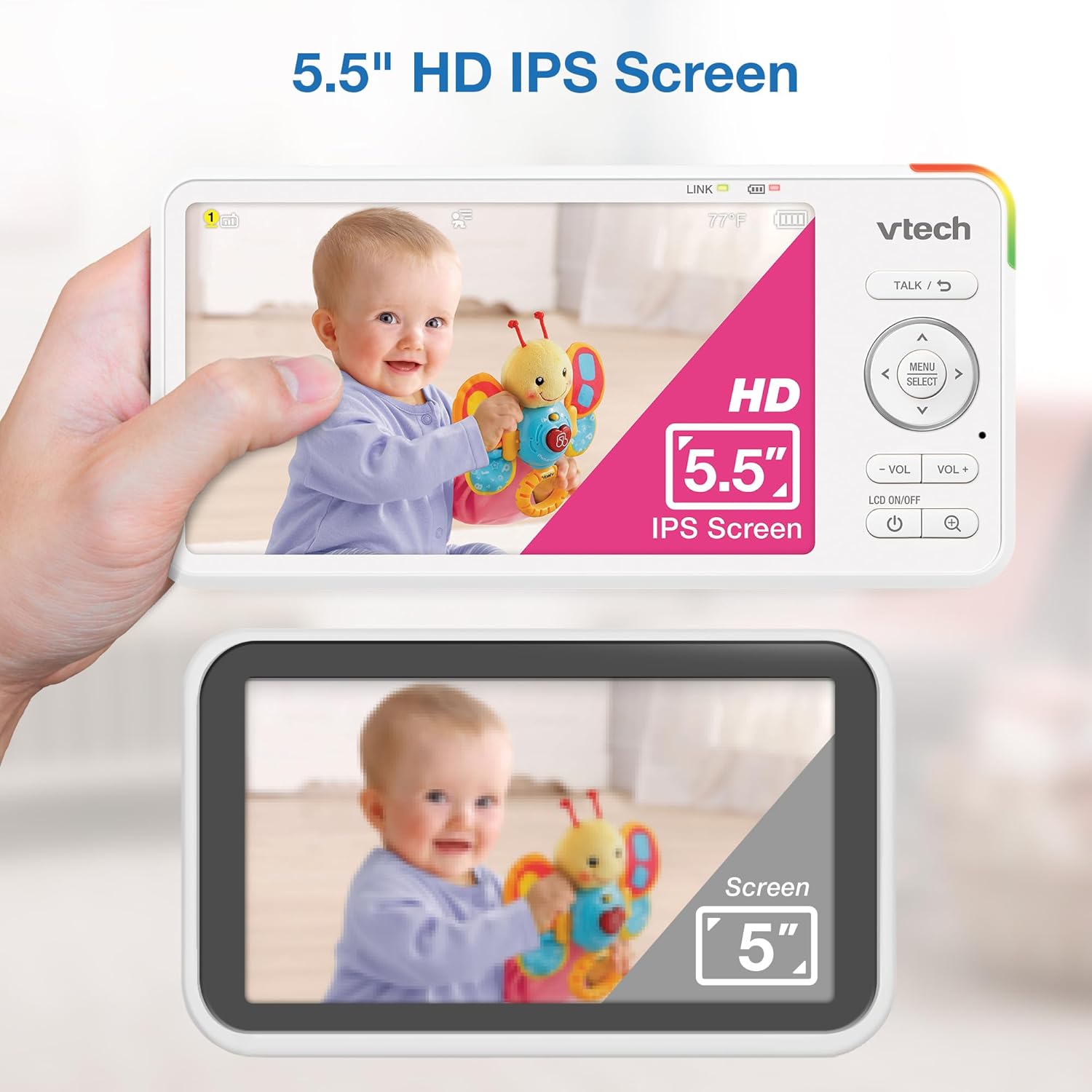
Image 5.1: The 5.5" HD IPS screen offers a larger and clearer view compared to standard screens.
5.3. Pasukimas, pakreipimas ir priartinimas
Use the arrow buttons on the parent unit to remotely adjust the camera's view:
- Paspauskite Aukštyn/Žemyn arrows to tilt the camera vertically (122-degree vertical view).
- Paspauskite Kairė/dešinė arrows to pan the camera horizontally (360-degree panoramic view).
- Paspauskite MODYTI button to activate the 4x digital zoom for a closer look.

Image 5.2: Remote pan, tilt, and 4x zoom functionality for comprehensive nursery coverage.
5.4. Dvipusis pokalbis
Norėdami kalbėti su kūdikiu, paspauskite ir palaikykite KALBĖKITE button on the parent unit. Release the button to stop talking and resume listening.

Image 5.3: Using the two-way talk feature to communicate with your baby.
5.5. Night Light, Lullabies, and Soothing Sounds
Access these features through the parent unit's menu:
- Naktinė šviesa: Select the night light option to choose from 7 colors or adjust brightness. The adaptive feature adjusts to nursery brightness.
- Lullabies & Soothing Sounds: Choose from five melodies and five ambient sounds to play through the baby unit.
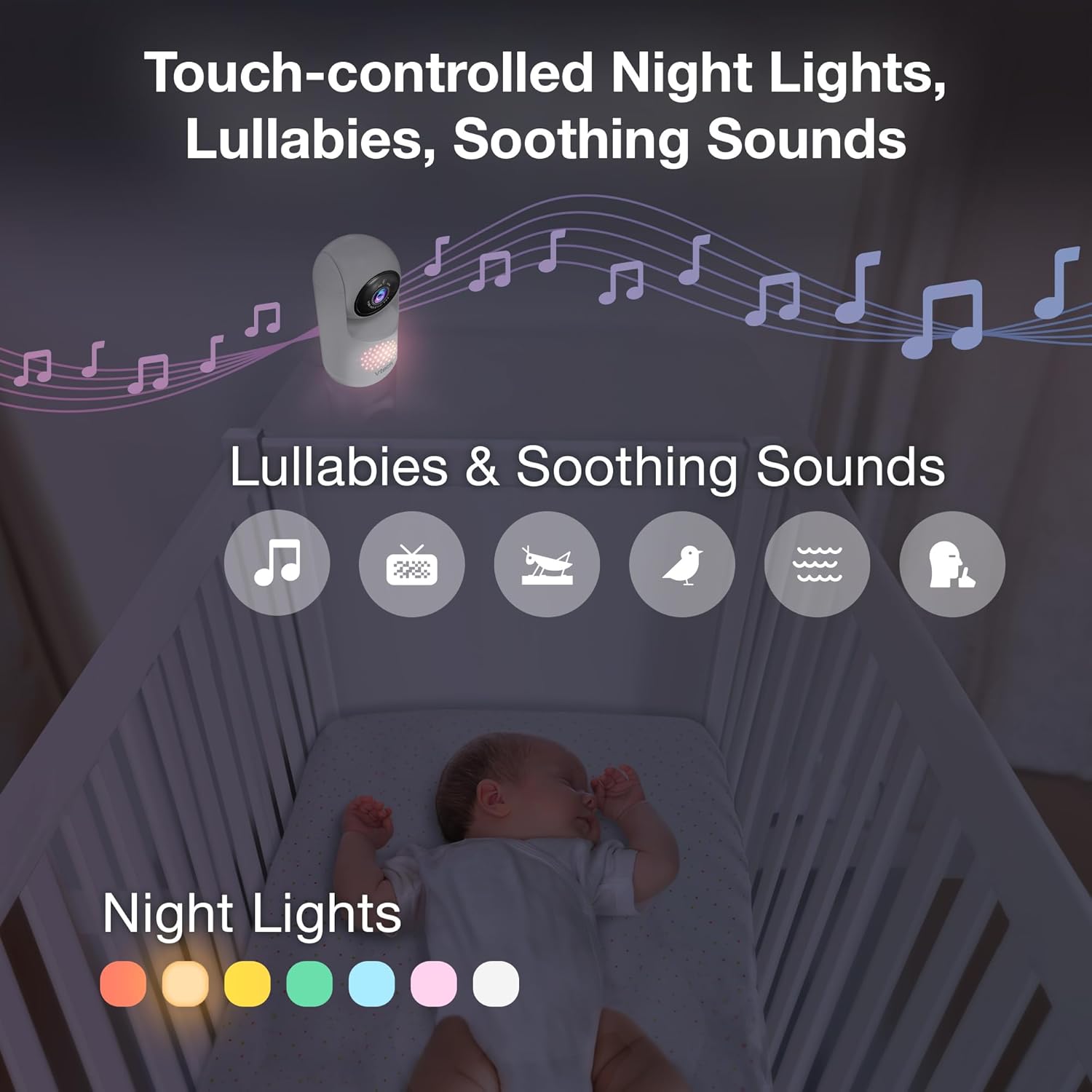
Image 5.4: The camera unit provides touch-controlled night lights, lullabies, and soothing sounds.
5.6. Temperatūros stebėjimas
The parent unit displays the current temperature of the baby's room, measured by the baby unit. This helps ensure a comfortable environment for your baby.
5.7. Motion and Sound Alerts
The monitor is equipped with motion and sound detection. When activity is detected, the parent unit will provide an alert. You can adjust the sensitivity settings in the menu.

Image 5.5: Motion and temperature alerts displayed on the parent unit.
5.8. Naktinis matymas
Kūdikio įrenginys automatiškai įjungia infraraudonųjų spindulių naktinio matymo funkciją esant prastam apšvietimui, todėl tėvų įrenginyje rodomas aiškus nespalvotas vaizdas.

Image 5.6: Automatic infrared night vision for clear monitoring in the dark.
6. Priežiūra
6.1. Valymas
- Monitorių blokus valykite minkšta, d šluosteamp audinys.
- Nenaudokite valymo purškalų ar skystų valiklių.
- Ensure units are unplugged before cleaning.
6.2. Akumuliatoriaus priežiūra
- Norėdami pailginti baterijos veikimo laiką, prieš pirmą kartą naudodami tėvų įrenginį, jį visiškai įkraukite.
- Venkite ekstremalių temperatūrų, kurios gali turėti įtakos akumuliatoriaus veikimui.
- If storing the unit for an extended period, charge the battery periodically.

Image 6.1: The 5,000mAh rechargeable battery provides extended monitoring time.
7. Problemų sprendimas
If you experience issues with your VTech Advanced HD Plus monitor, refer to the following common solutions:
| Problema | Galimas sprendimas |
|---|---|
| No link / Poor connection |
|
| Nėra vaizdo / Juodas ekranas |
|
| Nėra garso / Mažas garsumas |
|
| Baterija greitai išsikrauna |
|
Jei problema išlieka ir išbandžius šiuos sprendimus, susisiekite su „VTech“ klientų aptarnavimo tarnyba.
8. Specifikacijos
| Funkcija | Detalė |
|---|---|
| Modelio pavadinimas | Pažangus HD Plus |
| Ekrano dydis | 5.5 colių IPS LCD |
| Vaizdo raiška | 720p |
| Ryšio technologija | 2.4G FHSS Wireless (No Wi-Fi) |
| Diapazonas | Iki 1,000 pėdų (matymo linija) |
| Baterijos talpa | 5000 mAh |
| Battery Life (Video Streaming) | Iki 13 valandų |
| Battery Life (Audio-only) | Iki 19 valandų |
| „Pan“ kampas | 360 degrees panoramic |
| Pakreipimo kampas | 122 laipsnių vertikaliai |
| Padidinti | 4x skaitmeninis |
| Platus kampas View | 110 laipsnių |
| Naktinis matymas | Automatinis infraraudonųjų spindulių |
| Įspėjimų tipai | Garsas ir judesys |
| Maitinimo šaltinis | Laidinis elektrinis (5 V, 7.5 W) |
| Matmenys (tėvų įrenginys) | 6.58 x 3.23 x 0.71 colio |
| Prekės svoris | 1.6 svaro (0.73 kg) |
| UPC | 735078058157 |
9. Palaikymas ir garantija
For technical support, product registration, or warranty information, please visit the official VTech websvetainėje arba susisiekite su klientų aptarnavimo tarnyba:
- Websvetainė: www.vtechbabycare.com
- El. paštas: support@vtechbabycare.com
Please refer to your product packaging or the VTech websvetainėje, kurioje rasite konkrečią jūsų regione taikomą garantijos informaciją.