
1. Įvadas
The Qubo X232 is a 4G mobile phone designed for simplicity and reliability, particularly suitable for seniors or users who prefer a straightforward device for calls, messages, and daily use without complications. It features a large display, big buttons, and an emergency SOS function for enhanced safety and ease of communication.
2. Produktas baigtasview
The Qubo X232 offers a user-friendly design with essential features for clear communication.
2.1 Pagrindinės savybės
- Didelis 2.3 colio ekranas: Provides clear visibility with larger text and icons for easy reading.
- Big Buttons & Backlit Keypad: Physical keys are large for comfortable dialing, and the backlit keypad aids use in low-light conditions. Voice announcement of keys pressed is also included.
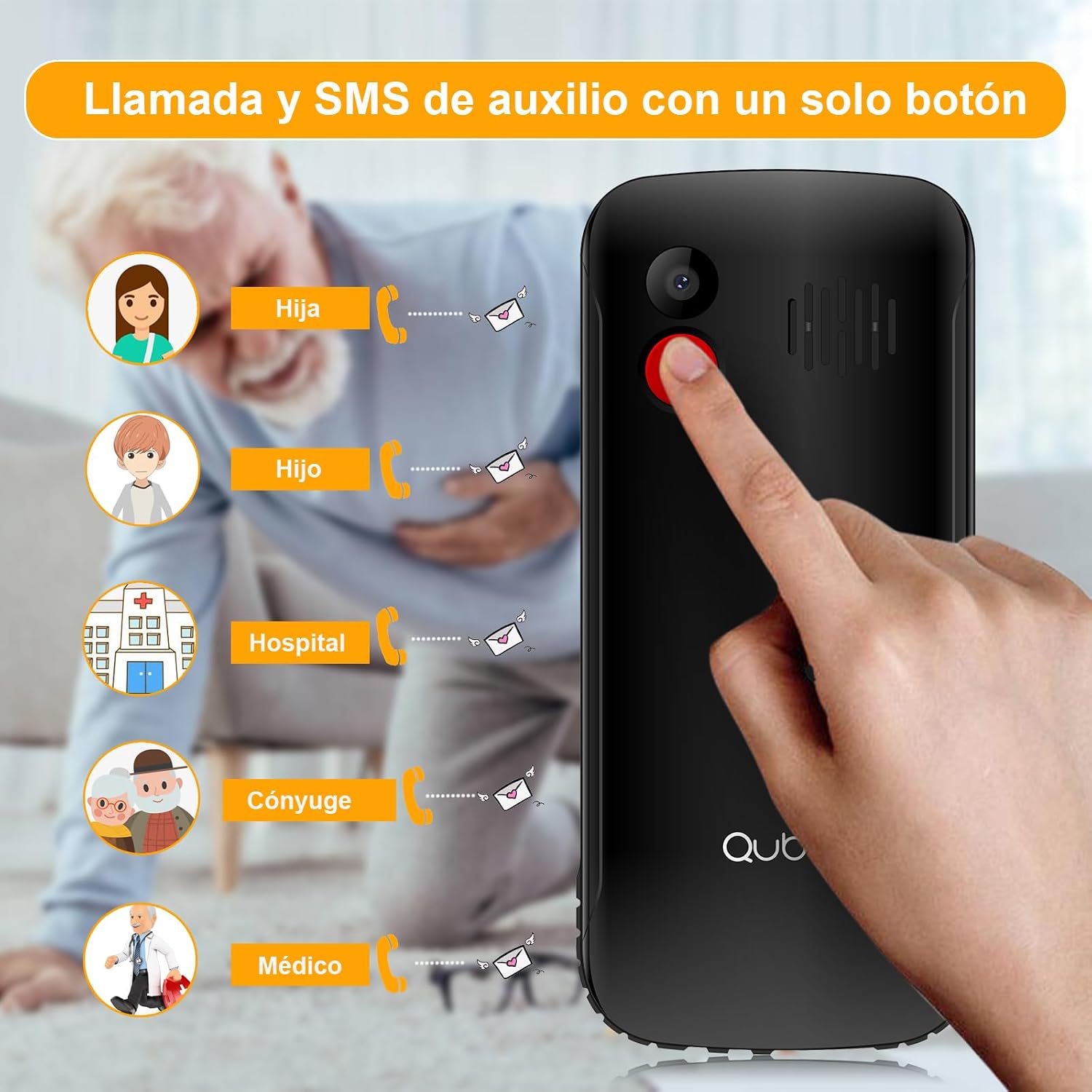
- SOS avarinis mygtukas: A dedicated button for emergencies, allowing automatic calls and SMS to up to 5 pre-set contacts.
- Garsus garsas: High volume for calls and ringtones, beneficial for users with hearing difficulties or in noisy environments.
- Ilgai veikianti 1700 mAh baterija: Offers extended standby time, reducing the frequency of charging.
- Unlocked & Wide Compatibility: Compatible with various network operators (Telcel, AT&T, Movistar, BAIT, CFE, Altan) and supports 4G/3G/2G networks.
- Convenient USB Type-C Charging: Modern and reversible charging port for easy connection.
- Integruotas žibintuvėlis: Quick access to a powerful flashlight for convenience and emergencies.
- Papildomos funkcijos: Includes FM radio, camera, music/video player, alarm, calendar, Bluetooth, microSD slot, and 3.5mm headphone jack.
2.2 Telefono komponentai




3. Sąranka
3.1 SIM kortelės ir akumuliatoriaus įdėjimas
- Nuimkite galinį dangtelį: Švelniai nuimkite telefono galinį dangtelį.
- Įdėkite SIM kortelę (-es): Locate the SIM card slot(s). The Qubo X232 supports Dual SIM. Insert your SIM card(s) into the designated slots, ensuring proper orientation as indicated on the phone.
- Įdėkite „MicroSD“ kortelę (neprivaloma): If you wish to expand storage, insert a microSD card into its dedicated slot.
- Įdėkite bateriją: Place the 1700mAh battery into the battery compartment, aligning the contacts correctly.
- Pakeiskite galinį dangtelį: Tvirtai pritvirtinkite galinį dangtelį.
3.2 Telefono įkrovimas
Connect the provided USB Type-C cable to the phone's charging port and the other end to a power adapter. Plug the adapter into a wall outlet. The battery indicator on the screen will show charging status. Ensure the phone is fully charged before first use.
3.3 Maitinimo įjungimas/išjungimas
To power on, press and hold the Power button (usually red) until the screen lights up. To power off, press and hold the Power button, then select 'Power Off' from the options.
4. Pagrindinės operacijos
4.1 Skambinimas
- Skambinimas: Įveskite telefono numerį naudodami klaviatūrą.
- Pradėti skambutį: Press the green Call button to make the call.
- Baigti skambutį: Press the red End Call button to hang up.
4.2 Skambučių priėmimas
When a call comes in, press the green Call button to answer. Press the red End Call button to reject or end the call.
4.3 Sending Messages (SMS)
- Eikite į meniu „Žinutės“.
- Pasirinkite „Nauja žinutė“ arba „Sukurti SMS žinutę“.
- Įveskite gavėjo telefono numerį arba pasirinkite jį iš kontaktų.
- Įveskite pranešimą naudodami klaviatūrą.
- Paspauskite „Siųsti“.
4.4 Kontaktų tvarkymas
Access the 'Contacts' menu to add, edit, or delete contacts. You can assign speed dial numbers (M1, M2, M3) for quick access to important contacts. The phone also supports contacts with photos for easier identification.
5. Ypatingos savybės
5.1 SOS avarinis mygtukas
The dedicated SOS button on the back of the phone is for emergencies. When pressed and held, it will automatically call up to 5 pre-set emergency contacts and send an emergency SMS message to them simultaneously. Ensure emergency contacts are properly configured in the phone settings.
5.2 Žibintuvėlis
The Qubo X232 includes a powerful flashlight. To activate or deactivate it, use the dedicated side button or navigate through the phone's menu options.
5.3 FM radijas
The phone features a built-in FM radio. Access it through the multimedia menu. No headphones are required to listen to the radio.
5.4 Garsumo valdymas
Adjust call and ringtone volume using the dedicated side buttons. The phone is designed to provide loud and clear audio.
6. Specifikacijos
| Funkcija | Specifikacija |
|---|---|
| Prekės ženklas | Qubo |
| Modelio pavadinimas | Qubo-X232 |
| Operacinė sistema | Branduolio OS |
| Ekrano dydis | 2.3 colių |
| Baterijos talpa | 1700 mAh |
| Korinio ryšio technologija | 4G (compatible with 5G SIMs at 4G speed) |
| Belaidžio ryšio operatorių suderinamumas | All carriers (Telcel, AT&T, Movistar, BAIT, CFE, Altan) |
| SIM Card Count | Dvi SIM kortelės |
| RAM | 48 MB |
| CPU modelis | 6x86 |
| CPU greitis | 2 GHz |
| Įkrovimo prievadas | C tipo USB |
| Ausinių lizdas | 3.5 mm |
| Matmenys | 132.1 x 58.2 x 14.1 mm |
| Svoris | apytiksliai 110 g |
| Spalva | Juoda |
7. Problemų sprendimas
- Telefonas neįsijungia: Įsitikinkite, kad akumuliatorius tinkamai įdėtas ir įkrautas. Prijunkite įkroviklį ir bandykite dar kartą.
- Nėra signalo: Check if the SIM card is properly inserted. Ensure you are in an area with network coverage.
- Negalima skambinti / priimti skambučių: Verify SIM card activation with your carrier. Check if the number is blocked or if call barring is active.
- Įkrovimo problemos: Ensure the USB Type-C cable and adapter are securely connected and undamaged. Try a different power outlet.
- SOS mygtukas neveikia: Confirm that emergency contacts are correctly set up in the SOS settings menu.
8. Saugos informacija
Read all safety information before using your phone to ensure safe and proper use. Keep the phone away from water and extreme temperatures. Use only approved accessories. Do not attempt to disassemble or repair the phone yourself.
9. Garantija ir palaikymas
The manufacturer offers a 30-day warranty for this product. For any issues or support inquiries beyond this period, please contact your retailer or the seller directly. Keep your purchase receipt as proof of purchase.