
1. Įvadas
The SonicWall NSa3800 Next-Generation Firewall is designed to provide advanced security and network performance for large enterprises and distributed networks. This appliance offers robust threat prevention, secure SD-WAN capabilities, and high throughput to protect your network infrastructure.
Pagrindinės funkcijos:
- High firewall throughput and threat prevention capabilities.
- Multiple Ethernet and SFP+ interfaces for flexible connectivity.
- Support for a large number of concurrent connections and VPN tunnels.
- Integration with SonicWall services like Capture ATP sandboxing, intrusion prevention, and TLS 1.3 inspection.

Figure 1: SonicWall NSa3800 Next-Generation Firewall, front view.
2. Sąranka
This section outlines the steps for physically setting up your SonicWall NSa3800 appliance.
2.1 Išpakavimas ir patikrinimas
Carefully unpack the NSa3800 appliance and its accessories. Inspect all components for any signs of damage. If any items are damaged or missing, contact SonicWall support immediately.
2.2 Priekinio skydelio viršusview
Familiarize yourself with the front panel ports and indicators.

Figure 2: Front panel of the SonicWall NSa3800, showing 1 GbE Management port, Console port, 2 USB 3.0 ports, 10x10G SFP+ interfaces, 24x1GE Cu interfaces, and Power button.
2.3 Užpakalinis skydelisview
Understand the rear panel connections, including power and optional redundant power.
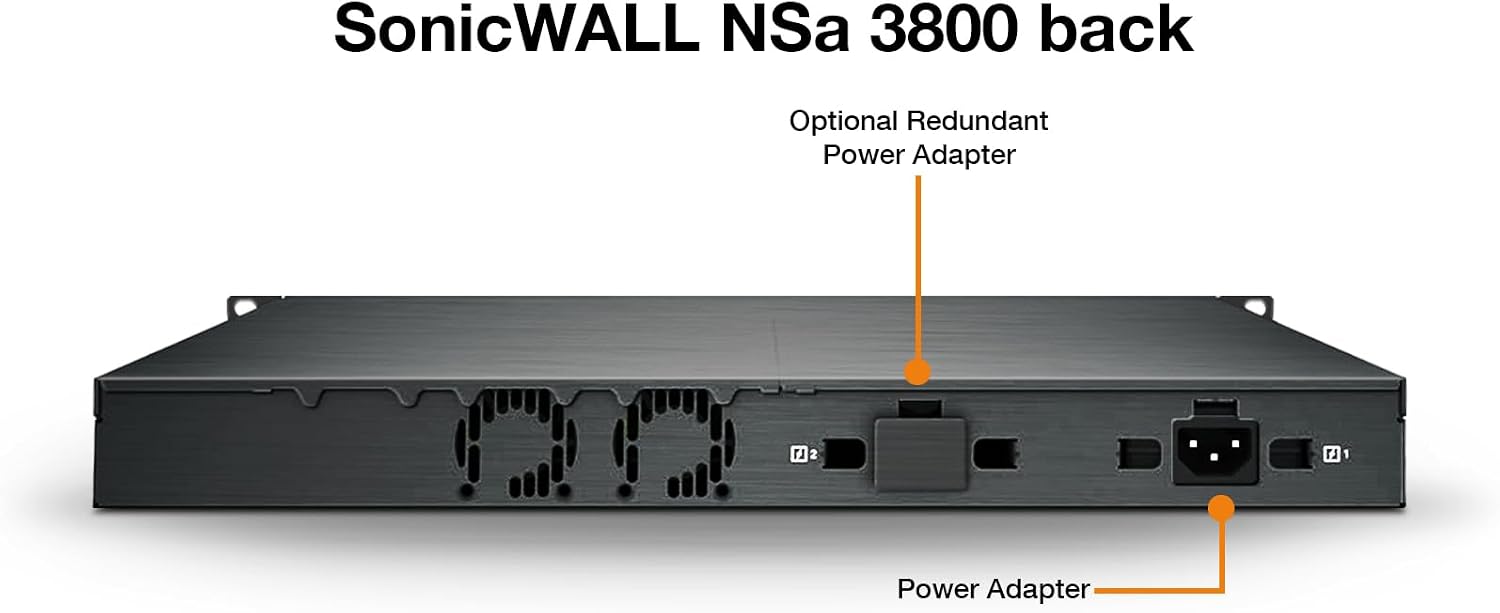
Figure 3: Rear panel of the SonicWall NSa3800, indicating the Power Adapter input and an Optional Redundant Power Adapter slot.
2.4 Montavimas ant stovo
The NSa3800 is designed for rack installation. Secure the appliance in a standard 19-inch rack using the provided rack-mount kit. Ensure adequate ventilation around the unit.

Figure 4: SonicWall NSa3800 appliance securely mounted in a server rack.
2.5 Pradinis įjungimas ir prijungimas
- Connect the power cable to the appliance and a grounded power outlet.
- Paspauskite maitinimo mygtuką priekiniame skydelyje.
- Connect the 1 GbE Management port to your network for initial configuration.
- For advanced configuration, connect a console cable to the Console port and use a terminal emulator.
- The NSa3800 supports zero-touch deployment, simplifying initial setup and configuration.
3. Operating the NSa3800
The SonicWall NSa3800 operates on SonicOS, providing a comprehensive suite of security and networking features. This section covers general operational aspects.
3.1 Core Functionality
The NSa3800 functions as a Next-Generation Firewall, offering:
- Firewall Inspection: Stateful packet inspection and deep packet inspection for network traffic.
- Threat Prevention: Intrusion Prevention System (IPS), anti-malware, and Capture ATP sandboxing.
- Secure SD-WAN: Optimizes network performance and security for distributed environments.
- VPN: Supports IPSec VPN and SSL VPN for secure remote access and site-to-site connectivity.
- TLS 1.3 Inspection: Decrypts and inspects encrypted traffic for hidden threats.
3.2 Performance Metrics
The NSa3800 is engineered for high performance in demanding network environments.
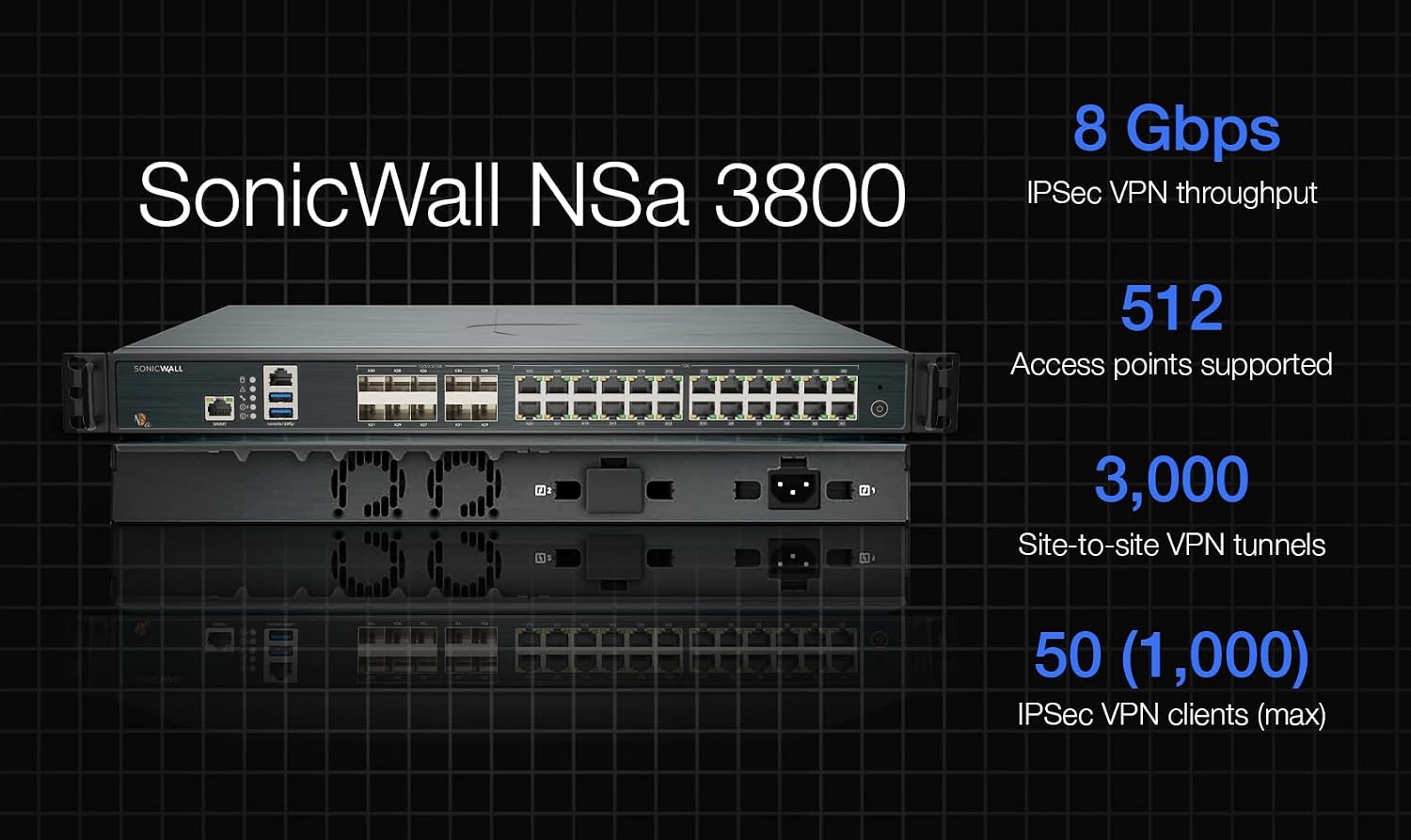
Figure 5: Performance metrics for the SonicWall NSa3800, including IPS Throughput, Anti-Malware Inspection Throughput, Threat Protection Throughput, Firewall Inspection Throughput, TLS/SSL inspection and encryption throughput, and IPSec VPN Throughput.
3.3 Deployment Scenarios
The NSa3800 can be deployed in various network architectures, including Internet Edge and Campus/Private Edge Network configurations.

Figure 6: Deployment options for the NSa Series, showing how the NGFW integrates into Internet Edge and Campus/Private Edge Network setups.
4. Priežiūra
Regular maintenance ensures optimal performance and security of your NSa3800 appliance.
- Firmware atnaujinimai: Regularly check for and apply the latest SonicOS firmware updates to ensure you have the most current security features and bug fixes.
- Konfigūracijos atsarginės kopijos: Periodically back up your appliance configuration. This allows for quick recovery in case of unforeseen issues.
- Sistemos stebėjimas: Monitor system logs and performance metrics through the SonicOS interface to identify and address potential issues proactively.
- Fizinė apžiūra: Ensure the appliance has adequate airflow and that all cables are securely connected. Keep the environment clean and free of dust.
5. Problemų sprendimas
Šiame skyriuje pateikiami pagrindiniai dažniausiai pasitaikančių problemų sprendimo veiksmai.
- Nėra galios: Verify the power cable is securely connected to both the appliance and the power outlet. Check the power button status.
- Tinklo ryšio problemos: Ensure Ethernet cables are properly connected to the correct ports. Check network configurations in SonicOS. Verify upstream network devices (modems, switches) are functioning.
- Lėtas našumas: Review system logs for high resource utilization. Check for active threats or misconfigured security policies that might be impacting performance.
- Prieiga prie valdymo sąsajos: Confirm your computer's IP address is in the same subnet as the management interface. Clear browser cache or try a different browser.
- Peržiūrėkite dokumentaciją: For detailed troubleshooting, refer to the comprehensive SonicWall NSa3800 administration guide available on the official SonicWall support portal.
6. Specifikacijos
Detailed technical specifications for the SonicWall NSa3800 Next-Generation Firewall.
| Funkcija | Specifikacija |
|---|---|
| Prekės ženklas | Sonicwall |
| Modelio pavadinimas | NSa3800 |
| Modelio numeris | 03-SSC-1843 |
| Ryšio technologija | Ethernet |
| Operacinė sistema | SonicOS |
| Prievadų skaičius | 32 |
| Duomenų perdavimo sparta | 20 gigabitas per sekundę |
| LAN prievado pralaidumas | 10 Gbps |
| Belaidžio ryšio standartas | 802.11ac |
| Dažnių juostos klasė | Dviejų juostų |
| Rekomenduojami naudojimo būdai | Verslas |
| Ypatinga funkcija | QoS |
| UPC | 758479318439 |
| GTIN | 758479318439 |
7. Garantija ir palaikymas
For warranty information, please refer to the official SonicWall warranty policy available on their website or contact your authorized SonicWall reseller. SonicWall provides comprehensive technical support for its products.
7.1 Techninė pagalba
If you encounter issues that cannot be resolved using this manual or the online documentation, please contact SonicWall Technical Support. Have your product serial number and a detailed description of the issue ready.
You can find support resources, including knowledge bases, forums, and contact information, on the official SonicWall support portal: www.sonicwall.com/support