
Įvadas
This manual provides detailed instructions for the VINABTY Voice Remote Control, designed as a direct replacement for various OK. QLED TV models. This remote control features voice search capabilities, an ergonomic design, and durable construction for reliable performance. Please read this manual carefully to ensure proper setup and operation.
Sąranka
1. Akumuliatoriaus įdėjimas
Nuotolinio valdymo pultui reikalingos dvi AAA baterijos (nepridedamos). Norėdami jas įdėti, atlikite šiuos veiksmus:
- Atidarykite baterijų skyriaus dangtelį, esantį nuotolinio valdymo pulto gale.
- Įdėkite dvi AAA tipo baterijas, užtikrindami, kad teigiamas (+) ir neigiamas (-) poliai sutaptų su skyriaus viduje esančiomis diagramomis.
- Saugiai uždarykite akumuliatoriaus skyriaus dangtelį.

Vaizdas: Galinis view nuotolinio valdymo pulto su nuimtu baterijų dangteliu paveikslėlis, kuriame parodyta teisinga dviejų AAA baterijų vieta.
2. Susiejimas su televizoriumi
This remote control is designed for easy use and typically requires no programming. However, for voice search functionality, it must be paired with your TV. Refer to your TV's user manual for specific pairing instructions for a new remote control. Generally, this involves:
- Įsitikinkite, kad jūsų televizorius įjungtas.
- Navigate to the TV's settings menu, usually under 'Remotes & Accessories' or 'Bluetooth Settings'.
- Select 'Add new device' or 'Pair remote control'.
- Follow the on-screen prompts to complete the pairing process. This may involve holding down specific buttons on the remote.

Image: The VINABTY remote control positioned beside a television, highlighting its ready-to-use nature and material quality.
Naudojimo instrukcijos
The VINABTY Voice Remote Control offers intuitive control over your OK. QLED TV. Below are the primary functions:
- Įjungimo mygtukas (⏻): Įjungia arba išjungia televizorių.
- Skaičių mygtukai (0–9): Tiesiogiai pasirinkite televizijos kanalus.
- Navigacijos skydelis (aukštyn, žemyn, kairėn, dešinėn, gerai): Naršyti meniu ir patvirtinti pasirinkimus.
- Garsumo didinimas / sumažinimas (+/-): Sureguliuokite televizoriaus garsumą.
- Kanalo aukštyn/žemyn (P^/P˅): Keisti televizijos kanalus.
- Nutildymo mygtukas (🔇): Nutildyti arba įjungti televizoriaus garsą.
- Atgal mygtukas (←): Grįžti į ankstesnį ekraną arba meniu.
- Namų mygtukas (🏠): Access the TV's home screen or smart hub.
- Balso valdymo mygtukas (🎤): Press and hold to activate voice search or commands (requires successful pairing).
- Greitos prieigos mygtukai: Dedicated buttons for popular streaming services like Netflix, YouTube, Prime Video, and Google Play for direct access. A USB button is also included for media playback.
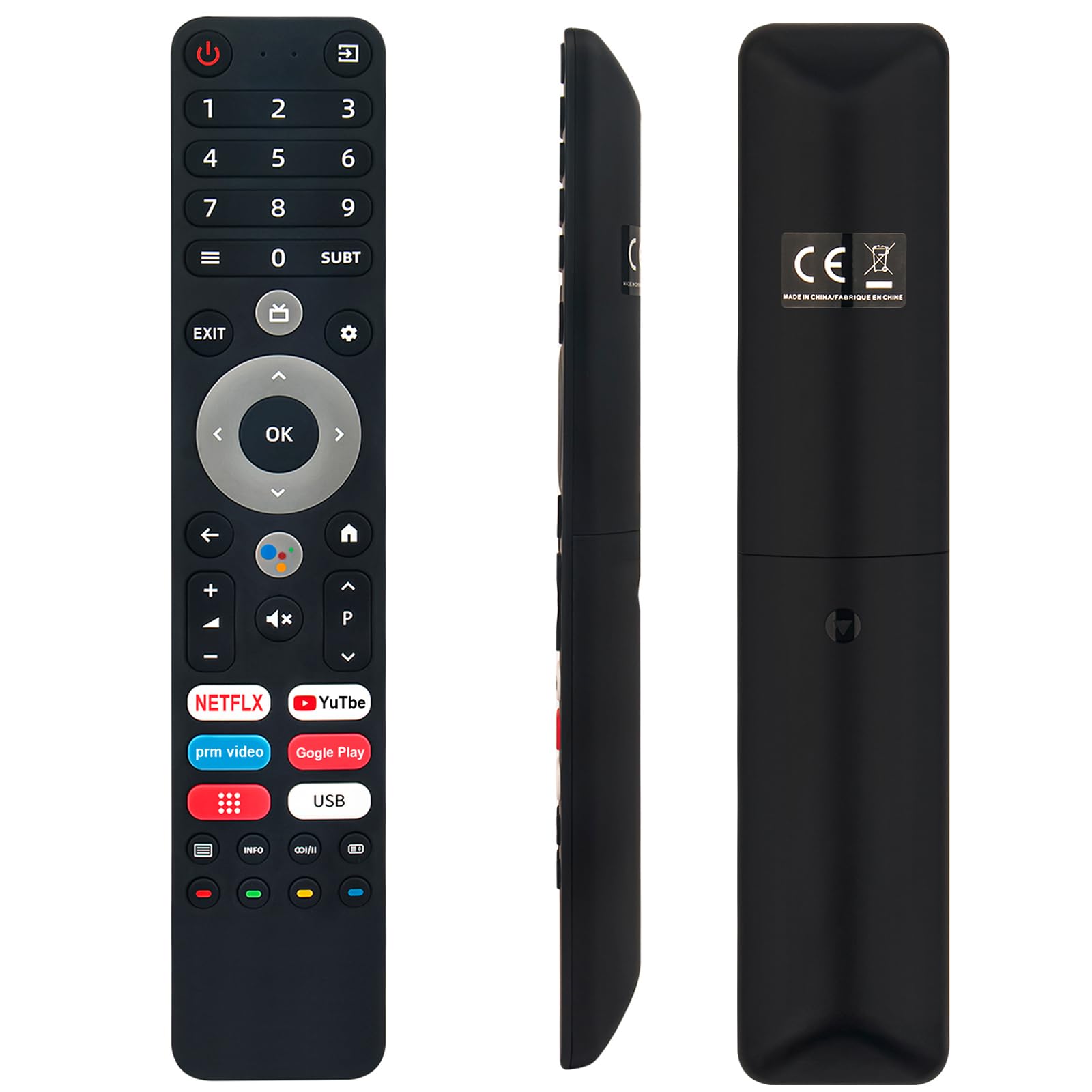
Image: The remote control with a visual emphasis on the voice command button, indicating its functionality.
Priežiūra
To ensure the longevity and optimal performance of your VINABTY Voice Remote Control, follow these maintenance guidelines:
- Valymas: Use a soft, dry cloth to clean the remote control. Avoid using liquid cleaners, aerosols, or harsh chemicals, as these can damage the surface or internal components.
- Baterijos keitimas: Pakeiskite baterijas, kai nuotolinio valdymo pultas reaguoja lėtai arba nustoja veikti. Visada keiskite abi baterijas vienu metu naujomis to paties tipo (AAA) baterijomis.
- Saugykla: Nuotolinio valdymo pultą laikykite vėsioje, sausoje vietoje, toliau nuo tiesioginių saulės spindulių, ekstremalių temperatūrų ir didelės drėgmės. Jei nuotolinio valdymo pulto ilgesnį laiką nenaudosite, išimkite baterijas, kad išvengtumėte elektrolito pratekėjimo.
- Tvarkymas: Venkite nuotolinio valdymo pulto numetimo ir stiprių smūgių, nes tai gali pažeisti vidines grandines.
Trikčių šalinimas
If you encounter issues with your VINABTY Voice Remote Control, try the following solutions:
- Nuotolinio valdymo pultas nereaguoja:
- Patikrinkite, ar baterijos tinkamai įdėtos ir neišsikrovusios. Jei reikia, pakeiskite jas.
- Įsitikinkite, kad tarp nuotolinio valdymo pulto ir televizoriaus infraraudonųjų spindulių imtuvo nėra jokių kliūčių.
- Įsitikinkite, kad nuotolinio valdymo pultas nukreiptas tiesiai į televizorių.
- Balso valdymas neveikia:
- Verify that the remote control is successfully paired with your TV. Refer to the 'Pairing with Your TV' section or your TV's manual.
- Ensure your TV's internet connection is stable, as voice commands often rely on online services.
- Neveikiantys mygtukai:
- Clean the remote control, especially around the buttons, to remove any dirt or debris that might be causing sticking.
Jei šie veiksmai neišsprendžia problemos, kreipkitės į klientų aptarnavimo tarnybą ir gaukite daugiau pagalbos.
Specifikacijos
| Funkcija | Detalė |
|---|---|
| Prekės ženklas | VINABTY |
| Suderinami modeliai | OK. QLED TV OTV 55AU-5023C, OTV43AU-5023C, OTV50AU-5023C, OTV 43AU-5023C, OTV 50AU-5023C |
| Ryšio technologija | Infraraudonųjų spindulių |
| Didžiausias diapazonas | 10 metrai |
| Baterijos tipas | 2 x AAA (neįtraukta) |
| Medžiaga | ABS (body), Soft Rubber (buttons) |
| Spalva | Juoda |
| Matmenys (I x P x A) | 18 cm x 3 cm x 1.5 cm (apytiksliai 7.09 x 1.18 x 0.59 colio) |
| Svoris | 60 gramų |
| Ypatingos savybės | Voice Control, No Programming Required, Ergonomic Design |

Image: The remote control displayed with its precise length and width measurements.
Palaikymas
For any questions regarding the VINABTY Voice Remote Control, or if you are unsure about its compatibility with your specific TV model, please contact our customer support team. We are committed to providing assistance and ensuring your satisfaction.
If you received a remote control that does not function as expected, or if you require further technical support, please reach out to us via email. We will respond promptly to address your concerns.