
1. Įvadas
Thank you for choosing the Pro Breeze 40L Smart Dehumidifier. This manual provides important information regarding the safe operation, installation, use, and maintenance of your appliance. Please read this manual thoroughly before use and retain it for future reference.
This dehumidifier is designed to efficiently remove excess moisture from the air, helping to prevent mold, mildew, and condensation in spaces up to 50 m².
2. Svarbios saugos instrukcijos
Naudodami elektros prietaisus, visada laikykitės pagrindinių saugos priemonių, kad sumažintumėte gaisro, elektros smūgio ir sužalojimų riziką.
- Prieš naudodami prietaisą, atidžiai perskaitykite visas instrukcijas.
- Įsitikinkite, kad ttagAnt etiketės nurodyta įtampa atitinka jūsų elektros tinklo įtampątage.
- Nemerkite prietaiso, maitinimo laido ar kištuko į vandenį ar kitus skysčius.
- Do not operate the appliance with a damaged cord or plug, or after it malfunctions or has been dropped or damaged in any manner.
- Prietaisą laikykite vaikams ir naminiams gyvūnėliams nepasiekiamoje vietoje.
- Always unplug the appliance when not in use, before cleaning, or before moving.
- Įsitikinkite, kad prietaisas pastatytas ant stabilaus, lygaus paviršiaus.
- Neužblokuokite oro įleidimo ar išleidimo angų. Palikite bent 20 cm tarpą aplink įrenginį.
- Šis prietaisas skirtas naudoti tik patalpose.
- Do not use in bathrooms or other excessively humid environments where water may splash onto the unit.
3. Produktas baigtasview
3.1 Komponentai
The Pro Breeze 40L Smart Dehumidifier features a compact design with integrated controls and a water tank. It includes a continuous drainage option and mobility wheels for easy placement.
Vaizdas: priekis view of the Pro Breeze 40L Smart Dehumidifier, highlighting its dimensions (52cm height, 28cm depth, 35.5cm width) and key features like smart app control, laundry mode, 5.5L tank, and low energy consumption.
3.2 Valdymo skydelis ir ekranas
The dehumidifier is equipped with an intuitive touch control panel and an LED display for easy operation and monitoring of humidity levels.

Image: A hand interacting with the touch control panel of the dehumidifier, showing the digital display and various function buttons.
4. Sąranka
4.1 Išpakavimas
- Atsargiai išimkite oro sausintuvą iš pakuotės.
- Nuimkite visas pakavimo medžiagas, įskaitant apsaugines plėveles ar juostas.
- Patikrinkite, ar prietaisas nėra pažeistas. Jei pažeistas, nenaudokite jo ir susisiekite su klientų aptarnavimo tarnyba.
4.2 Įdėjimas
Place the dehumidifier on a firm, level surface in the desired room. Ensure there is at least 20 cm of clear space around all sides of the unit to allow for proper airflow.

Image: A person easily moving the dehumidifier across a wooden floor in a living room, demonstrating its portability with four swivel wheels.
4.3 Maitinimo jungtis
Plug the power cord into a grounded electrical outlet. Ensure the outlet meets the power requirements specified in the 'Specifications' section.
4.4 Nuolatinis drenažas (neprivaloma)
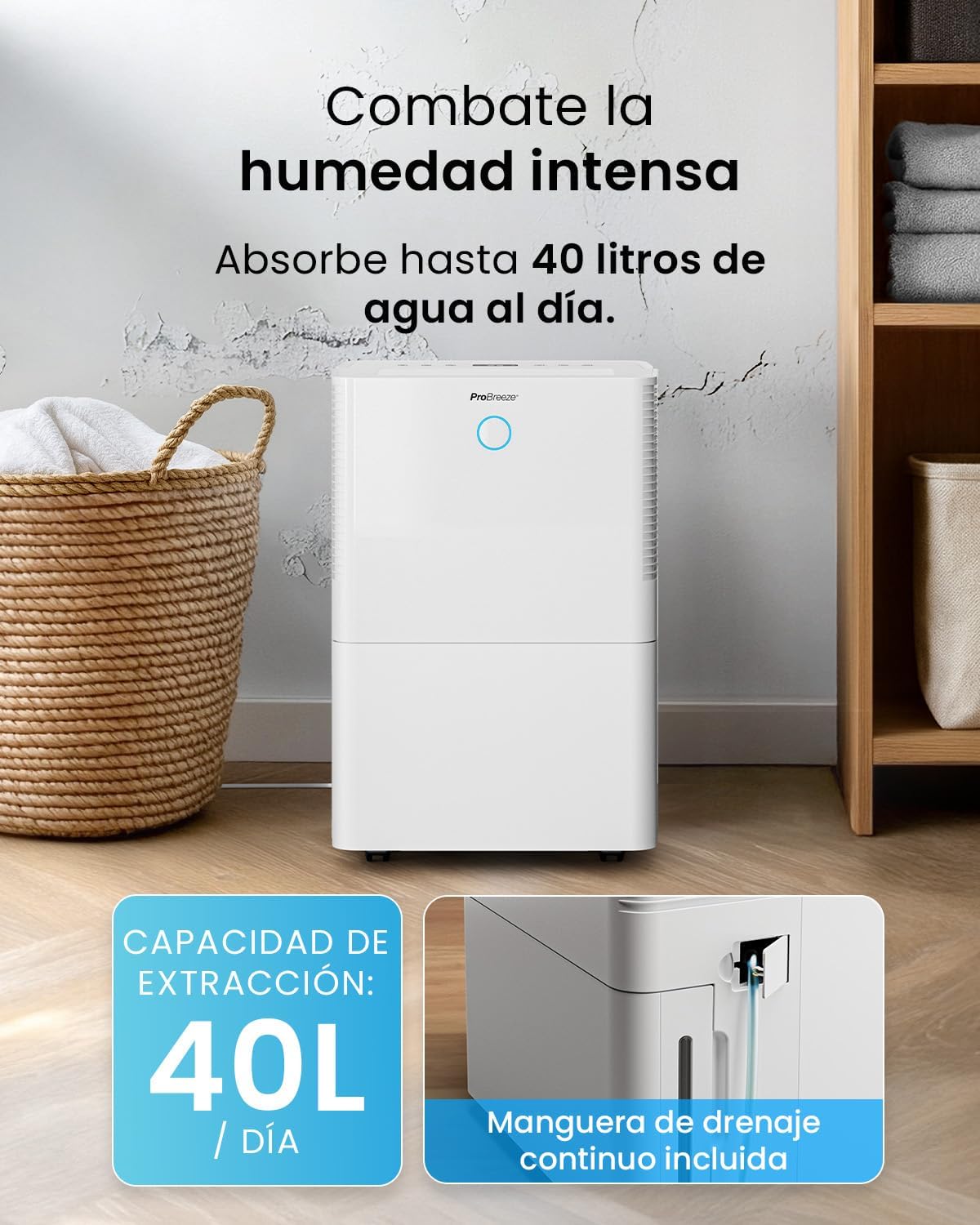
For continuous operation without needing to empty the water tank, attach the included drainage hose. Connect one end to the drainage port on the back of the unit and the other end to a suitable drain or container that is lower than the drainage port.

Vaizdas: Stambus planas view of the dehumidifier's side, showing the continuous drainage hose connected and leading to a floor drain.
5. Naudojimo instrukcijos
5.1 Maitinimo įjungimas/išjungimas
Paspauskite Galia mygtuką valdymo skydelyje, kad įjungtumėte arba išjungtumėte įrenginį.
5.2 Norimo drėgnumo nustatymas
The dehumidifier features an automatic sensor that continuously measures room humidity. Use the Drėgmė buttons to set your desired humidity level between 30% and 80%.

Image: A family relaxing in a living room with the dehumidifier operating. An overlay illustrates the humidity indicator lights: Blue for >50% (Low), Green for 50-70% (Medium), and Red for <70% (High).
5.3 Darbo režimai
- Automatinis režimas: The unit will automatically adjust its operation to maintain the set humidity level.
- Nepertraukiamas režimas: The dehumidifier will operate continuously regardless of the humidity level, ideal for very damp sąlygas.
- Skalbimo režimas: This mode is designed to accelerate the drying of clothes indoors by running at maximum fan speed and continuous dehumidification.
- Miegojimo rezimas: Reduces fan speed and dims the display for quiet operation during the night.

Image: A woman smiling while placing clothes on a drying rack next to the dehumidifier, illustrating the accelerated laundry drying feature.

Image: A family watching television in a dimly lit living room, with the dehumidifier operating quietly in the foreground, indicating its silent operation and night mode features.
5.4 Laikmačio funkcija
Naudokite Laikmatis button to set a 24-hour timer for automatic power on or off. This allows you to schedule operation according to your needs.

Image: A close-up of a smartphone screen displaying the Pro Breeze app's 24-hour timer function, allowing users to schedule the dehumidifier's operation.
6. Wi-Fi Connectivity and App Control
The Pro Breeze 40L Smart Dehumidifier can be controlled remotely via the free Pro Breeze app, compatible with both Alexa and Google Home.
6.1 Programėlės diegimas ir susiejimas
- Download the Pro Breeze app from your smartphone's app store.
- Follow the in-app instructions to create an account and pair your dehumidifier.
- Ensure your dehumidifier is powered on and your smartphone is connected to a 2.4GHz Wi-Fi network during the pairing process.
6.2 Nuotolinio valdymo funkcijos
Per programėlę galite:
- Įjunkite / išjunkite oro sausintuvą.
- Adjust humidity settings.
- Select operating modes (Auto, Continuous, Laundry, Sleep).
- Set and manage the 24-hour timer.
- Monitor current room humidity.

Image: A woman using a smartphone to control the dehumidifier, with icons for Amazon Alexa and Google Home indicating voice control compatibility.
7. Priežiūra
Reguliarus drėkintuvo techninis aptarnavimas užtikrina optimalų veikimą ir ilgaamžiškumą.
7.1 Oro filtro valymas
Oro filtrą reikia valyti kas dvi savaites arba dažniau, priklausomai nuo naudojimo ir oro kokybės.
- Išjunkite ir atjunkite oro drėkintuvą.
- Nuimkite oro filtrą nuo įrenginio galinės dalies.
- Filtrą nuplaukite šiltu muiluotu vandeniu. Kruopščiai nuskalaukite ir leiskite jam visiškai išdžiūti prieš įdėdami atgal.
- Do not operate the dehumidifier without the filter installed.
7.2 Vandens bako ištuštinimas ir valymas
When the water tank is full, the unit will automatically shut off and an indicator light will illuminate. Empty the tank and clean it regularly to prevent mold and bacteria growth.
- Atsargiai ištraukite vandens baką iš įrenginio priekio.
- Surinktą vandenį išpilkite.
- Clean the tank with mild detergent and water. Rinse thoroughly.
- Reinsert the dry tank firmly into the dehumidifier.

Image: The dehumidifier in operation, with an overlay indicating its 40L/day extraction capacity and the continuous drainage hose option.
7.3 Išorinis valymas
Nuvalykite sausintuvo išorę minkšta, damp audinys. Nenaudokite abrazyvinių valiklių ar tirpiklių.
8. Problemų sprendimas
If you encounter issues with your dehumidifier, refer to the following table before contacting customer support.
| Problema | Galima priežastis | Sprendimas |
|---|---|---|
| Oro sausintuvas neįsijungia. | No power; Power cord not plugged in; Water tank full or not correctly inserted. | Patikrinkite maitinimo šaltinį; Prijunkite maitinimo laidą; Ištuštinkite vandens bakelį ir tinkamai jį įstatykite atgal. |
| Vanduo nesurinktas. | Room humidity too low; Temperature too low; Air filter blocked; Continuous drainage hose connected. | Increase desired humidity setting; Ensure room temperature is above 5°C; Clean air filter; Disconnect continuous drainage hose if collecting water in tank. |
| Įrenginys triukšmingas. | Unit not on a level surface; Air filter blocked; Fan obstruction. | Place on a flat, stable surface; Clean air filter; Check for obstructions in fan area. |
| „Wi-Fi“ ryšio problemos. | Neteisingas „Wi-Fi“ slaptažodis; neprisijungta prie 2.4 GHz tinklo; maršrutizatorius per toli. | Verify password; Connect to 2.4GHz Wi-Fi; Move unit closer to router or use a Wi-Fi extender. |
9. Specifikacijos
- Prekinis ženklas: Pro Breeze
- Modelio pavadinimas: PB-D-32W-W
- Drėgmės ištraukimas: Iki 40 litrų per dieną
- Vandens bako talpa: 5.3 litrai
- Rekomenduojamas kambario dydis: Iki 50 m² (538 kv. pėd.)
- Matmenys (P x P x A): 27.5 x 35.5 x 52.2 cm
- Svoris: 16.36 kg
- Greičių skaičius: 3
- Ypatingos savybės: Smart App Control, Automatic Humidity Sensor, Automatic Shut-off, 24-hour Timer, Laundry Mode, Sleep Mode, Continuous Drainage
- Triukšmo lygis: <49dB
10. Garantija ir palaikymas
For warranty information and customer support, please refer to the documentation included with your purchase or visit the official Pro Breeze website. Ensure you have your model number (PB-D-32W-W) and proof of purchase available when contacting support.
Gamintojas: Viena mažmeninės prekybos grupė