
1. Įvadas
The Perixx PERIBOARD-832RGB is a compact, wireless mini keyboard featuring RGB backlighting and multi-device Bluetooth connectivity. This manual provides instructions for setting up, operating, and maintaining your keyboard to ensure optimal performance.

Image 1.1: The Perixx PERIBOARD-832RGB keyboard in use, showcasing its compact design and backlit keys.
2. Pakuotės turinys
Patikrinkite pakuotę, ar joje yra šie daiktai:
- Perixx PERIBOARD-832RGB Wireless RGB Backlit Mini Keyboard
- USB-C to A Charging Cable
- Vartotojo vadovas (šis dokumentas)

Image 2.1: Contents of the Perixx PERIBOARD-832RGB package, including the keyboard, USB-C cable, and manual.
3. Sąranka ir prijungimas
3.1 Klaviatūros įkrovimas
Before first use, fully charge the keyboard. Connect the provided USB-C to A cable to the keyboard's USB-C charging port and the other end to a USB power source (e.g., computer USB port, USB wall adapter).
- Įkrovimo metu užsidegs įkrovimo indikatoriaus lemputė.
- Indikatorius pasikeis arba išsijungs, kai įkrovimas bus baigtas.

Image 3.1: Location of the USB-C charging port and power ON/OFF switch on the keyboard.
3.2 Maitinimo įjungimas/išjungimas
Locate the power switch on the side or back of the keyboard. Slide it to the 'ON' position to power on the keyboard. Slide it to 'OFF' when not in use to conserve battery.
3.3 Bluetooth Pairing (Multi-Device Connection)
The PERIBOARD-832RGB supports connection to up to three devices via Bluetooth. Follow these steps to pair your keyboard:
- Įsitikinkite, kad klaviatūra įjungta.
- Paspauskite ir palaikykite Fn klavišą ir vieną iš „Bluetooth“ kanalo klavišų (Q BT1 atveju, W for BT2, or E for BT3) for 3-5 seconds until the corresponding indicator light (usually above the key) starts blinking rapidly. This indicates the keyboard is in pairing mode.
- Savo įrenginyje (asmeniniame kompiuteryje, nešiojamajame kompiuteryje, planšetiniame kompiuteryje, išmaniajame telefone) įjunkite „Bluetooth“ ir ieškokite naujų įrenginių.
- Select "PERIBOARD-832RGB" from the list of available devices.
- If prompted, enter the pairing code displayed on your screen using the keyboard and press Įeikite.
- Once paired, the indicator light will stop blinking and remain solid for a few seconds before turning off. The keyboard is now connected.
To connect to additional devices, repeat the process using a different Bluetooth channel key (Fn+W or Fn+E).

Image 3.2: Visual guide for connecting the keyboard to up to three devices using Fn+Q/W/E keys.
4. Operacija
4.1 Perjungimas tarp prijungtų įrenginių
Norėdami perjungti susietus įrenginius, tiesiog paspauskite Fn klavišą kartu su atitinkamu „Bluetooth“ kanalo klavišu (Q, W, arba E) for the desired device. The keyboard will automatically connect to the selected device.
4.2 Foninio apšvietimo valdymas
The PERIBOARD-832RGB features RGB backlighting with multiple color options.
- Turn Backlight On/Off: Paspauskite Fn + F11 (RGB) , kad įjungtumėte arba išjungtumėte foninį apšvietimą.
- Change Backlight Color: Paspauskite Fn + F12 (RGB) to cycle through the available RGB colors (7 colors).
- Sureguliuokite ryškumą: Naudokite Fn + Puslapis aukštyn ryškumui padidinti ir Fn + Puslapis žemyn ryškumui sumažinti.
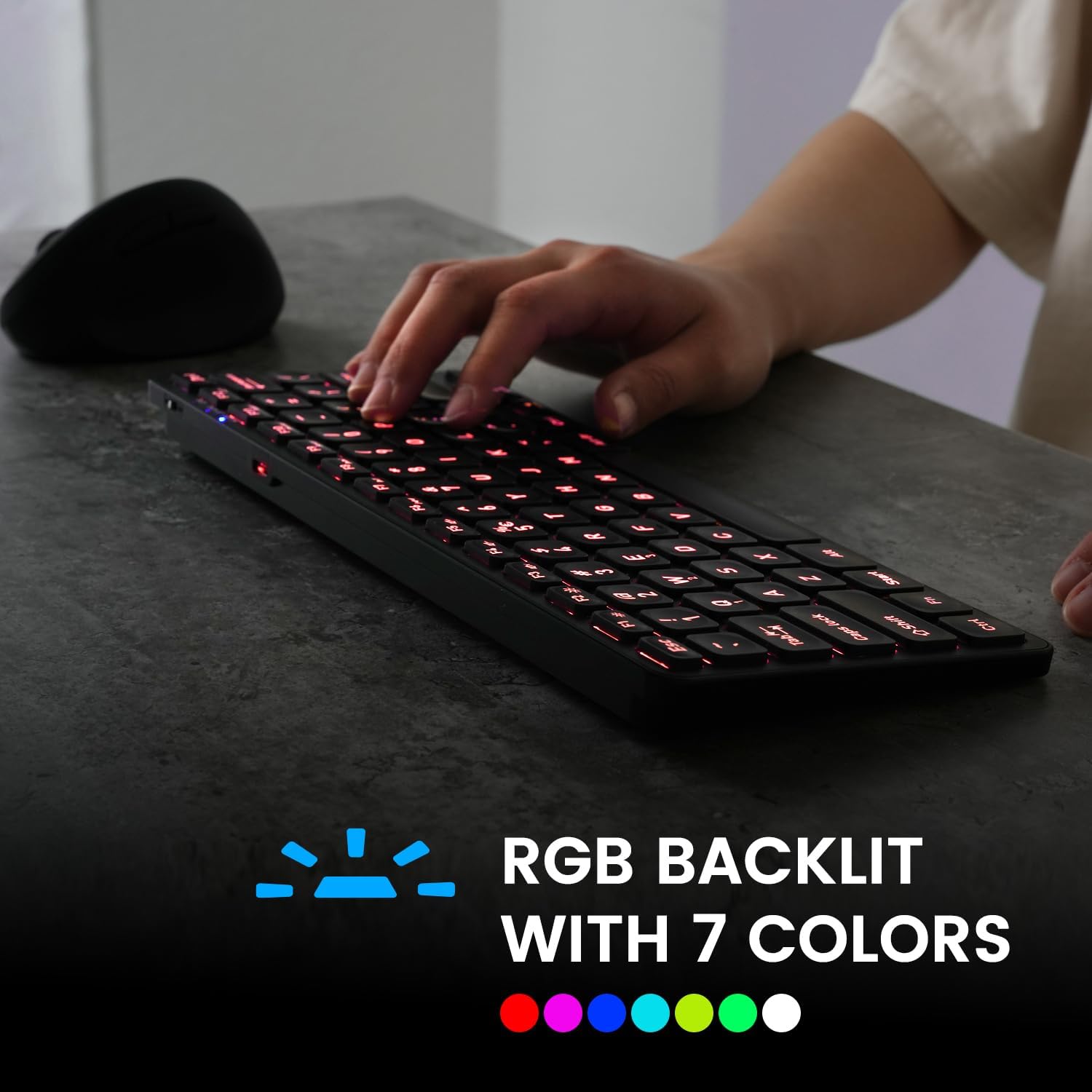
Image 4.1: The keyboard illuminated with RGB backlighting, demonstrating visibility in low-light conditions.
4.3 Funkciniai klavišai (Fn deriniai)
Many keys have secondary functions accessible by holding the Fn key and pressing the desired function key. These include media controls, volume adjustments, and other system shortcuts.
| Raktų derinys | Funkcija |
|---|---|
| Fn + Q | Perjunkite į „Bluetooth“ įrenginį 1 |
| Fn + W | Perjunkite į „Bluetooth“ įrenginį 2 |
| Fn + E | Perjunkite į „Bluetooth“ įrenginį 3 |
| Fn + F1 | Media Player |
| Fn + F2 | Sumažinti garsumą |
| Fn + F3 | Padidinti garsumą |
| Fn + F4 | Nutildyti |
| Fn + F5 | Ankstesnis takelis |
| Fn + F6 | Leisti / pristabdyti |
| Fn + F7 | Kitas takelis |
| Fn + F8 | Sustok |
| Fn + F9 | Web Naršyklė |
| Fn + F10 | El. paštas |
| Fn + F11 (RGB) | Foninis apšvietimas įjungtas/išjungtas |
| Fn + F12 (RGB) | Cycle Backlight Colors |
| Fn + Puslapis aukštyn | Padidinkite foninio apšvietimo ryškumą |
| Fn + Puslapis žemyn | Sumažinkite foninio apšvietimo ryškumą |

4.2 pav.: Išsamus view of the keyboard keys, highlighting the primary and secondary (Fn) functions.
5. Priežiūra
Norėdami užtikrinti klaviatūros ilgaamžiškumą ir optimalų veikimą, laikykitės šių priežiūros nurodymų:
- Valymas: Šiek tiek naudokite minkštą, be pūkelių šluostę dampKlaviatūros paviršių nuvalykite vandeniu arba švelniu valymo tirpalu. Venkite stiprių cheminių medžiagų ar abrazyvinių medžiagų.
- Dulkių šalinimas: Norėdami pašalinti dulkes ir šiukšles iš tarpų tarp klavišų, naudokite suslėgtą orą.
- Akumuliatoriaus priežiūra: Avoid fully discharging the battery frequently. Charge the keyboard regularly, especially if it will not be used for an extended period.
- Saugykla: Klaviatūrą laikykite vėsioje, sausoje vietoje, apsaugotoje nuo tiesioginių saulės spindulių ir ekstremalių temperatūrų.
6. Problemų sprendimas
If you encounter issues with your PERIBOARD-832RGB, refer to the following common solutions:
| Problema | Galimas sprendimas |
|---|---|
| Klaviatūra neįsijungia. | Ensure the power switch is in the 'ON' position. Charge the keyboard fully using the provided USB-C cable. |
| Nepavyksta prisijungti per „Bluetooth“. | Make sure the keyboard is in pairing mode (Fn + Q/W/E, indicator blinking). Ensure Bluetooth is enabled on your device. Try unpairing and re-pairing the keyboard. Move the keyboard closer to your device. |
| Klavišai nereaguoja arba spausdina neteisingai. | Check battery level and charge if necessary. Ensure the keyboard is connected to the correct device. Restart the keyboard and your device. |
| Foninis apšvietimas neveikia. | Press Fn + F11 to toggle the backlight. Ensure the keyboard has sufficient battery charge. |
| Klaviatūra dažnai atsijungia. | Ensure the keyboard is within the effective Bluetooth range (typically 10 meters). Reduce interference from other wireless devices. Charge the keyboard. |
7. Specifikacijos
| Funkcija | Detalė |
|---|---|
| Prekės ženklas | Perixx |
| Modelis | PERIBOARD-832RGB |
| Ryšio technologija | Bluetooth |
| Klaviatūros aprašymas | Mechanical (Scissor-switch type) |
| Ypatinga funkcija | RGB Backlit (7 colors) |
| Suderinami įrenginiai | Kompiuteris, nešiojamas kompiuteris, planšetinis kompiuteris, išmanusis telefonas |
| Gaminio matmenys | 11.06 colio ilgio x 4.53 colio pločio x 0.87 colio aukščio (28.09 x 11.51 x 2.21 cm) |
| Prekės svoris | 1.06 svaro (0.48 kg) |
| Medžiaga | Plastikiniai |
| Maitinimo šaltinis | USB Powered (Rechargeable Battery) |
| Įtraukti komponentai | USB-C į A laidą |
8. Garantija ir palaikymas
Perixx products are covered by a limited warranty. For detailed warranty information, technical support, or customer service, please refer to the official Perixx websvetainėje arba susisiekite tiesiogiai su jų klientų aptarnavimo tarnyba. Išsaugokite pirkimo kvitą garantiniams reikalavimams.