
1. Įvadas
This manual provides detailed instructions for the installation, operation, and maintenance of your GNCC 2K 3MP Indoor WiFi Surveillance Camera, model P5W. Please read this manual thoroughly before using the product to ensure proper functionality and safety.
2. Produktas baigtasview
2.1 Pakuotės turinys
Patikrinkite, ar pakuotėje yra visi reikalingi daiktai:
- GNCC 2K 3MP Indoor WiFi Surveillance Camera (P5W)
- Maitinimo adapteris
- 2 metro maitinimo laidas
- Montavimo pagrindas
- Varžtai montavimui
- Vartotojo vadovas (šis dokumentas)
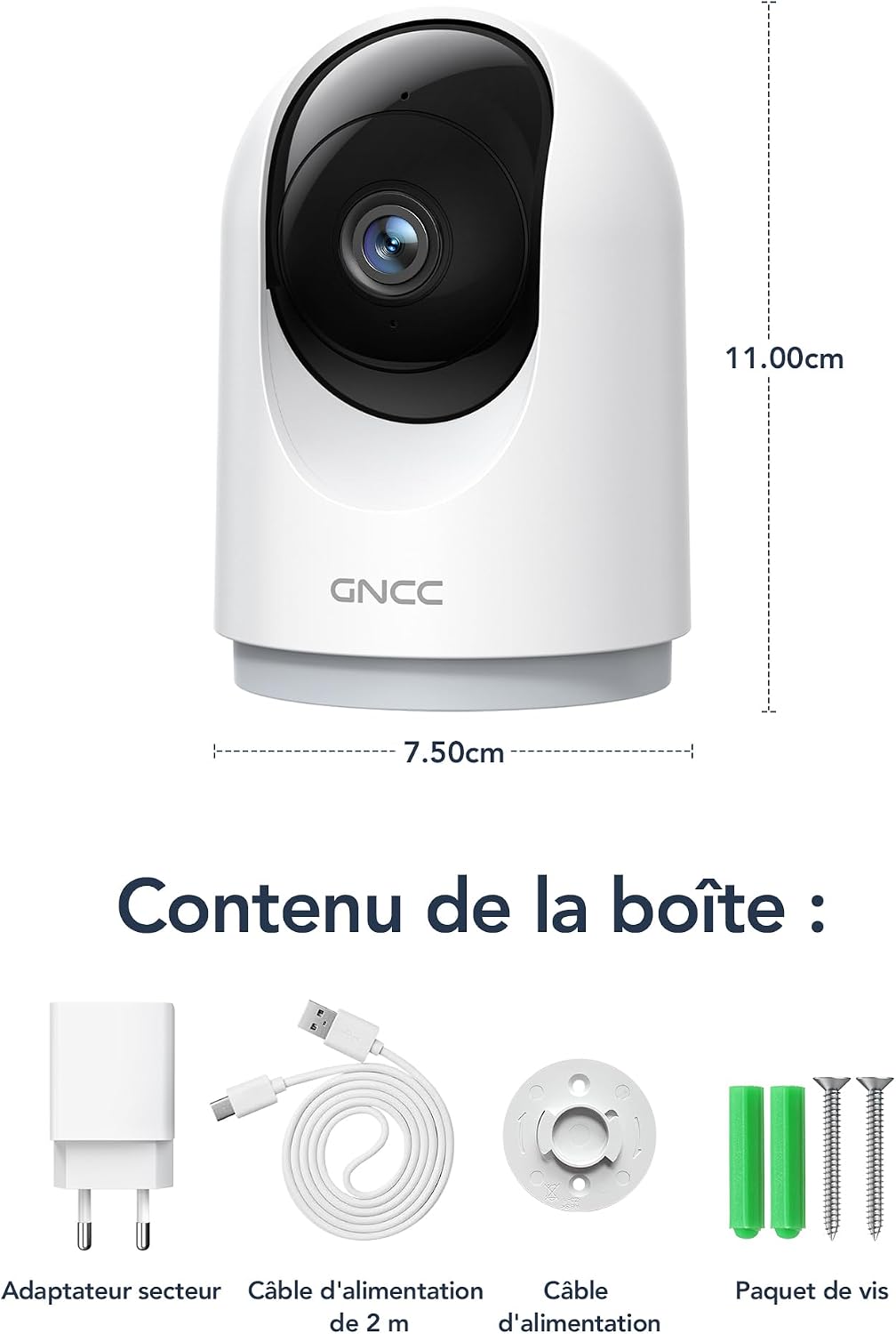
Figure 2.1: Package Contents and Camera Dimensions. The image displays the camera, power adapter, USB cable, mounting base, and screws. Dimensions are indicated as 7.50cm width and 11.00cm height.
2.2 Kameros funkcijos
- 2K 3MP raiška: Pateikiamas aiškus ir išsamus vaizdo įrašastage.
- 360° aprėptis: Features 355° horizontal pan and 60° vertical tilt for comprehensive monitoring.
- 2.4 GHz „Wi-Fi“ ryšys: Connects to your home network for remote access.
- Infraraudonųjų spindulių nakties vizija: Automatically activates in low light, providing clear visibility up to 15 meters.
- Dvipusis garsas: Leidžia bendrauti realiuoju laiku per kamerą.
- AI Motion Detection & Tracking: Detects movement, human shapes, pets, and abnormal sounds, sending instant alerts to your phone.
- Kelių įrenginių View: Monitor up to four cameras simultaneously on your mobile device.
- Išmaniųjų namų integracija: Suderinamas su „Amazon Alexa“ ir „Google Assistant“ balso valdymui.
- Privatumo režimas: Remotely disable recording and live view per programėlę.
- Lankstus saugojimas: Supports Cloud storage (subscription required) and local storage via MicroSD card (up to 128GB, not included).

Figure 2.2: Key Features of the GNCC P5W Camera.
3. Sąrankos instrukcijos
3.1 Kameros įjungimas
- Connect the 2-meter power cable to the camera's power input port.
- Įjunkite maitinimo adapterį į standartinį elektros lizdą.
- Kamera įsijungs ir pradės mirksėti indikatoriaus lemputė, rodanti, kad ji paruošta sąrankai.
3.2 Programėlės diegimas ir paskyros sukūrimas
- Download the official GNCC app from your smartphone's app store (iOS App Store or Google Play Store).
- Atidarykite programėlę ir vykdykite ekrane pateikiamus nurodymus, kad sukurtumėte naują paskyrą arba prisijunkite, jei jau turite.
3.3 Kameros prijungimas prie „Wi-Fi“
Įsitikinkite, kad jūsų išmanusis telefonas prijungtas prie 2.4 GHz „Wi-Fi“ tinklo. Kamera nepalaiko 5 GHz „Wi-Fi“.
- In the GNCC app, tap the "+" icon to add a new device.
- Select your camera model (P5W) from the list of devices.
- Follow the app's prompts to connect the camera to your 2.4GHz Wi-Fi network. This typically involves scanning a QR code displayed on your phone with the camera lens.
- Once connected, the camera's indicator light will turn solid, and you will hear a confirmation sound.
3.4 Fotoaparato montavimas
The camera can be placed on a flat surface or mounted to a wall/ceiling using the provided mounting base and screws.
- Stalo laikiklis: Place the camera on a stable, flat surface. Ensure it has a clear view ploto, kurį norite stebėti.
- Screw-in Installation:
- Pasirinkite tinkamą montavimo vietą.
- Use the mounting base as a template to mark the screw positions on the wall or ceiling.
- Drill pilot holes and insert the wall anchors if necessary.
- Secure the mounting base with the provided screws.
- Attach the camera to the mounting base by twisting it until it locks securely.
4. Naudojimo instrukcijos
4.1 Tiesiogiai View ir panoraminio/pakreipimo valdymas
Open the GNCC app and select your camera to access the live view. Use the on-screen controls to pan (355° horizontal) and tilt (60° vertical) the camera lens to adjust the viewing kampas.

Figure 4.1: 360° Coverage of the GNCC P5W Camera.
4.2 Dvipusis garsas
Iš tiesioginio view screen, tap the microphone icon to enable two-way audio. You can speak into your phone, and your voice will be transmitted through the camera's speaker. Similarly, you can hear audio from the camera's environment.

Figure 4.2: Two-Way Audio Functionality.
4.3 Judesio aptikimas ir įspėjimai
The camera is equipped with AI-powered motion detection, human shape detection, pet detection, and abnormal sound detection. When an event is detected, the camera will automatically record and send an instant notification to your smartphone.
- Enabling/Disabling Alerts: Navigate to the camera settings in the app to customize alert preferences, including sensitivity levels and detection zones.
- Judesių sekimas: When motion is detected, the camera can automatically track the moving object within its field of view.

Figure 4.3: Motion Detection and Instant Notifications.
4.4 Naktinis matymas
The camera automatically switches to infrared night vision mode in low-light conditions, providing clear black-and-white video up to 15 meters. No manual intervention is required.

Figure 4.4: Night Vision in operation, showing a baby in a crib.
4.5 Saugojimo parinktys
- „MicroSD“ kortelės saugykla: Insert a MicroSD card (up to 128GB, not included) into the camera's designated slot for local recording. The camera will continuously record or record upon motion detection, depending on your settings.
- Saugykla debesyje: Optional cloud storage is available via subscription, offering 24/7 unlimited recording and access to past footage. A 14-day free trial for smart AI detection features may be available.

Figure 4.5: Cloud and Local Storage Options.
4.6 Smart Home Integration (Alexa & Google Assistant)
The GNCC P5W camera can be integrated with Amazon Alexa and Google Assistant for convenient voice control. Follow the instructions in your Alexa or Google Home app to link your GNCC account and devices.
- ExampBalso komanda: "Alexa, show me the living room camera."

Figure 4.6: Smart Home Integration and Advanced Features.
4.7 Privatumo režimas
To ensure privacy, you can remotely disable the camera's recording and live view functions through the GNCC app. This feature allows you to turn off surveillance when not needed.
5. Priežiūra
- Valymas: Kameros objektyvą ir korpusą valykite minkštu, sausu audiniu. Venkite naudoti stiprias chemines medžiagas ar abrazyvines medžiagas.
- Firmware atnaujinimai: Regularly check the GNCC app for available firmware updates. Keeping your camera's firmware up-to-date ensures optimal performance and security.
- Maitinimo ciklas: Jei kyla problemų dėl fotoaparato veikimo, pabandykite jį 10 sekundžių atjungti nuo maitinimo šaltinio ir vėl prijungti.
- „MicroSD“ kortelės valdymas: If using a MicroSD card, periodically check its status in the app and format it if necessary to maintain recording quality and prevent errors.
6. Problemų sprendimas
| Problema | Galima priežastis | Sprendimas |
|---|---|---|
| Kamerai nepavyksta prisijungti prie „Wi-Fi“. | Neteisingas „Wi-Fi“ slaptažodis; kamera per toli nuo maršrutizatoriaus; naudojamas 5 GHz „Wi-Fi“ tinklas; maršrutizatoriaus užkardos nustatymai. |
|
| Ne gyvai view arba neprisijungus prie interneto. | No internet connection; Camera powered off; Weak Wi-Fi signal. |
|
| Judesio aptikimo įspėjimai negaunami. | Alerts disabled in app; Incorrect detection zone/sensitivity; App notifications blocked by phone settings. |
|
| Dvipusis garsas neveikia. | Microphone/speaker muted in app; Phone volume too low; Network latency. |
|
7. Specifikacijos
| Funkcija | Detalė |
|---|---|
| Modelio pavadinimas | P5W |
| Rezoliucija | 2K (1296 Pixels effective capture, 1440p screen capture resolution) |
| Panardinimo / pakreipimo diapazonas | Horizontaliai 355°, vertikaliai 60° |
| Ryšys | 2.4GHz Wi-Fi (Wireless) |
| Naktinio matymo diapazonas | Iki 15 metrų |
| Garsas | Dvipusis garsas |
| Judesio aptikimas | AI Motion, Human, Pet, Abnormal Sound Detection |
| Saugojimo parinktys | MicroSD Card (up to 128GB), Cloud Storage (subscription) |
| Maitinimo šaltinis | Wired Electric Cable (5 Volts, 3 Watts) |
| Matmenys (I x P x A) | 7.5 x 7.5 x 14.9 cm |
| Svoris | 330 gramų |
| Veikimo aplinka | Naudoti tik patalpose |
| Suderinami įrenginiai | Išmanusis telefonas („iOS“ / „Android“), „Amazon Alexa“, „Google Assistant“ |
| GTIN / UPC | 850070296489 |
8. Garantija ir palaikymas
8.1 Informacija apie garantiją
GNCC products are designed and manufactured to the highest quality standards. For specific warranty details, please refer to the warranty card included in your product packaging or visit the official GNCC websvetainėje. Išsaugokite pirkimo kvitą kaip pirkimo įrodymą garantiniams reikalavimams.
The product has a return policy duration of 30 days for refund/replacement, as per Amazon's policy.
8.2 Pagalba klientams
If you encounter any issues or have questions regarding your GNCC P5W camera, please contact GNCC customer support through the following channels:
- Oficialus Websvetainė: Visit the GNCC official websvetainė, kurioje rasite DUK, pagalbos straipsnius ir kontaktinę informaciją.
- Pagalba programėlėje: The GNCC app may offer a support section or direct contact options.
- Pagalba el. paštu: Žiūrėkite produkto pakuotę arba oficialų webklientų aptarnavimo el. pašto adreso svetainė.
When contacting support, please have your product model (P5W) and purchase information ready.