
1. Įvadas
This manual provides essential information for the proper use and maintenance of your ZWP Replacement Remote Control. This remote is designed to be a direct replacement for various walking pad treadmill models, ensuring seamless operation without complex programming.
2. Produktas baigtasview
Pagrindinės funkcijos:
- Patvari konstrukcija: Made of high-quality ABS material, ensuring wear resistance and durability.
- Patogus dizainas: Ergonomically designed for a comfortable hand feeling.
- Nereikia programuoti: Paruoštas naudoti įdėjus bateriją.
Suderinamumas:
This replacement remote control is compatible with the following walking pad treadmill models:
- Citysports: CS-WP6, CS-WP2, CS-WP3
- SubSun: SH01-A
- Anylife: 480L, 480L-A, 480L-B, 480G-A, 520A-A, 520A-B, P3-D, L1, P1, P2, P3
- AKLUER: 480L, 480L-A, 480L-B, 480G-A, 520A-A
- BestGod: 480A-A

This image illustrates the design of the ZWP replacement remote control alongside a common original remote, highlighting their functional equivalence.
3. Sąranka
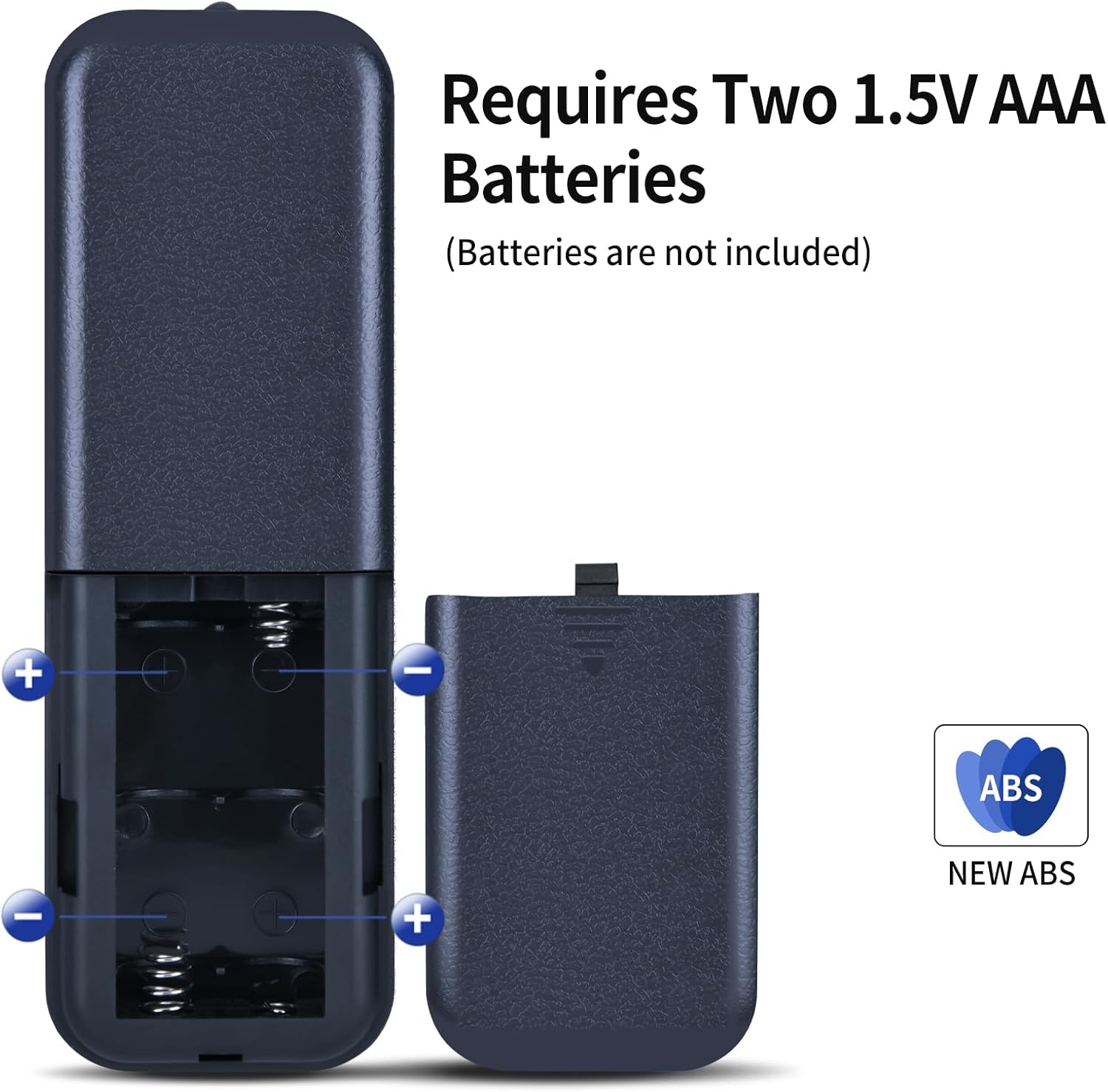
Akumuliatoriaus montavimas:
- Nuotolinio valdymo pulto gale raskite baterijų skyriaus dangtelį.
- Nustumkite dangtelį, kad atidarytumėte skyrių.
- Insert two (2) 1.5V AAA batteries, ensuring correct polarity (+ and - ends match the markings inside the compartment).
- Stumkite baterijų skyriaus dangtelį atgal į vietą, kol jis tvirtai spragtelės.
Pastaba: Baterijos nepridedamos prie nuotolinio valdymo pulto.

The remote requires two 1.5V AAA batteries for operation. Ensure correct polarity when inserting.
4. Naudojimo instrukcijos
Once batteries are installed, the remote control is ready for use with your compatible walking pad treadmill. No additional programming is required.
Mygtukų funkcijos:
- Maitinimo mygtukas (⏻): Press to turn the treadmill ON or OFF.
- Greičio padidėjimas (+): Press to increase the treadmill's speed.
- Greičio sumažėjimas (-): Press to decrease the treadmill's speed.
- Start/Pause (⏸): Press to start or pause the treadmill's operation.
- Režimas (M): Press to cycle through different workout modes or display options, if supported by your treadmill.
This diagram details the primary control buttons: speed increase (+), speed decrease (-), and start/pause (play/pause icon). Ensure your treadmill's original remote has a similar button configuration for compatibility.
Veikimo diapazonas:
The remote control operates effectively up to a distance of approximately 8 meters (26 feet) from the treadmill. Ensure a clear line of sight between the remote and the treadmill's receiver for optimal performance.

The remote control maintains effective communication with the treadmill up to 8 meters, allowing for flexible use during exercise.
Oficialūs produktų vaizdo įrašai:
This video demonstrates the functionality of the ZWP replacement remote control for walking pad treadmills, including basic operations.
A demonstration of the ZWP replacement remote control's compatibility and ease of use with a specific treadmill model (AD-4000).
5. Priežiūra
- Valymas: Nuotolinio valdymo pultą valykite minkštu, sausu skudurėliu. Venkite naudoti stiprias chemines medžiagas ar abrazyvinius valiklius.
- Saugykla: Nuotolinio valdymo pultą laikykite vėsioje, sausoje vietoje, apsaugotoje nuo tiesioginių saulės spindulių ir ekstremalių temperatūrų.
- Baterijos keitimas: Replace batteries promptly when the remote's performance diminishes. Remove batteries if the remote will not be used for an extended period to prevent leakage.
6. Problemų sprendimas
Nuotolinio valdymo pultas nereaguoja:
- Patikrinkite baterijas: Ensure batteries are inserted correctly with the correct polarity and are not depleted. Replace with fresh AAA batteries if necessary.
- Matymo linija: Verify there is a clear line of sight between the remote control and the treadmill's receiver. Obstructions can interfere with the signal.
- Artumas: Ensure you are within the operational range of 8 meters from the treadmill.
- Suderinamumas: Double-check that your treadmill model is listed in the compatibility section of this manual. While designed for broad compatibility, some models may vary.
Operacija su pertraukomis:
- This can often be resolved by replacing the batteries or ensuring a clear path for the signal.
7. Specifikacijos
| Funkcija | Specifikacija |
|---|---|
| Prekės ženklas | ZWP |
| Pakuotės matmenys | 7.4 x 2.5 x 1.1 colio |
| Prekės svoris | 2.08 uncijos |
| Spalva | Juoda |
| Ypatinga funkcija | Ergonomiškas |
| Maksimalus palaikomų įrenginių skaičius | 1 |
| Suderinami įrenginiai | Treadmill (various models listed in Section 2) |
8. Garantija ir palaikymas
While specific warranty details are not provided, for any questions or issues regarding your ZWP Replacement Remote Control, please do not hesitate to contact the seller or manufacturer directly. They are committed to assisting you with any concerns to ensure your satisfaction.