
1. Įvadas
Thank you for choosing the Avatar Controls Solar Pool Thermometer and Smart Lighted Flag Bundle. This product combines a solar-powered floating pool thermometer with integrated RGB LED lights and a smart app-controlled lighted American flag. This manual provides essential information for the safe and efficient operation of your new devices. Please read it thoroughly before use and retain it for future reference.
2. Saugos informacija
- Keep all electrical components, especially the flag's USB power and control box, away from water. These parts are not waterproof.
- Ensure the solar pool thermometer is securely floating in the water and not submerged for extended periods beyond its intended design.
- Do not attempt to open or repair the devices yourself. Refer all servicing to qualified personnel.
- Keep out of reach of children and pets to prevent accidental ingestion of small parts or damage to the devices.
- Avoid placing the flag in areas where it may obstruct pathways or create a tripping hazard.
3. Pakuotės turinys
Patikrinkite, ar pakuotėje yra visi reikalingi daiktai:
- Solar Floating Pool Thermometer with RGB LED Lights
- Remote Control for Pool Thermometer/Lights
- Smart Lighted American Flag (3x5 ft) with integrated LEDs
- USB Power Cable for Smart Lighted Flag
4. Sąrankos instrukcijos
4.1 Solar Pool Thermometer and Floating Lights
- Pradinis mokestis: Place the solar pool thermometer in direct sunlight for 4-8 hours to ensure a full initial charge. The device charges automatically during the day.
- Vieta: Gently place the thermometer into your pool, pond, or hot tub. It will float on the surface.
- Automatinis veikimas: The lights will automatically turn off during the day while charging and turn on at night, providing illumination for 10-15 hours on a full charge.

Image: The solar pool thermometer charges during the day and automatically illuminates at night, showcasing its solar energy feature.
4.2 Smart Lighted American Flag
- Išpakuokite ir išskleiskite: Carefully remove the flag from its packaging and unfold it.
- Montavimas: Hang the flag in your desired outdoor location. Ensure the USB power cable can reach a power source.
- Maitinimo jungtis: Connect the flag's USB cable to a compatible USB power adapter (not included). Warning: The USB and control box are not waterproof. Ensure they are protected from moisture.
- Programos atsisiuntimas: Download the 'Hello Fairy' app from your smartphone's app store.
- Poravimas: Open the 'Hello Fairy' app and follow the on-screen instructions to pair your smart lighted flag. This typically involves ensuring Bluetooth is enabled on your phone and the flag is powered on.

Image: The Smart Lighted American Flag, measuring 3x5 feet, with a close-up of its fabric texture and the USB power connector.
5. Naudojimo instrukcijos
5.1 Solar Pool Thermometer and Floating Lights
- Temperatūros rodmenys: The digital display on the thermometer will show the current water temperature.
- Nuotolinio valdymo pultas: Use the provided remote control to manage the floating lights.
- ĮJUNGTA/IŠJUNGTA: Press the 'ON' or 'OFF' button to manually control the lights.
- Spalvos pasirinkimas: Press the 'R', 'G', 'B', or 'W' buttons for red, green, blue, or white light.
- Spalvų režimai: Use the 'MODE' button to cycle through various color-changing effects.
- Greičio reguliavimas: Use the 'SPEED +' or 'SPEED -' buttons to adjust the speed of color transitions.
- Laikmatis: Select '2H', '4H', or '6H' to set the lights to turn off automatically after 2, 4, or 6 hours.

Image: The solar pool thermometer floating in water, displaying the temperature, alongside its remote control for light functions.
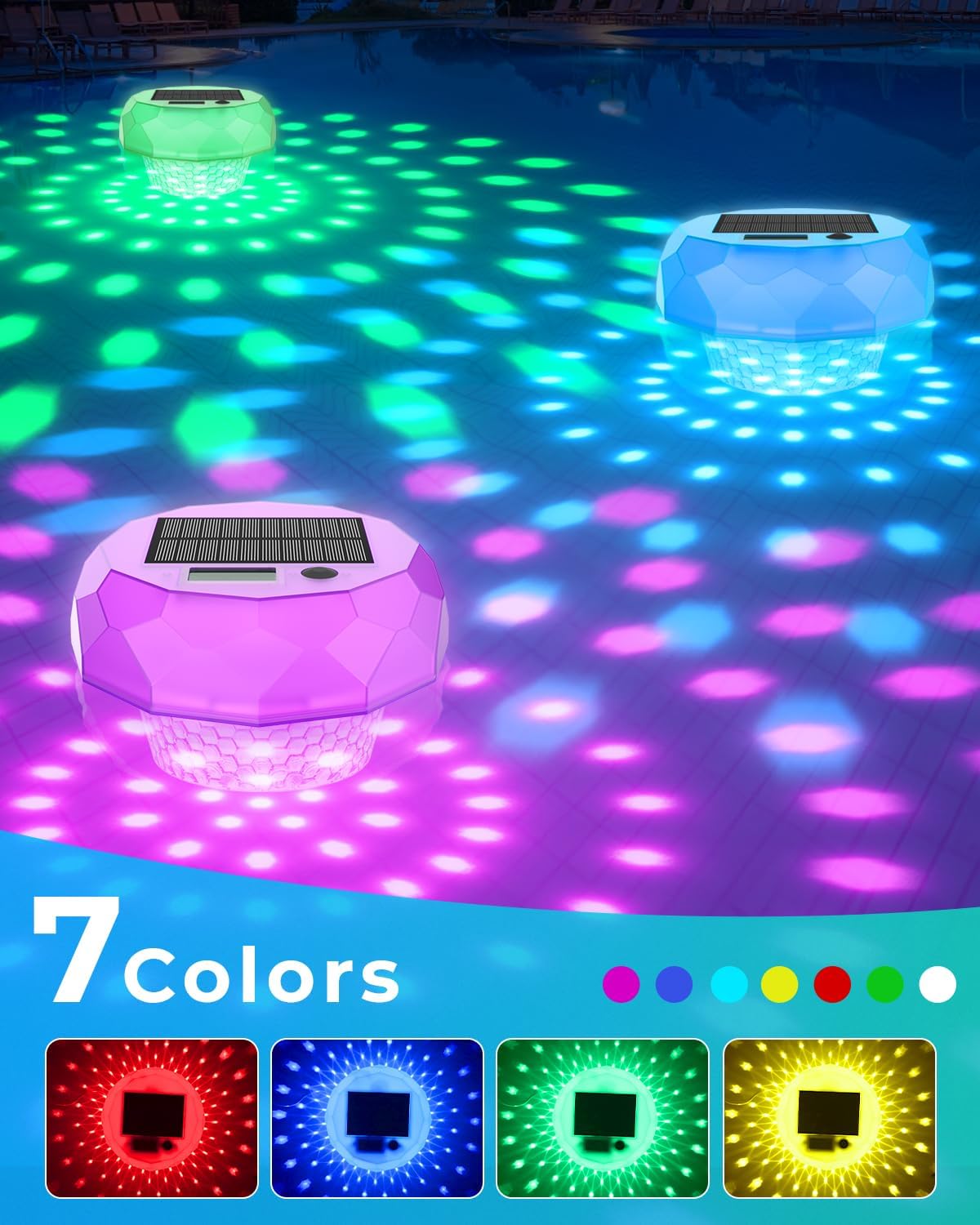
Image: Multiple floating pool lights illuminating the water in various colors, demonstrating the 7-color light show capability.
5.2 Smart Lighted American Flag
Control the flag's lighting effects using the 'Hello Fairy' app:
- Ryškumo reguliavimas: Use the app to increase or decrease the brightness of the 98 integrated LEDs.
- Spalvos pasirinkimas: Choose from a wide range of colors to customize the flag's illumination.
- Dinaminiai efektai: Select various pre-programmed lighting effects or create your own custom 'DIY' patterns.
- Muzikos režimai: Activate music synchronization mode for the lights to react to sound.
- Planavimas: Set timers within the app for the flag lights to automatically turn ON/OFF at specific times.

Image: A smartphone screen displaying the 'Hello Fairy' app interface, illustrating options for dynamic DIY flag light customization.

Image: An outdoor scene with people enjoying a gathering, featuring the lighted American flag displaying dynamic colors, indicating music mode functionality.

Image: A hand holding a smartphone displaying the 'Hello Fairy' app, showing the timing schedule interface for setting automatic ON/OFF times for the lighted flag.
6. Priežiūra
6.1 Solar Pool Thermometer and Floating Lights
- Valymas: Reguliariai nuvalykite saulės bateriją ir šviestuvo paviršių minkšta,amp cloth to remove dirt, dust, or mineral deposits that may hinder charging or light output.
- Saugykla: During off-season or extended periods of non-use, clean the thermometer, ensure it is fully charged, and store it in a cool, dry place away from direct sunlight.
6.2 Smart Lighted American Flag
- Valymas: The flag is made of Velvet cloth and Non-woven fabric. Spot clean with a damp audiniu pagal poreikį. Neskalbti skalbimo mašinoje.
- USB Protection: Always ensure the USB connector and control box are protected from rain and moisture. Consider using a waterproof enclosure for the USB connection if used outdoors in wet conditions.
- Saugykla: When not in use, carefully fold the flag and store it in a dry place to protect the fabric and integrated LEDs.
7. Problemų sprendimas
- Pool Thermometer Lights Not Turning On: Ensure the solar panel is clean and has received adequate direct sunlight for charging (4-8 hours). Check if the remote control battery needs replacement.
- Netikslus temperatūros rodmuo: Ensure the thermometer is floating freely and not obstructed. Allow sufficient time for the thermometer to stabilize in the water.
- Flag Lights Not Turning On: Verify the USB power cable is securely connected to a working power source. Check if the control box is properly connected. Ensure the app settings haven't scheduled the lights to be off.
- Flag Not Connecting to App: Ensure Bluetooth is enabled on your smartphone. Restart the app and try pairing again. Power cycle the flag by unplugging and re-plugging the USB cable.
- Nuotolinio valdymo pultas neveikia: Check and replace the remote control battery if necessary. Ensure there are no obstructions between the remote and the pool thermometer.
8. Specifikacijos
| Prekės ženklas | Avataro valdikliai |
| Modelis | Solar Pool Thermometer and Smart Lighted Flag Bundle |
| ASIN | B0FCCPHNRG |
| Pool Thermometer Power | Solar Powered (1200mAh solar panel) |
| Pool Thermometer Lights | RGB LEDs, 7 dynamic lighting modes |
| Pool Thermometer Waterproof Rating | IP68 |
| Smart Lighted Flag Dimensions | 3x5 pėdos |
| Smart Lighted Flag LEDs | 98 didelio ryškumo šviesos diodai |
| Smart Lighted Flag Material | Velvet cloth and Non-woven fabric |
| Smart Lighted Flag Control | Hello Fairy App (Bluetooth), Local Control |
| Smart Lighted Flag Power | USB Powered (USB and control box are NOT waterproof) |
9. Garantija ir palaikymas
Avatar Controls products are designed for reliability and performance. For warranty information, technical support, or customer service inquiries, please refer to the contact information provided with your purchase or visit the official Avatar Controls websvetainę. Kreipdamiesi į palaikymo tarnybą, turėkite po ranka savo produkto modelį ir pirkimo datą.