
Įvadas
This manual provides essential information for the safe and efficient operation of your Ulefone Armor 34 Pro Plus 5G Rugged Phone. It covers device setup, feature usage, maintenance, and troubleshooting. Please read this manual thoroughly before using your device to ensure optimal performance and longevity.
Video: Ulefone Armor 34 Pro Rugged Phone overview, šouasindėl tvirto dizaino ir pagrindinių savybių.
Kas yra dėžutėje
Patikrinkite, ar jūsų prekės pakuotėje yra visi šie daiktai:
- 1 x telefonas
- 1 x AC Power Charger, 66W
- 1 x C tipo–C tipo duomenų kabelis (100 cm)
- 1 x apsauginė plėvelė (iš anksto sumontuota)
- 1 x grūdinto stiklo ekrano apsauga
- 1 x SIM adata
- 1 x dirželis
- 1 x kelių kalbų vartotojo vadovas
- 1 x įkrovimo instrukcijų kortelė
- 1 x saugos raginimo kortelė

Image: Contents of the Ulefone Armor 34 Pro Plus retail package.
Sąranka
1. SIM kortelės ir atminties įdiegimas
- Suraskite SIM kortelės dėklą įrenginio šone.
- Įkiškite pateiktą SIM kortelės adatą į mažą skylutę šalia dėklo, kad ją išstumtumėte.
- Place your Nano-SIM cards and/or a microSD card (up to 2TB) into the designated slots on the tray. Ensure correct orientation.
- Atsargiai įstatykite dėklą atgal į telefoną, kol jis spragtelėdamas užsifiksuos.
2. Pradinis įjungimas ir konfigūracija
- Paspauskite ir palaikykite maitinimo mygtuką, kol pasirodys „Ulefone“ logotipas.
- Vykdykite ekrane pateikiamus nurodymus, kad pasirinktumėte kalbą, prisijungtumėte prie „Wi-Fi“ ir nustatytumėte „Google“ paskyrą.
- Configure security settings such as fingerprint unlock or face unlock for enhanced device protection.
3. Įrenginio įkrovimas
Connect the provided 66W AC power charger and Type-C cable to the phone's charging port. The device supports fast charging. Ensure the charger is connected to a compatible power outlet. The phone also supports 10W reverse charging, allowing it to act as a power bank for other devices.
Naudojimo instrukcijos
1. General Phone Operation
The Ulefone Armor 34 Pro Plus runs on Android 15. Navigate the interface using touch gestures. Swipe up from the bottom for the app drawer, swipe down from the top for notifications and quick settings. Customize your home screen by long-pressing on empty space.
2. 5G tinklo ryšys
The device supports global 5G networks with dual SIM dual standby functionality. Ensure your SIM cards are properly installed and your mobile data plan supports 5G. Access network settings via Nustatymai > Tinklas ir internetas > Mobilusis tinklas norėdami sukonfigūruoti nuostatas.
3. Projektoriaus funkcionalumas
The Ulefone Armor 34 Pro Plus features a built-in DLP projector with 150 lumens brightness and 854x480 resolution. It supports smart autofocus and ±40° keystone correction for clear projection. The integrated 98 dB loudspeaker enhances the audio experience.
- Aktyvinimas: Use the dedicated projector button or access the projector app to activate.
- Automatinis fokusavimas: The projector automatically adjusts focus. Manual adjustment options are available in the projector settings.
- Keystone korekcija: Adjust vertical keystone up to ±40° to correct distorted images.
- Projekcijos atstumas: Project a screen size of up to 100 inches from a distance of 3 meters.
Video: Demonstration of the Ulefone Armor 34 Pro Plus projector features, including autofocus and keystone correction.

Image: The Ulefone Armor 34 Pro Plus projecting a movie for outdoor entertainment.

Image: Visual representation of screen sizes achievable with the projector at different distances.
4. Kamerų sistema
Įrenginys aprūpintas universalia kamerų sistema:
- 64MP naktinio matymo kamera: Features 4 infrared LEDs and NightEif Ultra 3.0 algorithm for clear images in low-light conditions.
- 50MP pagrindinė kamera: Utilizes a large 1/1.3" sensor for high-resolution photos.
- 50MP Ultra-wide Macro Camera: Suteikia 117.3° matymo lauką view for expansive shots and detailed close-ups.
- 32MP priekinė kamera: Aukštos kokybės asmenukėms ir vaizdo skambučiams.

Image: Night vision camera capabilities comparison.
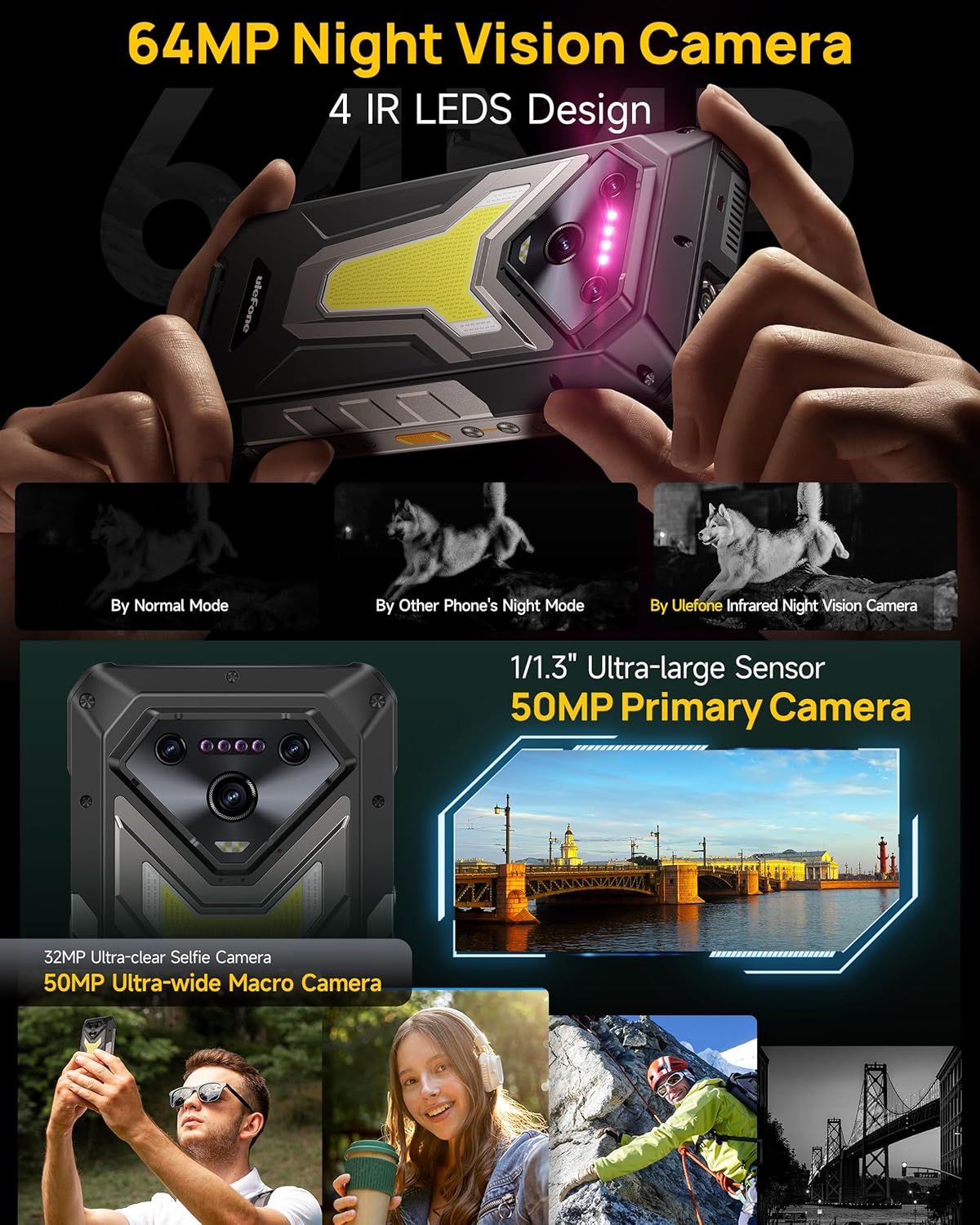
Vaizdas: Išsamus view of the Ulefone Armor 34 Pro Plus camera setup.
5. LED Light and Warning Lights
The device integrates an 1100 Lumens camping light and red/blue warning lights for various situations.
- Campšviesa: Provides powerful illumination for outdoor activities. Adjustable brightness and duration settings are available in the dedicated app.
- Įspėjamieji žibintai: Red and blue lights can be activated for emergency alerts, signaling for help, or increasing matomumas.
Video: Demonstration of the Ulefone Armor 34 Pro Plus LED camping light and warning light functions.

Image: The 1100 Lumens LED light in use during camping.
6. Baterijos valdymas
The Armor 34 Pro Plus features a 25500mAh battery, providing extended usage. It supports 66W fast charging for quick power replenishment and 10W reverse charging to power other compatible devices.

Image: The 25500mAh battery and 66W fast charging feature.
7. Tvirtos savybės
Designed for durability, the phone is MIL-STD-810H certified and boasts IP68/IP69K ratings for water and dust resistance. The 6.95-inch FHD+ display is protected by Corning Gorilla Glass 5.

Image: Demonstrating the IP68/IP69K and MIL-STD-810H ruggedness of the device.
8. „uSmart“ išplėtimo jungtis
The uSmart Expansion Connector allows for integration with various external accessories, such as endoscopes and microscopes, expanding the phone's utility for specialized tasks.
Video: Showcase of various accessories compatible with the Ulefone Armor 34 Pro Plus, including the uSmart ecosystem.

Image: The uSmart Expansion Connector in use with an endoscope accessory.
9. Kitos funkcijos
The device includes additional functionalities:
- NFC: Bekontakčiams mokėjimams ir duomenų perdavimui.
- Widevine L1: Įgalina didelės raiškos transliaciją iš palaikomų platformų.
- IR Blaster: Valdykite suderinamus infraraudonųjų spindulių įrenginius.
- Fingerprint Unlock & Face Unlock: Biometric security options.
- Pasirinktinis raktas: Programuojamas mygtukas, skirtas greitam funkcijų pasiekimui.
- GPS + GLONASS + Beidou + Galileo: Comprehensive navigation support.

Vaizdas: Viršview of additional functionalities available on the device.
Priežiūra
To ensure the longevity and optimal performance of your Ulefone Armor 34 Pro Plus, follow these maintenance guidelines:
- Valymas: Nuvalykite prietaisą minkšta, damp cloth. Avoid harsh chemicals or abrasive materials. Ensure all ports are dry before charging or connecting accessories.
- Programinės įrangos atnaujinimai: Reguliariai tikrinkite, ar yra sistemos naujinimų, ir įdiekite juos, kad jūsų įrenginyje būtų naujausi saugos pataisymai ir funkcijos. Eikite į Nustatymai > Sistema > Sistemos naujinimas.
- Akumuliatoriaus priežiūra: Avoid extreme temperatures. Do not fully discharge the battery frequently. Use only the provided charger for optimal charging.
- Ekrano apsauga: While the screen is durable, using the provided tempered glass screen protector can offer additional protection against scratches.
Trikčių šalinimas
Jei kyla problemų dėl įrenginio, vadovaukitės toliau pateiktais įprastais trikčių šalinimo veiksmais.
- Įrenginys nereaguoja: Paspauskite ir palaikykite maitinimo mygtuką maždaug 10–15 sekundžių, kad priverstumėte paleisti iš naujo.
- Įkrovimo problemos: Ensure the charger and cable are securely connected and undamaged. Try a different power outlet. Clean the charging port if necessary.
- Tinklo ryšio problemos: Check if airplane mode is off. Restart the device. Verify your SIM card is correctly inserted and your mobile data plan is active.
- Projector Not Working: Ensure the projector is enabled in settings. Check for any obstructions in front of the lens. Adjust focus and keystone correction.
- Programėlės strigimas / užstrigimas: Išvalykite programos talpyklą ir duomenis naudodami Nustatymai > Programos > [Programos pavadinimas] > Saugykla ir talpyklaJei problema išlieka, pašalinkite programėlę ir įdiekite ją iš naujo.
- Perkaitimas: Close background applications and reduce screen brightness. Avoid direct sunlight exposure during heavy use or charging.
For more complex issues, refer to the built-in Service Center 2.0 application on your device or contact customer support.

Image: The Service Center 2.0 application for device diagnostics and support.
Specifikacijos
| Funkcija | Specifikacija |
|---|---|
| Prekės ženklas | Ulefone |
| Modelio numeris | Armor 34 Pro Plus |
| Operacinė sistema | Android 15 |
| Procesorius | MediaTek Dimensity 7400X |
| RAM | 32GB (16GB + 16GB adjustable) |
| Vidinė saugykla | 512GB ROM (expandable up to 2TB) |
| Ekranas | 6.95 inch FHD+ 120Hz Corning Gorilla Glass 5 |
| Pirminė kamera | 50MP (1/1.3" sensor) |
| Ultra-wide Macro Camera | 50 MP (117.3° matymo laukas) |
| Naktinio matymo kamera | 64MP (4 IR LEDs) |
| Priekinė kamera | 32 MP |
| Projektorius | 150 Lumens DLP (854x480 resolution), Autofocus, ±40° Keystone Correction |
| Baterijos talpa | 25500 mAh |
| Įkrovimas | 66 W greitas įkrovimas, 10 W atvirkštinis įkrovimas |
| Tvirtumas | IP68/IP69K, sertifikuotas MIL-STD-810H |
| Ryšys | 5G, Wi-Fi 6E, Bluetooth 5.4, NFC, IR Blaster |
| Ypatingos savybės | 1100 Lumens Camping Light, Red & Blue Warning Lights, uSmart Expansion Connector, Widevine L1, Custom Key, GPS |
| Matmenys | 7.21 x 3.41 x 1.29 colio |
| Svoris | 3.14 svaro |
Garantija ir palaikymas
Your Ulefone Armor 34 Pro Plus comes with a 12-month manufacturer warranty service in the US, covering defects in materials and workmanship under normal use. Please retain your proof of purchase for warranty claims.
For technical assistance, warranty inquiries, or product support, please contact Ulefone customer service through the Service Center 2.0 app on your device or visit the official Ulefone website for contact information. Our support team is available to assist you with any questions or concerns regarding your product.