
OMOTON B0FCMD15TF
OMOTON Foldable Bluetooth Keyboard with Touchpad (QWERTZ Layout)
Model: B0FCMD15TF
Prekės ženklas: OMOTON
1. Įvadas
Thank you for choosing the OMOTON Foldable Bluetooth Keyboard with Touchpad. This portable QWERTZ keyboard is designed for convenience and efficiency, offering multi-device connectivity and an integrated touchpad. This manual provides detailed instructions for setup, operation, and maintenance to ensure optimal performance.
2. Pakuotės turinys
Patikrinkite pakuotę, ar joje yra šie daiktai:
- OMOTON Foldable Bluetooth Keyboard
- Mobilaus telefono stovas
- C tipo įkrovimo laidas
- Dėklas nešiojimui
- Vartotojo vadovas
3. Produktas baigtasview
The OMOTON Foldable Bluetooth Keyboard features a compact QWERTZ layout with 78 full-size keys and a multi-touch touchpad. It supports connection to up to three devices simultaneously across iOS, Android, and Windows operating systems. Its magnetic folding design makes it highly portable.
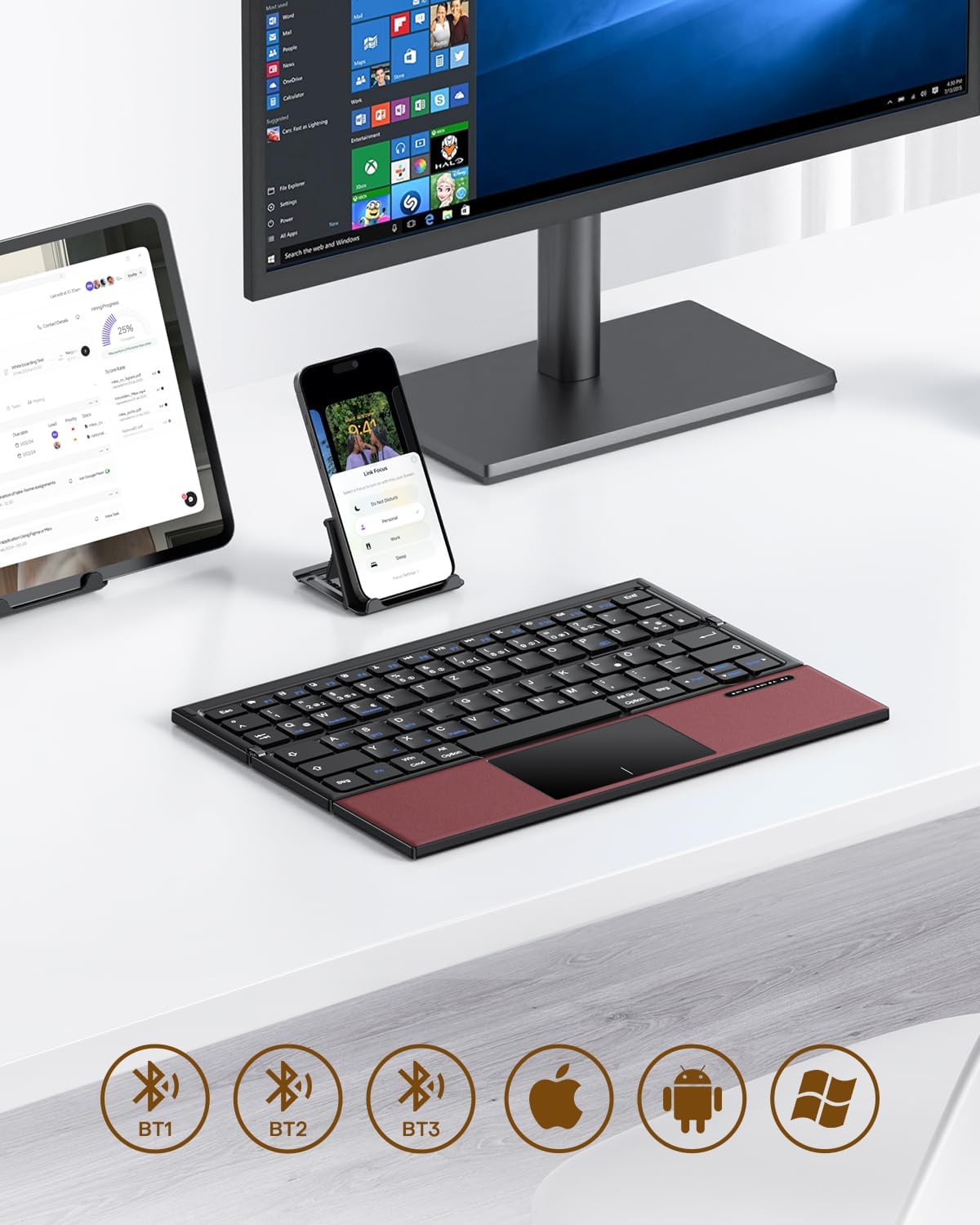
Image 3.1: The OMOTON Foldable Bluetooth Keyboard in use with a tablet, smartphone, and monitor, demonstrating multi-device connectivity via BT1, BT2, and BT3 channels.
Pagrindinės funkcijos:
- Trigubas dizainas: Compact and portable for travel.
- Integruotas jutiklinis skydelis: Multi-touch functionality for navigation without an external mouse.
- Kelių įrenginių ryšys: Connects to up to three Bluetooth-enabled devices (BT1, BT2, BT3).
- QWERTZ Layout: Standard German keyboard layout with 78 full-size keys.
- Įkraunama baterija: Built-in 180mAh battery with Type-C charging.

Image 3.2: Close-up details of the keyboard, highlighting its magnetic closure, indicator lights, silent scissor keys, elegant PU leather finish, and durable metal hinge.
Perkeliamumas:
The keyboard's compact, tri-fold design makes it ideal for travel and on-the-go use. It easily fits into bags and pockets, making it a convenient companion for various environments.

Image 3.3: The keyboard in use in a cafe, on an airplane, and in a meeting room, demonstrating its versatility for different work and travel scenarios.

Image 3.4: The folded keyboard being placed into a carrying case inside a bag and slipped into a jacket pocket, illustrating its compact size and ease of transport.
4. Sąranka
4.1 Klaviatūros įkrovimas
Before first use, fully charge the keyboard. Use the included Type-C charging cable to connect the keyboard to a power source (e.g., computer USB port, USB wall adapter).
- The power indicator light will show charging status.
- Visiškas įkrovimas paprastai trunka 2–3 valandas.
- The keyboard offers up to 60 hours of operating time and 90 days of standby time on a full charge.

Image 4.1: The keyboard connected via its Type-C port for charging, with icons indicating charging time, working time, and standby time.
4.2 Susiejimas su įrenginiu
The keyboard supports up to three Bluetooth connections (BT1, BT2, BT3). Follow these steps to pair your keyboard with a device:
- Maitinimas: Unfold the keyboard to automatically power it on. The indicator light will flash.
- Pasirinkite kanalą: Paspauskite Fn + BT1, Fn + BT2, arba Fn + BT3 keys simultaneously to select a Bluetooth channel. The corresponding indicator light will flash slowly.
- Įjunkite susiejimo režimą: Paspauskite Fn + C (or the Bluetooth icon key) to enter pairing mode. The selected channel indicator light will flash rapidly.
- Įjunkite „Bluetooth“ įrenginyje: Savo įrenginyje (išmaniajame telefone, planšetiniame kompiuteryje, nešiojamajame kompiuteryje) eikite į „Bluetooth“ nustatymus ir įjunkite „Bluetooth“.
- Pasirinkite klaviatūrą: Ieškokite "OMOTON Keyboard" (or similar) in the list of available devices and select it to connect.
- Patvirtinkite ryšį: Prijungus, klaviatūros indikatoriaus lemputė nustos mirksėti ir kelias sekundes šviečia nemirksėdama, o tada užges.
Note: The Type-C cable is for charging only and does not support wired connectivity.
4.3 Įrenginių perjungimas
Norėdami perjungti susietus įrenginius, tiesiog paspauskite Fn + BT1, Fn + BT2, arba Fn + BT3 to select the desired channel. The keyboard will automatically connect to the last paired device on that channel.
5. Naudojimo instrukcijos
5.1 Klaviatūros išdėstymas ir specialieji klavišai
The keyboard features a QWERTZ layout with 78 standard keys and 12 multimedia shortcuts. Familiarize yourself with the layout for efficient typing.

Image 5.1: The keyboard displaying its full-size keys and integrated multi-touch touchpad, designed for a laptop-like typing experience.
5.2 Jutiklinės planšetės naudojimas
The multi-touch touchpad supports various gestures for navigation. This eliminates the need for an external mouse.
- Bakstelėjimas vienu pirštu: Kairysis spustelėjimas.
- Dviejų pirštų bakstelėjimas: Dešiniuoju pelės mygtuku spustelėkite (kontekstinis meniu).
- Dviejų pirštų slinkimas: Slinkite aukštyn / žemyn arba kairėn / dešinėn.
- Žiupsnelis, norint priartinti: Zoom in/out (supported on some devices/apps).
- Braukimo gestai: Specific gestures may vary by operating system (Windows, Android, iOS).
Note for iPad users: You may need to enable "AssistiveTouch" in your iPad settings for full touchpad functionality. Some gestures may vary between applications. Scrolling direction can be adjusted in your device settings.
5.3 Energijos taupymo režimas
To conserve battery, the keyboard will automatically enter sleep mode after 30 minutes of inactivity. To wake it up, press any key.
5.4 Ergonomiškas naudojimas
For comfortable and ergonomic typing, ensure your screen is positioned correctly to maintain a healthy posture.

Image 5.2: A visual guide showing the recommended ergonomic posture for using the keyboard with a screen, emphasizing proper neck and back alignment.
6. Priežiūra
- Valymas: Use a soft, dry cloth to clean the keyboard surface. For stubborn dirt, slightly dampNuvalykite šluostę vandeniu arba švelniu valymo tirpalu. Venkite per didelės drėgmės.
- Saugykla: When not in use, fold the keyboard and store it in the provided carrying case to protect it from dust and scratches.
- Akumuliatoriaus priežiūra: Avoid fully discharging the battery frequently. Charge the keyboard regularly, especially if it will be stored for an extended period.
- Venkite ekstremalių sąlygų: Nelaikykite klaviatūros ekstremaliose temperatūrose, tiesioginiuose saulės spinduliuose ar didelėje drėgmėje.
7. Problemų sprendimas
7.1 Klaviatūra neprisijungia
- Įsitikinkite, kad klaviatūra įjungta (išskleista).
- Įsitikinkite, kad jūsų įrenginyje įjungtas „Bluetooth“.
- Check if the keyboard is in pairing mode (indicator light flashing rapidly after pressing Fn+C).
- Ensure you have selected the correct Bluetooth channel (BT1, BT2, or BT3).
- Pabandykite atjungti ir iš naujo susieti klaviatūrą įrenginio „Bluetooth“ nustatymuose.
- Įsitikinkite, kad klaviatūros baterija įkrauta.
7.2 Touchpad Not Responding
- Įsitikinkite, kad klaviatūra tinkamai prijungta per „Bluetooth“.
- For iPad users, verify that "AssistiveTouch" is enabled in your iPad settings.
- Iš naujo paleiskite klaviatūrą ir įrenginį.
- Nuvalykite jutiklinės planšetės paviršių, kad pašalintumėte nešvarumus ar šiukšles.
7.3 Incorrect Key Output (QWERTZ vs. QWERTY)
- This keyboard has a QWERTZ layout. Ensure your device's software keyboard setting is also set to QWERTZ (German layout) for correct character output.
- If your device is set to QWERTY, some keys (e.g., Y/Z, special characters) will not match the physical keyboard. Adjust your device's input language/keyboard layout settings.
7.4 Trumpas baterijos veikimo laikas
- Prieš naudodami įsitikinkite, kad klaviatūra yra visiškai įkrauta.
- The keyboard automatically enters sleep mode after 30 minutes of inactivity to save power.
- Avoid leaving the keyboard unfolded and powered on when not in use for extended periods.
8. Specifikacijos
| Prekės ženklas | OMOTON |
| Modelis | B0FCMD15TF |
| Ryšio technologija | Bluetooth |
| Suderinami įrenginiai | iPadOS, iOS, Android, Windows (Laptops, PCs, Tablets, Smartphones) |
| Klaviatūros išdėstymas | QWERTZ (vokiškas išdėstymas) |
| Raktų skaičius | 78 |
| Ypatingos savybės | Foldable, Portable, Rechargeable, Integrated Multi-touch Touchpad |
| Medžiaga | Plastikas, poliuretanas (PU) |
| Baterijos talpa | 180 mAh ličio jonų |
| Įkrovimo prievadas | C tipas |
| Įkrovimo laikas | apytiksliai 2-3 valandos |
| Veikimo laikas | Iki 60 valandų |
| Budėjimo laikas | Iki 90 dienų |
| Sulenkti matmenys | 25.3 x 6 x 2.1 cm |

Image 8.1: Visual representation of the keyboard's dimensions when unfolded and folded, alongside a tablet and smartphone for scale.
9. Garantija ir palaikymas
OMOTON products come with a standard warranty. For detailed warranty information, please refer to the warranty card included in your package or visit the official OMOTON websvetainę.
If you encounter any issues or have questions regarding your OMOTON Foldable Bluetooth Keyboard, please contact OMOTON Customer Support:
- Websvetainė: OMOTON Official Store on Amazon
Please have your model number (B0FCMD15TF) and purchase details ready when contacting support.
Ask a question about this manual
Ask about setup, troubleshooting, compatibility, parts, safety, or missing instructions. Manuals+ will review the question and use this page’s manual context to help answer it.