
1. Įvadas
This manual provides detailed instructions for the installation, operation, and maintenance of your BOTSLAB W510 4K Wireless Outdoor Security Camera System. Please read this manual thoroughly before using the product to ensure proper functionality and safety.
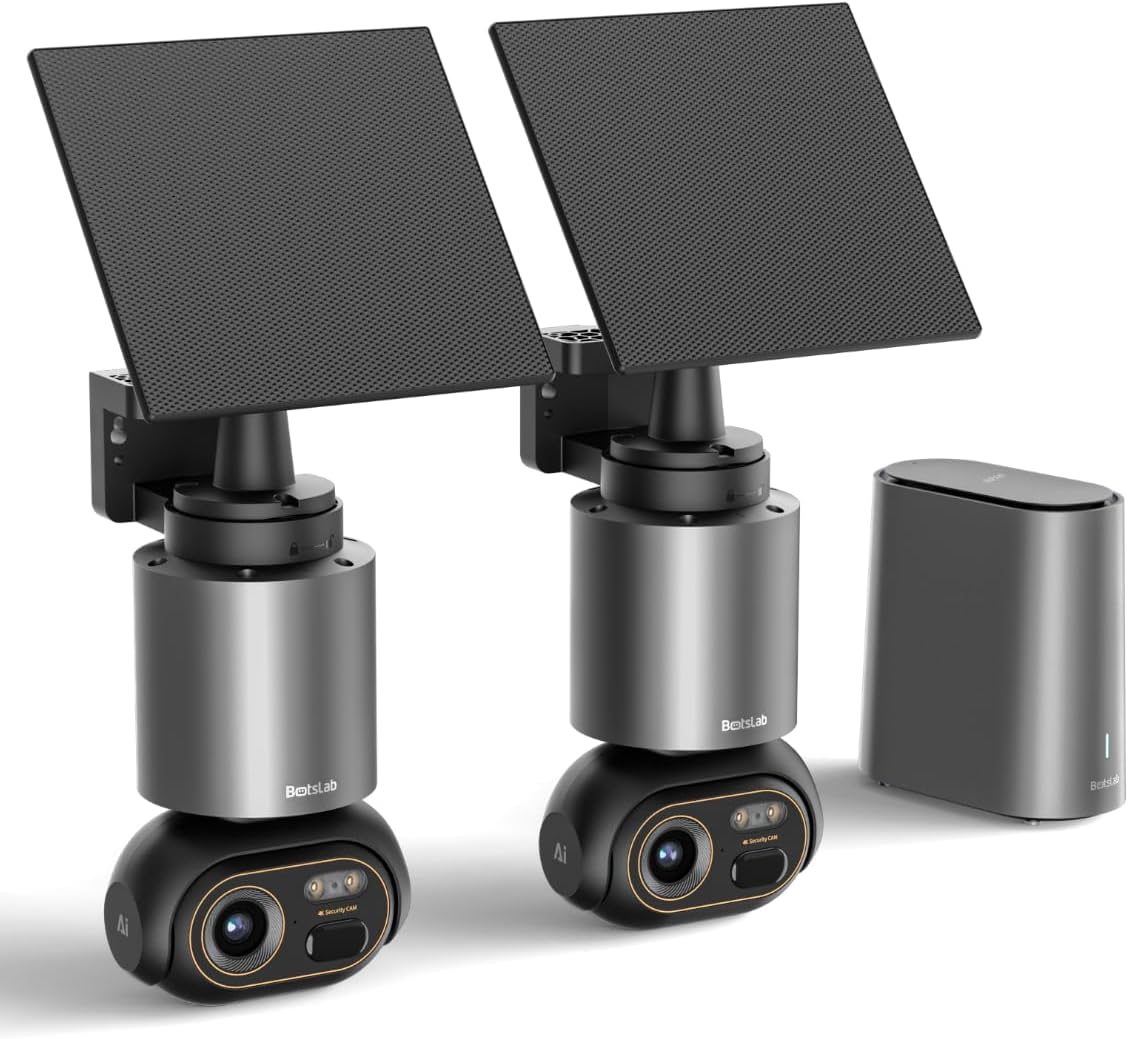
Image 1.1: The BOTSLAB W510 4K Wireless Outdoor Security Camera System, including two cameras with solar panels and the HomeBase unit.
2. Kas yra dėžutėje
Įsitikinkite, kad pakuotėje yra visi komponentai:
- W510 Camera body *2
- Montavimo kronšteinas *2
- Saulės baterija *2
- H200 HomeBase *1
- Camera Mounting Brackets / Wall Stickers *2
- Wall Mounting Screws Package *2
- Solar Panel Mounting Bracket / Wall Stickers *2
- Solar Panel Installation Screws (for mounting) *2
- C tipo įkrovimo kabelis *2
- User Manual (Quick Guide + Certification) *1
- Įspėjamieji lipdukai *2
- Base Station Adapter *1
- Hard Drive Mounting Screws *1
- Ethernet kabelis *1
- User Guide Card *1

Image 2.1: All included components of the BOTSLAB W510 2-Cam Kit.
3. Produktas baigtasview
The BOTSLAB W510 system offers advanced security features for outdoor surveillance.
3.1 Pagrindinės savybės
- 4K Ultra HD raiška: Užfiksuoja aiškų ir išsamų vaizdo įrašątage.
- Spalvotas naktinis matymas: Provides vivid, full-color images even in low-light conditions.
- Varomas saulės energija: Equipped with a 5W external solar panel and a 10,000mAh built-in battery for continuous operation.
- 360° pasukimas ir pakreipimas: Offers a comprehensive panoramic view be aklųjų dėmių.
- BOTSLAB IQ (AI-Powered): Features intelligent notifications, customized warnings, quick search, and auto-tracking for people, vehicles, and pets.
- Nėra mėnesinio mokesčio: Utilizes local storage via the H200 HomeBase (32GB internal, expandable up to 16TB with HDD).
- IP66 atsparumas oro sąlygoms: Sukurta atlaikyti įvairias lauko oro sąlygas.
- 2.4G „Wi-Fi“ ryšys: Ensures stable and long-distance wireless communication.

Image 3.1: Demonstrates the clarity of 4K Ultra HD resolution.

Image 3.2: Illustrates the effectiveness of Color Night Vision.
4. Sąrankos vadovas
4.1 Kameros ir saulės baterijos montavimas
The camera and solar panel can be mounted together or separately, offering flexibility for optimal solar exposure and camera placement.
- Pasirinkite tinkamą vietą kamerai, užtikrindami, kad ji būtų skaidri view of the area you wish to monitor and is within Wi-Fi range of the HomeBase.
- Norėdami tvirtai pritvirtinti kamerą prie sienos arba lubų, naudokite pateiktą tvirtinimo laikiklį ir varžtus.
- If mounting the solar panel separately, select a location that receives ample direct sunlight throughout the day. The solar panel can be adjusted 360° horizontally and 180° vertically.
- Connect the solar panel's USB-C cable to the camera's charging port. Ensure the port cover is securely closed after connection to maintain weather resistance.

Image 4.1: Various mounting options for the camera and solar panel.
4.2 Connecting to HomeBase
The H200 HomeBase acts as the central hub for your security system, providing local storage and managing camera connections.
- Place the HomeBase in a central location within your home, ensuring it is connected to your router via the provided Ethernet cable and powered on.
- The HomeBase will automatically connect to your cameras once they are powered on and within range.
4.3 Programėlės diegimas ir susiejimas
Manage your cameras and access features through the Botslab app.
- Download the 'Botslab' app from your smartphone's app store (available on Google Play and Apple App Store).
- Susikurkite paskyrą arba prisijunkite, jei ją jau turite.
- Follow the in-app instructions to add your HomeBase and cameras. This typically involves scanning a QR code on the device or manually selecting the model.
- Ensure your smartphone is connected to a 2.4GHz Wi-Fi network during the initial setup process.

Image 4.2: The Botslab mobile application for device management.
5. Naudojimo instrukcijos
5.1 Tiesiogiai View ir valdikliai
Access real-time video feed and control camera movement via the Botslab app.
- Open the Botslab app and select the desired camera to view jo tiesioginis srautas.
- Use the on-screen controls to pan (horizontal movement) and tilt (vertical movement) the camera for a 360° view.
- Digital zoom allows you to magnify specific areas of the live feed or recorded video.

Image 5.1: Illustrates the 360° pan and tilt capabilities and PIR detection range.
5.2 Judesio aptikimas ir pranešimai
The system uses advanced AI to provide intelligent alerts.
- Intelligent Notification: Receive detailed, descriptive notifications on your smartphone, identifying visitors or events without needing to open the app.
- Customized Warnings: The camera analyzes the scene and can send tailored warnings to suspicious individuals based on the perceived threat level.
- Adjust detection sensitivity and set activity zones within the app to minimize false alarms.

5.2 pav.: pvz.ample of intelligent notifications from the Botslab app.
5.3 Įrašymas ir saugojimas
Visi footage is stored locally without monthly fees.
- The H200 HomeBase includes 32GB of internal local storage, automatically looping and saving footage for up to two months.
- Storage can be expanded up to 16TB by adding a hard disk drive (not included).
- Prieiga įrašyta footage through the app's timeline or use the Intelligent Search feature.

Image 5.3: HomeBase H200 with local and expandable storage options.
5.4 Dvipusis garsas
Communicate with individuals near your camera using the two-way audio feature.
- Iš tiesioginio view Programėlėje palieskite mikrofono piktogramą, kad kalbėtumėte per kameros garsiakalbį.
- Kameros integruotas mikrofonas leidžia girdėti garsą iš kameros buvimo vietos.
5.5 Dirbtinio intelekto funkcijos
Leverage BOTSLAB IQ for enhanced surveillance capabilities:
- Human Recognition: Identifies human figures and filters videos.
- Transporto priemonės aptikimas: Recognizes vehicles in the camera's view.
- Naminių gyvūnėlių aptikimas: Identifies pets (cats and dogs supported).
- Automatinis stebėjimas: The camera automatically tracks the movement of detected subjects (people, vehicles, pets) within its 360° field of view.
- Pažangi paieška: Quickly find specific events, people, vehicles, or objects in historical footage.

Image 5.4: Intelligent Search feature in the Botslab app.
6. Priežiūra
6.1 Akumuliatoriaus įkrovimas
The camera is designed for minimal power intervention.
- The 5W solar panel continuously charges the built-in 10,000mAh battery. Approximately 30 minutes of direct sunlight can power the camera for a full day.
- In periods of low sunlight, the large battery capacity ensures stable operation for extended durations.
- If manual charging is required, detach the camera from its mount and use the provided Type-C charging cable.
6.2 Valymas
To maintain optimal performance, periodically clean the camera lens and solar panel.
- Naudokite minkštą, damp cloth to gently wipe the lens and solar panel.
- Avoid using harsh chemicals or abrasive materials that could scratch the surfaces.
6.3 Programinės įrangos atnaujinimai (OTA)
The system supports Over-The-Air (OTA) firmware updates to improve performance and add new features.
- Ensure your camera and HomeBase are connected to the internet.
- The Botslab app will notify you when a new firmware update is available. Follow the in-app instructions to initiate the update.
7. Problemų sprendimas
If you encounter issues with your BOTSLAB W510 system, refer to the following common solutions:
- Nėra gyvų View/Offline Device: Check the HomeBase's internet connection (Ethernet cable, router status). Ensure the camera is powered on and within range of the HomeBase. Restart the HomeBase and camera if necessary.
- Prasta vaizdo kokybė: Verify your Wi-Fi signal strength. Ensure the camera lens is clean and free from obstructions. Adjust the camera's position if there are strong light sources directly facing the lens.
- Greitai išsikrauna baterija: Ensure the solar panel is positioned to receive maximum direct sunlight. Reduce motion detection sensitivity or frequency of recordings if not critical.
- Klaidingi pavojaus signalai: Adjust the motion detection sensitivity in the app. Define specific activity zones to monitor only relevant areas.
- Programos ryšio problemos: Ensure your smartphone has a stable internet connection. Restart the Botslab app.
8. Specifikacijos
| Funkcija | Detalė |
|---|---|
| Naudojimas viduje / lauke | Lauke |
| Suderinami įrenginiai | Išmanusis telefonas („Android“) |
| Maitinimo šaltinis | Varomas saulės energija |
| Ryšio protokolas | „Wi-Fi“ (2.4 G) |
| Montavimo tipas | Sieninis laikiklis |
| Vaizdo įrašymo raiška | 4K |
| Prekių skaičius | 2 (2-Cam Kit) |
| Viewing kampas | 360 laipsnių (sukimas ir pakreipimas) |
| Prekės matmenys P x P x A | 4.72 x 3.8 x 7.54 colio |
| Įdiegtos „Flash“ atminties dydis | 32 GB (HomeBase) |
| „Flash“ atminties palaikomas maksimalus dydis | 16 TB (with external HDD) |
| Reikalingos baterijos? | Yes (1 12V battery included) |
| Fokusavimo tipas | Automatinis fokusavimas |
| Silpno apšvietimo technologija | Naktinė spalva |
| Priartinimo tipas | Skaitmeninis priartinimas (8x) |
| Vaizdo įrašymo formatas | AVI |
| Specifinis produkto naudojimas | 360 laipsnių aprėptis, stebėjimas |
| Kontrolės metodas | Programėlė |
| Prekės svoris | 9.13 svaro |
| Modelio pavadinimas | W510 |
| Ypatinga funkcija | 10000mAh Battery, 4K/8MP, No Monthly Fee, 32G Local Storage, Intelligent Notification, Intelligent Alarm, Intelligent Search, Cross-camera Tracking, Facial Detection, Human Detection, Vehicle Detection, Night Vision |
9. Garantija ir palaikymas
BOTSLAB is committed to providing reliable products and customer satisfaction.
- 12 mėnesių garantija: Your BOTSLAB W510 system is covered by a 12-month warranty from the date of purchase.
- Techninis palaikymas visą parą: For any questions or technical assistance, please contact BOTSLAB customer support.
- Kontaktinė informacija: You can reach support via Amazon Messages or through the contact details provided in the Botslab app.


