
bemi KIX-M
„bemi“ išmaniojo laikrodžio kūno rengybos sekiklio naudotojo vadovas
Model: KIX-M (B0FCYD6VV2)
Įvadas
This manual provides detailed instructions for the setup, operation, and maintenance of your bemi Smartwatch Fitness Tracker. Please read this manual thoroughly before using the device to ensure proper functionality and to maximize your user experience.
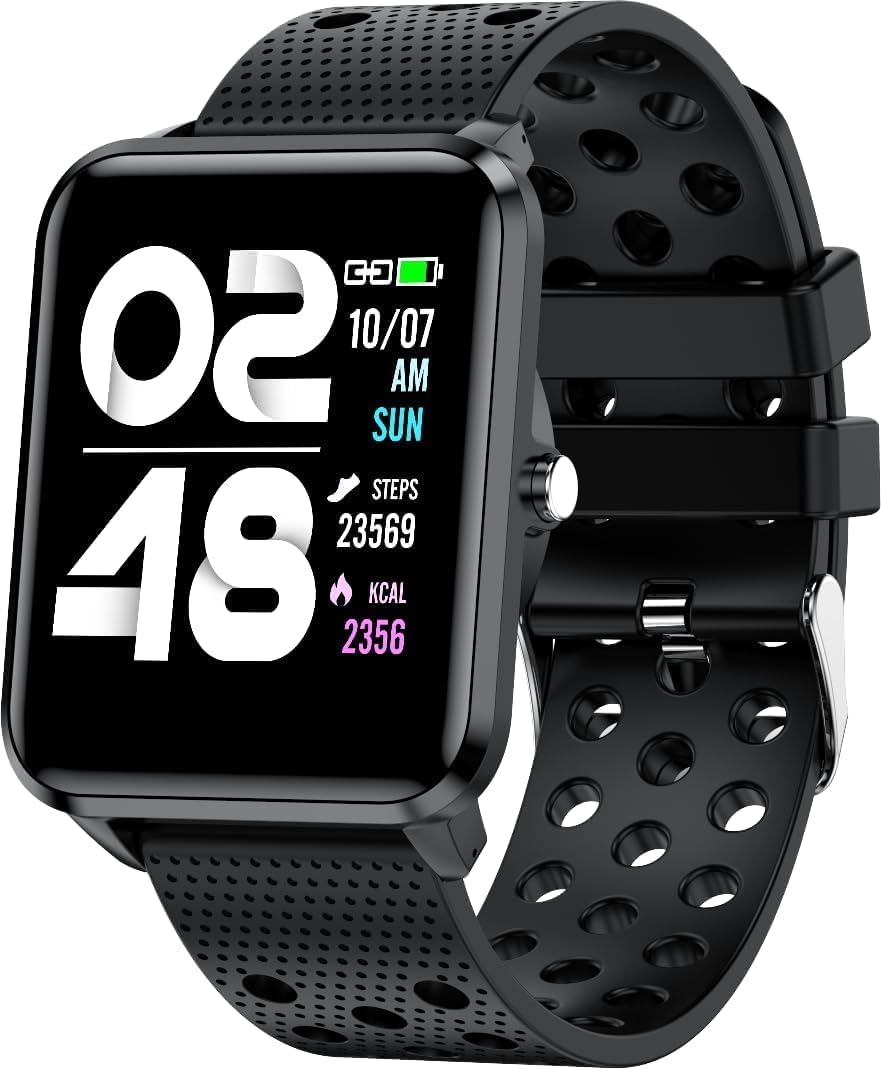
Vaizdas: priekis view of the bemi Smartwatch, showing the digital display with time, date, steps, and calories burned. The watch has a black perforated silicone band.
Kas yra dėžutėje
- Kix-m Smartwatch
- USB Cable (Charging Cable)
- Vartotojo vadovas
- Dovanų dėžutė
Sąranka
1. Išmaniojo laikrodžio įkrovimas
Before first use, fully charge your smartwatch. Connect the provided USB charging cable to the magnetic charging points on the back of the watch and to a USB power source. The watch display will indicate charging status.

Vaizdas: Galinis view of the bemi Smartwatch, highlighting the magnetic charging contacts and the optical heart rate sensor.
2. Papildomos programėlės diegimas
The smartwatch operates with the "H Band" application. Download the app from the App Store (for iOS devices) or Google Play Store (for Android devices).
- Ieškokite "H Band" in your device's app store.
- Atsisiųskite ir įdiekite programą.
- Įsitikinkite, kad jūsų išmaniajame telefone įjungtas „Bluetooth“ ryšys.
3. Pairing the Smartwatch with Your Phone
- Open the "H Band" app on your smartphone.
- Norėdami sukurti paskyrą arba prisijungti, vykdykite ekrane pateikiamus nurodymus.
- Programėlėje eikite į įrenginių susiejimo skyrių.
- Select your bemi Smartwatch from the list of available devices. The app will guide you through the pairing process.
- Jei būsite paraginti, patvirtinkite susiejimo užklausą ir telefone, ir išmaniajame laikrodyje.
Note: The smartwatch is compatible with Android (4.4 or newer) and iOS (8.0 or newer) operating systems.
Naudojimo instrukcijos
Pagrindinė navigacija
- Jutiklinis ekranas: Braukite kairėn / dešinėn, aukštyn / žemyn, kad naršytumėte meniu ir funkcijas. Palieskite, kad pasirinktumėte.
- Šoninis mygtukas: Press to wake the screen, return to the home screen, or confirm selections.
Pagrindinės savybės ir funkcijos
Pritaikomi laikrodžių ciferblatai
Choose from 24 clock faces available in the "H Band" application. You can also set a photo from your phone as the watch face.

Image: The smartwatch screen showing different digital and analog watch face designs, indicating customization options available through the app.
Veiklos stebėjimas
The smartwatch monitors your steps, distance, and calories burned. All activity data is recorded and can be viewed in the "H Band" app.

Image: A person running outdoors with the bemi Smartwatch visible on their wrist, showing the step tracking interface with current steps, distance, and calories.
Širdies ritmo ir kraujo deguonies stebėjimas
The watch provides 24-hour monitoring of pulse and blood oxygen levels. View realaus laiko duomenys laikrodyje arba išsamūs istoriniai duomenys programėlėje.

Image: A close-up of the smartwatch screen showing heart rate (BPM) and blood pressure (mmHg) readings with a graph of historical data.
Miego stebėjimas
Track your sleep patterns, including deep sleep, light sleep, and awake times. The app provides detailed analysis of your sleep quality.

Image: The "H Band" app interface displaying sleep quality data, including total sleep duration, deep sleep, light sleep, and awake times, with a corresponding graph.
Muzikos atkūrimas
The KIX-M features a built-in audio player with 512MB of internal memory. You can store music directly on the watch and connect Bluetooth headphones or speakers for wireless listening.

Image: The bemi Smartwatch showing its music player interface with play/pause and skip controls, alongside a pair of wireless earbuds, demonstrating its audio capabilities.
Pranešimai
Receive notifications for calls, messages, and various applications directly on your smartwatch. Configure notification settings within the "H Band" app.

Image: The smartwatch screen showing an incoming message notification, with icons for various social media and communication apps like SMS, Twitter, WeChat, Skype, YouTube, Facebook, Google+, Instagram ir LinkedIn.
Kitos išmaniosios funkcijos
- 10 sporto režimų: Track specific workouts like running, cycling, and more.
- Judėjimo priminimas: Get alerts to move if you've been sedentary for too long.
- Special Mode for Women: Track menstrual cycles and ovulation.
- Kameros valdymas: Nuotoliniu būdu valdykite savo telefono kamerą.
- Signalizacija: Nustatykite žadintuvus tiesiai iš laikrodžio arba programėlės.
- Chronometras ir laikmatis: Pagrindinės laiko skaičiavimo funkcijos.
- Rasti telefoną: Suraskite susietą išmanųjį telefoną.
- GPS Position Tracking: Requires carrying your phone with you for GPS data.

Image: The "H Band" app interface displaying the female health tracking calendar, allowing users to log menstrual periods and predict ovulation.
Priežiūra
Išmaniojo laikrodžio valymas
Regularly clean your smartwatch and band to prevent skin irritation and maintain device performance.
- Laikrodžio ekraną ir korpusą nuvalykite minkštu, nepūkuotu skudurėliu.
- Dėl sunkiai įveikiamų dėmių, dampŠluostę šiek tiek sudrėkinkite vandeniu. Venkite naudoti stiprias chemines medžiagas ar abrazyvines medžiagas.
- Reguliariai valykite įkrovimo kontaktus, kad užtikrintumėte gerą ryšį.
Atsparumas vandeniui (IP68)
The smartwatch is IP68 waterproof, meaning it is resistant to dust and can withstand immersion in water up to 1.5 meters for up to 30 minutes. It is suitable for daily use, hand washing, and light rain. Avoid hot water, steam, or prolonged immersion in water, especially saltwater.

Image: The bemi Smartwatch with water splashing over its screen and band, illustrating its IP68 water resistance rating.
Akumuliatoriaus priežiūra
- Prieš pradėdami naudoti akumuliatorių, visiškai jį įkraukite.
- Venkite dažnai visiškai iškrauti akumuliatorių.
- Jei prietaisas nebus naudojamas ilgą laiką, laikykite jį vėsioje, sausoje vietoje.
Trikčių šalinimas
| Problema | Galima priežastis | Sprendimas |
|---|---|---|
| Laikrodis neįsijungia | Senka baterija | Įkraukite laikrodį mažiausiai 30 minučių. |
| Nepavyksta susieti su telefonu | Bluetooth off, app not open, watch not discoverable, phone OS not compatible | Ensure Bluetooth is on. Open "H Band" app. Restart watch and phone. Check OS compatibility (Android 4.4+/iOS 8.0+). |
| Inaccurate health data (HR, SpO2) | Improper fit, sensor obstruction, movement during measurement | Ensure watch is snug but comfortable on wrist. Clean sensor. Remain still during measurement. |
| Pranešimai negauti | App permissions, notification settings, Bluetooth disconnected | Check app permissions for notifications. Verify notification settings in "H Band" app. Ensure watch is connected via Bluetooth. |
| Ekranas nereaguoja | Software glitch, low battery | Restart the watch (if possible). Charge the watch. |
Specifikacijos
| Funkcija | Detalė |
|---|---|
| Modelis | KIX-M |
| Ekrano dydis | 1.5 colių |
| Ekrano tipas | Jutiklinis ekranas |
| Atsparumas vandeniui | IP68 |
| Ryšys | Bluetooth (Dual Bluetooth module) |
| Vidinė atmintis | 512 MB (muzikos saugojimui) |
| Baterijos talpa | 200 milijonųamp Valandos (mAh) |
| Operacinė sistema | ROTS |
| Suderinama OS | Android 4.4+ / iOS 8.0+ |
| Jutikliai | Heart Rate Monitor, Blood Oxygen Sensor, Accelerometer |
| Savybės | Activity Tracker, Sleep Tracking, Pedometer, Calorie Tracker, Music Player, Notifications, Gesture Control, 10 Sport Modes, Female Health Tracking, Camera Control, Alarm, Stopwatch, Timer, Find Phone, GPS via Smartphone |
| Prekės svoris | 4.4 uncijos |
| Matmenys | 5.35 x 2.64 x 2.44 colio (paketo matmenys) |
Garantija ir palaikymas
For warranty information and technical support, please refer to the contact details provided with your purchase or visit the official bemi websvetainėje. Išsaugokite pirkimo įrodymą, jei prireiktų pateikti garantinį ieškinį.
Note: The manufacturer is Minrek.
Ask a question about this manual
Ask about setup, troubleshooting, compatibility, parts, safety, or missing instructions. Manuals+ will review the question and use this page’s manual context to help answer it.