
Įvadas
The Fender LTX-5 Footswitch is designed to provide intuitive control over Fender Mustang LTX 50 and 100 watt amplifiers. It offers direct access to presets and effects, enhancing the user's ability to shape their tone during performance or practice. This manual provides essential information for the proper setup, operation, and maintenance of your LTX-5 Footswitch.
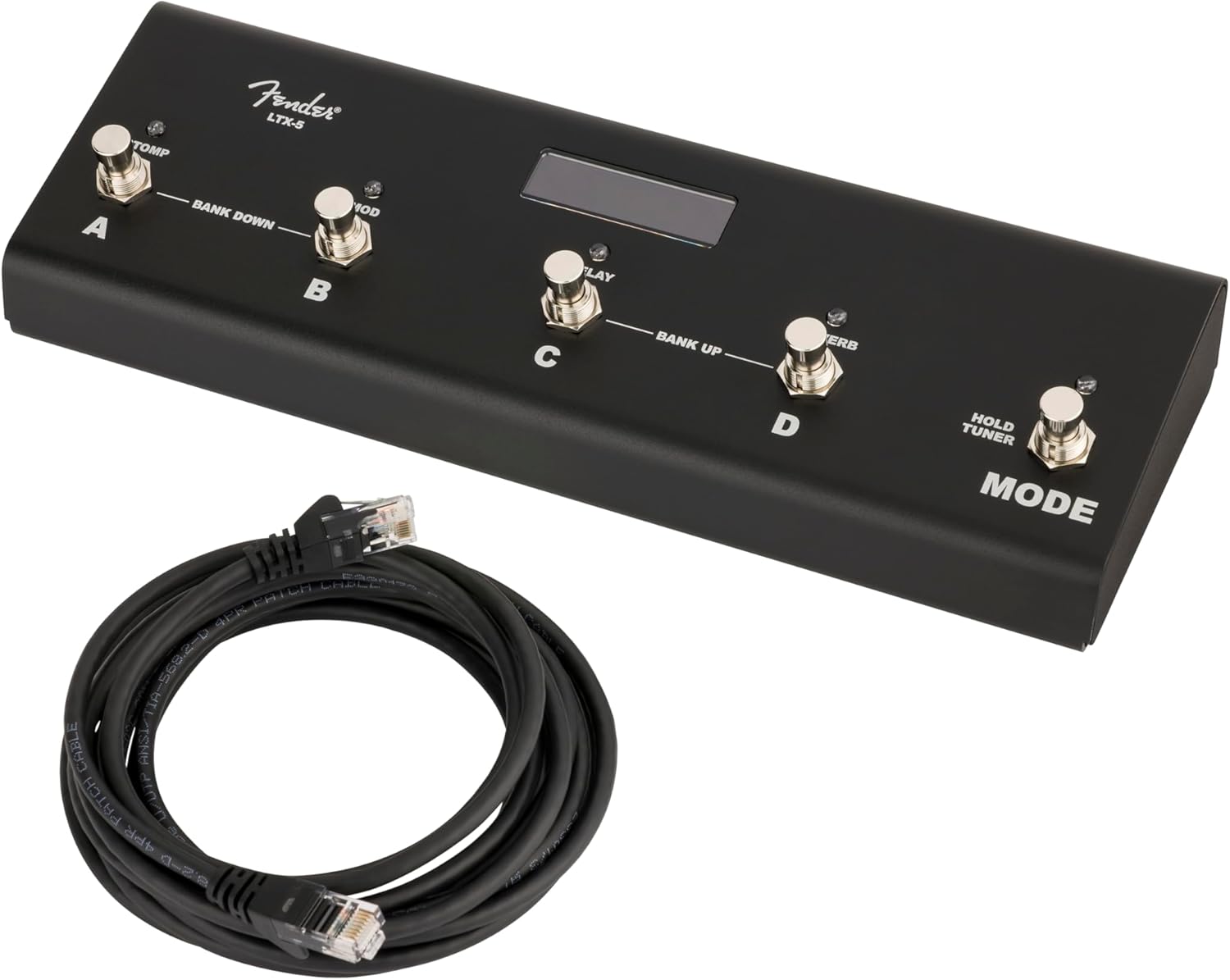
Image: The Fender LTX-5 Footswitch, showing its compact design and the included connection cable.
Pakuotės turinys
Patikrinkite, ar pakuotėje yra visi reikalingi daiktai:
- LTX-5 Button Footswitch
- Connection Cable (RJ45 type)
Sąranka
Kojinio jungiklio prijungimas
- Ensure your Fender Mustang LTX 50 or 100 watt ampkeltuvas išjungtas.
- Locate the footswitch input port on your amplifier. This is typically an RJ45 (Ethernet-style) port.
- Connect one end of the provided RJ45 cable to the footswitch input port on your ampgyvesnis.
- Connect the other end of the RJ45 cable to the input port on the side of the LTX-5 Footswitch.
- Įjunkite savo amplifier. The footswitch should initialize and be ready for use.

Vaizdas: Šoninė view of the LTX-5 Footswitch, highlighting the RJ45 connection port.
Naudojimo instrukcijos
The LTX-5 Footswitch offers two primary modes of operation: Preset Mode and Effects Mode, along with an integrated tuner function.
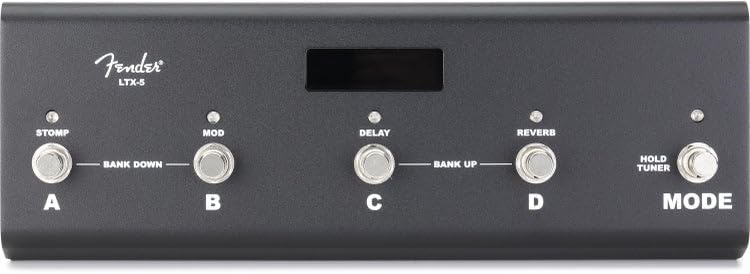
Vaizdas: Viršus view of the LTX-5 Footswitch, showing the labeled buttons (A, B, C, D, Mode) and the LED display.
Iš anksto nustatytas režimas
- Funkcija: Allows for instant recall of ampiš anksto nustatyti keltuvo nustatymai.
- Navigacija: Presets are organized in groups of four. Each of the four footswitches (A, B, C, D) corresponds to a specific preset within the active bank.
- Indikacija: Bicolor LEDs above each footswitch indicate the currently active preset.
- Bank Navigation: To move between banks of presets, simultaneously press the two leftmost switches (A and B) to move down four presets, or the two rightmost switches (C and D) to move up four presets.
Efektų režimas
- Funkcija: Provides control over individual effects within your amplifier's effect chain.
- Valdymas: Dedicated switches are assigned to Stomp, Modulation, Delay, and Reverb effects.
- Sužadėtuvės: Pressing the corresponding footswitch will engage or bypass the effect.
- Indikacija: Bicolor LEDs above each footswitch indicate the active status of each effect.
Režimo jungiklis
- Funkcija: Toggles between Preset Mode and Effects Mode.
- Imtuvo aktyvinimas: Briefly hold the Mode switch to activate the onboard chromatic tuner.
Derintuvo režimas
- Aktyvinimas: Briefly hold the Mode switch.
- Ekranas: The LED display will show the closest note being played.
- Pitch Indication: The bicolor LEDs on the footswitches indicate whether the pitch is flat or sharp relative to the target note.
- Išeiti: Step on any footswitch (A, B, C, D, or Mode) to exit Tuner Mode and return to the previous operating mode. The amplifier's signal is muted while in Tuner Mode.
Funkciniai šviesos diodai
- A series of five bicolor LEDs are located along the top of each footswitch, just below the display screen.
- These LEDs provide visual feedback on various functions and active states within both Preset and Effects Modes.
Priežiūra
Valymas ir priežiūra
- Disconnect the footswitch from the ampkeltuvą prieš valymą.
- Use a soft, dry cloth to wipe down the exterior of the footswitch.
- Avoid using abrasive cleaners, solvents, or waxes, as these can damage the finish and electronic components.
- Do not expose the footswitch to excessive moisture or extreme temperatures.
Trikčių šalinimas
Bendros problemos ir sprendimai
- Footswitch not responding: Ensure the RJ45 cable is securely connected to both the footswitch and the amplifier. Verify the ampkeltuvas įjungtas ir tinkamai veikia.
- Incorrect preset/effect changes: Confirm you are in the correct operating mode (Preset or Effects). Refer to the Operating Instructions for proper bank navigation and effect control.
- Tuner not activating: Ensure you are briefly holding the Mode switch, not just pressing it.
- Nešviečia šviesos diodai: Check all connections. If the issue persists, contact Fender support.
Specifikacijos
| Funkcija | Detalė |
|---|---|
| Prekės ženklas | Sparnas |
| Modelio pavadinimas | LTX-5 |
| Modelio numeris | 0994073000 |
| UPC | 717669705084 |
| Valdymo tipas | Kojinis jungiklis |
| Techninės įrangos sąsaja | RJ45 (for amplifier connection) |
| Garso išvesties efektai | Stomp, Modulation, Delay, Reverb |
| Prekės matmenys (I x P x A) | 24.1 x 21.6 x 2.8 inches (Note: These dimensions may refer to packaging) |
| Gamintojas | „Fender Musical Instruments Corporation“. |
Informacija apie garantiją
The Fender LTX-5 Footswitch comes with a 2 metų ribota garantija. This warranty covers defects in materials and workmanship under normal use. For specific terms and conditions, please refer to the warranty documentation provided with your product or visit the official Fender websvetainę.
Palaikymas
For technical assistance, troubleshooting beyond this manual, or warranty claims, please contact Fender Musical Instruments Corporation customer support. You can find contact information and additional resources on the official Fender websvetainė: