
1. Įvadas
This manual provides instructions for the setup, operation, and maintenance of your Retroid Pocket Classic handheld gaming console. The Retroid Pocket Classic is a portable Android-based gaming device featuring a 3.92-inch OLED touchscreen, designed for a versatile gaming experience.

Image 1.1: Retroid Pocket Classic consoles in white and yellow.
2. Kas yra dėžutėje
Patikrinkite, ar pakuotėje yra visi reikalingi daiktai:
- Retroid Pocket Classic Gaming Console
- Įkrovimo laidas (USB-C)
- Vartotojo vadovas (šis dokumentas)
3. Įrenginys baigtasview
Familiarize yourself with the physical components and controls of your Retroid Pocket Classic.
3.1 Priekis View

3.1 vaizdas: priekis view of the Retroid Pocket Classic.
- 3.92-inch OLED Touchscreen: The primary display for all operations and gaming.
- D-Pad: Directional input for navigation and gameplay.
- Veiksmų mygtukai: (A, B, X, Y or similar layout) for in-game actions.
- Pradžios / pasirinkimo mygtukai: For game and system functions.
- Garsiakalbių grotelės: Garso išvestis.
3.2 Top and Back View

3.2 pav.: Viršus view showing shoulder buttons and ports.
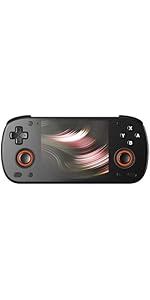
Image 3.3: Curved back design and trigger buttons.
- Pečių mygtukai (L1, R1): Įsikūręs viršutiniame krašte.
- Paleidimo mygtukai (L2, R2): Located on the back, below the shoulder buttons.
- USB-C prievadas: Įkrovimui ir duomenų perdavimui.
- 3.5 mm garso lizdas: Ausinėms prijungti.
- „Micro SD“ kortelės lizdas: Dėl saugyklos išplėtimo.
- Maitinimo mygtukas: Įjungti / išjungti įrenginį arba užmigdyti.
- Garsumo mygtukai: To adjust audio output.
3.3 Internal Components (Cooling)

Image 3.4: Integrated active cooling system.
The Retroid Pocket Classic features an integrated active cooling system designed to maintain optimal performance and manage heat during extended use.
4. Sąranka
4.1 Pradinis įkrovimas
Before first use, fully charge the device. Connect the provided USB-C charging cable to the console's USB-C port and the other end to a compatible USB power adapter (not included). The device has a 5000mAh battery.
4.2 Įjungimas / išjungimas
- Norėdami įjungti: Paspauskite ir palaikykite maitinimo mygtuką, kol ekranas įsijungs.
- Norėdami išjungti: Press and hold the Power button, then select "Power Off" from the on-screen options.
- Miegui / pabudimui: Trumpai paspauskite maitinimo mygtuką.
4.3 „Wi-Fi“ ryšys
To access online features and download applications, connect to a Wi-Fi network:
- Eikite į Nustatymai.
- Pasirinkite Tinklas ir internetas.
- Bakstelėkite Wi-Fi ir įjunkite.
- Iš sąrašo pasirinkite norimą tinklą ir, jei būsite paraginti, įveskite slaptažodį.
4.4 „Google“ paskyros sąranka
The Retroid Pocket Classic runs Android 14 and supports the Google Play Store. To download apps and games, you will need to sign in with a Google account during the initial setup process or later via the Settings menu.
4.5 „Micro SD“ kortelės įdėjimas
To expand the device's storage (128GB internal), insert a Micro SD card into the designated slot. Ensure the card is inserted correctly until it clicks into place. The device supports various Micro SD card capacities.
5. Naudojimo instrukcijos
5.1 „Android“ sąsajos naršymas
The device operates on Android 14. Use the touchscreen for navigation, tapping icons to open applications, swiping to scroll, and using gestures for system controls. The D-pad and action buttons can also be used for navigation within compatible applications and games.
5.2 Downloading and Installing Applications
Applications and games can be downloaded from the Google Play Store. Open the Play Store app, search for your desired content, and follow the on-screen prompts to download and install.
Note: The Retroid Pocket Classic does not come with preloaded games. Users are responsible for acquiring and installing their own game content.
5.3 Saugyklos valdymas
Į view and manage internal and external storage, go to Nustatymai > Saugykla. Here you can see storage usage and manage files. For optimal performance, ensure sufficient free space is available.
5.4 „Bluetooth“ ryšys
The device supports Bluetooth 5.1 for connecting wireless accessories such as headphones or external controllers.
- Eikite į Nustatymai.
- Pasirinkite Prijungti įrenginiai.
- Bakstelėkite Suporuokite naują įrenginį ir iš sąrašo pasirinkite savo priedą.
6. Priežiūra
6.1 Prietaiso valymas
Use a soft, dry, lint-free cloth to clean the device's exterior. For the screen, a screen cleaner specifically designed for electronics can be used. Avoid using harsh chemicals or abrasive materials.
6.2 Akumuliatoriaus priežiūra
Norėdami pailginti baterijos veikimo laiką:
- Venkite ekstremalių temperatūrų.
- Neiškraukite akumuliatoriaus dažnai iki galo.
- Store the device with a partial charge if not used for extended periods.
6.3 Programinės įrangos naujiniai
Reguliariai tikrinkite, ar yra sistemos atnaujinimų, ir juos įdiekite, kad užtikrintumėte optimalų našumą ir saugumą. Eikite į Nustatymai > Sistema > Sistemos naujinimas , kad patikrintumėte, ar yra galimų atnaujinimų.
7. Problemų sprendimas
7.1 Įrenginys neįsijungia
- Įsitikinkite, kad įrenginys pakankamai įkrautas. Prijunkite jį prie maitinimo šaltinio bent 30 minučių.
- Pabandykite palaikyti maitinimo mygtuką 10–15 sekundžių, kad priverstumėte įrenginį paleisti iš naujo.
7.2 „Wi-Fi“ ryšio problemos
- Patikrinkite, ar „Nustatymuose“ įjungtas „Wi-Fi“.
- Paleiskite iš naujo „Wi-Fi“ maršrutizatorių.
- Forget the network and reconnect, ensuring the password is correct.
7.3 Programų gedimai arba užstrigimas
- Uždarykite ir vėl atidarykite programą.
- Išvalykite programos talpyklą ir duomenis naudodami Nustatymai > Programos > [Programos pavadinimas] > Saugykla ir talpykla.
- Ensure the application is updated to its latest version.
- Iš naujo paleiskite įrenginį.
7.4 Ekranas nereaguoja
- Paleiskite įrenginį iš naujo laikydami nuspaustą maitinimo mygtuką.
- Įsitikinkite, kad ekranas yra švarus ir be šiukšlių.
8. Specifikacijos

Image 8.1: Retroid Pocket Classic detailed specifications.
| Funkcija | Detalė |
|---|---|
| Modelio pavadinimas | RP CLASSIC |
| Procesorius | G1 Gen2 (8-Core Kryo CPU, 2 Performance Cores, 6 Efficiency Cores) |
| GPU | Adreno A12 |
| RAM | 6GB LPDDR4x @2133M |
| Sandėliavimas | 128GB EMMC 5.1 (expandable via Micro SD card) |
| Ekranas | 3.92-inch AMOLED, 1240x1080 @60fps |
| Operacinė sistema | Android 14 |
| Wi-Fi | „Wi-Fi“ 5 |
| Bluetooth | Bluetooth 5.1 |
| Sąsaja | USB-C / 3.5mm Audio Jack / TF Card Slot |
| Vaizdo išvestis | N/A |
| Baterija | 5000 mAh |
| Įkrovimo greitis | 27 vatų |
| Matmenys | 138 x 89.8 x 26 mm (5.43 x 3.53 x 1 colio) |
| Svoris | 223 g (7.9 uncijos) |
9. Garantija ir palaikymas
For warranty information and technical support, please refer to the official Retroid Pocket websvetainėje arba susisiekite su jų klientų aptarnavimo tarnyba. Išsaugokite pirkimo įrodymą garantiniams reikalavimams.
Online resources and community forums may also provide helpful information and troubleshooting tips.