
1. Įvadas
This manual provides essential information for the safe and efficient operation of your FASTWD Android 15 Tablet 11-inch. Please read this manual thoroughly before using the device and retain it for future reference. This tablet features an 11-inch 2K display, Android 15 operating system, Octa-Core processor, 36GB RAM, 256GB ROM (expandable up to 1TB), 4G LTE, and 5G WiFi connectivity.
2. Saugos informacija
- Nelaikykite planšetinio kompiuterio ekstremaliose temperatūrose, tiesioginiuose saulės spinduliuose ar didelėje drėgmėje.
- Venkite planšetinio kompiuterio numetimo ar stiprių smūgių.
- Naudokite tik patvirtintus įkroviklius ir priedus, kad išvengtumėte pažeidimų ir užtikrintumėte saugumą.
- Laikykite tabletę atokiau nuo vandens ir kitų skysčių.
- Do not attempt to disassemble or repair the tablet yourself. Contact customer support for assistance.
- Išmeskite bateriją ir įrenginį pagal vietinius reikalavimus.
3. Pakuotės turinys
Upon opening your FASTWD Android 15 Tablet package, please verify that all the following items are included:
- FASTWD Tablet
- Bluetooth klaviatūra
- Pelė
- Apsauginis dėklas
- Stylus Pen
- C tipo kabelis
- Įkroviklis
- Vartotojo vadovas

Image: The FASTWD Android 15 Tablet displayed with its full set of accessories, including the keyboard, mouse, protective case, stylus, and charging components.
4. Įrenginys baigtasview
The FASTWD Android 15 Tablet features a sleek metal body with an 11-inch 2K INCell display. It is designed for both productivity and entertainment.
4.1 Fizinės savybės
- Ekranas: 11-inch 2K UHD INCell display with 120Hz refresh rate.
- Kameros: 8MP front camera, 13MP rear camera with LED flash.
- Prievadai: USB C tipo prievadas įkrovimui ir duomenų perdavimui.
- Kortelės lizdas: Dual SIM card slot, also supports MicroSD card expansion up to 1TB.
- Garsiakalbiai: Keturi amplitude speakers for enhanced audio.

Image: A visual representation of the FASTWD tablet's slim design, 11-inch screen, and Type-C charging port.
5. Sąranka
5.1 Pradinis įjungimas
- Paspauskite ir palaikykite nuspaudę planšetinio kompiuterio šone esantį maitinimo mygtuką, kol pasirodys FASTWD logotipas.
- Vykdykite ekrane pateikiamus nurodymus, kad pasirinktumėte kalbą, regioną ir prisijungtumėte prie „Wi-Fi“ tinklo.
- Prisijunkite naudodami „Google“ paskyrą arba sukurkite naują, kad galėtumėte pasiekti „Google Play“ parduotuvę ir kitas paslaugas.
5.2 SIM kortelės ir „MicroSD“ kortelės įdėjimas
Your tablet supports dual SIM cards for 4G LTE connectivity and a MicroSD card for expanded storage.
- Planšetinio kompiuterio šone raskite SIM / „MicroSD“ kortelės dėklą.
- Pateiktu SIM kortelės išstūmimo įrankiu švelniai stumkite mažą skylutę šalia dėklo, kol jis iššoks.
- Place your Nano-SIM card(s) and/or MicroSD card into the designated slots on the tray. Ensure they are correctly oriented.
- Atsargiai įstatykite dėklą atgal į planšetinį kompiuterį, kol jis spragtelėdamas užsifiksuos.

Paveikslėlis: detalus view of the tablet's SIM card tray, showing slots for two SIM cards and one MicroSD card.
6. Naudojimo instrukcijos
The FASTWD tablet runs on Android 15, offering an intuitive and customizable user experience.
6.1 Pagrindinė navigacija
- Braukite aukštyn: Pasiekite programėlių stalčių.
- Braukite žemyn: Atidarykite pranešimų skydelį ir greituosius nustatymus.
- Bakstelėkite: Pasirinkite elementus arba atidarykite programas.
- Ilgas paspaudimas: Pasiekite kontekstinius meniu arba perkelkite piktogramas.
- Žiupsnelis, norint priartinti: Adjust zoom level in apps like browser or gallery.
6.2 „Android 15“ funkcijos
Android 15 introduces several enhancements for privacy, security, and user experience:
- Improved Privacy Controls: Granular permissions for apps, allowing you to authorize access more precisely.
- Dirbtinio intelekto optimizavimas: Intelligent AI features for improved performance and battery life.
- Navigacija gestais: New touch control gestures for a more fluid interaction.
- Visuotinis tamsusis režimas: System-wide dark theme for reduced eye strain and power consumption.
- Face Recognition Unlock: Saugiai atrakinkite planšetinį kompiuterį naudodami veido atpažinimo funkciją.
- Tėvų kontrolė: Manage screen time and app access for children.
- Padalintas ekranas: Use two applications simultaneously side-by-side.
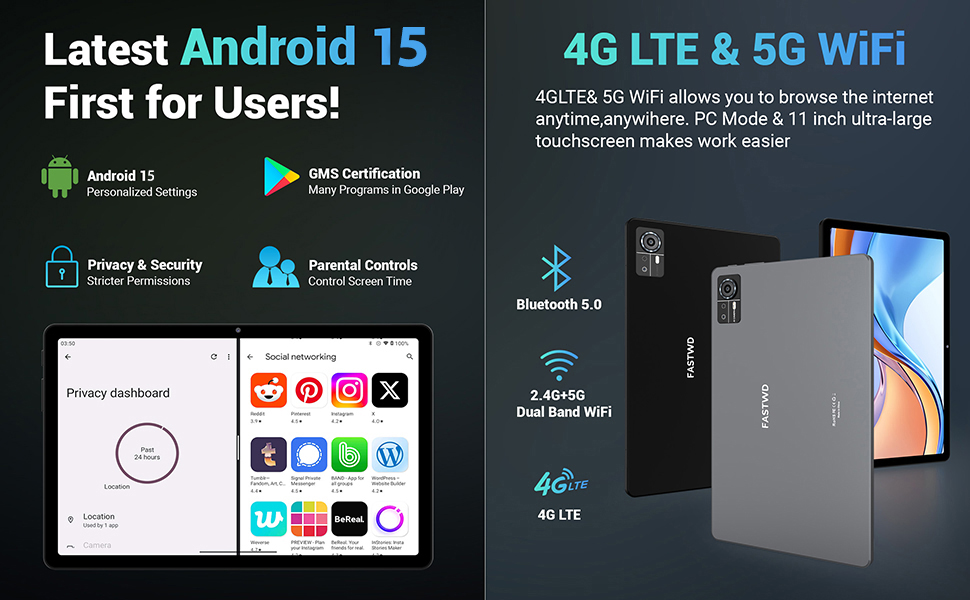
Image: A visual guide to key Android 15 features such as easy app pairing, storage management, quick Bluetooth connection, face recognition unlock, double-tap to wake, and parental control settings.
7. Ryšys
Your FASTWD tablet offers versatile connectivity options for internet access and peripheral devices.
7.1 „Wi-Fi“ ryšys
- Eikite į Nustatymai > Tinklas ir internetas > Wi-Fi.
- Perjungti „Wi-Fi“ On.
- Iš sąrašo pasirinkite norimą tinklą ir, jei būsite paraginti, įveskite slaptažodį.
- The tablet supports dual-band 2.4G/5G Wi-Fi for stable and fast connections.
7.2 4G LTE Mobile Data
With a compatible SIM card installed, you can access 4G LTE mobile data.
- Ensure your SIM card is correctly installed (refer to Section 5.2).
- Eikite į Nustatymai > Tinklas ir internetas > Mobilusis tinklas.
- Įgalinti Mobilieji duomenys and configure APN settings if required by your carrier.
7.3 Bluetooth poravimas
Connect Bluetooth accessories like the included keyboard and mouse.
- Eikite į Nustatymai > Prijungti įrenginiai > Bluetooth.
- Perjungti Bluetooth On.
- Įjunkite „Bluetooth“ priedą susiejimo režimą.
- Select the accessory from the list of available devices and follow any on-screen prompts to complete pairing.
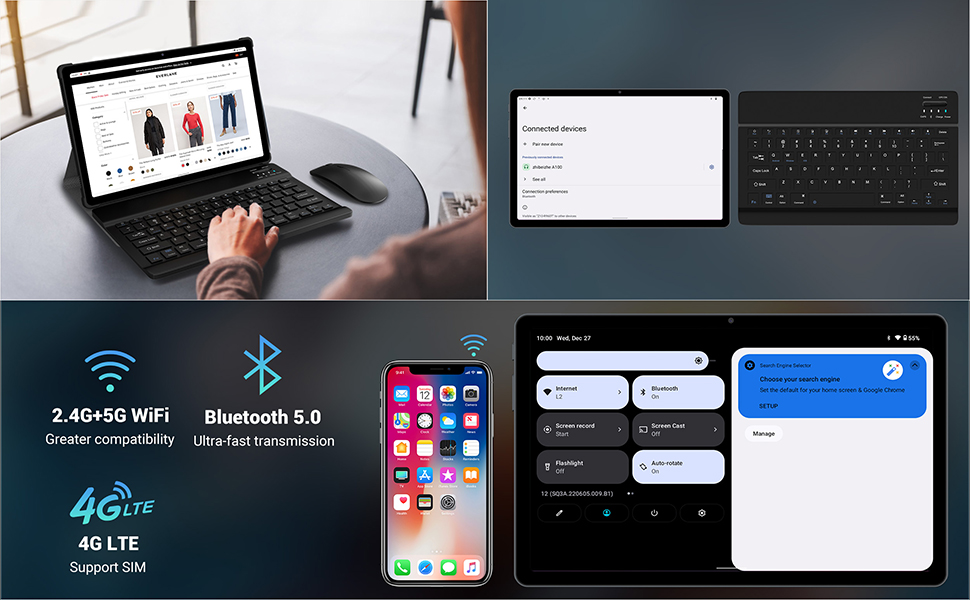
Image: The FASTWD tablet connected to its keyboard and mouse, illustrating its 2.4G+5G WiFi, Bluetooth 5.0, and 4G LTE SIM support for comprehensive connectivity.
8. Fotoaparatas
The tablet is equipped with an 8MP front camera and a 13MP rear camera for photos and video calls.
- Atidarykite Fotoaparatas taikymas.
- Norėdami nufotografuoti, palieskite užrakto mygtuką.
- Perjunkite priekinę ir galinę kameras naudodami kameros perjungimo piktogramą.
- AI post-processing technology enhances photo quality, making images more realistic.

Paveikslėlis: detalus view of the tablet's rear camera, highlighting its 13MP sensor and AI Camera branding.
9. Baterijos valdymas
The tablet features a 9580mAh battery for extended usage and supports 12W fast charging.
9.1 Planšetinio kompiuterio įkrovimas
- Prijunkite C tipo laidą prie planšetinio kompiuterio įkrovimo prievado.
- Plug the other end of the cable into the provided charger, and then into a power outlet.
- Akumuliatoriaus piktograma ekrane parodys įkrovimo būseną.
9.2 Baterijos optimizavimas
- Sureguliuokite ekrano ryškumą iki patogaus lygio.
- Uždarykite nenaudojamas programas, veikiančias fone.
- Įjunkite akumuliatoriaus taupymo režimą Nustatymai > Baterija.
- Išjunkite „Wi-Fi“, „Bluetooth“ arba GPS, kai jų nenaudojate.

Image: The FASTWD tablet connected to a Type-C charger, illustrating its 9580 mAh battery and 12W fast charging capability.
10. Sandėliavimas
The tablet comes with 256GB of internal storage (ROM) and supports expansion up to 1TB via a MicroSD card.
10.1 Saugyklos valdymas
- Norėdami patikrinti saugyklos naudojimą, eikite į Nustatymai > Sandėliavimas.
- You can free up space by uninstalling unused apps, deleting old files, or moving media to a MicroSD card.
10.2 RAM Management
The tablet features 36GB RAM (12GB LPDDR4 + 24GB expandable virtual memory) for smooth multitasking.
- The system automatically manages RAM for optimal performance.
- You can activate additional virtual RAM in the settings if needed for demanding applications.
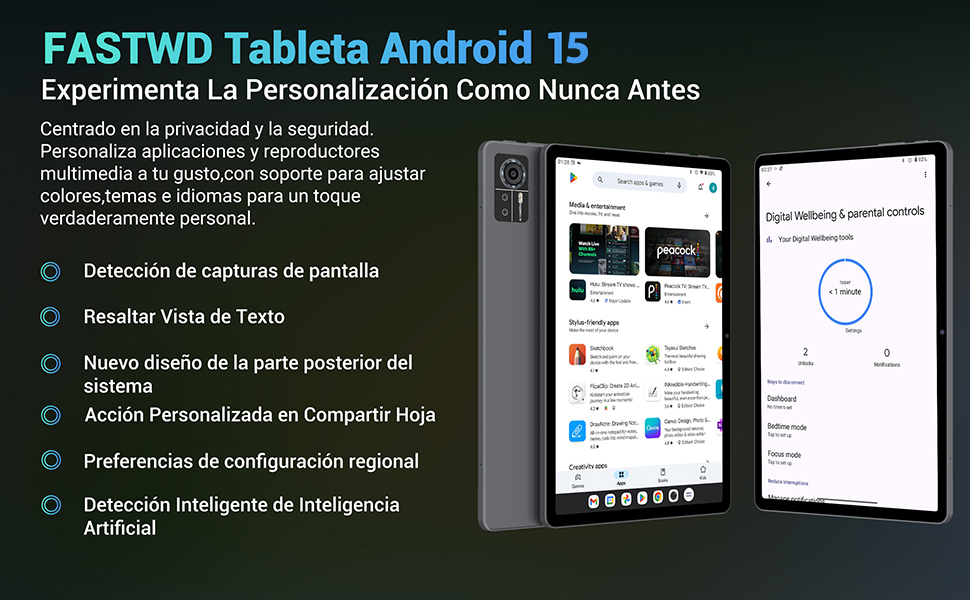
Image: An illustration highlighting the tablet's 36GB RAM (12+24GB), 256GB ROM, and 1TB MicroSD expansion capabilities, alongside its Octa-core processor.
11. Priežiūra
11.1 Valymas
- Planšetinio kompiuterio ekraną ir korpusą valykite minkštu, nepūkuotu audiniu.
- Nenaudokite stiprių cheminių medžiagų ar abrazyvinių medžiagų.
11.2 Programinės įrangos naujiniai
- Reguliariai tikrinkite, ar yra sistemos atnaujinimų, Nustatymai > Sistema > Sistemos atnaujinimas siekiant užtikrinti optimalų našumą ir saugumą.
12. Problemų sprendimas
Jei kyla problemų dėl planšetinio kompiuterio, žr. šiuos dažniausiai pasitaikančius sprendimus:
| Problema | Sprendimas |
|---|---|
| Planšetinis kompiuteris neįsijungia | Įsitikinkite, kad akumuliatorius įkrautas. Prijunkite įkroviklį ir palaukite kelias minutes, prieš bandydami vėl įjungti. Jei įrenginys nereaguoja, priverstinai paleiskite įrenginį iš naujo, 10–15 sekundžių palaikydami nuspaustą maitinimo mygtuką. |
| Applications crash or freeze | Close background applications. Clear the cache of the problematic app (Settings > Apps > [App Name] > Storage & cache > Clear cache). Restart the tablet. |
| Prastas Wi-Fi ryšys | Įsitikinkite, kad esate „Wi-Fi“ maršrutizatoriaus veikimo zonoje. Paleiskite maršrutizatorių ir planšetinį kompiuterį iš naujo. Pamirškite tinklą ir prijunkite iš naujo. |
| SIM kortelė neaptikta | Ensure the SIM card is correctly inserted into the tray. Restart the tablet. Verify the SIM card is active with your mobile carrier. |
| Baterija greitai išsikrauna | Reduce screen brightness. Disable unused connectivity features (Wi-Fi, Bluetooth, GPS). Close background apps. Check for apps consuming excessive battery in Settings > Battery. |
13. Specifikacijos
Detailed technical specifications for the FASTWD Android 15 Tablet 11-inch (Model M986):
| Funkcija | Specifikacija |
|---|---|
| Prekės ženklas | FASTWD |
| Modelio pavadinimas | FASTWD Android 15 Tablet 11 Pulgadas |
| Operacinė sistema | Android 15 |
| Procesoriaus greitis | 2 GHz aštuonių branduolių |
| RAM | 36 GB (12GB LPDDR4 + 24GB expandable) |
| Vidinė atmintis (ROM) | 256 GB |
| Išplečiama saugykla | Iki 1 TB per „MicroSD“ kortelę |
| Ekrano dydis | 11 Pulgadas (Inches) |
| Ekrano raiška | 2560 x 1440 pixels (2K UHD INCell) |
| Atnaujinimo dažnis | 120 Hz |
| Galinė kamera | 13 MP |
| Priekinė kamera | 8 MP |
| Baterijos talpa | 9580 mAh |
| Battery Life (average) | 8 valandos (vaizdo įrašų atkūrimas) |
| Įkrovimas | 12 W greitas įkrovimas, C tipo sąsaja |
| Ryšys | 4G LTE (Cellular), 5G Wi-Fi (802.11ac), Bluetooth 5.0 |
| Matmenys | 29.7 x 19.6 x 4 cm |
| Svoris | 1.36 kg |
| Ypatingos savybės | Gaming Tablet, Face Recognition, Parental Control, GPS (Beidou, Galileo, Glonass, GPS) |
14. Garantija ir palaikymas
FASTWD offers two years of premium after-sales service and long-term technical support for your tablet.
- Garantinis laikotarpis: 2 metai nuo pirkimo dienos.
- Techninė pagalba: For any issues or inquiries, please contact the FASTWD after-sales team through your Amazon purchase platform.
- Our support team aims to respond within 24 hours.