
Įvadas
Thank you for choosing the Yaheetech Ergonomic Gaming Chair. This manual provides essential information for the safe assembly, operation, and maintenance of your new chair. Designed for comfort during extended periods of use, this chair features adjustable height, recline, a retractable footrest, and a massage lumbar support pillow.
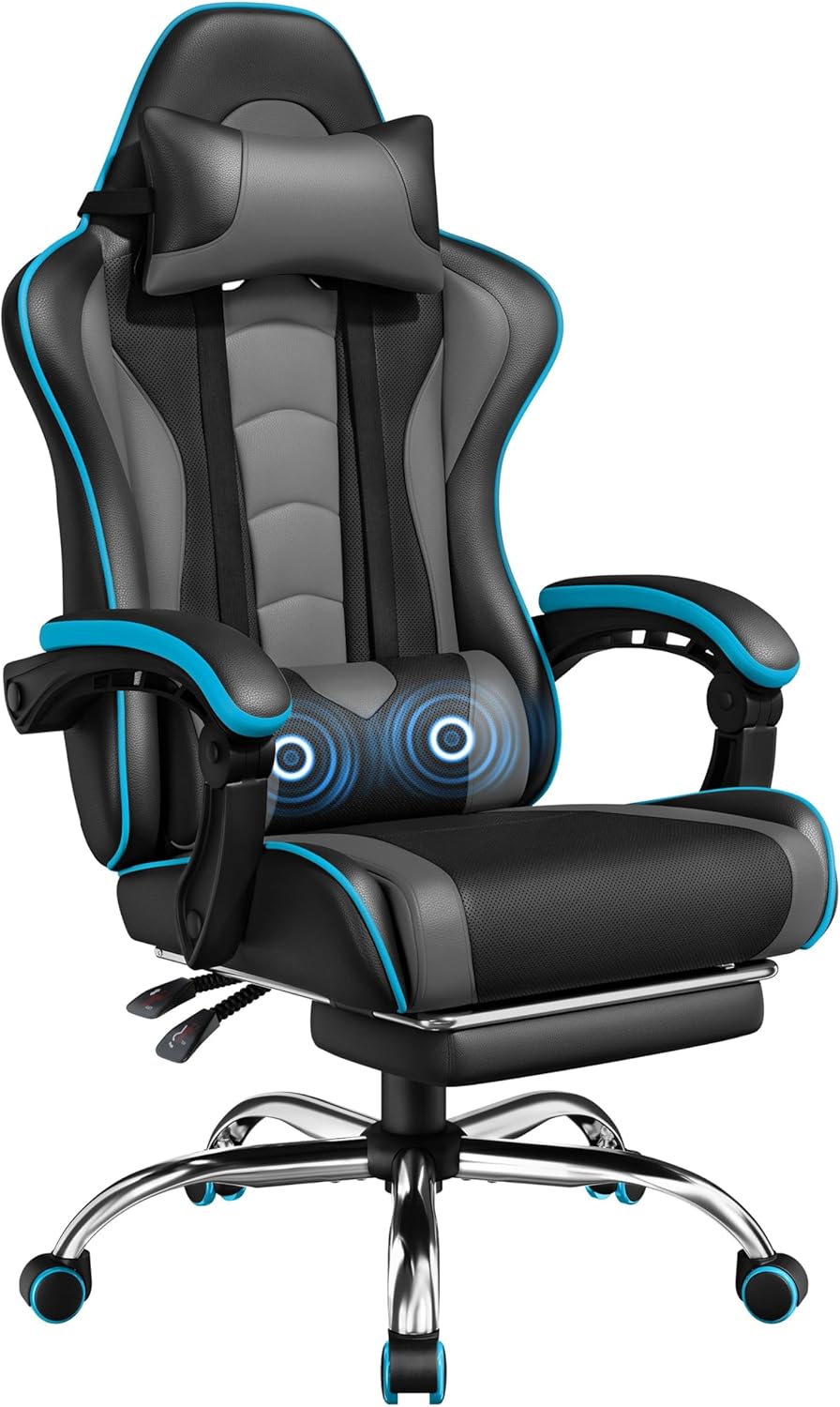
Image: The Yaheetech Ergonomic Gaming Chair in Black/Gray, showcasing jo dizainą ir savybes.
Saugos informacija
- Didžiausia svorio talpa: Ši kėdė skirta atlaikyti maksimalų 136 kg (300 svarų) svorį. Neviršykite šios ribos.
- Surinkimas: Ensure all parts are correctly assembled and all screws are tightened before use. Refer to the assembly instructions carefully.
- Stabilumas: Do not stand on the chair. Avoid leaning excessively to one side or backward when the chair is fully reclined without the footrest extended, as this may cause instability.
- Vaikai: Surinkimo ir naudojimo metu laikykite vaikus atokiai nuo judančių dalių.
- Judėjimas: Use caution when moving the chair, especially on uneven surfaces.
Pakuotės turinys
Prieš pradėdami surinkimą, patikrinkite, ar yra visi toliau išvardyti komponentai ir ar jie nepažeisti:
- Kėdės atlošas
- Seat Base with Mechanism
- Porankiai (2)
- Penkių žvaigždučių bazė
- Ratukai (5)
- Gas Lift Cylinder with Cover
- Massage Lumbar Pillow (USB-powered)
- Galvos atramos pagalvė
- Ištraukiama pakoja
- Surinkimo detalės (varžtai, poveržlės, šešiakampis raktas)

Image: All chair components, including the seat, backrest, base, and accessories, laid out before assembly.
Sąranka ir surinkimas
Follow these steps to assemble your Yaheetech Gaming Chair. It is recommended to have two people for certain steps, especially when attaching the backrest.
- Assemble the Five-Star Base: Insert the five caster wheels into the holes at the end of each leg of the five-star base. Ensure they are securely fitted.
- Įdiekite dujų keltuvą: Place the gas lift cylinder into the central hole of the assembled five-star base. Cover it with the telescopic plastic cover.
- Attach the Seat Mechanism: Secure the seat mechanism to the underside of the seat base using the provided screws. Ensure the front of the mechanism aligns with the front of the seat.
- Prijunkite sėdynę prie dujinio keltuvo: Carefully place the assembled seat onto the gas lift cylinder, ensuring the central hole of the seat mechanism aligns with the top of the gas lift.
- Pritvirtinkite atlošą: Align the metal brackets on the backrest with the corresponding attachment points on the seat mechanism. Secure with the provided screws. This step may require two people.
- Porankių montavimas: Attach the armrests to the sides of the seat and backrest using the designated screws. Cover the screw holes with the provided caps for a neat finish.
- Pritvirtinkite kojų atramą: Slide the retractable footrest assembly into the guides located under the seat.
- Position Pillows: Attach the headrest pillow and massage lumbar pillow using their elastic straps. The lumbar pillow's height can be adjusted by sliding it along the straps.
Asamblėjos vaizdo įrašas
Vaizdo įrašas: išsamus aprašymasview of the Yaheetech Gaming Chair, including assembly steps and feature demonstrations.
Vaizdo įrašas: Pakartotinaiview highlighting the assembly process and massage lumbar support feature of the Yaheetech Gaming Chair.
Video: A demonstration of the ergonomic design and footrest of the Yaheetech Gaming Chair, including assembly.
Naudojimo instrukcijos
Aukščio reguliavimas
To adjust the chair's height, locate the lever on the right side under the seat. Pull the lever upwards while lifting your weight off the seat to raise it. To lower the seat, pull the lever upwards while remaining seated.
Atlošimo funkcija
The chair offers a recline range of 90° to 135°. To recline, pull the lever on the left side under the seat upwards and lean back to your desired angle. Release the lever to lock the backrest in place. To return to an upright position, pull the lever and lean forward slightly.
Ištraukiama pakoja
To use the footrest, pull it out from underneath the seat. Flip the padded section upwards for comfortable leg support. To store, flip the padded section down and slide the footrest back under the seat.

Image: Visual guide to the chair's adjustable features: 135° reclining angle, adjustable seat height, lockable backrest, foldable footrest, and smooth 360° swivel.
Massage Lumbar Support
The lumbar pillow provides a soothing vibration massage. Connect the USB cable from the lumbar pillow to any standard USB power source (e.g., computer, power bank). Use the inline switch on the cable to turn the massage function on or off.

Image: Detail of the USB-powered massage lumbar support pillow, illustrating its connection and function.
Reguliuojami porankiai
The linkage armrests automatically adjust with the chair's recline angle, providing continuous support for your elbows and arms.

Image: Diagram showing how the linkage armrests move in conjunction with the chair's recline.
Priežiūra
- Valymas: The chair's faux leather upholstery is designed for easy cleaning. Wipe down surfaces with a damp šluoste ir švelniu muilu. Venkite stiprių cheminių medžiagų ar abrazyvinių valiklių.
- Aparatinės įrangos patikrinimas: Periodiškai patikrinkite visus varžtus ir veržles, ar jie gerai priveržti. Prireikus priveržkite, kad išlaikytumėte stabilumą ir saugumą.
- Ratukų priežiūra: Keep the caster wheels free of debris (hair, dust, etc.) to ensure smooth and quiet movement.
Trikčių šalinimas
- Kėdės girgždesys: If the chair squeaks, check all bolted connections and tighten them. Applying a small amount of silicone lubricant to moving parts may also help.
- Sunkumai reguliuojant aukštį: Įsitikinkite, kad dujų pakėlimo svirtis yra visiškai įjungta. Jei problema išlieka, gali tekti pakeisti dujų pakėlimo cilindrą.
- Footrest Sticks: If the footrest is difficult to extend or retract, check for any obstructions in its tracks. A small amount of dry lubricant can improve movement.
- Massage Not Working: Verify the USB cable is securely connected to a powered USB port and the inline switch is in the 'on' position.
Specifikacijos
| Funkcija | Detalė |
|---|---|
| Prekės ženklas | Yaheetech |
| Modelio pavadinimas | Vaizdo žaidimų kėdė |
| Modelio numeris | YTwnf00001001 |
| Spalva | Juoda/Pilka |
| Gaminio matmenys | 28.5 "D x 28.5" P x 28.5" A |
| Didžiausio svorio rekomendacija | 300 svaro |
| Ypatinga funkcija | Massage Lumbar Pillow, Removable Head Pillow |
| Gulimosios padėties skaičius | 2 (90°–135°) |
| Užpildymo medžiaga | Putos |
| Prekės svoris | 40.2 svaro |

Image: Detailed dimensions of the gaming chair, including height, width, and depth measurements.
Garantija ir palaikymas
For warranty information, technical support, or to order replacement parts, please contact Yaheetech customer service through their official website or the retailer where the product was purchased. Please have your model number (YTwnf00001001) and purchase date available.