
Įvadas
Thank you for choosing the GNCC 1080P Indoor Security Camera. This manual provides detailed instructions for setting up, operating, and maintaining your camera to ensure optimal performance and security for your home. This camera offers high-definition video, advanced detection features, and two-way audio communication.
Kas yra dėžutėje
Patikrinkite siuntinio turinį. Jei trūksta kokių nors daiktų arba jie pažeisti, susisiekite su klientų aptarnavimo tarnyba.
- Vidaus kamera
- Maitinimo adapteris
- Instrukcijų vadovas
- Montavimo varžtas
- 2 m maitinimo laidas
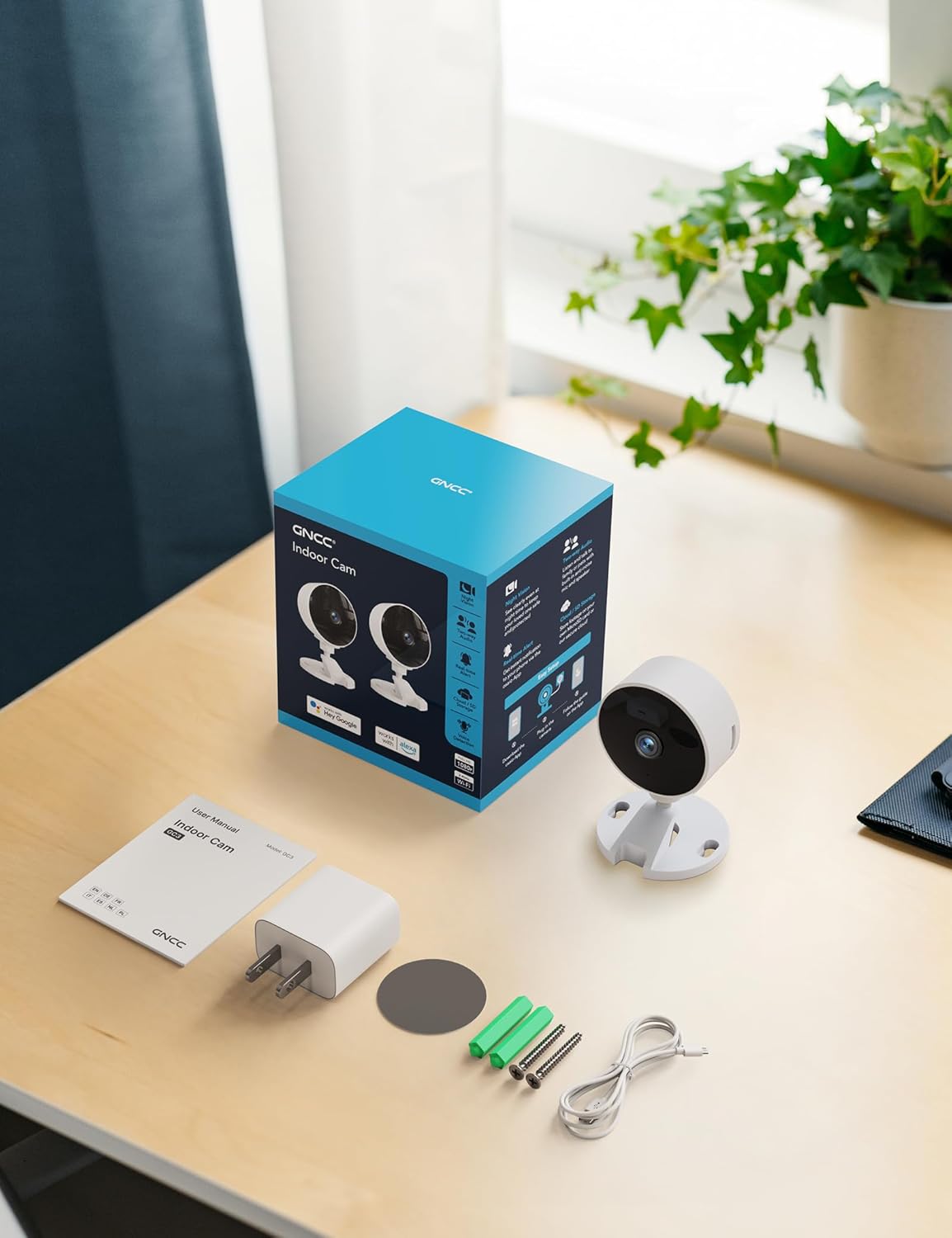
Image: All components included in the GNCC Indoor Camera package, neatly laid out on a wooden surface.
Produkto savybės
The GNCC Indoor Security Camera is equipped with several features designed to enhance your home security and monitoring experience:
- 1080p Full HD raiška: Provides clear and detailed video monitoring.
- 15m Night Vision: Built-in infrared LEDs enable clear vision up to 15 meters in low-light conditions.
- Smarter AI Detection: Advanced AI (subscription required) for identifying people, pets, vehicles, and packages, reducing false alerts.
- Lanksčios saugojimo parinktys: Supports local recording with a 128GB Micro SD card (not included) and offers a 14-day free cloud storage trial.
- Lengvas nustatymas: Can be installed quickly using 3M tape or included screws for wall mounting.
- Privatumo režimas: One-tap privacy mode to disable the lens and LED for enhanced privacy.
- Dvipusis garsas: Integruotas mikrofonas ir garsiakalbis bendravimui realiuoju laiku.
- Išmanioji integracija: Compatible with Alexa and Google Home for voice control.
- Šeimos bendrinimas: Allows sharing access with up to 3 users.

Image: Visual representation of the camera's core functionalities, including HD resolution, night vision, and two-way audio.
Sąranka
1. Įjungimas
- Prijunkite pridedamą maitinimo adapterį prie fotoaparato maitinimo įvesties prievado.
- Įjunkite maitinimo adapterį į standartinį elektros lizdą.
- Kamera įsijungs, o indikatoriaus lemputė rodys jos būseną.
2. Programėlės diegimas ir paskyros sukūrimas
- Download the official GNCC app from your smartphone's app store (iOS App Store or Google Play Store).
- Atidarykite programėlę ir vykdykite ekrane pateikiamus nurodymus, kad sukurtumėte naują paskyrą arba prisijunkite, jei jau turite.
3. Kameros pridėjimas prie programėlės
- In the GNCC app, tap the "+" icon to add a new device.
- Pasirinkite „Apsaugos kamera“ arba konkretų modelį, jei būsite paraginti.
- Follow the app's instructions to connect the camera to your 2.4GHz Wi-Fi network. Pastaba: ši kamera nesuderinama su 5 GHz „Wi-Fi“ tinklais.
- You may be required to scan a QR code displayed on your phone with the camera lens or enter a code manually.
- Once connected, name your camera and assign it to a specific room or location.

Image: The GNCC camera alongside a smartphone showing the camera's live feed and app interface, demonstrating connectivity.
4. Montavimo parinktys
Kamera siūlo lanksčias tvirtinimo galimybes:
- Stalviršio išdėstymas: Simply place the camera on a flat surface like a shelf, table, or desk.
- Montavimas ant sienos: Use the included 3M adhesive tape for a drill-free installation, or use the provided screws for a more permanent fixture. Ensure the mounting surface is clean and dry before applying adhesive.
Naudojimo instrukcijos
Tiesiogiai View ir nuotolinis stebėjimas
Once connected, you can access the live video feed from your camera anytime, anywhere, through the GNCC app.

Image: A smartphone screen showing the live feed from the GNCC camera, illustrating remote monitoring capabilities.
Dvipusis garsas
The camera features a built-in microphone and speaker, allowing for two-way communication. Tap the microphone icon in the app to speak, and release to listen. This is ideal for communicating with family members or pets.

Image: A visual representation of the two-way audio feature, showing a child and a pet, with text bubbles indicating conversation.
Naktinis matymas
The camera automatically switches to night vision mode in low-light conditions, providing clear black and white images up to 15 meters. This ensures continuous monitoring even in complete darkness.

Image: A baby sleeping in a crib, demonstrating the camera's clear night vision capabilities in a dark environment.
Judesio ir garso aptikimas
The camera can detect motion and sound, sending instant alerts to your smartphone. With an optional AI subscription, the camera can differentiate between people, pets, vehicles, and packages, reducing false alarms. You can customize motion detection zones within the app.

Image: Children and a dog triggering motion and sound detection, with example alert notifications shown.
Saugojimo parinktys
Your GNCC camera supports two primary storage methods for recorded footage:
- „Micro SD“ kortelė: Insert a Micro SD card (up to 128GB, not included) into the camera's slot for continuous local recording.
- Saugykla debesyje: A 14-day free trial of cloud storage is included. Cloud storage provides secure, off-site backup of your recordings, accessible from anywhere.

Image: The camera with visual cues for both SD card and cloud storage, highlighting flexible recording options.
Privatumo režimas
To ensure privacy, the GNCC camera features a one-tap privacy mode within the app. Activating this mode will fully disable the camera lens and LED indicator, preventing any recording or live viewing.
Priežiūra
- Valymas: Kameros objektyvą ir korpusą valykite minkštu, sausu audiniu. Venkite naudoti skystus valiklius ar abrazyvines medžiagas.
- Firmware atnaujinimai: Regularly check the GNCC app for firmware updates. Keeping your camera's firmware up-to-date ensures optimal performance, security, and access to new features.
- Vieta: Įsitikinkite, kad kamera pastatyta stabilioje vietoje, atokiau nuo tiesioginių saulės spindulių, šilumos šaltinių ir per didelės drėgmės.
Trikčių šalinimas
| Problema | Galima priežastis / sprendimas |
|---|---|
| Kamera neprisijungia prie „Wi-Fi“. |
|
| No video feed / Offline status |
|
| Prasta vaizdo kokybė |
|
| Judesio / garso įspėjimai negaunami |
|
| Neveikia dvipusis garsas |
|
Specifikacijos
| Funkcija | Detalė |
|---|---|
| Modelio pavadinimas | GC3B-1P |
| Naudojimas viduje / lauke | Vidinis |
| Vaizdo įrašymo raiška | 1080p „Full HD“ |
| Naktinio matymo diapazonas | 15 metrai |
| Ryšio technologija | Belaidis ryšys (Wi-Fi) |
| Wi-Fi dažnis | 2.4 GHz (nesuderinamas su 5 GHz) |
| Maitinimo šaltinis | Su laidu elektra |
| Valdiklio tipas | Amazon Alexa, Google Home |
| Montavimo tipas | Stalinis laikiklis, sieninis laikiklis |
| Saugojimo parinktys | „Micro SD“ kortelė (iki 128 GB, nepridedama), debesies saugykla |
| Dvipusis garsas | Taip |
| AI aptikimas | Motion, Sound (AI features require subscription) |
| Gaminio matmenys | 2.56 x 2.76 x 3.54 colio |
| Prekės svoris | 2.24 uncijos |
| Spalva | Baltas |
| Įtraukti komponentai | Indoor camera, Power Adapter, Instruction Manual, Mounting Screw, 2m power cord |
Garantija ir palaikymas
GNCC products are designed for reliability and performance. For specific warranty details, please refer to the warranty card included with your product or visit the official GNCC websvetainę.
If you encounter any issues or have questions regarding your GNCC 1080P Indoor Security Camera, please contact GNCC Customer Support through the following channels:
- Official GNCC Websvetainė: Look for the "Support" or "Contact Us" section.
- Pagalba el. paštu: Refer to the contact information provided in the GNCC app or on the product packaging.
- Pagalba programėlėje: Some issues can be resolved directly through the help section within the GNCC application.
Please have your product model (GC3B-1P) and purchase information ready when contacting support.