
GNCC GC3-2P
GNCC GC3-2P 1080P Indoor Security Camera Instruction Manual
Model: GC3-2P
Įvadas
The GNCC GC3-2P Indoor Security Camera provides reliable home monitoring with 1080P Full HD video, motion detection, two-way audio, and night vision capabilities. Designed for easy installation and integration with smart home systems, this camera helps you keep an eye on your home, pets, or loved ones. It connects exclusively to 2.4GHz Wi-Fi networks and offers flexible storage options including local microSD card storage and optional cloud services.
Kas yra dėžutėje
Upon unboxing your GNCC GC3-2P Indoor Security Camera, you should find the following components:
- GNCC GC3 Indoor Camera Unit
- Maitinimo kabelis (2 m)
- Maitinimo adapteris
- Wall Mounting Kit (screws, anchors, adhesive)
- Vartotojo vadovas
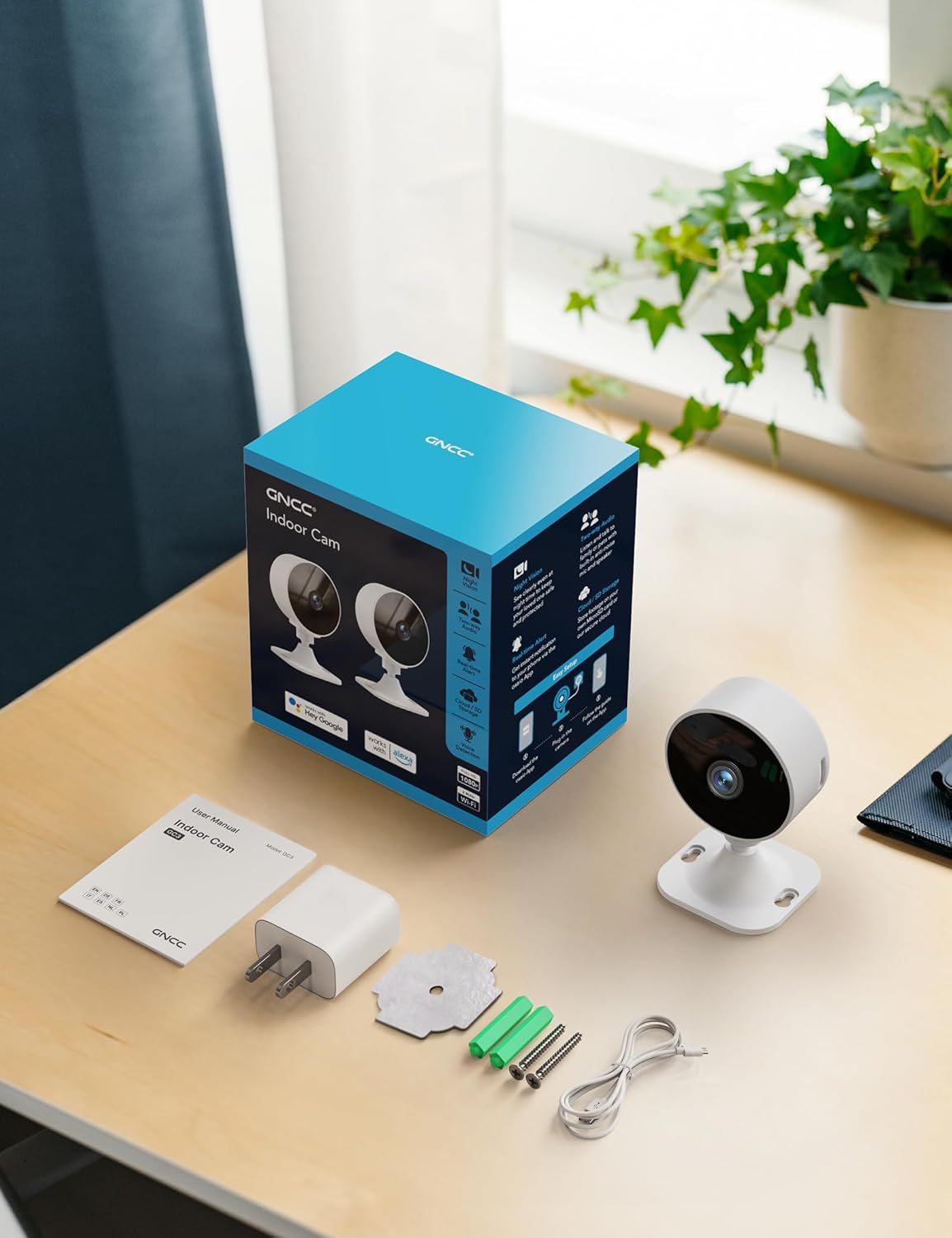
Image: All components included in the GNCC GC3-2P Indoor Security Camera package.
Produktas baigtasview
The GNCC GC3-2P camera is a compact and versatile indoor security solution. It features a 1080P Full HD lens for clear video, infrared night vision for monitoring in low-light conditions, and a built-in microphone and speaker for two-way audio communication. The camera's base allows for flexible manual rotation to adjust the viewing angle. It supports both local microSD card storage (up to 128GB, not included) and cloud storage options.

Vaizdas: Viršview of the GNCC Indoor Camera's main features.
Pagrindinės funkcijos:
- 1080P „Full HD“ vaizdo įrašas: Užfiksuoja aiškų ir detalų maistątage.
- 2.4 GHz Wi-Fi ryšys: Connects to your home network for remote access. (Note: 5GHz Wi-Fi is not supported.)
- Infraraudonųjų spindulių nakties vizija: Provides clear black-and-white images in darkness up to 15 meters.
- Judesio ir garso aptikimas: Sends real-time alerts to your smartphone.
- Dvipusis garsas: Allows for listening and speaking through the camera.
- Lankstus saugojimas: Supports microSD card (up to 128GB) and optional cloud storage.
- Rankinis sukimas: Easily adjust the camera angle by hand.
- Išmanioji integracija: Compatible with Alexa-enabled devices.

Image: Clear Night Vision for Peaceful Nights.

Image: Two-Way Audio Lets You Speak in Real Time.
Sąrankos instrukcijos
Follow these steps to set up your GNCC GC3-2P Indoor Security Camera:
- Maitinimas: Connect the provided 2m power cord to the camera's USB-C port and plug the power adapter into a wall outlet. The camera will power on and a red indicator light will flash, indicating it's ready for connection.
- Atsisiųskite programą: Download the "OsaiO" app from the Google Play Store or Apple App Store. You can scan the QR code provided on the product packaging for quick access.
- Sukurti / Prisijungti: Open the OsaiO app and create a new account or log in if you already have one.
- Pridėti įrenginį: In the app, tap the '+' icon to add a new device. Follow the on-screen instructions to select your camera model.
- Prisijunkite prie „Wi-Fi“: Ensure your smartphone is connected to a 2.4GHz Wi-Fi network. The camera only supports 2.4GHz Wi-Fi. If your router combines 2.4GHz and 5GHz, ensure your phone is on the 2.4GHz band during setup. Bring the camera close to the router for optimal initial connection. Enter your Wi-Fi password into the app.
- Nuskaityti QR kodą: The app will generate a QR code. Hold your camera up to your phone screen to scan the QR code. You will hear a confirmation sound from the camera once it successfully scans.
- Užbaigimas: Once connected, the camera's indicator light will turn solid white. You can then name your device and begin monitoring.
- Montavimas (pasirinktinai): The camera can be placed on any flat surface. For wall or ceiling mounting, use the provided mounting kit (screws, anchors, or adhesive) to secure the base, then attach the camera. The camera head can be manually rotated to achieve the desired viewing kampas.

Image: App-guided setup process for the GNCC Indoor Camera.
Naudojimo instrukcijos
Tiesiogiai View and Monitoring:
Once your camera is set up and connected, open the OsaiO app to access the live feed. You can view real-time video from anywhere with an internet connection.

Image: Real-time monitoring remote live view išmaniajame telefone.
Judesio ir garso aptikimas:
The camera is equipped with AI-powered motion and sound detection. When activity is detected, you will receive instant notifications on your smartphone via the OsaiO app. You can customize alert sensitivity and schedules within the app settings.

Image: Motion & Sound Detection with AI-Powered Alerts.
Dvipusis garsas:
Use the two-way audio feature to communicate with people or pets in the camera's vicinity. Tap the microphone icon in the live view to speak, and ensure your phone's volume is up to hear responses. Remember to remove any protective film from the camera's microphone and allow microphone access in the app.
Storage Options and Playback:
Kamera palaiko du saugojimo būdus:
- „MicroSD“ kortelė: Insert a microSD card (up to 128GB, not included) into the designated slot on the camera for local storage of recordings.
- Saugykla debesyje: An optional subscription service is available for cloud storage, providing convenient backup and access to your recordings.
Į view įrašytas footage, navigate to the playback section in the OsaiO app. You can browse events by date and time.

Image: Playback Ready with SD Card or Cloud Backup options.
Smart Home Integration (Alexa):
The GNCC GC3-2P camera is compatible with Amazon Alexa. To integrate:
- Open the Alexa app and log in.
- Tap "More" in the lower right corner, then choose "Skills & Games."
- Tap the search icon and search for "OsaiO."
- Tap "OSAIo" and click "ENABLE TO USE."
- Sign in to your OsaiO account.
- Tap "Authorize" and then "Close."
- Tap "Cancel" and return to the home page.
You can now use voice commands like "Alexa, show the office camera" to view the live feed on compatible Alexa devices.
Video: Instructions on how to connect the GNCC camera to Alexa for voice control.
Privacy Mode and Sharing:
- Privatumo režimas: Activate privacy mode in the app to turn off the camera with a single tap, ensuring no recordings or sharing occur.
- Šeimos bendrinimas: Share camera access with up to 3 family members through the app, allowing multiple users to monitor the feed.

Image: Advanced operating features including privacy and sharing.
Priežiūra
- Valymas: Švelniai nuvalykite fotoaparato objektyvą ir korpusą minkštu, sausu skudurėliu. Venkite naudoti stiprias chemines medžiagas ar abrazyvines medžiagas.
- Firmware atnaujinimai: Regularly check the OsaiO app for available firmware updates to ensure your camera has the latest features and security enhancements.
- Vieta: Įsitikinkite, kad kamera pastatyta stabilioje vietoje, atokiau nuo tiesioginių saulės spindulių, šilumos šaltinių ir drėgmės.
Trikčių šalinimas
- Fotoaparatas neprisijungia prie „Wi-Fi“:
- Įsitikinkite, kad jūsų „Wi-Fi“ tinklas yra 2.4 GHz dažnio. Kamera nepalaiko 5 GHz dažnio.
- Patikrinkite, ar programėlėje teisingai įvestas „Wi-Fi“ slaptažodis.
- Sąrankos metu padėkite kamerą arčiau „Wi-Fi“ maršrutizatoriaus.
- Reset the camera using the reset button on the back and try the setup process again.
- No Motion/Sound Alerts:
- Check the app's settings to ensure motion and sound detection are enabled.
- Adjust the sensitivity levels for detection in the app.
- Patikrinkite, ar jūsų išmaniajame telefone įjungti programėlių pranešimai.
- Poor Two-Way Audio Quality:
- Remove any protective film from the camera's microphone.
- Ensure the OsaiO app has microphone access permissions on your phone.
- Increase your phone's volume.
- Check for any obstructions near the camera's microphone or speaker.
- Vaizdo įrašų atkūrimo problemos:
- Ensure a microSD card is properly inserted and formatted, or that your cloud storage subscription is active.
- Check your internet connection stability for cloud playback.
Specifikacijos
| Funkcija | Specifikacija |
|---|---|
| Modelio pavadinimas | GC3-2P |
| Naudojimas viduje / lauke | Vidinis |
| Vaizdo įrašymo raiška | 1080p |
| Ryšio protokolas | „Wi-Fi“ (tik 2.4 GHz) |
| Ryšio technologija | Laidinis |
| Maitinimo šaltinis | Su laidu elektra |
| Naktinio matymo diapazonas | 15 metrai |
| Saugojimo parinktys | MicroSD (up to 128GB), Cloud Storage (optional subscription) |
| Valdiklio tipas | Amazon Alexa |
| Montavimo tipas | Stalviršio laikiklis |
| Prekės matmenys (I x P x A) | 2.56 x 2.76 x 3.54 colio |
| Prekės svoris | 5.4 uncijos |
| Spalva | Baltas |
Garantija ir palaikymas
The GNCC GC3-2P Indoor Security Camera comes with a 12 mėnesių garantija from the manufacturer, Kalado. For technical support, troubleshooting assistance, or warranty claims, please refer to the contact information provided in your product packaging or visit the official GNCC websvetainę.
Manufacturer: Kalado
El. paštas: ic.support@gncchome.com
Ask a question about this manual
Ask about setup, troubleshooting, compatibility, parts, safety, or missing instructions. Manuals+ will review the question and use this page’s manual context to help answer it.